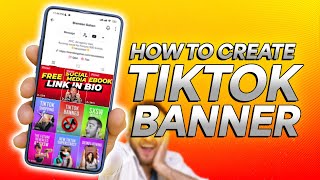
In this instructional video, Brendan Gahan walks viewers through creating a seamless banner across three pinned TikTok thumbnails. He outlines five steps: (1) design a single 1260 × 654 px banner image (using Canva, Adobe Suite, etc.) with high‑contrast colors, minimal bold text, and a clear focal element for mobile viewing; (2) split the banner into three 420 × 654 px thumbnails; (3) insert each thumbnail into its own TikTok video using an editor such as Adobe Rush, ensuring the thumbnail frame lasts long enough (≈1 s for 30‑second videos, longer for longer clips); (4) upload each video, set the thumbnail via TikTok’s thumbnail selector, and be precise with frame selection; and (5) pin the three videos in reverse order (right‑most first, then middle, then left) so they appear as a continuous banner on the profile. He also notes that the videos don’t need to be thematically linked, but a consistent call‑to‑action (e.g., newsletter sign‑up) works well. The tutorial ends with a call‑to‑action to subscribe.
Chapters
TikTok thumbnails are a great way to make your account stand out. But what's even cooler, if you look at my TikTok account, you'll notice my thumbnails are pinned together at the top of my profile to make this awesome banner. It's a great way to really highlight a call to action and is shockingly easy. So in this video, I'm going to break down how to do this in 5 easy steps. First up, you're going to want to design the banner. You need one holistic image that's going to be cut into 3 sections. And then those will be placed into 3 TikToks to create the appearance of a single banner image. To do this, you're going to be creating one image that is 1260 by 654 pixels. That's the size of 3 TikToks side by side. You can create this in Canva or Adobe Suite. I make mine in Adobe, but that's just personal preference. As you design the banner, you'll want to keep in mind that this will mostly be viewed on mobile, so I recommend doing a few things to make sure it stands out. Ideally, try and have high contrast, bright imagery. Limit the amount of text, but what text you do have should be big and bold as possible. So make sure to limit the number of characters. You don't want it to be too cluttered with stuff because then it's going to be so small nobody's going to be able to actually see it on their phone. You'll notice with mine I use really bright colors, primarily red, white, and yellow. I've got one clear image—me—and I'm actually reinforcing the message in the text by pointing up. 2. Once you've designed your image, you'll cut it into 3 separate thumbnails, and each should be 420 by 654 pixels. This is the size of a TikTok thumbnail. 3. Now once you've got each of these images, you'll want to add each into 3 separate TikToks. I use Adobe Rush, but any editing software where it works. Just make sure as you insert the thumbnail that it appears for several frames. You'll want to extend the number of frames based off the length of the video. My TikToks tend to be in the 30-second range, and I'll have my thumbnail appear for about a second, which is about 24 frames, give or take. But for longer TikToks, you're going to want to extend the amount of frames it appears in. So if you've got a 3 to 5 minute video, you'll maybe want to leave it up for 2 or 3 seconds at least. I'll show you why this is important in a sec. Also, one thing I've gotten questions about is whether or not these videos need to be related. My recommendation is that's probably ideal, but it's not in Necessity. For example, each of my pinned videos that make up the banner have a call to action to sign up for my newsletter. 4. Now that you've got your thumbnail added to your TikTok and it's fully edited, how do you make sure to actually feature that TikTok when you upload it? Here's how you do that. After you export each video, open TikTok, upload each. Just make sure to select the COVID scroll, stop at thumbnail, click save, then post. Now when you upload TikToks, you're scrolling through the timeline to select your thumbnail image, and this is where it gets tougher when your video is a little bit longer. You have to be more precise, and because you're doing it with your thumb, it can bit tough to nail down. So it's important you make sure to elongate the amount of frames that it appears for, for longer videos. 5, once you've got the 3 videos uploaded, you'll want to pin them in reverse order. So you pin the image for the right-hand side first, the middle one second, and the first one last. Boom, that's it. Hit me with a subscribe if you like this video.