7-Figure Ad Agency CEO Reveals $60M YouTube Ads Strategy
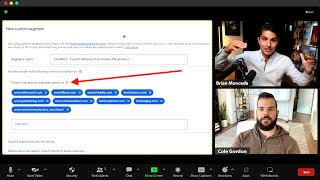
Brian Moncada, CEO of a 7-figure ad agency, walks through fractal targeting, a method for scaling YouTube ads across a $60M portfolio. He shows how to build high-ROI audiences using custom affinity and intent targeting, then layer conversion data to refine both targeting and creative.
Yes. Did it do? That's in the training, bro. That's in that Google Doc. That's what I'm saying, dude. That's killer. Because like that hook first of all, like, I mean, you can't get much more direct in terms of who's watching the videos like that. I mean, this is limitless ideas, dude. Yeah, bro, like that's gold right there. Hey, this is Brian with that spend.com and what you just saw was a clip of me revealing for the first time ever our YouTube ads agency's scaling process called fractal targeting. This process allows you to to create an infinite number of high ROI audiences for you to target as well as hooks and add ideas so that you never run out of new creatives to test or audiences to test that target your most ideal clients. This is one of the best kept secrets I've kept in my back pocket. But today I'm revealing it all for you right now. So let's dive in. So look, the problem is, right here's the problem. Finding new high converting targeting is very time consuming, especially with all the changes that have happened with YouTube ads in the last year. Right. Keyword targeting be removed has, you know, really crippled some ad accounts. People are freaking out and they don't know how to find their ideal audiences. So it's time consuming to find those audiences and often results in thousands of dollars in wasted ad spend on targeting the wrong audience. That's the problem. So here's the solution. Okay. Instantly generate a dozen high ROI audiences by expanding deeper into what's already working instead of reinventing the wheel each and every time you try to launch a new campaign and replicating your success instead. So here's exactly how the fractal targeting process works. Number one, you should be combing through your ad accounts placements where ads show tab ad every single month. We do this basically on a weekly process for our clients on a weekly basis. And at the very least, taking the top channels and video placements with conversions and creating a new custom affinity and intent audiences for you to test. So for example, here's what this looks like. When you're inside your ads account, you can actually go to your where ads show tab. You can see a list of YouTube channels that your audiences have converted on. Right. That your ads have actually got conversions from. And so what you want to do is once you're in the where ad show tab, like here, you want to sort by conversions so you get the highest converting placements to the top of the list. Copy at least 5 to 15 of the top converting YouTube channels and write their channel names down, right? So you can see here I've copied about 10 or so of them and I wrote their channel down. And you can see these are sorted by the top conversion. So make sure you sort by the top conversions. So the most converting channels show up to the very top of your results and copy the top 5 to 15 channels and write their names down. Right, now what you want to do next is you want to go to your audience manager inside your ad account and you want to create a new custom segment audience, okay? New custom segment audience. Then you want to paste those channel names as keywords into the audience. So click people with any of these interests or purchase intentions. This button right here, these are what's called custom affinity audiences. Okay? Custom affinity audiences. So copy these channels, paste those channels keywords inside of a new custom segment audience and make sure to click people with any of these interests or purchase intentions. You can see here an example of what this looks like. Now what this means is your ads will show to people who are interested in these specific keywords, okay? Which is a much, much bigger pool of people and audiences for you to target. This audience is going to be very, very huge, which is good because it's going to allow you for massive scale. Now in this example, right, I have 10 of the most popular YouTube channels that my ads are converting on as keywords inside this one audience. Okay? You can see right here the same channels that I took from my conversions list here by sorting for the top 10, I then copied and pasted them into this audience, right, right here. Now, Google recommends five to 10 keywords per custom affinity audience as best practice, right? So you got to have at least 5 to 10 keywords for you know, you to have a successful custom affinity the audience according to know Google Ads. Now of course, you can have more, you can have less, which I'll talk about in a second. You want to have at least five to 10. Now I can realistically create, okay, a new audience with only five of these keywords. So after I create this one, that's one audience I can test. I can realistically create a new audience with only five of these keywords, right? Because you got to have at least 5 to 10 per Google Ads best practices and recommendations. So that's another audience, my second audience with only five of these keywords. And then another audience I can create with six of those keywords and then another audience with only seven of the keywords. And then another audience with only eight or only Nine. And I can find even more channels to do this again. I can go back up here and copy the next top 10 channels, right? And do this all over again and again and again and again, making tens, if not hundreds of custom affinity audiences to test with my YouTube ads. And depending on the number of channels that are converting with your ads available in your ads account, you could have dozens and dozens and dozens and again, hundreds of audiences for you to test with just this one strategy alone. But hey, we're not done yet. It only gets better. So stay with me. That's the first thing. Okay, now step two. Next, you want to do the same channels we've already copied, right, from the placements tab where ad showed. Then we want to create all those audiences we just created all those different types of audiences, at least five to 10 right there alone that you can create and start testing immediately. Next, you want to take those same channels, those same keywords, and create a new audience. And this time, you want to click people who searched for any of these terms on Google. Okay, this button right here, these are what's called custom intent audiences. All right? This means your ads will show to people who have literally typed in those keywords on Google and YouTube. I'm going to repeat that for a second. When you create this audience, this means your ads will show to people who have literally typed in those keywords on Google. Meaning that if someone typed in Mike Vastill, Mark Tilbury, Central Media, Lewis House, Judd Albring, Wesley, Virginia Wholesale, Ted Carlton, Dennis the Deal guy, or Smart money tactics on Google or YouTube, your YouTube ad will show to them the next time they watch another YouTube video on the YouTube platform and play before their next video as an ad. Think about that for a second. This means that you can literally show your YouTube ads to the right person at the right time, the right price, based off what they're already searching for their intent, they're raising their hand saying, I'm interested in this because I've literally typed this into Google and YouTube. And your ad pops up before their next YouTube video. Now, in this example, I have 10 of the most popular YouTube channels that my ads are converting on as keywords inside this one audience. But for custom intent audiences, Google recommends 10 to 15 keywords per custom intent audience as best practice. Okay, they recommend 10 to 15 as best practice. So I can simply go back to my where ad show tab. Okay, go back here where ads showed, right? And I can simply find more channels and then create a new audience with another additional channel added another keyword. Added. So I have 11 keywords total, and just add another one right there. Boom. That's a new audience, right? And then another audience with 12, and then another audience with 13, and then another audience with 14 or 15. And I can find even more channels and do this again and again and again and again. I go back up here I go to the next 10 to 20 keywords, the next 10 to 20 channels, and I just create more and more and more and more, making tens, if not hundreds of customers. Intent custom. Oops. Yeah, there we are. Custom intent audiences to test. And depending on the number of channels that are converting with your ads and how much you're spending on a weekly and monthly basis, you probably have hundreds of channels in your account right now in your Where Ad show tab that are converting for you, okay. That you can easily pool and create new custom affinity and intent audiences for you to test, right? So depending on your ads now, I can even test less than 10 keywords per audience. So, for example, we found@our agencyadspend.com that just one keyword in a custom intent audience can work very, very well. So, for example, if I just went over here and I just put Mark or Mike Vastil, I just had him alone by himself. Boom. Now I name this custom intent Mike Vastill, and that's the audience I test. I could do the same thing with Mark Tilbury with just that keyword, or Lewis Howes with just him and his name specifically, or the deal guy, et cetera, et cetera. Now you're testing just one keyword out of all those keywords you just looked up and found, which literally opens the floodgates of how many audiences you can test based on the conversion data you already have inside your ad account. Think about that for a second. I've literally already in the first almost 10 minutes of this video, given you at least 20 to 30 audiences for you to test in the next 30, 60, or 90 days in your ad account, right? That's just the first half of this. And it's only getting better. Stay with me. It's going to keep getting better. Okay, next you want to again create a new audience, right? This time, though, you click people who browse types of websites. Okay? It's this button right here. People who browse types of websites. Okay? So for example, when you're like, over in this dashboard, it's the custom segment audience. You just click people who browse types of websites. All right? So now once you've clicked that, it'll look like this. Okay? So this means okay, These are what we call custom website audiences. Okay? Custom website audiences. This means your ads will reach people who browse websites similar to the URLs you enter in this specific audience, right? These ads, Your ads, your YouTube ads, will literally target people who browse websites similar to the ones you enter in this specific audience. Now, keep in mind, this doesn't mean your ads will show right on those URLs. Okay? Doesn't mean your ads will show on those URLs. But in this example, right, I've taken the top 10 channel placements from above, okay? Those same, those same channels right here. These guys, I've taken those those same channels and I found those specific influencers because they're all influencers main websites and entered their URLs. Here you can see I have mikevisto.com marktilbury.com centralmedia.com lewishouse.com judd albring.com wholesaleted.com carltondenis.com thedealguy.com smart moneytactics.com I've just entered their URLs for their main websites. Based off those specific keywords I've typed them into. Google found their websites, enter them in this one right here. People who've browsed websites similar to. Now, for custom website audiences, okay, Google recommends at least 5 to 10 websites. Okay? At least 5 to 10 websites. Now what you can also do is find each of these influencers specific sales funnels and add all their sales funnels URLs here too. So again, five to ten websites is all you need. I have ten here. I can again just create one with five websites, one with six websites, one with seven websites, one with eight websites, one with nine websites, one with ten websites and do it all over again just like I showed you above. But I can also go deep on just one person's website. I can find their main website. Like Mike Vastill, I can also find a sales funnel. I can look on Facebook ads library and see if he's running ads and just copy the landing page that he's running ads to. Boom. Now I have his sales funnel and his landing page entered into here along with Mike Bestill dot com. Maybe it's Mike. Mike Vastill. Landing page dot com. That's his sales funnel, for example. Boom. Now I have two website URL's inside this audience. But then guess what? I actually opt into his landing page and now I'm on his vsl. And then I take that URL and I put that in this custom segment audience. As well. That's three websites. And I go to guess what, his application page or his booking page, that's another one to two websites. And then I finally book a call and then I go to his thank you page. And then that allows me five websites on just this one person right here, which again I'm getting because he's already had a lot of conversions in my Google Ads account, which tells me that my audience also watches his content. Therefore, if I target his websites and his sales funnels, naturally I'll find more of his audience and get them to buy more of my products, services and programs. Do you see how this is working? Okay, I hope you're getting excited right now because I am having fun just literally filming this video. I hope that shows by the energy I'm talking about right now. So now once you've done that, okay, you can do that for all of these people. Literally all of these people, you can do that for all of them. And that's at least 5, 10, 15, 20, 25 audiences, maybe even 50 audiences right there with just website, custom website audiences you can test alone. So we found this method specifically the websites to be very profitable for all types of businesses, okay? And all types of industries and, and niches. This one tip alone could allow your ads to show in front of thousands of your ideal customers. For example, one of my clients, Scott Jack, he was selling a low ticket $67 info product in the dating space, helping men get on more dates with women. Okay? We took some of his biggest competitors, sales funnels. Again, like I just told you how to do, right? And those audiences were some of his best performing audiences in terms of cost per acquisition of all time. So this is not theory, this is based on cold hard data, right? And you can also find more channels. Again, just going back to your channels placements where ads show tab, go to the next section, the next section, the next section, copy the next 10, the next 10, the next 10. And literally rinse and repeat the exact same process over and over and over again, giving you tens, if not hundreds of new audiences. You to test text test based on the conversion data already inside your ads account. Okay? So it only gets better. This is the last piece. This is the key to the next level of scale for your YouTube ads. Now here's what you want to do next, okay? Once you've done all that, those are all just the audiences alone, the all targeting options you can use right now in the next 30, 60, 90 days for you to test immediately, your media buyer is going to have A field day with this or they're going to hate you or they're going to quit. There's really no in between. But if you give them this process to do on a monthly basis, the very minimum, you're going to find new winning campaigns, guaranteed. No doubt about it. All right, so now number two, go back. This is the next thing. Okay, that's the audiences. Now go back to your ad accounts. Placements where ads show tab. Okay, this one right here, the same one that I showed you above. This time I want you to click View details. Okay, this button right here, view details of those same channels. Now what this will allow you to do is find all the specific YouTube videos that your YouTube ads have gotten conversions from on those specific channels. Okay, you're going one layer deeper now. Yeah, the channels before, we created a bunch of audiences with those. Now we're going to find the specific videos that actually led to the conversions from those specific channels. Okay, so here's what that looks like. Once you click View Details, you get a tab that looks like this. You can see the channel placements on the left and the placement details right here, which is the specific video titles and videos your ads have got. I've got conversions on. You can see here. You want to again, sort by conversions. Okay, so sort by conversions. So you get the highest converting videos to the top of the list, right? Top of the list. Now, examples here, for example, top 11 companies always hiring work from home jobs. This is just one example in the ad account, how to pay yourself as an LLC or affiliate marketing tutorial for beginners. 20, 21. Step by step. Now here's what you do next. You want to take the top 5 to 10 videos and create new custom affinity audiences with them. You just literally want to go up here, copy their video title, copy all of their video titles, five to 10 of them, put them in a custom affinity audience, just like I showed you how to do already. Okay, then you want to take the top 10 to 15 video titles and create a new custom. Keep doing the same thing over and over. The next five to 10, the next five to 10, the next 10 to 15, the next five to 10,the next 10 to 15. You can mix and match. You can get really creative with this. Again, your media buyer is going to hate you. They're going to love you, they're going to going to quit. Really know in between you can get really creative here. All right, there's at least 20 to 30 to 50 new audiences with just that alone. But okay, it gets even better. You can also use those video titles to find new keywords within those titles, both short and long. Okay. This is why it's called fractal targeting. If you look at the definition of what fractal means, you'll understand why this is so powerful and how this is an infinite number of of audiences, ad ideas and hooks for you to test, which we're getting to right here and right now. So you can also use those video titles to find new keywords within those titles, both short and long. For example, short tail keywords are about 2 to 5 words and long tail keywords are about 5 to 10 words. So here's an example from the titles above these same titles right here. Here's how you can find keywords to target and test inside of new custom audiences within those titles. So, so for example, the top 11 companies always hiring work from home jobs worldwide. Look at the keyword inside of that video title. Work from home jobs. Work from home jobs. Now this is a keyword that again, if you're selling some sort of business opportunity or make money online or wealth creation, something around, you know, obviously make money online, biz, op, you know, whatever, that's an easy keyword for you to target someone who's looking for work from home. Okay, boom. Now you have another keyword you can put into a custom affinity or custom intent audience. However, you can also look in this one, for example, how to pay yourself as an llc. How to pay yourself. If someone's going to be typing that into Google or YouTube, they're probably going to be self employed, someone who just started a business, someone who, you know, doesn't really have much experience with being their own business owner. You get my point. Now there's another key keyword inside of this one, for example, Affiliate marketing Tutorial for Beginners 2021. Step by step, look at this keyword. Affiliate Marketing Tutorial. Right? I can even mix and match this. Affiliate Marketing for beginners. Right? I combine this and this. Or affiliate marketing 2021. Affiliate marketing for beginners 2021. Right. There's different keywords in there. That's a whole custom segment right there. Affinity and intent, right? Now here's how you turn this into an infinite number of ad ideas and hooks that you can test to consistently refresh your ads over and over and over again based off the data already in your ad account, proven to get you conversions. So you can also use these video titles as creative inspiration to test new angles, hooks or leads with keywords or topics around those video titles. Because your audience is Also interested in this type of content or even use these video titles as inspiration, friends. And so here's exactly what I mean, here's exactly how to do this. Here's an example. For example, I'm going to take this one. Affiliate marketing tutorial for beginners, 2021, okay? So if I was, for example, my good friend Cole Gordon, right? I would write an indirect lead positioning an offer like his Remote Closing Academy. Like Cole Gordon's Remote Closing Academy. Cocoa Cold, Jeez, and even talk right now. Cole Gordon's Remote Closing Academy, right? Which is a business opportunity teaching people how to make money as a high ticket closer and work from your own home and close deals through the phone, okay? I would write an indirect lead positioning an offer like his, where he recruits, trains and staffs appointment setters and closers for high ticket business owners, okay? As the new way to make money in affiliate marketing. The new way to make money in affiliate marketing, I would use that as an ad, okay? Affiliate marketing is dead. There's a new way to make money in affiliate marketing, right? Now, here's how, right? Boom. Another hook you can test, right? Because if you think about it, right, affiliate marketing and high ticket closing or remote closing is literally the same thing. Affiliate marketing, you're selling other people's products digitally, right? Remote closing, you're selling other people's product products on the phone or through zoom. It's literally the exact same thing. So you're going to be using what's already proven to work in your ad account and spinning it for a new big idea that you can use to refresh your ads and make your offer an instant classic in the industry and in the marketplace. So that way if you're ever experiencing ad fatigue, right, you can tap into a already proven angle based off the data inside your ad account and spin it in your own way.
More from Brian







CASE STUDY: How Usman scaled to $200k+/month after joining The Ad Men Mastermind