What is New and Notable in LinkedIn
Catherine Sanders Reach covers LinkedIn's evolution from a résumé site to a conversation network. She walks through profile optimization, content creation, networking strategy, and how to set clear goals like job search or thought leadership. The session includes LinkedIn QR codes for in-person connections and tips on measuring engagement.
Chapters
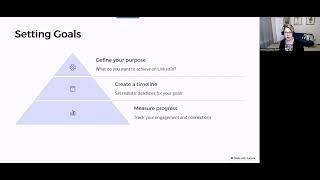
So good afternoon everybody and welcome to today's learning objectives. We are going to be talking about what's new and notable in LinkedIn, but really I'm also going to talk about generally using LinkedIn to use it to its best advantage. So feel free to let me know what questions you have, any concerns that you have, that kind of stuff, and we'll go ahead and get started. Started. So one thing that I've noticed in the last couple of years, it really started with the pandemic but continues to, um, evolve, is how people are using LinkedIn. And I think in the past LinkedIn was this online resume and people didn't necessarily interact with it from a social perspective. And, um, and so what I'm, I'm seeing is people are being more personal and kind of talking about lessons they've learned or being a little bit more expressive and exposed. In the past, LinkedIn was, I'm sharing an article, or I've won this award, or I've moved to a different job, or, you know, it had not, not a lot to interact with. And so what I'm saying is people are exposing themselves a little bit more, being a little bit more personal. They're still definitely promoting themselves and what they've done, promoting other people, promoting where they're working and what's going on there. And for those who are uncomfortable with the social media aspect of it versus just uploading your resume, um, I think that sharing what your workplace is doing, um, sharing activities that you're participating in, those things are pretty easy because it's not, it's not personal, it's professional, but I am seeing a lot more kind of personal notes coming up. The other thing is it feels more relevant than in the past. I think there are just a lot more people interacting, a lot more people, um, talking about what they've learned, sharing views, uploading documents, things like that. And I think that is in part due to the demise, or rather the degradation of the platform formerly known as Twitter. I've seen a lot of people who were very active on Twitter in the past, um, kind of move over to LinkedIn as their new platform of choice. So it feels, feels busier, feels like there's more conversations happening, which is all good stuff because it makes it more interesting to actually get on. I never was a huge fan of Twitter, um, as a platform because it's short form and I I'm no, I'm no good at short form. And then I think some people moved over and tried Bluesky, which was kind of the new Twitter alternative. But it felt a lot like the same thing. So for that reason, I feel like LinkedIn has a lot more to provide in terms of just what it was in the past, which was kind of kind of a promotional tool and also where your online resume lived. So the other thing is, and this is if we were in person, um, this is kind of a party trick, you can actually easily connect with someone. So if you're the kind of person who has a LinkedIn profile and you think, why do I even bother? Well, you can use it in person, um, instead of giving out a business card. And that just, you know, having a business card is great, and obviously people still care carry their business cards around, but a business card only provides a certain amount of information. Now, I do tell especially lawyers who are just starting out, add your practice areas to the back of your business card because when you hand it out, people may remember you, but they may not remember what you do. And that's one of the whole points is that you want to use this to get people to contact you for referrals and other things. So if they don't remember what your practice area is, or you really didn't talk about it when you passed your business card around. There's an easy way to do this in person. As long as you have the LinkedIn app on your phone, you actually just open up the LinkedIn app, and then at the very top, there's a search button. And if you press into the search button to kind of activate it, you'll see this little square of squares. And if you click on the square of squares, it opens it up to a QR code, and someone can take a picture of that QR code and link in with you, or you can tap scan. If so, if they open up their LinkedIn app and pull up that little QR code, then you tap over into yours on scan and scan the code. Either way, whether you open up scan or just take a picture of it with your phone or vice versa, it will connect that person with you on LinkedIn. So that gives you, um, a little bit more, uh, immediacy in terms of communicating versus handing out a business card, which then someone would have to find the business card, enter your information into their contacts and all that. This just gives immediate opportunities to communicate, um, become memorable, all of that. So that's, that's again something to do in person, um, even at a, you know, if you're at a networking event or a conference or, um, you just meet somebody in the courthouse and you go, oh, we should connect. This is just the new way of doing that. Now, there are lots of other QR codes for business cards and things like that, which you can do, but I think this gives it a little bit more life. I did a program on LinkedIn for first-generation lawyers a couple of weeks ago, and one of the things that I've been talking to people about in terms of your use of LinkedIn is thinking about why am I here? And it may be because you're looking for a job or you're creating a new practice area, or you're just trying to be out there as a thought leader, or you're trying to keep top of mind for referrals. All of that, you need to determine what— why are you here? Why are you on LinkedIn? What is it to be, you know, what is— do you want it to do for you to help further your goals? Because if you don't set goals, then If you're inclined to not use the product, um, or the platform very often, then you have no real motivation. So kind of figure out what is it that I want to do. And even if you don't, you can have multiple goals. For me, for instance, LinkedIn is, um, for exposure and to share content, hopefully because it's useful. Um, and so for that reason That's why I'm on there. So what do we do to actually achieve those goals? Create realistic deadlines. If you never get on LinkedIn, it's hard to say, yeah, go post 3 times a week because you're probably not going to. You need to start small. Or is that increase the number of people you're connected with? LinkedIn pretty much will continue to bug you until you have at least 500 connections. So It's been a while since I've been bugged by LinkedIn for this stuff, but it wants you to increase your number of connections and it wants to have a complete profile. So it'll bug you a lot to do those things. Not too terribly hard to do. Those are the two things that will then help you achieve your goals. So, you know, have a complete profile, have a lot of connections. People a lot ask me, should I connect with everybody who sends me a LinkedIn connection? The answer is No, but when someone sends you a connection request and you look at their profile and they are connected with a bunch of other people that you are connected with and they seem to be in an area that is logical, you know, then I don't see any harm in it. You can always disconnect with someone. So My, for instance, in that is I get connection requests from people who do financial services a good bit. And for a while I would, you know, allow that to happen and then they would immediately pitch services to me. I usually tell them no thanks, and then I may disconnect with them. So, but in terms of creating the, the timeline, that timeline is I'm going to go into LinkedIn every day and add one new connection or, I'm going to post, or I'm going to react to someone's posts, or I'm just going to get on and spend 10 minutes in the morning every day, or at lunch or after work or whatever. So kind of create deadlines to meet your goals and then track your engagement. You can actually see metrics, so it'll show you how your posts are doing, how many people are looking at your profile, all that kind of stuff. One of the goals that I set for myself when I moved from Illinois to North Carolina was to connect with more North Carolina attorneys. Because my connections were primarily in Illinois, New York, and California because I used to work at the ABA and then the Chicago Bar. So here, wanted to increase the number of touches I had to North Carolina attorneys. So that was not only connecting with more attorneys in North Carolina, but also focusing content, using tags, and all things things like that. So, um, oops, wrong direction. So just some basics on your, your profile settings. You can actually see what your profile looks like to the public, whether they're, um, connected with you or not. So viewers who aren't signed into LinkedIn will see some portions of the profile displayed below, and you can edit your visibility. So I've worked with attorneys who were reticent to have a lot of this information just publicly available through a Google search, which is fine because you can kind of toggle that stuff on and off. And then I see a lot of people who do maintain anonymity in terms of when they're looking at other people's profiles. And there's, there's a cost to that, which we'll talk about. But you You can do all sorts of stuff with your profile, and I'm just going to toggle over into LinkedIn. This show you some of these things. So when you want to go to your profile, you just open it up to LinkedIn. It defaults to showing you your feed. You click on this and it goes to your profile and you can— there's this verification badge thing. People ask me all the time, do I need to get a verified profile? My answer is no, and I'll send you a blog post where I kind of analyze that response a little bit more thoroughly, but I wouldn't worry about verification. I also think that there may be some benefit to paying for it, but for the most part, I've been on LinkedIn since 2008, and I've never paid them a dime, and it has never seemed to make much of a difference. Um, so you don't need to pay for it. Uh, mostly I think that's useful for recruiters and stuff like that, um, but not so much for the regular user. So I say I'm open to work because I think everybody should always be open to work, but that only shows to recruiters. It doesn't show to anybody who's looking at my profile otherwise. Um, and then this headline, in the past you couldn't edit this headline. So this headline would say basically where I worked. Whoops, I have sort of all sorts of ridiculous plugins in my browser. So this headline does not— it can say Attorney at Whatever, but it can also be more descriptive. So if you're in private practice and you're using LinkedIn as a way to get referrals and get more clients, then I would I wouldn't say attorney at XYZ Law Firm. I would say, um, something more intentional about the type of clients or the types of matters you work on so that everybody within the first second of looking at your profile understands that your practice areas are X, Y, and Z. Obviously, we don't want to say specialties or expertise unless you actually have a specialty from a certified entity, whether that's a state bar or otherwise, but just kind of describing what you do. And then it'll show where you're employed and where it is. You can put a link to— I'm going to go ahead and show y'all some of the options you have here so I can edit this. So basic information. Whether that's all LinkedIn members can see this, only me, only my network. So you even have options to what people can see there. You can add your pronouns and again, choose whether everybody sees this headline is what I was talking about. This defaults to your current position, but it doesn't have to be. You can make it say anything you want to, so leverage that. To tell people what you do, um, not just where you work. And then you can have your current position show, add another position, um, show whether you show that current company in your intro or not is up to you. What industry, um, your education, uh, whether you want to show that in your intro, um, and then if you have a website, definitely put the link to the website. You have the link and then you can actually put the link text So when that all comes together, you've got what you do, where you work, where you went to school, where you live, um, and a link to your website. And then if I click on contact information, this is only available to people who are in my, um, who I'm connected with. So we've got the link to my profile. I put my websites in there, um, my phone number. My work address. And that, again, if you click on contact information— whoops— um, the way that you edit that— I think I just completely removed myself. Is going in here, clicking on contact information, and then to edit it, click on this pencil icon. And everywhere you can see, everywhere there's a pencil icon is something you can do to edit. Um, Remember I mentioned the public profile and URL. So if you click over here, one thing you can do is if you haven't already, create a personalized URL. So if you still have a LinkedIn link that goes to your profile that has your name and some letters and numbers, go ahead and click on this little pencil icon and make it unique. If you share a— if you have a common name or you share a name with someone, you may have to create a, a unique link that has something like Catherine S. Reach if there was already a Catherine Reach, or if there's, you know, Janet Smith, it may have to be Janet S. Smith, or it has maybe Janet Smith, comma, attorney. So you'll, depending on whether you've already done that or not, if you haven't, you may find that there's a scarcity of unique links, so you have to be a little bit creative about that. Then If you want to edit your visibility, you can turn your public visibility on or off. This is what is captured in and visible in Google. So when you Google your name, it is more than likely that if you have a public profile in LinkedIn, that is going to come up really high in the, the search engine results. So it's worth taking a look. So this is required name, number of connections, number of followers if you make it visible to the public. And then you can choose beyond that whether your public— whether your profile photo shows up to specific people. And then all of these different aspects of your profile, you can toggle them on and off depending on what you want people to be able to see if they're not connected with you., and then you can, um, just kind of check out how things look to other people. Also, this area, this About, um, this is the part that I like to talk about, uh, this formula of what problem do I solve and for whom. And this is kind of reiterating that, um, initial kind of area in the about section. Um, if you— in this, I heard Damon Duncan say this the other day and I thought it was super smart. If you write an about statement or a bio or anything else to describe you, and it could be anybody if the name was replaced. So for instance, if I, you know, if you had an ear about I practice in the Charlotte-Mecklenburg area in, in bankruptcy and financial fraud, you know, licensed in North Carolina for 25 years. All of this is, you know, factual and informational, but it's not unique to you necessarily. And so thinking about two elements in your about statement is what problem do you solve and for whom, and that should go right at the beginning. So saying, you know, I help X type of person with X problem, and that way, you know, whether another attorney is looking at it or whether a potential client is looking at it, they— it gets right to the point because that area will get truncated. So it'll It'll put the first sentence or so up, and then it'll say, see more. Now, under see more, that's where you get to get a little bit more personal and put something unique, put something that stands out. You can say something about your passions. You can say something about, um, your, you know, something that makes you stand out that's unique. Um, I think is, is helpful, um, in that about statement. The other thing that I see a lot of is this kind of stuff. I'm a highly motivated, goal-driven, detail-obsessed, team-playing, blah, blah, blah. You're telling us that that's what you're about. I would rather you show it. And when I mean show it, I mean look into that experience section and, and detail out what would evidence your highly motivated, goal-driven, detail-obsessed, team-playing, multitasking, strategic thinking, innovation-loving activities versus just saying, these are the things I am. I want you to evidence that in the same way that if you were interviewing somebody, it's easy to say things. It's much harder, I think, to evidence that those are the things that define your qualities. And it's just something to think about. Also in your settings and privacy, there are a whole lot of account settings in LinkedIn, and I just wanna show you one that I think is important for you to be aware of. So for your settings, go up into this area and then go into settings and privacy. And I— there's lots of things in terms of how people see what works, what doesn't, security, data privacy. Privacy, advertising data, and notifications, all those kinds of things. This is the one I wanna point out to you, and this is your visibility. So profile viewing options, your name and headline. If you, and I see this all the time, it, I will get a notification that someone in the X industry viewed your profile or anonymous viewed your profile. So if you switch over to private profile characteristics, someone at North Carolina Bar, that's what someone sees. If I look at their profile. Similarly, private, it'll say an anonymous LinkedIn member. Now here's something to think about. If you're using LinkedIn to— and, and this is a perfectly legitimate use of it— look at potential witnesses, uh, look at a potential client, um, you know, information gathering, research, all that kind of stuff, um, every time you look at their profile, they see that you're looking at your profile and they see that, you know, very specifically who you are and what you're doing. So if you're using it for investigation, you may toggle over to private profile or private mode. What it will tell you though is that selecting private profile characteristics or private mode will disable who's viewed your profile and erase your viewer history. Now, depending on what you're using LinkedIn for, that may not be a big deal. Um, but if you're using this as a social network and not a, a research and investigation platform, then you're probably gonna want to leave your name and headline. But be aware that every time you look at someone's profile, they can see that you looked. If you change it over to private, every time you look at someone's profile, they won't see that it was you. You can't see who's looked at your profile. So again, it's really about, are you investigating or are you using this as a social platform? If you're using it as a social, I would probably leave your name and headline right there and just be aware that people can see that you're looking at them. And that's, you know, depending on what your purpose is, no big deal. The other thing I mentioned is kind of your metrics. So there's a bunch of different ways you can look at how your posts are doing, how your profile is doing, all of that kind of stuff. When I mentioned that people are using this as a, to talk about things that are a little bit more personal these days, this is a post that got a whole lot of interaction and it was just off the cuff and kind of personal. And I got a ton of interaction, lots of comments. And this was just, you know, I was giving a Zoom presentation this morning. Thank goodness I got on early because everything went wrong. And I'm so glad that I got on early. So I, you know, sometimes that confirmation bias, repeating what other people feel works. I don't love to promote doing that, but it is what it is. So anyway, you can post something. It doesn't have to be particularly pithy or legal related. You can say personal things. Then you can actually go into those views and see where they kind of, where they work, what their titles are, where they live. And this is where I gather, you know, am I hitting the audiences that I want to get to. And again, that's for your profile and for anything you post. Speaking about posting, um, and connecting with other people, not everybody is going to connect with you. It's not personal. Some people don't actually go on LinkedIn. Some people are reticent to connect for whatever reason, but If someone doesn't connect with you and you send them a connection request, don't take it personally. It probably has nothing to do with you. Also, if you're new to the practice and you post something, don't think, well, I'm not an expert, so I can't talk about that. That you're just sharing. Now, of course, if you work in government or public sector, think about Is there, are there any restrictions on what I can post? And then also, if you work for a firm, they may have policies about what you're allowed to share. Obviously you never share anything that's client confidential, but there's plenty of other things you can post. And then, you know, when am I going to make time for this? Don't obsess about that. Just 10, 15 minutes a day to build the habit of getting on and looking at LinkedIn and then Like anything else, it takes some time to develop a habit, but once you've done it, um, you get used to doing it and you just do it by default. I mentioned LinkedIn is really great for research, so you can do searches for people, jobs, um, content and posts, companies, schools, groups, uh, just type in your keywords and then Specify what you're looking for. So if you're looking for an expert in X, Y, and Z, LinkedIn is a great place. If you're looking for information on the latest and greatest on a legal topic, another, you know, this is another place to look for information because people are posting things kind of à la moment. And I find that just following the right people and connecting with them I'm, I've got a steady stream of updated content that I think is valuable. In fact, right before I got on the call today, I looked on LinkedIn. I saw one of my friends had posted something, um, about a particular tool. I was emailing back and forth with the vendor. The tool was not acting properly. And so I said, look, it's really important that y'all get this up to date and running because this person who is an influencer just talked about the necessity of it. So connecting those dots, I think, is also important. Obviously, LinkedIn is great for jobs. You can go in and set up a job search and then do skills assessment, resume building, interview prep. It's— I mean, if you're looking for a job, it's a great place to help with that. The other side of that is if your firm is hiring, LinkedIn is a great place to post jobs, and you can get your entire net— or your, your firm— excuse me, um, you can get everybody in your firm to help amplify your job. And also make sure that when people go to your firm on LinkedIn, that they, they see something that makes you unique and stand out and look interesting. So I want to kind of give you a sense of what that looks like. So I'm just going to do a search for a law firm that I know has a representation. All right, so LinkedIn has personal, um, profiles and then it has company profiles, and I'll send you an article about how to get your, your, um, company profile up and running. But when someone is looking at your firm and thinking about, do I want to work with them, this is an opportunity to really put a lot about the firm itself. So you've got this overview Wilson Sonsini is posting, they've got job openings, they're highlighting people, and then they've also got affiliate pages. So they've got a whole careers page and their showcase page for Wilson Sonsini Gives for their pro bono efforts, for their innovation network. And so all All of these are these called affiliate pages. Now, you may not be in an organization or firm that's big enough to have affiliate pages, but you never know. And so you can, you know, you have your overview, you have your about, and this is all controlled by you. And then posts. So probably one of the harder aspects of having a a company page is posting personally and on your firm, but that's, you know, that's doable and you can certainly cross-post. And then jobs, and then the people who are working there. So if you've got multiple people in the firm, um, make sure that they have, uh, LinkedIn profiles and that they're linking back, um, to the firm as well. Because we connect with people, not necessarily with businesses. So, and then on almost every page of LinkedIn,, it shows you people you may know. And so a lot of times I look through and just go, do I know any of these people? And if I do, then I just click the connect button. Um, it's very easy to build your connections that way. So the other thing is share your story, be unique. Um, you know, I think that in the past we feared showing your, showing your vulnerability. I think that this is something that is more on trend than it used to be. Um, it, it may feel wrong to you, so don't say anything you don't want to say, but being unique and sharing your journey is something that people are doing. Express your ideas. Obviously steer clear of the things you wouldn't have a conversation at a dinner party with, and you'll probably be fine. But if you want to say something, if you want to take a stand, hey, you know what, do it. Be authentic, engage naturally. Obviously make sure that you've check spelling and stuff like that, because it still matters. But you can have conversations with people on LinkedIn. It's just the awareness that other people are seeing it. Of course, you can have direct messages, which we can talk about. It's just a little tip for you. If your name is difficult to pronounce, or even if it's not, on the LinkedIn app in your profile, you can actually record your name. So you just go edit your profile in the app, and it has a place to record your name, and you record it. Only works on the, uh, the app on your phone, and that way people can hear your voice pronounce your name correctly. It's remarkable to me. I have a fairly straightforward name, Katherine Sanders Reach, but yet people mispronounce it in all sorts of hilarious ways. So You never can assume that your name is easy, so make it easy for people. The other thing I see attorneys do a lot, especially if you're, if you have a leadership position in a bar association, is they use this, they use their experience section to add their volunteer experience. And even though I am sympathetic and understand that a lot of times if you're You know, a high functional volunteer in an association, you may feel like it's your job, but it's not the right place to put it in your LinkedIn profile. So what happens is if you are active in a bar association or a volunteer organization in a leadership position, if you put that in experience, it makes it look like you work for that organization. And so the right place to put it is in volunteer experience. The other thing to remember is add that stuff, um, into your profile. So I'll show you where that is. So in your profile, if you want to add other profile settings or sections, click on Add Profile Section, and it's got the education, position, services, Career break. Oh, I love career break, by the way. LinkedIn has acknowledged, and I think this is a wonderful thing, that sometimes people have gaps. And so you can say, you know, they have a bunch of reasons. Or you can just say career gap or a gap year and put that in there and kind of own why there's a gap in your resume. It's, it's not It's not the sentence that it used to be. I mean, people used to say, well, you know, I had to set out a year, I took out a year. That's normal and that's human, and I'm glad that LinkedIn acknowledges it. But in this profile section, they also have recommended. So if you don't have your law license and certifications, please add that. And then under Additional is where you find that volunteer experience. And so if you click on Volunteer Experience, you can put the organization. The role doesn't have to be filled in though. You don't have to put the role, um, or you can just say member. And then you don't have to select a cause, so it doesn't have to be a cause. Um, and you know, you can add media, images, documents, presentations, all sorts of stuff. So the volunteer experience is can be quite a rich section. And the nice thing is it shows up really early. So your, your job experience is here. Education shows up here and volunteering shows up here. Every time you do that and you're connecting your profile to a volunteer organization, you get this logo and that's telling the algorithm more about you, which unearths your profile for more people and shows you better connection opportunities based on your volunteer activities. So absolutely go down. Now, one of the things you may notice is there's another area for organizations. See how there's no real link to these other organizations in the same way there is with the volunteer? Go ahead and add the same stuff in organizations. It's a slightly different place. It's less visible and all of that. So you can, you can fill it out in both places. Courses, languages, publications, all this stuff. Fill in all of it. It just gives the algorithm more keywords and availability and also helps you build that brand. So you're going to put a professional photo and a compelling headline and complete that, that, you know, experience section, and then engage. And that's, that's really important to the success of your visibility on LinkedIn is interacting with people, and it can be just as simple as open it up, look at the feed, and interact with it. So what I'm talking about is you go to the homepage of LinkedIn, and this is called your feed, and you can congratulate people. Like I noted to someone today, there are no negative, um, reactions in LinkedIn. There's no frowny face. There's no thumbs down. It's all positive. So, like, celebrate, support, love, note this insightful, and notice something's funny. I have to admit that I don't see a lot of funny stuff happening, but for instance, let me see if I can find— oh, and in your post you can also add lots of images, all sorts of stuff. Um, let me see if I can find— well, I'll just search for him. So I just saw a post by, uh, my friend Greg. Oh, you can also save posts. So if I want to get back to this post from Greg, if I click save, I'll show you that shows up. Um, so I can react to this from here. Nope, I can't. I have to go into the post. I don't know why it makes it so hard for me to actually go to the post, because that's going to make— take me to this. Well, I don't know why I'm failing to do this, because I'm demonstrating it. Oh, I can react to this. So I'm going to mark this as insightful. But it's much easier in the actual feed itself. So go and interact, um, because every time you interact with someone, I see you pop up in front of— I don't know Kelly, um, and I'm not connected with her. So there's two things that interacting does. One, if, if you interact, then I'm going to see your name and I'm connected with Debbie I don't know Kelly. I could, I can connect with Kelly because I see her stuff. Also, I can see what Debbie said. I can also go and see what Debbie's doing, all of that kind of thing. So the more you interact, the more visible you are to direct connections and other connections and all that. The story that I tell is that when I bought the house, I, uh, my loan officer connected with me on LinkedIn, which seems kind of weird. He likes everything I do. If you ever need a loan officer, I can tell you my loan officer's name at PNC off the top of my head because he reacts to every single thing I post on LinkedIn. So he— his name is top of mind with me, and I think that's one of the benefits. So in addition to interacting You've got two different ways to add content. Well, three really, but two primary ways: creating a post, and then you can actually blog. So when I go into LinkedIn and I go to the home page at the very top, you can start a post and just post to anybody. But you can also say, I only wanna post to my connections or a specific group that I'm in. And then I can add a video, a photo, or adding a photo or an image helps because it gets more visibility. But you start a post, type in your text, add a video, add a photo, add, create an event. Um, you can also celebrate, do all these different things, and then you can schedule your post. So if So if you have a bunch of posts that you want to put out there and you have a block of time to do it, um, you can schedule them for later so they don't all appear at the same time. You can put hyperlinks in, all this kind of stuff. So post. But the other option is, well, you've got two, like I mentioned. Um, you can write an article. And if you do this, articles are a little bit different. If you post an individual article, it basically is a longer form. You can upload an image, you can give it a title, you can add headers and subheaders, you can bold and indent and italicize and bullet and add hyperlinks and images and all this kind of stuff. Um, so, and then you actually have your, um, a list of what's been published. So I can go back to a particular article that I've posted and edit the article. I can measure how many people have commented, reposted. I can link to this. So it's just a richer, richer form of posting than you had before. And then the other thing is that you can add a— you can create a newsletter. So if we go back— well, it's not letting me because apparently LinkedIn doesn't like me today as I'm showing it off. You can post an individual article or create a newsletter, and I'll show you. Um, you just click on Create Newsletter, uh, give it a title, how often you want to publish. It doesn't hold you to that. Uh, give it a description, upload an image. Your connections and followers will be invited to subscribe., and then you have— so if you don't have a good list, um, of people to subscribe for Constant Contact or one of the other, this is just an easy way to create a newsletter. If you already send a newsletter out, you can create a LinkedIn version of it. So, um, that's just another way to get engagement and visibility. Another thing to be aware of is you can edit your posts, you can edit your content, you can delete them, you can change who can comment on it, who can see it, and that can be done at any time. So if you post something and you're getting a bunch of comments from weirdos, then you can change who can comment on it. You can change it to nobody can comment on it. Um, you can also livestream if you're so inclined, but, you know, make sure that you're connecting with people first because you have to have connections for all of this to work., and, and then, you know, you can direct message people. People direct message me all the time. Um, one of the things that I do a good bit to build my connections is I use the fact that, um, LinkedIn and Outlook are owned by the same company, that being Microsoft. So Microsoft does own LinkedIn, and for that reason, if you're an Outlook user, you can actually go into, um, someone's profile. Um, so I'll show you what that looks like. So if I go into, um, just open up an email for my friend Baron. I can actually click on his name and it shows me— well, of course they've downgraded this. Oh no, there it is. So I'm connected with him on LinkedIn. If I weren't, I could connect with him. Him, but since I already am, I can see we have 331 mutual connections. I can see some stuff about him, and then if I go into the overview, I can kind of go and see, you know, if he's posted lately on LinkedIn. This is just a nice way of kind of seeing, oh hey, Baron just won an award, or, you know, he's just done this, or, um, one of my friends lost a pet and he posted about it. So the next time I emailed him, I just kind of saw what he was talking about on LinkedIn and said, hey Paul, I'm so sorry. I know that the loss of a pet is extremely difficult and I hope you're doing well. It's just instead of saying, isn't the weather lovely today? Or, you know, if you don't have something else to start off with, it's just a nice way to kind of strengthen that connection, strength that personal communication before you jump right into business. You can also get on groups, and I'll send you this slide deck, but you can go into find groups that are talking about all sorts of things. And, you know, different groups have different rules. Some are closed, some are open, but it's just another discussion group. Where you can learn things from other people and share what you know. Sometimes people who are not comfortable with using social media platforms ask me, what do I talk about? New regs, new statutes, opinions, news items, things. I mean, If you do elder law, share scams. They— I feel like I see a scam every other day. The place to get a lot of good information is oddly FBI advisories. So you follow FBI advisories and you just say, hey, you know, be aware, this is the newest scam going around and how to protect yourself from it. I was really interested, I suppose everybody who had an LLC or a PLLC was very interested in what the heck was going on with the Corporate Transparency Act. There was one attorney who was keeping up with it on a day-to-day basis while it was just shifting constantly. I didn't know her. I connected with her on LinkedIn, followed everything she wrote because she was helping me keep up with something that was a moving target for a while. So those are So those are things that you can think about in terms of offering value, sharing articles. Try not to talk about yourself too much. I mean, certainly celebrate your achievements, but don't, don't be too terribly self-promotional because people are really looking for engagement. Expressing gratitude is a great thing to do. You know, thank people for their help. Tag them, ask questions, engage in dialogue. So when I say tag them, you can use hashtags, and that's like adding little keywords to your topics. And then you can actually tag individual people that you're connected with. So, you know, I posted about this and then I tagged all the authors who then shared the posts and that kind of thing. So hashtags and mentions just help, help other people see your content and, and help it get shared out. I mentioned you can time your posts so you can schedule them. We talked about the LinkedIn newsletters, the blog post. There's this new section that you can add services. So if you are in a private practice setting, then you can go into LinkedIn, into your profile. This, I think, um, let's see, we'll go home. Remember when I said you can save items? This is where they show up. So when I save an article that I wanna go back to, go to my items under saved, save posts and articles, and then I can go read what Greg wrote, which was an interesting thought about AI and all this, you know, people submitting hallucinated briefs with bad sites and things like that and why this might be happening and all that kind of thing. So you've got your saved stuff here. But in your profile you can add this section, um, called Services. So you go to Add Profile Section, click on Add Services, and you can, again, if you're in private practice or in, uh, you're doing mediation or consulting or whatever, go add services. You can pick up to 10 services. Write about them, where you do them. If you have pricing that you wanna make available, media, allow members that are not connected with you to message through open profile. Again, this is, um, you know, you're trying to get work. Um, so you can, you can put services and then if someone is searching for services, Um, let's see, I'm looking— say I'm looking for, uh, an expert in, um, I can actually now search by services, not that there's gonna be any, but But you know, people who are, um, attorneys specializing in whistleblower law and mass torts. Then I click on request services. Those are the services that she provides. And I can, I can immediately kind of find someone to hire for contract work or services. So absolutely add that, that section. So that's all I've got. I've got a bunch of articles that I'll send you that kind of consolidate and give you instructions on doing some of the things we talked about. Um, but let me stop the recording and then see if y'all have any questions.