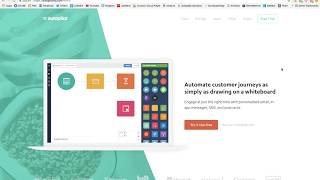
Christina Haftman (president/founder of creatingdigitalassets.com) narrates a screen review of the Autopilot (autopilothq.com) homepage. She catalogs design elements and marketing copy—hero demo video and CTA, trust/logo row, statistics about email personalization, a three-step workflow (Acquire → Nurture → Grow), integrations with common apps, journey analytics, and customer testimonials—while emphasizing first-run user experience, low-friction onboarding, and visual minimalism.
Questions this video answers
$20 a month ("plans start at $20 a month").
72%.
Eight logos ("1, 2, 3, 4, 5, 6, 7, 8").
Acquire, Nurture, Grow.
30% ("conversions increased by 30%").
Chapters
Hey there, it's Christina, president and founder of creatingdigitalassets.com and tonight I'm doing another video. Always a student of marketing, digital marketing. And tonight taking a look at the homepage for autopilothq.com and this is software that automates customer journeys. So it enables you to create a new nurturing sequence and really deliver personalized email because personalization is really important in a digital world to your newest customers. And when they log into your app for the first time, that is really, really an important, critical time to have. In app messages, contextual help, live chat, things like that are really enjoyable product experience that is friction free. The web design is very intuitive, things like that. Because when they first come in, they're excited about it. You really want to deliver a great first impression and make them feel productive and reduce the amount of time it takes them to actually get an outcome that they want, like an early success. And yeah, you don't want there to be any friction or frustration. And yeah, so this is what the software is about, but this is not what this video is about. This video is about how to make a beautiful homepage. So let's take a look at some elements on the page. Here is their brand logo in the top left corner which is pretty typical navigation. Here we have about six things including a call to action for a free trial. If you hover over it, it has a mint green background and then above the fold is this huge marquee block with a very short video that will. This is like a demo because it says show me that it's call to action. So if we click here, it'll show you how the software works. So a new person subscribes and they get an email. That's what the email looks like. Call to action to their website. If they click that, they get some online help and they order and five minutes. All of that is predetermined, architected experience and then technology makes it happen. Alright, so over here there's a short. You know, this is our promise and kind of like your value proposition about what it does. A call to action to try it for free with the plan start at $20 a month. And in this next block here are of course these are for trust and for social proof. There's 1, 2, 3, 4, 5, 6, 7, 8 different companies with their recognizable logos arranged horizontally across the screen so that people can see that they've done business with them and that increases trust because they might have not heard of Autopilot before, but they have heard of Some of these other companies. And then here are some big blocks where the images are pretty large. And this is some statistics to support the fact that your customers want to hear from you. And it's really important to stay in touch every two to four weeks. And 72% of consumers hate receiving generic emails and marketing. You really want there to be personalization. If it's not personalized to me, if I feel like I'm just aggregated into a group, I'm just going to delete the email. I'm not even going to open it. All right, so right here is there three step how it works. Acquire, nurture and grow. So acquire new leads, nurture them with a predetermined sequence, and grow your email list and your buyers, your customer base. Win customers and revenue automatically capture leads and create unique buying. A unique buying experience with automated online and offline messages that integrate with your CRM, your data analytics. So right here they have a timeline with different touch points, SMS and display. This is like, this is the live chat. This usually in the bottom right corner of whenever you go into the software, it kind of pops up and it looks like a chat window. And there's usually like a little circle with a face like a customer service rep or sales rep. And then there's email and then website visits. These are all the brand touch points that come together to give the totality of your brand experience. And all of these should be consistent with the same tone, so the same branding, the same colors. And whether they are online or offline, desktop or mobile use cases really need to have a, have consistency there. All right, so the next block here, connect apps to automate tasks and get more out of your data. So it's telling you here that you probably have some legacy investments. Some of your favorite apps like Google Drive, GoToWebinar, Mailchimp, Salesforce, Slack, any one of these. And it is trying to let you know that they have APIs and can integrate probably through zapier to use this with things that you already know. So this isn't like some isolated new thing over here. There's interoperability with apps that have been on the market for quite some time and that you're probably using in your business. So down here is another big picture, another big block. Track success throughout the journey. Track journey performance and get insight into which messages convert, how the customer journey, how the journeys are trending and what is driving sales. Visualize your revenue funnel and optimize on the fly. Okay, so this is all based on analytics and as you can See here, when you implement these things, you definitely need to keep an eye on your dashboard and the metrics that are most meaningful to you to see what's working and what's not so that you can pause and pause what's not working, modify it, figure out what needs to be changed. And if something is working, you probably want to take a look at that and scale it. So that is what this is about because we're performance measured, performance improves and that is kind of like a principle in any industry. So here are some customer stories, some customer testimonials. So this is a huge block with a background and then the text overlay. This is CEO of Instapage and how their conversions increased by 30%. Now usually this block has about three to five to seven customer testimonials. And sometimes it's just like a little picture but they use a huge big black the background and usually this transitions. But this one here, you actually have to click it to read more. So they have, I think the reason they make you click through is because there are so many to look at. So here's more brand recognition and some more client testimonials, social proof, things that will increase certainty and trust. Okay, so you see how if you hover over any of these customer logos, you'll see that's really neat. You'll see their quotes and what they had to say. And this one here must have a lot a longer narrative because it makes you click through again to see more. So all of this is to increase trust. There's Dolby freshdesk, that's really neat. Hover over them. So as you accumulate more and more clients, you can have a page dedicated to them like this because sometimes when we're first starting out we only have three to five to seven, but apparently they have a whole lot. So this is like a full fledged page of customers. Really nice. And on this page they're featuring Patreon, which is, which is a platform which you can donate to content creators. And they are, they're featuring that they're one of their high end customers that's on Autopilot, which is the software. So here they have a background and if you click the button you actually, it's muted but it's on Autoplay. But if you click this, you'll actually hear what they're saying. You can see that they're actually using it. It's really nice. It's like an immersive experience. There's full screen of Autopilot, the campaign, see all the color coded sequence it's really nice. This is a really nice design. Again, here's navigation with a call to action. Really nice. Let's go back. And. Yeah, that's about it then. Here is the footer with all these other navigate all the other things that you might want to navigate to push down to here and lead capture right here. Yeah, so that's my review of this webpage. Looking good. It's very minimalistic. When you see a lot of this white background with a lot of white space and margins, it focuses your attention. You know, it's all very intentional website design. Don't want to distract the website visitor with too many different things. Alright, so that is it for Autopilot and I will see you on one of my next videos. Thanks for watching. If you have any questions or comments, leave them below and I will get back with you as soon as I can.