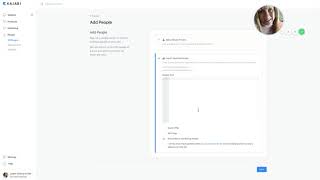
A brief video tutorial by Christina Haftman explaining how to bulk-import contacts into Kajabi from other email marketing platforms. She explains exporting contacts as a CSV from providers (AWeber, Mailchimp, ConvertKit, ActiveCampaign, etc.), then in Kajabi navigating to People → All People → Add People to paste or upload the CSV. The walkthrough covers three import options: subscribe the contacts to marketing emails, add a tag (e.g., source and date), and optionally grant an existing Kajabi offer/product to imported contacts. She also notes Kajabi support/live chat can import very large files and gives contact/example email.
Chapters
Hey there, it's Christina, president and founder of creatingdigitalassets.com and I am a product creation consultant and a digital marketing strategist. And I focus exclusively on course delivery platform Kajabi. And in this video, I just wanted to show you how you can do a bulk import of contacts. If you had email marketing software outside of Kajabi. And now you want to move those people into Kajabi. And this is a very common use case for people who just buy the software because they have been handling their email list somewhere else. So they want to bring it in here and segment it and begin using email campaigns with Kajabi. So what you want to do is you want to go out to aweber or infusionsoft or constant contact, eye contact, mailchimp. What else is there? I don't know. All the other ones. ConvertKit, activecampaign, wherever you have your contacts. And somewhere in there is the capability to export all of them. And that will create a CSV file. And you don't have to worry about the acronym, it's comma, separated variable, but it just means that it takes their name, their first name, comma, last name, comma, email address, and just separates those, segregates those so that they can be inserted into the Kajabi database. So anyway, you want to export that CSV file and you want to just take all of them, or if you have them segmented by interest or by behavior or what they bought or anything that's really significant that you want to preserve, then you can do several exports, exporting segments of your list. But just to keep this video simple, just say that you're taking the entire. All of them, the total of them. So it's not segmented at all. So you create, you have that, you export that CSV file, it's on your local hard drive. And then you come into Kajabi and you want to log in and go over to the menu here on the left and go into people and then all people and then add people. Okay, now you don't want to add a single person, but you could if you need to. What we want to do is import multiple people. Okay? And here is where you would copy and paste your CSV file. Or you can use Kajabi support. If your file is significantly large and just too much to do it in this space, they will import it for you. But what you want to do is look at these actions right here. There's four checkboxes, and you want to subscribe these individuals to your Marketing emails. If this is true, which is usually true, if they've opted in, you're just changing software and where they reside, but they've already opted in somewhere else and you know, gave permission and clear consent that they want to receive promotional materials from you. Then you can select these two and that same will continue in Kajabi. Now you probably want to add a tag because you want to group these people, this subset of people you want to know and recognize that they came from your other software. So you can create like, let's just say it was an aweber import. Okay. And you could even put the date if you want, or the month and year, Whoops, let's do July 2018. So, so all of them will be tagged with this so that you recognize that these are your, this is your list, your old list, you know, so they'll be tagged and then I'm just going to delete that. That's just an example. And then you could also theoretically grant them an offer to one of the offers that you have in Kajabi. How this is used often is maybe you are migrating other things to Kajabi and these individuals already had access to something you previously created that you're migrating to Kajabi. So again, you're just changing the software, but they still need to have access and now they're the link to access the content. The paid content is going to change and so is their login credentials. So if you've recreated that product in Kajabi, then you want to. And they have had access to it before, either free or paid. You want to preserve that because you've made a commitment to them, you know, to deliver this and it should be transparent to them or, you know, it shouldn't matter to them if you decide to change platforms where that content resides. So if those prerequisite steps in that situation is what you have, then you want to grant them access to one of your products in here that is appropriate. Again, this could also be a segment of that list that bought something from you before or opted into a free program of yours. And you want to segregate those people and then grant those individuals access to what you created. So I hope that makes sense. And then you just, whether you do it yourself here, if it's not too many people, you can do it in this matrix right here and it gives you some syntax about how to do it. The first name, last name and email. Okay. And like let's just do one. So let's do me. You would go in here and the syntax is to put the first name and last name with no, Christina Haftman and then, my email address which is Christina.HafftmanMail.com and then you would go to the second contact and you would keep going. So if you didn't have too many, you could do it manually. But if it's a really a substantial amount, just use Kajabi. You can do a support ticket@supportajabi.com or from within Kajabi, you can go over here up to the Kajabi assistant, type in live chat, click live chat and start chatting here and tell them what you need and they will help you. Okay, so let's go back to this. I think it, it took it away. Okay. Yeah, took it away. So yeah, if you have any questions, please feel free to reach out to me. I gave you my email in the example here is christina.halfmanmail.com and I will talk to you soon. Thanks for watching.