YouTube Channel Optimization: What To Put In The Description Box of Your Videos
A transcript of a YouTube tutorial by Christina Haftman explaining how to optimize the YouTube video description box to increase visibility, engagement, lead capture and monetization. The speaker reviews concrete examples from four creators (Patrick Bet-David/Valuetainment; Evan Carmichael; Natty Maddie; Stefan & Tatiana/Project Life Mastery) and gives practical tips: place primary CTAs in the first 2–3 visible lines, include time-stamped jump links for list items, add blog post transcriptions, playlists, affiliate/product links, social links, lead-capture quizzes, and reminders to subscribe and enable notifications.
Chapters
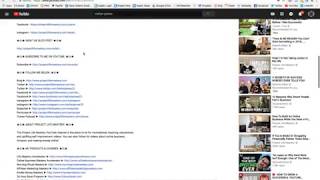
Hey there, it's Christina, president and founder of creatingdigitalassets.com and welcome to my channel if it's your first time here and if not, then welcome back. Tonight I am doing a video. It's actually in response to one of my clients questions, so I thought I would answer it through a video and also post it to my YouTube channel. So he is starting his YouTube channel and wants to make the most of of the description box. So I wanted to show you guys how you can do that. So I'm going to show you four separate YouTube channels that I follow with YouTubers and entrepreneurs who've been doing it daily and who do it well. So the first one is Patrick Bet David. He is the president of PHP Life Insurance Company in Dallas, Texas and the popular YouTube channel Valuetainment. And he's almost at a million views. I think at the time of this recording he has 800,000. So congratulations Patrick. I highly recommend you to subscribe. But let's go down here for the tutorial and show you how he uses his description field. Okay, well let me just. Collapse it. So when somebody comes onto the video, they're only gonna see what's visible is only like two or three lines. So the point of this is not everybody is going to hit show more because there's a whole lot of like you have, you have a lot of capacity, free body, I'm sorry, free text. Like a whole body of text that can be written in here. But not everybody's going to hit the show more. And actually a lot of people don't even know it's there. So you want to put your most important call to action or CTA link right here in one of the first two to three lines. Okay, that's the first thing. And let's go see how he uses his description. Everybody uses a little bit different. Okay, so for detailed notes and resources mentioned in this video, he has a link and this is going to go to his blog. So anybody who wants to read, who has a preference for reading can go there and get the same content. It probably was transcribed and then edited into something readable and keyword tagged and all that. And it's over there on his blog. His website here he sells apparel, so he has a link for that. And here, since this is the 20 rules of money, numbered lists do very well in YouTube because it's just a human, human nature. If somebody tells us there's 20 things, then we are counting and we want to know what they all are. It invokes curiosity and, and it really increases watch time because we just want to find out what they all are. So what he did in this particular video in the description is he put all 20 of them with the actual rule of money and the minutes and seconds, so you could jump. These are all hyperlinked. So if you were. If you expanded this and you looked at all 20, there they are where they are, where they occur in the video. So these are. You can just jump to them. Most people are just going to watch the whole video, but some people are really busy and they would value something like this. Okay. And then subscribe to the channel. He has a link for that in your videos. You always want to tell people because not. Because, you know, not everybody that comes there is a subscriber. And any one of your videos can be somebody's very first encounter with you. So remember that when you're making videos that it could be somebody's first impression. Any. Any of your content. So every time it has to be quality. So anyway, when you. When you tell somebody to subscribe to your channel, remind them to subscribe. As you can see, I'm subscribed. And hit the notification bell so that they will get notified by email every time the minute you upload a video. And that brings them back to YouTube. And as you can see, I have both enabled. So this is. This is his. That is. Let's look at Evan Carmichael. Okay. He produces videos daily. He's up in Canada, also an entrepreneur, entrepreneurial content. So this is an AMA video, an Ask me Anything video. So this is his lead capture. I'm not sure what this is. It's probably another. Something promotional here. He encourages you to watch related videos, so he gives a few links so that you stay on the channel and watch some other things. I think this is a project, a philanthropic project where he's trying to get the videos translated for people in other countries. These are his. Excuse me. These are his books. This is his mailing list. He also has a call to action to subscribe to the channel. He has some other FAQ videos that he did in the past. He has links to those that are related to this one. And then he has his social media channels, Instagram, Twitter, Facebook and his website all hyperlinked here. Okay. Natty Maddie's also in Canada. She has a really amazing vegan channel she does with her boyfriend Kyle. And I've been subscribed for a very long time and I have my notifications on. So how she uses her description field is she's promoting her recipe Book her cookbook, vegan cookbook. And she's also an affiliate for the certain vegan protein powdered thing. So she has her link and a coupon code to get discount. So those are front and center what she wants primarily to promote because they're in the first couple lines of the description. So if we were to show less, you see how you can see those, you have visibility to that. So you want to make sure you put the most important things right up there. So we're going to do show more to expand there. She's promoting another video with potato salad. I think that was a few videos back. And these are her playlists. In YouTube, it's really important to categorize your content. It helps people who are new to the channel kind of, you know, focus in on what, what is most important to them, especially if you video blog across different topics. She has her what, what she eats in a day videos. She has recipes, where she actually makes the food. She has workouts. And video blogs are like Day in the life where she's video ed, editing and traveling and going to the dog park and going to the gym and going to Costco and all that. That's what a video blog is. So categorize your content. I have a client and he's in, you know, he's more B2B. So he has his playlist across industries that he services. And this, these are things that she actually uses and then she has affiliate links to them because she's a video blogger. She has her camera and the lens and the tripod and the external microphone and her GoPro for adventurous outdoor water, underwater proof things. Okay. And here she has how to connect with her on social media. I'm surprised she didn't use hyperlinks because these all could be clickable if she put the hyperlinks in there. But nonetheless, she's on Instagram, Snapchat, Snapchat, Twitter, Facebook. And then here is her email for business inquiries if you want to collaborate with her sponsorships, anything like that. And since this is a vegan channel, we encourage people to consider going vegan and all the reasons why. So here are some of the best documentaries on it, about the animals and about health. Cowspiracy. What the health. This is Gary. I can't pronounce his last name. Vansky. Speech. Another one. Earthlings. Forks over Knives. And then she gives credit, she says the camera that she uses and the sound, the music that she uses in her background music gives attribution. Okay, so that's Maddie and then Stefan And Tatiana, okay. They're also from Canada, these Canadian entrepreneurs. I love their channels. They have separate channels, but this is. This particular video that I'm on is a collaboration because they have really. They've been in a relationship for about four years, and they're making a video about how it's wonderful to find a partner who is supportive and shares the same vision and values and how that can really excel your business because it just gives you so much energy and just infuses energy into your day. You can do so much more when you have someone like that. So how stuff. This is actually on Stefan's channel. It's probably published on Luxe Health as well, on Tatiana's channel. I'm just happened to be here because he's been doing this many more years longer. So how he uses his description box is he has a lead generation tool right here for online business quiz. It kind of. It's a quiz that he created in Try Interact. That is a quiz software. There's also another one called Outgrow. And you can create a quiz and it can be used as lead generation where people take the quiz and then they fill out their email to get the results. His quiz is actually what kind of. You know, there's different ways you can make money online. So which one would be your person would be best for you? And he asked a whole bunch of questions related to your timeline, your personality, what you like to do, things like that. So, you know, it might be an Amazon business or, you know, be a seller on Amazon. It might be Kindle Publishing, it might be print on demand, a Shopify store, physical products, digital products, information products, all different kind of things like that. So that's what he wants to be front and center for lead capture. So he's optimizing for lead capture. And then this is like just a real description of the video and probably has some keywords in there so that this is found by people who might be typing in something like that. And since he's doing a collaboration with Tatiana, he gives all of her stuff right here. Okay. And then he also has a blog post of this, of this video. So for people who want to read it, they can go there. And again, how that is created is people start off. You always want to start off with a video, okay. Because you can create an array of assets, brand assets. When you start with the video, you can snap out a picture and have a photo from the video. You can have the video transcribed and you have a transcript, but you also can have it transcribed and edited into a blog post so it's readable because you don't want to just put a transcript out there that's like sort of like just every single word you say. It just doesn't make sense. You need it edited to be like a readable blog post that is keyword rich and can be on your blog so that it gets crawled by Google and you get indexed and you want to optimize your content for retrieval. And that's the way you do it. Because in Nvidia, there's no text for Google to crawl. So that's the purpose of that as well as to give people a place to go if they're not like video people, if they like to read anyway, that's the. I'm sorry up here, the reason for that one. Then he has a call to action to subscribe. And again, remember to ask your people to subscribe and hit the notification bell to get alerted. And I have both here. I love this channel. Okay, where did we leave off? Yes. And then here's all of his social media in this block, hyperlinked. And he has quite a few here that are duplicate because he is self branded Stefan James and his business, which is Project Life Mastery. So there's, you know, two, there's one for each. He also has a. He syndicates, so he also has a podcast in itunes. So what happens again? Go back to video first. When you have, when you make a video, it's an MP4 file, but you can also have your videographer or video editor or whoever does this virtual assistant, strip out the audio. Only have an mp3 file that you upload to itunes and you have a podcast as well. Do you see how that works? Like there's so many things you can create after you create a video. And it can be like a process. He has probably, you know, a standard operating procedure to get all this done. And so he's, he's there as well for people who like to watch, I'm sorry, not watch, listen to podcasts, you know, at the gym, when they're walking the dog, when they're doing the laundry, when they're making dinner, when they're in the car, commuting, anything. There's a whole, you know, other demographic that just, you know, likes podcasts. So he's there as well. He has a little description about what Project Life Mastery is. And here are his information products, his digital products. Life Mastery Accelerator, Online Business, Morning Rituals, Affiliate Marketing, Kindle Publishing, how to Create a book in 24 hours. And then I think this is Software to automate some, some things when you writing your Kindle books with hyperlinks to all of them. Okay. And he also has merchandise, he has branded apparel and also just I think T shirts and hoodies and different things with entrepreneurial, like motivational inspirational quotes and you know, confident kind of statements. So he has a link to that. And I think actually all the, all the profits, 100% of the profits from that business go to building schools in another country. I'm not sure which one it was, but it's basically charitable. This is not like profit, this one. And here is his recommended resources. It goes to his blog, his website resources, and on that page of his website he has all of his affiliate links for all the different kind of things that he's an affiliate for that he actually uses and has found useful and beneficial. It might be a value to you that's high quality and they're all on there. So there's a lot of ways he's monetizing here. And then this is just a text written way of saying if you like the video, like it, share it, leave a comment, add it to your playlist, subscribe, hit the notification bell. You know, those are the kind of things you need to say on YouTube to remind people of the things that they can do. There's a lot of links in this description, so that should give you some ideas of how you can use your description field in your, on your YouTube channel for each individual video. And that's what you can be filling out. Like when you upload a video, it takes a little while, you know, while it's uploading, you can be adding your title, your description and your tags, optimizing it for retrieval. You always want to include your name, okay, your personal name and your company or your business or your brand so that people who actually already know about you will find you. Okay. So you kind of optimize for those people who already are aware of you. And then the rest of the keywords are going to be like industry specific, niche specific, and then topic specific depending on the video. So it's kind of like a gradient. And once you brainstorm these, you can put them in a document and then pull that up every time you do a video so you know, which you can just add them in. And actually I think even a better way to do it is to get tubebuddy. T U B E capital B U D D Y Tubebuddy. It is a must have if you are serious about becoming a YouTuber because it organizes everything. Organizes and automates a lot of different things you need to do with YouTube, so I highly recommend that. And yes, I hope this video is helpful. If you have any questions, leave them in the description box below. I'm going to be making more videos like this, so if there's something you would like me to make a video about, let me know. And if you like this video, give it a like, share it and subscribe. If you're new to the channel, thank you for watching.
More from Christina
Duke Ferguson at Unleashed Potential - Video Testimonial For Christina Haftman