Comparison of Microsoft Office 2013 desktop version and Office 365 cloud version, covering features, pricing, and licensing to help you choose between them.
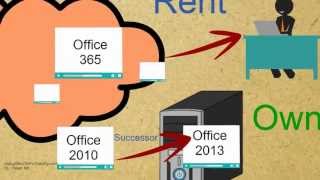
In this session we will talk About Microsoft Office 365 vs 2013 presented by 02Pro. Training.com applications are moving to Cloud these days and so did the Microsoft Office Suite. Now we have a cloud version of the Office. From the Cloud, applications are being offered as a service to the users, hence the term software as a service. In other words, the user is paying rent to use the software as opposed to owning the software. Microsoft Office Suite is Now available in two flavors. The desktop version is called Office 2013. The cloud version is called Office 365. Office 2013 is the successor of Office 2010. It resembles Windows 8 in its look and feel. While Office 365 is the cloud version. It is a similar software as 2013 but is offered as a service. It could work while you are connected to the Internet as well as offline mode. Once you reconnect, the files get synchronized with the cloud. Here are the popular suites for office 2013 which is a desktop software Home and Student, Home and Business and Professional the Home and Student Edition gives you Word, Excel, PowerPoint and OneNote, while Home and Business Edition additionally gives you Outlook as well. The Professional Edition on top gives you publisher and access. The cost for Home and student edition is $140 U.S. the home and business edition is sold for $220 and the professional edition is sold for $400. The desktop office editions are only licensed for one computer. The desktop Editions are only available for Windows based computers. Also, when you purchase a Desktop Edition, you are only purchasing the current versions. The upgrades are not included. Purchase of Office 2013 gives you 5GB SkyDrive storage. SkyDrive is cloud based drive that lets you store files in the Cloud. Files stored at Cloud could be accessed from any computer. In contrast, the Cloud Editions start with Home Premium Edition. The Home Premium Cloud Edition contains all the applications that are included in the Professional Edition of Desktop Family. The rent for the Cloud Home Premium Edition is $100 per year or $10 per month. At this price you can use Office 365 on up to five computers, either Mac or Windows based, and five smartphone devices on top of that. With Cloud version of the Office you get 20 GB of SkyDrive space. Cloud Office subscribers also get 60 minutes each month of free Skype phone calls to 40 countries. Whether to rent or own this depends on various factors. Which Office applications do you want to use on how many computers you wish to use? Office Suite number of years you use one version before considering an upgrade, let's say you Upgrade after every three years you have one computer and you only need Excel but Word and PowerPoint. The desktop edition is a cheaper option if we consider the cost for a three year period. Let's say this time you need Office Suite on three computers. This time the Cloud version is a better option in terms of price. Now let's say you have two computers on which you need to run Office and you also need Outlook. Again, the Cloud Edition is a clear winner. This time let's say you have one computer and you need Access software. Again, Cloud version is a winner.
Unless all you need is Word, Excel and PowerPoint on a single computer. In most other scenarios, Office 3. 65 seems to be a better option strictly in financial terms.
Other benefits of Office 365 include free Skype credits. You get 15GB, extra space on SkyDrive. Documents are secured on the Cloud. Documents could be accessed from any computer. Upgrades are included for free. You get to choose when you are ready to mortar the newer version. Office 365 could be used from five computers and five devices. Computer could be Mac as well. You can use Office on Demand feature to access your Office suite temporary from any guest computer on top of your five computers, for example a public library PC. However, currently Office on Demand feature is only available for Windows based computers. Thank you for watching. For more videos, Visit Xero to ProTraining.com.