Flipboard aggregates news and social media into a flip-style interface. Subscribe to topics like photography and technology, connect your social accounts, and browse articles in a Cover Stories view. The app renders web pages directly and pulls tweets from people you follow.
Chapters
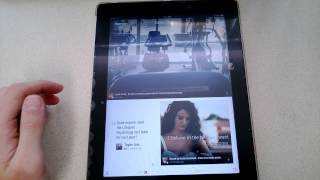
Hello, today we'll be looking at an application called Flipboard, which is really awesome. Essentially what it is, is you can sign up for it and subscribe to topics of interest. For example, see, you have photography, you have technology. Those are some of the ones that I've subscribed to, and you can also connect your social media accounts And what it does is it puts all this content in one place and in this really cool flipboard interface. And Cover Stories is sort of an overview of all the content at once. You can kind of browse and then find an article that's interesting to you. And if the website's formatted for it, it actually works inside the app just like the other components of it. And see, here's an example of a webpage that just loads. So you can either view webpages like this, or it, or it actually maps to the interface, which is pretty cool. And you can view in categories as well, like I was showing you earlier. So here's technology. These are technology-related articles. Here's one on Google Glass, which looks pretty cool. It tells you on the bottom how many pages there are. So there you go, it's pretty awesome. Um, I haven't used it too much to look at my social media sites yet, but it basically pulls important tweets and pulls articles from people that you're following. So yeah, it's pretty neat. Alright, signing off.