David walks through the Microsoft KIN One smartphone, showing its portrait slider keyboard, Zune integration, and Windows Phone interface. The device had a dedicated camera button and Zune Pass support, but failed commercially before Windows Phone 7 arrived.
Chapters
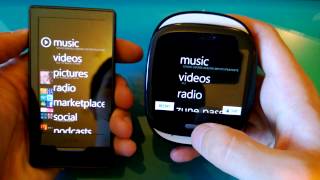
Hello, this is David, and this will be just a short video on the Microsoft KIN. This is their One model, I believe, and a very awesome device that was unfortunately a big failure for Microsoft, but it was really the— what I see as the precursor to Windows Phone and Windows Phone 7, Windows Phone 8, and it was a really cool device. So let's just take a look at it really quick. So the hardware— and what's funny too is you can see it says Windows Phone on it, which I think is awesome. And it has some hardware buttons. It has volume buttons here, it has an auxiliary here, and a camera button there. And there's a place to charge it with USB. And it had a physical keyboard, a portrait slider, And this is the main sort of screen. What was also really great about it is it had Zune built in on it, which I thought was awesome. Zune HD is my favorite media device, and so it was fun to see elements of the Zune incorporated into it. In fact, I have a Zune HD right here. I can show you just a brief, brief comparison. As you can see, they're very similar. In the UI, the only difference being to step back you hit this button down here and then you just tap on the top on the Zune HD to go back. It even has Zune Pass integration, which is so neat. Anyway, so I thought that made me smile. And then as you can see, it has sort of a very similar Windows Phone start screen, and then you can even slide to the right and have your favorites. I wasn't able to actually import any of my contacts or anything like that. This is a Verizon phone and I have AT&T. I just thought some of these features were really cool, like all the different settings they had. It had its own web browser, it had Bluetooth compatibility, you could change themes, but it required a restart of the phone, but it had all these cool little themes. The consistency across the UI was this recent button and you could quickly multitask between different applications. I thought that was pretty neat. And the camera is not really that good, obviously, but it was so cool to have a little button up here to take shots. You press it down partly to focus and then press it all the way down to actually take the picture. You could even share it. Let's look at some of the other features for fun. Here's the alarm. Create a new alarm up here. What time you want it. And so really it had some pretty cool features, and it's really a shame that it didn't do as well as I think it could have. Let's try the web browser and use the keypad. So we have Twitter open here. Let's see, let's type in Ah, let's go to Google. Had a browser pretty similar to the Zune HD's. I just love this keyboard, it's pretty awesome. As you can see, like, the navigation up here is pretty out of the way for the most part, which I think is neat. Then you had your status down here of the time, battery usage, signal, if that actually applied here. And again, the recent button. So yeah, I would say the Kin is pretty awesome, and I've had fun playing around with it. So until next time, see you around.