In this video, the presenter provides a concise review of the Mayflash GameCube-to-Wii U adapter, demonstrating how to connect a GameCube controller to a Wii U via the Wii Remote. He walks through the physical setup, explains that the adapter registers the controller as a Classic Controller, and then evaluates key performance aspects: there is no rumble support, shoulder button shielding only activates when pressed fully, and the larger GameCube stick results in a slightly delayed stop, which can feel like lag even though actual input latency is negligible. Side‑by‑side tests with a Classic Controller show no perceivable delay in button presses. The reviewer concludes that the adapter is a solid choice for players who are attached to a GameCube controller—especially for Super Smash Bros. titles—but notes the stick calibration issue and lack of rumble as drawbacks, suggesting alternatives like the Wii U Pro Controller for those seeking a flawless experience. He invites viewers to share their own experiences, subscribe, and comment.
Chapters
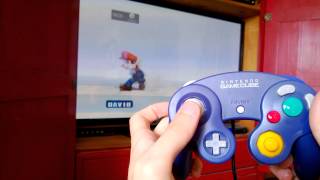
Hello folks, this will be a quick look at the Mayflash GameCube controller adapter for Wii U. Now to many Smash Bros. veterans out there, you will be rejoicing to find that there is a solution to play Super Smash Bros. Brawl in HD on your Wii U with a GameCube controller. Mayflash has made this, um, has made this adapter which essentially plugs into the back of the Wii Remote and allows a port for your GameCube controller. As you can see here, the button replacements. So we'll be looking at some of the upsides and downsides of this system. Really, it's the only solution out at the moment, as far as I know. I mean, I think they sold some in Japan a bit ago, but I don't think they sell them anymore. So let's just take a look. All you need for the adapter to work is a single Wii Remote, the GameCube controller you want to use to play your game, and the adapter itself by Mayflash. So to connect them in the order that they recommend, first take your GameCube controller, take the N connector, and plug it into the front of your adapter. Like so. Then take the end of the adapter and plug it into the back of your Wii Remote like you would a Nunchuk controller or another Classic Controller. Now, the little light on first connection, the light on this will blink a few times, and that's calibrating the Classic Controller. There. Once that's finished, it will register as a Classic Controller. So let's see how it works. So here's the control scheme that I use for the Classic Controller, and I will demonstrate what it's like to use the GameCube controller as a substitute. As you can see, it picks it up just fine. Let's do a test. Now, I get a lot of questions like, "Is there lag?" That's the biggest question. And, "Is there rumble?" And I'll answer those for you right now. So there is no rumble, although the GameCube controller can rumble, as many of you know. The functionality has been disabled because just the adapter doesn't permit it. Also, shielding doesn't occur until you press the button all the way on the shoulder buttons for L and R. It's another small difference. And the biggest difference, and in my opinion what, what is unfortunate about this product, is that they haven't calibrated the control stick exactly correctly. And when I say that, I mean they haven't they didn't take into account the different size of the control stick. It's slightly bigger on the GameCube and it has more of a reach than the Classic Controller, so stopping your movements is going to be a little bit delayed. As you can see, it sort of delays. I'll compare that with an actual Classic Controller here. Okay, here's the Classic Controller and let's do a test. So as you can see, the stops are much more sudden. Let's do another test. As you can see, he makes much farther leaps. So despite some minor setbacks, there is surprisingly no lag on this controller. However, it might feel like there is because of the control stick. There's a little bit— it seems a little delay— like there's a delay. And again, the reason for that is the control stick is larger. And has more reach than the control stick on the Classic Controller. As you can see, it only goes to a certain degree, whereas the GameCube controller goes a little bit farther in each direction. Here is proof that the controller doesn't lag, or is on par with the actual Classic Controller. I'll hold them sideways so it's easy for me to grab them and press the A button at the same time. No perceivable delay there. So is the Mayflash adapter a buy? Well, if you're married to your GameCube controller, then I'd say so, especially for Super Smash Bros. or a game like that. However, there are some defects, and it's so close to perfect but not quite there. If you're waiting for the upcoming Super Smash Bros. game, I would recommend trying maybe a different control scheme or the Wii U Pro Controller. Now, it's essentially blasphemy that I say that because I would not have dreamed of using anything else than the GameCube controller. But I'm not willing to have a compromising experience with the control, even if it's with my favorite controller. So I will continue to try to use the GameCube controller, but it just isn't quite the same. Do you have a different experience with this controller, or this adapter? Let me know, because this is my experience and you all may have different experiences, and I am ready and willing to hear what you have to say. Don't forget to subscribe, like, or leave a comment, and, uh, as always, it's been a pleasure.