Integrating the Power of ChatGPT in LinkedIn
This content was created by Sales 3.0 Masterclass Assistant. This content was uploaded by Sales 3.0 Masterclass Assistant. This is a YouTube video titled "Integrating the Power of ChatGPT in LinkedIn" created on October 9, 2024. It features Bryn Tilman discussing strategies for using ChatGPT and LinkedIn to enhance social selling. The session covers topics such as maintaining authenticity in AI usage, engaging prospects on LinkedIn, and leveraging Sales Navigator. The presentation includes practical tips for content creation, engagement, and pre-call planning using AI tools.
Chapters
I'm excited to talk about integrating the power of ChatGPT and LinkedIn. And really, even though we have a half hour together today, this is barely scratching the surface, but I do believe you are going to get some great value out of today and it will make your. There you go. Oops, sorry. Authentic voice Shine so I am Bryn Tilman. Let me just start with the number one question I get is can I have a copy of your deck? The answer is yes. So you can scan this or you can go to socialsaleslink.com sales3o summit all lowercase. You will also get a link to a chrome extension called getmagical.com that will help help you grab every one of my prompts. But even if you don't use that link, you will have all the prompts available in the PDF of this deck. So let's get started. Two rules. We need to keep it keep AI authentic and keep AI in your voice. So AI is not replacing us, it's it is helping us do things more efficiently, faster. But we need to keep the human piece in this and I cannot stress that enough.
Remember, if you're social selling or you're using LinkedIn, our goal is to get a conversation right. That's our goal. We want to start trust based conversations without being salesy and it's our engagement and our content that are going to get us there. But here's the thing, as salespeople we have a litany of things we want to tell our audience.
But that is not what gets us the conversation. They don't care about what we want to tell them, so we need to understand what it is that they care about. And our content needs to earn us the right to get the conversation.
There's an amazing book called Gap selling by Keenan and he was actually on a panel at the CRO Summit. It was so fun to meet him. But he talks about the ask offer ratio and the ask offer ratio is simply this. I am asking you to invest your something. In this case it's going to be time. I'm asking you to invest your time to consume my content in exchange for the content. One of three things is going to happen at the end of this. Number one, I'm going to think that was a bait and switch because it really was you selling me on something. Number two, neutral makes no difference to me, but does not. It didn't hurt you, but it doesn't help you or compelling. And so everything we're going to do today, we want to make sure that you're Showing up in a compelling way that ultimately positions you as that resource.
Here is the goal. We need to lead to our solution, not with it. When we lead with our solution, it comes across as a pitch. When we lead to our solution, it's insights and value.
So let's start with engaging our prospects on LinkedIn. And by the way, the ratio is about 10 to 1. We should be engaging 10 times more than we post. And if you want to increase that to 20 to 1, I'm great. Engaging matters more than almost anything you can do, especially when you're engaging with the right people like your prospects.
So I want to talk for a moment before we dive deep into this about social proximity and who's going to see your content and where you're engaging. There's you. This is your profile. You have your first degree connections. When you connect or follow someone, we'll talk about this. You can ring their bell, you start to see their content. Your first degree connections, you can message unlimited until they block you. Your second degree connections are your friends of your friends. There are opportunities where you can share. But when you are engaging with your first degree connections and your first degree connections engage back their first degree connections, your seconds will start to see this. So the more people that you are connected to that are in the right people, the more people are going to start to see your content. So we want to search and find our ideal customer profile and make sure and we're going to talk about this for a lot of reasons, but we want to make sure that we are identifying the right people, that we're connected to the right people because we're going to ask them to engage and we're going to talk about that. And if we are not connected to the right people, we have to start finding the right people. I'm going to jump into LinkedIn and I'm going to do a quick search in the free LinkedIn. If you have Sales Navigator, it's way better. But I'm going to go into the search bar and I'm going to hit enter.
I am going to go into my.
All filters. I'm going to start with my first degree connections. I'm global but I'm just going to put New York metropolitan area for now and I'm going to go in and I'm going to put in, I want sales or marketing. I'm just doing this fast but this is going to give me a list of all of my first degree connections in New York that are in sales and marketing. These are people I can engage with directly, we'll talk about this. We can also do connections beyond this, but we want to make sure before we're creating this content that we know that we're connected to the right people that want this content.
We're going to go into the specific people that we want to stay engaged with and ring their bell, right? So if I say, okay, Johnny, he's a perfect person I want to stay engaged with when I go in and ring Johnny's bell when he shares content.
So he's already rung when he shares content, it's going to actually come into my notifications and trigger me to engage on that content so I can see all most relevant or off identifically on most relevant. Unless they're a hot prospect and if it's someone that I don't want to stay in front of, I'll turn it off. But now when they share content, I don't have to wait to see them on my newsfeed. I can see Damon shared content. And now I have an opportunity 14 minutes ago and I have an opportunity to engage. Only two people have liked this. I can come in and I can say really boring things like very informative or thanks for sharing. We're not going to do that. We're going to use AI and make it much easier for us to comment, react and share. Here's our first one. I'm networking on LinkedIn and I want to leave a relevant comment on a post. Ask me to copy and paste the post text. Then make it it should be make it short, simple and engaging. Not too serious, but professional. And make sure to refer back to a key point in the post. So I'm going to go ahead and I'm going to put in my prompt.
And I'll say please copy and paste the text. I'm going to go back to Damon's text. I'm going to open this up.
I'm going to check this out. I'm going to copy it. I recommend you read it. I'm doing this quickly. Don't slow it down just a little bit. And I'm going to paste that. This is now going to give me a great little fantastic insights. Poor communication really can stifle innovation and trust. As you've highlighted. I found the point about collaboration vanishing particularly impactful. I'll definitely check out the Ear Model ebook. So now I don't want you to do paste this unless you've actually read it. Now I Damon is a client. I adore him. I can do this because I know him well. So I'm going to go in and I'm going to paste this, right?
I'm going to take out the quotation marks. I think I'm going to take this out and just put that in. So now I have a post. But please don't do this without reading it. But notice this is so much more impactful based on that post. So a quick little.
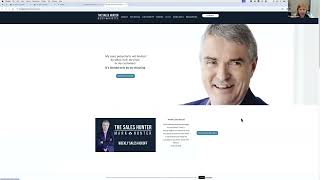
Putting in a prompt can make all the difference in the world. Next one. Posting curated content. I went out, I found a piece of content and now I want to post on it. So. So let's go find a piece of content. Let's go to. I'm going to go to the sales hunter, right? Is that. That's going to. I'm going to find a piece from Mark. I think that's it. Yes. So I'm going to go in, I'm going to go. Let's go to blog. So I'm going to go to the blog post and I'm going to look for a recent blog post. These are some ebooks I probably. Oh, I clicked. Let's see. Do it again. Blog post. And you're going to go. Here we go. 10 ways to get out of a sales slump. Great. I love it. I'm going to use this. So I'm going to go in and I'm going to grab that link. I found a piece I love. So now I'm going to go into ChatGPT. I'm going to start a new one here just so it's not. And I'm going to go in my second one. I've identified an article that I want to share on LinkedIn.
Oh, please write a short text for this. Please ask me to paste the link, which this is. Here's a draft. I did not paste the link. It should do that, but I'm going to paste the link. Let's see. All right, so now it's giving me here.
I recently came across an insightful article.
Now it's going to say, paste the link here for when I look forward to your comments. And I'm also going to then mention Mark. So I'm going to go into LinkedIn. I'm going to click on start a post.
I'm going to paste this and it's going to say paste link here. Right, because it wants me to bring it back. I'm going to go grab that again.
Paste the link.
Now for me, I am a big fan of white space.
So I can go ahead and add some white space in here.
And then.
I can say, I recently Came across.
Insightful article.
By at Mark Hunter.
It offers, okay, now I go ahead and I can schedule it or I can post it. So I go ahead and post. You can add hashtags if you choose to. But now Mark will be mentioned and look how fast it was grabbing that text.
Next, the process for original content at scale, for time wise, I'm going to go through this pretty quickly. But social selling content, not all content, but social selling content should resonate with your audience so they know it's for them. Create curiosity, teach them something new that they didn't know before. Otherwise it's just neutral content. Get them thinking differently about their solution and create a compelling moment moving them from lurker to engager. Because we can't start a conversation until we know who they are.
So let's go ahead and we're going to start with what trending topics would they care about? And this is really important that we start to identify again what matters to.
Them, not what I want to talk about. So I'm going to go ahead and I'm going to hop in and I'm going to put in my next prompt.
Identify trending topics that my audience would care about. Right. So now it's asking me some questions that I need to answer before. This is how we keep it in our voice. So who is your audience? And I'm going to say sales leaders. What platforms? Obviously LinkedIn.
What industries? Oh, and it can go on and on and on. Right? So we can keep going. I'm going to do LinkedIn.
Specific industries or themes. We'll say future of sales. Okay, so this is designed to keep asking you questions and giving you ideas. So as it goes through here now I could do okay, future of sales. So I want adoption of AI and machine for the rise of remote selling, integrate integration of advanced analytics. All these changes in consumer behavior. So I go, oh, I love this. I'm going to do number four, changes in consumer behavior. I have identified a topic. I really want to talk about this. So now I'm going to go back.
And I'm going to record in Zoom or your smartphone. I use BigVu. If you go to socialsaleslink.com BigVu V I G v U. It's a great in app that you can record on your phone and then edit on your desktop. And it's cheap and it's fabulous and you could do B roll all kinds of things but record yourself for up to 10 minutes, no more than 10 minutes. Right on the topic that you chose. This is now your Voice. Right. We've gotten inspired by these topics and now we want to download the video. If you want to, you can upload this video if it's under 10 minutes as native video, or we can simply download the transcript from this transcript. So you're going to download this from your Zoom in big view. I get it. Wherever you have this, even in teams, I think you get a transcript. If you don't, you can upload it to Otter AI and the video and it will transcribe it for you.
Now we're going to upload this transcript and so we're either going to copy and paste it or upload it depending on the version of chat that you're using using to create a blog post. So I'm going to start over in a new chat and I want to create. Is that four?
Nope. What number was that?
Hold on.
I think I need to do five. I may have recorded that as the wrong one.
Hold on.
I'm just going to quickly jump in and copy this because my code is not working. It has the old same one twice.
It's okay.
I'm going to hit paste. Here's my code. That is it. Yes. Okay. Please create a blog post from this transcript or if you've copied and pasted it. So I'm going to pull up my transcript for class.
Here I go.
Transcript for class.
And this is what it looks like. Downloaded straight from Zoom.
So I'm going to pull this transcript. I can copy and paste it or I can upload it. If I have opportunity to do that. I can upload it here.
If I have that. If not, I'm just going to paste. I'll upload for. So I'm going to upload transcript for class.
Open.
Once it up and I can share it.
Right. So that is now the transcript. I found a topic I went on. This is all used now. I don't like in today's digital age. I always take that one out. It's about 80% there. Right. So these are the things that I talked about on this call. Right. And it now has a blog post in my words. Right. These are my words that used my transcript. Right. Vet connection request. Those are my words. So that is now a blog post. The only thing is they always throw this in. Take that out. But everything else really is pulled from my transcript. So now I have a blog post. Let's go back to.
Viewer presentation.
I'm going to copy and paste that blog post. If I don't have a blog or a website to blog on, you can blog inside of LinkedIn. This is an area called articles. Creating an article is a blog post inside of LinkedIn. You have opportunity to post it there if you want. If you don't have it somewhere else. So now what if I want to create a poll around this? What are we doing on time? I go, okay, I've got this great transcript I want to pull. So I'm going to go in and I'm going to put in. So let's use the same one. I could start over of course, but I put in this I will, I'll paste or upload a transcript. So please go ahead and paste or upload your transcript. I told I'm going to just upload it again. If this were brand new, which is all good transcript for class.
And it's got everything in here including the character count and what I need to do in order to create poll from my transcript. So I go in here.
It thinks based on the transcript poll question.
Is prospecting on LinkedIn your number one concern for boosting sales effectiveness? Yes, it's crucial for leads somewhat depends on strategy. No, other methods work better. Other sharing comments straight from my transcript.
And then it has a LinkedIn text that I can put up. So all I have to do is go into the poll, copy and paste. Maybe it's 80, 20. But I now have a poll that I can use based on my transcript.
I can now list insights if I want to. So if I want to list insights. So pulling quotes out from that transcript.
So we'll do it again. We're going to keep using this, but if I want to pull out. Let's see if I have that one right.
Yep, 10 quotes. Now I typically will put these in either a social post in a Canva post, but I'm going to go back and I can now again I'm going to upload that transcript. I can keep working on that same transcript page if I want to. But if you're going to do different things, you just keep, you know, I like if you're new content, start over. So these are quotes that are pulled right out of this transcript.
Right. And I have up to 10. It gave me 10. Now I have 10.
You know, so this should say on average we've been ignoring 100 people that we should be having conversations with that we're connected to. So again, this is an 8020 rule. But it will pull out quotes that I can then use in social posts.
You can use canva if you like to. Right. You could create an ebook with this. You can you know all of these. There's so much that you can do to now create visual.
We can also use the Schedule later tool. I love this because I could do. Let's say I want to take, you know, set time aside and I want to create a poll and put that out for Monday. And then I want a quote for Tuesday and a quote for Wednesday. So if I wanted to do this.
And this becomes. Let's go back to the home page and I'm going to do this quickly. I want you to do a much.
Better post that I'm about to do. And you have the tools to do that now. But I go in here and I am going to.
Click oops paste.
Right?
So this becomes. I might have more.
I might have my hashtags. I might mention people. Here's my quote. I might, you know, whatever that is. And then I might have an image. Then I'm going to go in and schedule for later.
So maybe I schedule my poll on Monday.
I schedule.
This post to go out and I can choose the time when I want it to go. I can hit next, right? And I schedule it and it is now scheduled.
Now I can go in and delete.
It because I'm not going to actually share that. So I'll show you. You go in and you can view your scheduled posts. So this one is posting tomorrow. I have one that's actually. And it's a video. Leverage the power of shared influencers. Right?
And so and I can go in.
And I can delete this particular post or modify it, modify the schedule, whatever I want to do. So my point is, as a salesperson, one of the best things you can do is really have a, you know, time that's set aside where you can go in and maybe you do an hour a week and you're getting all of this done through AI and you're scheduling it for your week.
All right, so I have seven minutes for Q and A. Mark, I think you're going to grill me.
Of course I'm going to grill you. And hey, thank you for using me as an example. I was like, wow, I got to pay attention here. So thank you. Anyway, hey, here's a couple questions that have come in. You use Sales Navigator. Do you need Sales Navigator to do a search by location or professional type?
So you could do location professional type. I want a little bit more clarity on that. So Sales Navigator, you can use zip code radiuses, but in the free LinkedIn, you can put in any town or towns that have a zip code. But you can't do it by zip code. So if you, if you are a banker and you work in five towns and that's it, you don't have to put the greater New York area, you can put the five towns you're working in.
Great, great. Hey, now here's the other thing. When, when do you become large enough as a business? Because somebody said for SMB businesses, say under 10 million, is it really useful to have a Sales Navigator subscription?
Yes, Sales Navigator. And boy, you know, we'll talk to Gerhard. We should do a whole program on Sales Navigator.
I believe that Sales Navigator is the most powerful sales tool in the world.
Because.
Not only are the filters amazing, but the ability to stay in front of your people. The ability to leverage the insights that come in through Sales Navigator. Who's changing jobs, what's happening. Absolutely foundational. And it also has an almost built in process that the free doesn't have. It also integrates into most CRMs. It integrates into like sales loft or gong or if you're using any of those.
Really great sequencing models. Sales Navigator really just attaches in seamlessly.
I'll echo that even if you're a solopreneur Sales Navigator because it is one of those foundational tools with which you sell from. And again, LinkedIn is so powerful. You shared a number. I, I was doing a program with you earlier this week about how many new people join LinkedIn.
I don't think that was me, but I can google it because I some.
Reason I was thinking you had said like you know, three people a second or something like that.
Yep, that was another expert.
That was another expert. Okay, well we, okay, I, I won't hold your feet accountable to that. But anyway, here's the thing.
Here's.
Here's another question then. I know Gear, Gearhard's got some questions. You talk a lot about LinkedIn and the value of it. How much time should people be spending on LinkedIn? Every day or every week?
Yeah. So there are three types of people that I have three different answers for. There are the sometimes sellers. These are the CEOs in their company. They have to sell. They need, you know, they need to be out there prospecting, but it's not their full time job. So the sometime sellers, I think, you know, there should be maybe 45 minutes to an hour a week of content curation, development, all that fun stuff and then they schedule it through the week. I don't think they need to be out there every day thinking about what to put out there. The engagement is important. But they're going to use this for pre call planning. They're going to use this for lots of reasons and it's integrated into their day. But I would say no more like I would just say just make it integrated. The way your email is, I wouldn't set aside too much time. So if you're going to meet with someone, go in how much time? Can I just share one more tip that I didn't share? Go right ahead for pre call planning.
You've got three minutes. Go ahead.
Okay. Okay. So if you're going into pre call planning and this is for. So let me just finish so in case I. There's sometimes sellers, there's always sellers. The SDRs that are all their full responsibility is. And you should be in LinkedIn 100% of the time. If you're an always seller along with your CRM, should it be 100% of the time? It should be open. Right. And then there are the account manager, relationship managers, client success people that are somewhere in the middle. And so the time and the investment in those times really relies. I would throw that back and into.
You know how much time base is based on what your responsibilities are. But let's go into a quick pre call planning. Let's say I am going to have a call with Liam. I don't know much. I know Liam well but I don't know much about Liam and I want to know fast. I'm going to save Liam's LinkedIn profile to a PDF. I'm going to hop into ChatGPT and I am going to say I don't have a written one but it's easy. I would like a pre call planning summary for Liam and now I'm going to upload.
His.
I don't.
Let me see downloads.
I don't know which profile it is. 37 I think, I think it's Liam. I hope it's Liam. I'm going to change it. Yeah. For say for this person because I the wrong one for this person and then.
Oh, it is Liam. Right. Personal details, family says married, father of two kids. Professional summary, achievements, interests, personality and strengths. Myers Briggs.
Two seconds. And I might say what is his disc profile? If I want to. Right. And I can go into this. Right. So it'll talk about this.
So I, so I can. I. It may say. It may not say in here but I can go in and I can play. But he's intuitive, feeling, perceiving. Right. Really fun things. Now it'll also say it has a booking calendar. This is one of my favorites because I it gives me a link and I could go in and click so if there is a link in the profile it will pull it up anyway. Pre call planning use that download that profile for magic. Isn't that awesome?
That is chatgpt to come up with three good opening questions when you make.
Yeah absolutely use anything you want now. Yes.
I think it's awesome. I think you you did a fantastic job. According to the the comments that I see on Umbrella Brenna said this was an awesome session. There were so many tips and tricks I did not know that LinkedIn was capable of and I appreciate the insider what made me think what she said is that sales navigator in LinkedIn it's for a salesperson it's like flossing your teeth. You have to do it daily or twice a day and if you don't do it you're gonna lose your teeth and your sales pitch is not going to have that bite that you want.
I love your your stories and your analogies Gerhardt are like live in my heart. I just love it. You make me giggle so. Well thank you guys so so so much. For those I know we're over a minute but go to social saleslink.com sl sales 3summit all low oh all lowercase.
Can put that the QR code up one more time because somebody wants to download your information.
Sure. That's always fun, right? And then the other thing is we have a free library. If you go to social sales link.com library with tons of resources you get invited to lots of events like this one. If you're in our library you might be here today because we invited you today but who knows right? But we've got lots and lots of great things that are happening and I love the social aspect. So join join join.
More from Gerhard

What Selling Looks Like When Your AI Agents Have the Context Your Sellers Do

Better Conversations, Smarter Support: Wearable AI in Business



When Scarcity-Built Systems Meet Abundance - The Judgment Gap in AI-Powered Sales Leadership
