Introducing Advanced Checkout | Increase Self Storage Revenue
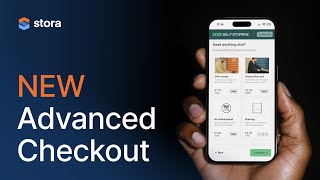
Stora's Advanced Checkout redesigns the booking flow for mobile, where two thirds of bookings happen. It breaks checkout into steps to capture leads earlier and upsell protection, insurance, and custom products like boxes or 24/7 access during the booking process.
Questions this video answers
70% of all bookings happen through the Stora platform.
Two thirds of bookings on the Stora platform occur on mobile devices.
A 30-day trial of Advanced Checkout is being offered to everyone who is not on a plan that includes it.
Advanced Checkout is not included on the basic/first plan but is available on the other two plans.
You can set a recommended protection (insurance) level at the unit-type level (smart defaults/minimums).
Chapters
70% of all bookings happen through the Stora platform, happen online. Any kind of upsell you can think of, you're now going to be able to offer that at the checkout when the customer is booking. Combination of padlocks, boxes and then recurring services like shelving24.7 access.
Hello and thanks for joining us. Today we're going to cover what is new in Stora. I'm joined by our head of product, David Hughes. David, welcome. What are we talking about today?
We're talking about our latest release which is advanced checkout and it's designed to get you more leads, increase your revenue and give your customers a better booking experience, especially on mobile.
Okay, so what was the reason for doing this? What have we kind of come from?
We were digging into the data as we do and turns out that 70% of all bookings happen through the store platform, happen on online. And then when you dig a little bit further into that, you see that actually two thirds of those happen on mobile devices equipped with that information. Plus, with our kind of regular mission of helping you build a better business, we were looking at ways that we could help increase your revenue. And we thought, well, helping people upsell at the checkout would be a really great addition to the platform. But then thinking about that 2/3 of bookings being on a mobile device, we thought it was time for a rethink of the checkout just from first principles. So yeah, so we designed the checkout experience from the ground up with a mobile first focus, helping you actually sell extra things at the checkout. Some more in there too, but yeah, that's more or less where it came from.
So what sort of things are we enabling to sell? Because like there's obviously you've got your storage, you've got your insurance, which we did before. So what, what, what, what if you're an operator? Like what, what are the, what are the things that you can add now that you couldn't do before?
The possibilities are actually kind of endless, which sounds a little bit easy, but we've created this concept of products in Stora, so custom products, you can create a product in the back office and offer that on the checkout and it can be whatever you want. So it could be a combination of one off items like boxes or padlocks, which we hear a lot of customers want to sell. Or it could even be recurring upsells, things like 24, 7 access, no notice period, unit by the door, any kind of upsell you can think of, you're now going to be able to offer that at the checkout when the customer is booking.
Excellent. Okay, so a combination of one off things like box and padlocks which lots of, lots of our operators do sell. But also then I suppose then yeah, the, the, the high margin upsells potentially about 24, 7 access, stuff like that as well. Okay.
Yeah, we spoke, we spoke to quite a few operators and you know, that's seemingly where the real opportunity is. These extra products and services that you can offer that are high margin don't cost you much and you can easily add. I'm a customer of self storage and I pay for 24 hour access because I need access after work and on the weekends. So I think it's time now operators can start looking at the other services that they offer around the regular storage and think about how they can unbundle that.
Cool. So can you show us that, can you show us how it works? Of course.
So yeah, I'll be looking at it here on desktop experience. But yeah, it's been redesigned from the ground up. You go through a regular store of booking and you choose your unit. And now what we do is we break the journey up into manageable, digestible steps. So step one, add your contact details. So we've actually added some more customization here so you can add and remove fields to make this journey a little more fun, frictionless. But I think the key idea here is that each step gives you an opportunity to explain what's happening. So why do you need my contact information? Well, it's actually because we can send you your move in details. And the good thing about advanced checkout is that when the customer submits these three fields and hits continue, that's when we actually capture the lead. Now. So we're capturing the lead earlier whereas before you had to fill in the entire form and then that's when we capture delete. So you're going to get more leads automatically when you turn on advanced checkout. After that we ask you what move in date you want to choose. So again here, because we have more real estate, right, we have more opportunity to explain what does move in day mean? Like from speaking to customers. A lot of people actually don't know how storage works. As we know they've never done it before or they've done it only a few times. So the idea here is that we can explain well what's going to happen in a move in day. So customer choose their move in day. And again we have more opportunities and more real estate to explain things like protection. Why do I need protection or insurance. And we've actually done some work and looked into the data of our insurance sales as well and we've created some smart defaults here, minimums and smart defaults. So you can now set a recommended protection level at the unit type level. So for example, if you want to sell higher levels of protection in larger units, you can do that and set that by default. So there's loads of opportunities for you to increase your revenue and capture more leads.
Very good. Okay. Yeah, so the, so it breaks it down. So see the contents. Insurance, the insurance, that's the third step. So what happens after that?
Then when you hit continue, this is where the upsells and the extras are. Right. So at this stage you can choose, you know, to feature as many products and upsells here as you want. So in this example here you'll see combination of padlocks, boxes and then recurring services like shelving 24. 7 access. Customer can decide, you know, whether they want these or not. So if I want to add some boxes, add two boxes and a padlock and you'll see the, you know that breakdown happen over on the right hand side. In the summary at this stage is when customer can decide whether they want these extra services or not. And then if they continue they can, you know, go to the payment, the payment screen and choose their payment method. It's a lot more clear what's happening.
Yeah, it is a lot. Even just the choosing of the payment method. I remember it was a drop down before.
Yep.
No, it's a nice kind of little box. You choose your. Choose the box.
Well that's it. It's more clear, it's more discoverable. Right. So like in the past a lot of these options were hidden in dropdowns and that was for a reason. It was because we didn't want to overwhelm because it was a single screen. Now we're taking the opportunity to break down these, you know, key features, these key ideas and you know, make it clear what's happening. So and we've more plans for this too. This isn't the end for advanced checkout. So this, you know, I would imagine over the next coming months this payment screen, we'll, we'll see some changes here too.
What about one of the things we've been talking about over the past few weeks has been a the unbundling of the seal Y and like you know, when we're on this page and you cannot out all the extras like padlocks, mag in box and 24. 7 access and no. Notice all these like, these are just ideas really, aren't they? One of the things that we've talked about is like the getting people to the point where they can in an industry like self storage where maybe a lot of customers, we know a lot of customers are booking it for the first time, don't understand it the same way you might understand a flight. It's important not to overwhelm with choice and too much confusion because you might be looking at this thing in 24, 7 access. Well, do I need that or not? Actually I need to think about it. And then next thing you know they just give up because there's too many choices. Where is that going to go with? Because we've talked about different ways of dealing with that.
Yeah. So like there's plenty of flexibility here already in the early days so you can decide how many, how many products you want to appear here. So you can hide things to reduce choice if you only want to, if you only want to upsell a few things. But I think there's another key idea here is to. You mentioned the flight analogy. Sometimes you are ready to book an extra bag or choose a seat but sometimes you're, you know, that happens later down the line. So it's not just about what you upsell and how, it's also the timing of that sale. So we have some ideas for how we can evolve that too. Maybe you're going to get an email a couple of days before move in day asking do you need 24 hour access? But the timing is critical, these things and it's something that we've thought about as part of this checkout as well.
Okay. So if you're a customer using store like what do you need to know.
About getting this turned on in your account today? You'll either see a way for you to just go and turn it on. You'll see a banner saying advanced checkout come switch it on. If you're on the right plan and if you're not, we're offering everyone a 30 day trial of advanced checkout so they can turn it on and start using it.
It's not on the basic, it's not on the sort of first plan, but it's on the other two plans. Most customers will have access to it. If you don't, you've got a free trial, give it a go.
And what you're going to want to do is you're going to want to go in and set up some products. Right. So we give you a bit of a hand with that. And I can show you how that works. If you log into the back office, everyone will see this. Doesn't matter what plan you're on, you can go to your, if you go to your site screen and here you'll see a new option for products and in there you'll be able to create a new product with the help of our image library. So, so if you want to sell boxes, padlocks, all the usual things, they'll be in there and we'll be able to help you with some of those assets. But yeah, you can go in, create some products and then you can decide if you want to feature them on the advanced checkout or not.
So if you want to use advanced checkout, you don't need to have products too. Like you can still move to it and get the benefit of the extra conversion.
Yeah, that's another important point actually. So every, you know, there's a lot of customization here. And if you don't want to sell products at the checkout and you want to leave that to an in person sale or when they, when they rock up on the day, or you don't.
Want to do it at all, or.
You don't want to do it at all, all you have to, you know, you just don't have to have products turned on. Or you could sell products in the back office, but not on the advanced checkout. You can just set them to hidden and they'll not display. So if you have no products set up to be visible, that step will just completely, you know, skip past.
Skip past. Yeah, so you can see that one of our demo pages actually, where it skips past it. So, so there's still a benefit. Even if you're not selling any of these products, there's still a benefit to increased conversion rates. Right. So even if you're not selling products, we would encourage people to turn this on and see the impact of it has. Because the whole goal of this is ultimately to increase the conversion rate from people from starting your booking flow to finishing it. And also if you're adding more products, increase your basket size too. So ultimately grow revenue.
Exactly. So yeah. And have a look. There's customization options and you can turn certain fields on and off now that you couldn't do before. So you, you're going to be able to reduce the number of asks from the customer as part of that checkout experience. So yeah, we've tried to add as much customization as it makes sense for now.
Well, thanks very much, David. That was very interesting. So if you're a customer of Stora, Go, turn it on, give it a go. See how you get on. If you're not a customer, store, move to Stora. Turn it on and give it a go. That's the key message. Yeah. And we're here to help you get your revenue up.
Yes, absolutely. Increase revenue, get more leads, increase revenue, get more leads. Better customer experience.
Yep. Brilliant. Thanks very much. Thanks. At Stora, our mission is to help our customers build the best self storage businesses. Self Storage Explained is here to try and bring you the best from inside and outside dentistry to help you grow your business. If you want to find out about more resources, go to Stora Co to sign up for a demo or find out more. Or you can go to Stora Co Academy for lots more resources including our financial model and other in depth guides to setting up and growing your business.
More from Gavin



Wie Space4You Einzüge von einer Stunde auf wenige Minuten verkürzt | Kundenbericht