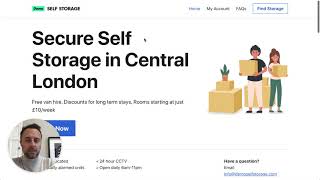
Gavin Shields, CEO of Stora, walks through setting up a self-storage business from scratch. The platform auto-builds a customer website, handles online bookings and payments via Stripe, tracks leads, sends automated emails, and integrates with smart locks for unit access.
Questions this video answers
April 28, 2021
Gavin Shields (CEO of Stora)
Demo Self Storage
Wandsworth
25 square foot up to 150 square foot
Chapters
Hi, my name is Gavin and I'm the CEO of Stora. If you're thinking of setting up a new self storage business and want to take a modern approach that involves having a website that takes online bookings and payments, automating all of the billing and invoicing and recurring payments in the background and making sure that your business and facility is run as efficiently as it possibly can be and store it as the product for for you. With Stora you can get your website set up in seconds. It takes online bookings and payments so your customers can get all that stuff done online themselves and automates loads of stuff in the background, including your payments, your billing and connecting with smart entry systems and loads more. I'm going to take you through a really short demo here of how it works, but please feel free to register for your own one on one demo at Stora Code. We'd be happy to talk you through it in more detail and answer some questions as we go. So let's look at what I've done just to get this demo set up. I set up a new business. It's called Demo Self Storage. It's got one site at Wandsworth, you can see here. I've included some information like a phone number and some other information for the particular site. At the site I've set up five different unit sizes, so 25 square foot up to 150 square foot. I've set some prices, I've even created some units and I've also set up some coupons that are applied whenever people book those units as well. This can all be edited by you in here really simply. You can change prices, change photos, turn on and off, discounts, all from here. You can even take it off the site so people can't book it if you've run out of that particular size. So I've done all these things, I've set up the site, I've set up some discounts here, I've set up insurance and pricing for insurance here and all that information then is collated together to create your website. So let me show you what that means. Here is the website that it built you by store. Now this is, you know, with five minutes of setup. So whenever you get using it, you can personalize this page in whatever way you want. You can add your logo, add colors, make it really personalized for your business and your brand. So you can change all of the images, all of the text and make this work exactly the way you want it to. But most importantly, this includes online bookings and Payments. So let me show you what the customer experience is like. They want to book a unit at your site. They click on book now they can see the address of the site and all the other bits of information. And then here are those five unit types that we've set up in this system in the background including all the prices. Let's say your customer wants to choose that unit. Let's go ahead and make that booking. They can see on the right hand side here all the details, the price and what they'll be charged. Lets put this customer's details. This person now lives in Northern Ireland. So this person's going to move in and it's going to have to pick a move in date. So they can, you can set all this information so you can restrict when they can book, whether they can move in on the same day or whether they have to book a week in advance. It's all set up by yourself. But let's just pick the 30th of April for this example and let's pick a contents level. I'm going to be storing some expensive records here. So let's pick £10,000 worth of insurance. So if we go down here we can see the details. You can see all of the information for this customer and they're going to click on to agree to your terms conditions and your insurance policy and they will confirm that booking now. So now they're taken off to the payment page. Before we do that you'll notice that in the system if we go to contacts. So this person hasn't yet paid. So we've created them in the system as a lead and they will stay there until they book. So if they don't go ahead and pay we will let you know. If there's a 10 minute delay we'll email you, tell you this person has chosen a room but hasn't yet paid. Here are their details. You can go into the system, see what the details are. If you want to ring them, call them, you can do that too. Let's go back. This customer really wants to book the payment. So they're going to book the units. They're going to put their payment details in. I've pressed enter so that's accepted that. So this person has now picked their unit and it's gone through. So it's confirmed. They'll get an email. They can then start the online check in process which is provided by Stora where we collect their id, check their ID and have them sign the contract. By the time they arrive on site. Everything's taken care of. You don't have to worry about any of that stuff or doing it in person whenever they arrive. So what's happened in the background? If we go here now, you can see in the upcoming subscriptions, you can see here is 50 who's waiting to move in. Moving in on the 30th of April. You can see if you click in here, we can see the details of that booking. You can make changes to it, you can change your dates, change the book units, cancel it, manage everything from here. And this customer now will automatically move in on that day. You can allocate the unit to them. Let's give this person a unit just for the sake of getting that done. And if we go back in here now, you can see this person is moving into unit number four. They will receive automatic emails from Stora to let them know. But all that moving details, if you're using a smart equity system, we communicate with it and take care of all that for you too. And all of the payments now are taken care of in the background. So really when you're setting up Stora, it's just a matter of connecting your account to Stripe takes a couple of minutes and all of your payments are just taken care of automatically through Stripe and by store. So you can start taking payments really within a matter of minutes of setting up your store account. So that's really kind of it. There's loads more I can show you. I mean there's lots of stuff in here where you can add in customer reviews, you can add your tracking ID from Google so you're able to see what's going on the site. You can manage your discounts, manage your insurance, optimize lots of stuff for your site. But that's probably for another video and another time before I finish really quick shout out to one of our latest products which is our brand marketplace. If you are looking to set up a new self storage business business, please check this out. We've got a bunch of brands here along with domain names with all of the artwork all in there, you can check it out for one fixed price, you get everything kind of done for you and you fully own the assets and the artwork. So check that out. Otherwise, thank you for watching. If you want to have a more in person demo, please book a demo on the site and we can go through this and answer questions and get into more detail of it. Otherwise, thank you very much for watching, for watching and hopefully speak soon. Thank you.