Stora Zapier Integration: Automate Self Storage Leads, SMS, Accounting & More
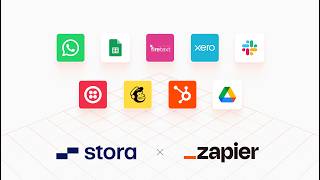
Stora's Head of Product David shows how the new Zapier integration lets self-storage operators automate lead capture, SMS follow-ups, accounting syncs, and more by connecting Stora to over 7,000 apps without coding. He walks through building a Zap live, from selecting a trigger to testing and publishing, and highlights pre-built templates and Copilot's natural-language builder.
Chapters
We're going to do this manually to begin with, but there's actually— they have a really cool Copilot feature that, you know, you can use natural language to create these things, which is actually really, really good. So that contact should have been created in my store, in my store account. And hopefully, all things being well, I go to the spreadsheet and there I am, David's 8 Beer Podcast. I'm going to get a text message hopefully here when a new lead comes in. I'm going to test that step. I should get a text. There we go. Text message says new lead came in, go close the deal. And there's the lead details.
Hi everyone. We are here today to talk about something that we're launching in Stora. I'm joined by our head of product, David. Hello. And so we'll be talking about our Zapier app that we're launching today. So David, you've sort of masterminded this project and I'm just curious, like, why did we do this?
Yeah, it's a good question. So just to zoom back from the Zapier piece specifically, like Automation is in the DNA of Stora. It's one of the main reasons that we started the company, why we built the product. Gavin Shields started a storage site that he wanted to have fully automated and unmanned. So automation's at the heart and the DNA of everything that we do. We believe you should be able to use the best tools available to you, not just in storage, but in all of tech. And that rolls onto something else that we've recently released, which is our public API. But we also know that not everybody has the ability or the resources to build stuff with APIs themselves. Not everyone has a team of developers on hand ready to make stuff. So for us, automation platforms like Zapier, there are others, are the bridge between our API and people getting value from it. So yeah, that's the main reason that we did this.
And so what is it about Zapier in particular that makes it the bridge? What does it enable for the average person who might not be technical?
Yeah. First of all, it's an automation platform, which is a fancy word for saying that you can use tools like Zapier to connect your Stora account and all the data in it to other tools out there. Zapier lets you connect to over 7,000 other apps. And so what does that mean? A good example of this would be a CRM type use case. So a lot of people use CRMs like Mailchimp and HubSpot and Pipedrive to run sales and marketing automations. So now using Zapier, you can connect Stora to tools like Mailchimp, tools like HubSpot and Pipedrive.
Yeah. So we get dozens of requests every day for features from various customers all around the world. And We would love to do everything and we will obviously keep adding more and more to the store platform, but we can't do everything and we wanted to make it possible, I suppose, as you say, to facilitate all our use cases and scenarios. So this is one way we think Zapier app will actually help people just to achieve today what they need. Is there anything in particular you can think of that this will help an operator do that they can't do today?
Yeah. So one of the things we get asked all the time is about Automating lead follow-up and sales process things like a lead comes in, you want to follow up automatically with, say, an SMS, or even now people are starting to experiment with Store API, with AI agents and things like that to help automate sales follow-up so that you never miss a sale, you never miss a lead. So anything like that when it comes to people coming into the pipeline and then automating them and putting them in an email sequence, Things like that are now very easy without needing a developer.
So that's, I suppose, part of it. What else could they do?
Oh, there's loads. This is the thing. It's up to your imagination, which is one of the hardest parts of this actually, is trying to distill it down into specific examples because everybody's stack is different.
Say I'm running my facility day to day. How could an API and a Zapier app facilitate an improvement to my processes today?
Let's go back to the original point around automation. So today, say somebody moves out of their unit, they leave. Usually there's a turnover process there. What happens today is a lot of our operators will go to Stora, somebody will deallocate the unit, they'll end the subscription, and then they'll create a task for someone to come along and clean and check the unit so that it's ready for the next person. At the minute, parts of that process are manual. But now using Zapier, you can automate that. So an example, so Zapier and other automation platforms like this are made up of what are called triggers and actions. So the trigger is the event that happens in Stora, and then the action is the thing that you can do off the back of it. And what's one of the coolest parts of, well, what I think we've done is this enables store-to-store automations as well as store-to-external-service automations. And I'll use that example. Unit gets deallocated, that's the trigger. And then the action off the back of that can be create a task and assign it to staff member. So now you can set those types of automations up, which you would have had to make manually. You can now automate those by just gluing an event and an action together in Stora. So it's not just about connecting services to Stora and external services.
Sounds really powerful. So how many different actions or triggers, or what are the examples of the things you could actually start from and then end with in Stora?
There's loads.
Give me your top 5.
So a contact being created in Stora, right? So that could be a lead coming in through Stora. And another one would be an invoice being paid. So when an invoice is paid, I can report on that or I could send a notification to Slack saying someone paid their bill. Another one would be someone started their subscription. That usually means that they've moved in.
So you could do after they moved in, send them a text message asking for a review or something like that.
Exactly. Or yeah, even after they moved out, it's another event. So when someone moves in, you could wait a day and then ask them for a Google review via SMS or email. And the way you would do that is the event would be Subscription started. Then you would wait one day and then you would use a service like Twilio or FireText or Textlocal. We've heard many people using different SMS services to send a text message to that customer asking them for a review.
So it sounds really powerful and I suppose with anything, sounds great in theory, but how easy is it really? And is there any way you could show an operator how to get started with this today?
Yes, I will show you. So first of all, you're going to need access to the Store API. Right, that's one thing to first point out. So if your account has access to the Store API, then you get access to our Zapier app. The other thing you're going to need is a Zapier account, right? So you're going to need to set up a Zapier account. You can get a free trial and play around with this stuff, but I'll show you how easy it is to set one of these things up just at a very basic level. So go into your Zapier account and you create a— what's called a Zap, right? So we go in here and, you know, there's we're going to do this manually to begin with, but there's actually— they have a really cool Copilot feature that, you know, you can use natural language to create these things, which is actually really, really good. But we'll go through the basics here so you can see. So there's a trigger here. So here what I got to do is I got to select the Store app. So you'll see Store app here, and when you go in here, you'll get a list of the trigger events, right? So when I choose a trigger you can scroll through all of these. There's, I think we've 38 triggers, right? So we've, it covers a significant amount of things in store. So let's just take the simplest thing, the start of the customer journey, which is the trigger will be contact created. So new contact. So triggers when a new contact is created and then you got to select your store account. So I connected this earlier. This is my example store account. In this case, you would just connect your own and authorize it. I'm going to hit Continue. I will hit Test Trigger, and that just makes sure that it's all hooked up right. And you'll see here Zapier actually pull in an example from your store account so you can see all the data you have access to. So there's their email, there's their marketing source, there's their phone number, everything you need when someone creates a contact. Yeah. So from here I hit Continue and What I'm going to do here is I'm going to take any new contacts that come in and I'm going to send it to a Google Sheet. Okay. So this is me connecting Stora and Google, my Google Spreadsheet. So I'm going to hit Google Spreadsheet and I'll create a new sheet here and I'll call it New Stora Contacts. Go in here, give it some headers, and when I go and select Google Sheet. So I'm going to— what I want to happen here is when a new contact gets created in Stora, create a row in the Google Sheet. So this is a very basic example, but it's kind of a good, good level setter.
So a contact gets created in Stora when somebody fills in a form on your Stora storefront.
Yes.
Yeah.
So I connect my Google account. I've connected this earlier. I picked the spreadsheet, right? So here you'll see my spreadsheet here, New Store Contact. And you pick which worksheet in the spreadsheet. And then all you have to do here is, it's super simple, you just map the fields. So I created 3 headings and I mapped those fields to the data that's coming in to store. So customer name, there you go. I just type in name and there it is, full name. And it gives you a little example as well, shows you there's the name, email. So this is just about mapping those fields. And again, I'm doing this manually just to show the fundamentals, but you could do this through the Copilot chat and it would pretty much take care of this for you for the most part.
Yeah. So if you knew upfront that you wanted to do that and you knew the names of the fields, it would probably work out and do it all for you really. Yep.
So I have mapped those fields, tested it. What's cool about the testing is it lets you do it with test data and see if it's working, if the plumbing is all working before you really publish it. But I know this is going to work, so I'm going to hit Publish and then I'm going to show it working. So I'm publishing my Zap. I probably should have given it a name, but—
It's okay, it's a demo. Live demos are never perfect.
Yeah, yeah. So now I'm going to go to my Stora website. And again, this is an imaginary situation, but here I am in Stora. I'm going to sign out. A customer comes to your website and they fill in a form. Let's just say they ask for a quote. I'm going to ask for a quote on this 25 square unit and it's going to David Zapier Podcast. That's my name. And my email is davidzapierpodcast@stora.co. And I'm going to put that in. And my mobile number is not this because you'll all text me. And I Okay, so that contact should have been created in my store, in my store account. And hopefully, all things being well, I go to the spreadsheet.
Moment of truth.
And there I am, David's Zapier Podcast. And you'll see the test data in there from testing earlier as well. But there I am, David's Zapier Podcast. So a very simple example. But the cool thing about this is, you know, how fast that was. This happens in real time. And once you've set up that Zapier, Zap that runs forever until you pause it or change it.
So every contact created in the storefront now from that account will appear in that spreadsheet. And that's just like one step. So it's important to say that there could be multiple steps. You could keep going. You could add a next step to say, send me an SMS so I know about this new lead. Let's do that. That I might want to do it or do it if you want.
Yeah. Okay. So I'm going to edit this up. All right. I'm going to edit this up. So I hit edit. I'm going to add a step. And so if you have a Zapier account, Zapier actually does SMS as well. I'm not saying it's the best SMS solution for following up with leads, but if this is just texting yourself, yeah, right. So you said text me to tell me to follow up with the lead because you're not going to get a notification on your Google spreadsheet, on your Google Sheets. So that's a good call. So, okay, so I added a third step. To this app. So step 1, new contact. Step 2, create a spreadsheet row. Step 3, send me a text. So let's, um, so let's— the action here is send SMS, and then I hit continue, and then I can format the message. So, um, so the phone number will be a random phone number from Zapier in this scenario, but the message can be, please, new lead, exciting. Go close the deal. And then what you can do here is add the customer details. So I can say customer name so I know who I'm speaking to. So name, list it out, phone number and email address. Because if they don't answer their phone, maybe I want to email them or something. So I'm going to get a text message hopefully here when a new lead comes in. I'm going to test that step and I should get a text, hopefully. There we go. Text message says new lead came in, go close the deal. And there's the lead details.
No, it's great. So it's like really anybody could use Zapier, but maybe not everybody wants to do this as well. So is there anything we're doing to help and make it even easier to go above and beyond just telling people there's a tool you can go use?
Yes. So a few things. So the first thing we're doing is we are publishing or we have published a bunch of templates. So these are things you can just lift and adapt to your own accounts. So you basically one-click get you started and it pre-populates all these.
These are Zapier templates.
These are Zapier templates.
What's an example of a template that we're publishing?
I can actually just show you them. But yeah, an example is, one example would be when a new contact comes in, add that contact to Mailchimp tagged as a store lead. So that's someone who's coming in as a Storefront lead. And then from there you can place them into a Mailchimp sequence to send them a bunch of emails. So we have an app page, landing page. We have a landing page on the Zapier Marketplace. And up there you'll see a bunch of these templates. So we've a library of templates that are growing, but There's plenty of examples here to get you started. So one example would be when a new store, a Storefront lead comes in, we'll add that to Mailchimp as a tagged lead. And you can do things off the back of that. But there's loads in here. There's everything from HubSpot integrations to Slack notifications when somebody pays their invoice. Feel free to browse these. So that's the first thing we're doing to help you get started with this. So these are templates that you can just lift and adapt. The other thing we're doing is that we've published a directory of trusted partners. So people that you can work with, external parties who can help set up custom Zaps for you. So you'll be able to see that on our website.
Great. That sounds perfect. So what would you recommend then, I suppose, as a next step for somebody who's never done this before? Would you say just go sign up for a Zapier account and try it out and just connect your tools and just play around with it? Or would you do something completely different?
I would— the first thing I would do is I would take one of our templates. So I would sign up for a Zapier trial or account. Then I would take some of our templates, whatever ones suit you in terms of your stack. And then I would probably start playing with the Copilot, which natural language UI that you can just say, I want to create a Zap that— sorry, I want to create an automation that connects Stora to my Xero and sends paid invoices to my Xero account. This will take care of that for you. That'd be one of the next things I would do. I'd check out our docs. We've got some guides up there. So I would go check out our docs and if you have any questions, get in touch.
Great. Well, thank you very much, David. This has been interesting and we're very excited at Stora to see how people use this new tool we're providing. And it's the first version of it, so there's still a lot more to come from both our API and the Zapier integration. We will add more triggers, more actions over time as we continue to develop the product.
Yep, absolutely. And of course, feedback always, you know, will always be at the heart of what we do. So yeah.
Great. All right. Well, thank you very much, David.
No worries.
More from Gavin




Wie Space4You Einzüge von einer Stunde auf wenige Minuten verkürzt | Kundenbericht