2015 02 10 08 59 eConnect Training
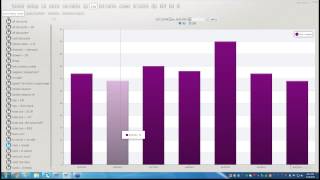
Craig Frizzell and Paul Bitters walk through 10 point-of-sale queries that catch suspicious activity: no sales, voids, cancels, comps, and checks left open over an hour. Paul adds advanced searches for void-plus-no-sale patterns, negative transactions, and discounts under $1.08 to find small-amount manipulations.
Chapters
I'm not sure if anybody heard me the first time. I think I had my mic turned off, but. Good morning, everybody. I just wanted to say hello, and we'll do this poll question until about 9:03. Here with me is Paul, and we'll be going over our top 10 queries. We'll give another minute here. Can everybody hear me okay?
All right, everybody, how you doing today? Hopefully so good it looks like we got about 34 people with us today. All right, so again, my name is Craig Frizzell. I'm one of the senior investigators here, and I'm going to go over my top five queries, and I'll let Paul do his top five, giving us a total of 10.
Now, just to give you a little heads or insight there, not all these queries will work at every location, but keep in mind that some of the queries may be turned off or only done by management. But this is what we kind of used because of the numerous locations that we review each week. Now, the first thing you want to do is when you're running these queries is think about how would you get money out of the register and into your pockets or hands? You know, think of, like, three different ways that you can think of to steal, and then use that to start your investigations once you're done with those three.
Give me one second.
Up top, to your right.
The broadcast is now starting. All attendees are in listen only mode.
Okay.
Good morning, everybody. I'm going to restart this whole thing because apparently I didn't have a button, of course. All right, so my name is Craig Frizzell here with Paul, and we are going to be going over our top 10 queries. I'll do my five, and then Paul will do his five.
What we do here is when we run these queries, we're looking at a multitude of locations that we review each week. So taking the fact that some of these queries may not work at your location because they either might be turned off or only done by management.
But the thing is, when you first start looking for something, you want to think of at least three ways of how you could steal. How would you do it in order to get the money out of the register and into your pocket, or to hook up your friends, family members, whatever. Once you've done that, then you want to follow up with some of the presets that we've made for your location.
So starting with number one, this is what I've got is no sales. This is a simple, simple way just to open up the Register and either take money out or just open the register, period.
Let me show you here what we have it on the summary view you see down here, you're going to see. Let me bring it down here. You got no sale right here. We can look at either yesterday's data or the whole week's worth of data. So while this is loading up, like I said, a normal check will look like. For example, if somebody wanted to conduct a no sale for legitimate reasons, they would probably do it at the beginning, at the end of their break, before breaks, lunches, starting of their shift, ending of their shift. And this is a good way and one of the many ways that they would do is to put their register drawer in or take it out for the end of the shift. Like I was telling you. We also see this when customers needs change. There's a lot of revenue centers out there that specifically what they do is give change to the customers. Like something that's near like a game room or something like that. Now a typical check that would have a no sale on it with a credit card would be if your register doesn't have that little, that hole in the drawer that you can slip the credit card slip into, then they'll do a no sell after a credit card transaction in order to put that credit card slip into. So those are examples of normal checks. Let's see if we can find a normal check here, give you an idea. So once this is loading up, here we go.
So these are the multitude of no sales that you have and that's how it's going to come across. Looking at the check summary.
Go down here to the bottom. There's a credit card transaction paid with a visa 659, 710. You got a cash drawer open, no sale because the time is so far for you. It could be something like cash, like maybe change or something like that. But this is one of the things that we look at is when you have multiple no sales, they're not back to back, but they're multiple no sales. So this looks like maybe a location that gives out change to a customer.
Out of here.
Something that's not normal. Like I was just showing you multiple no sales after a check, a no sale done or right after a cash transaction, a void tender followed by no sale. Void tender is basically saying that we're going to go ahead and cancel how they're paying for it, either credit or cash or avoid, followed by a no sale which my partner will talk about.
What I'm going to do now I'm Going to go ahead and show you.
A case that I made based on no sales alone. So bear with me while I get this information set up here.
And right now I'm in the query builder. As you can see that just setting up my time parameter. I'm going to go look down here for event type identifier. Under no sale.
Hit query. If I'm going too fast, just go ahead and please raise your hand, let us know.
Get that fixed right away. I can just slow down. It's real simple. Move this down here.
Now I know who I'm looking for. But you guys remember probably this from previous trainings. This is our grid page. I'm going to go ahead and aggregate it.
And I'm going to go by Revenue center.
And I'm looking for specifically log ride treats.
And because we have all these people.
Aggregate it one more time for employee.
Now I've already gone through Justina's transactions, but the person that I showed up with, this gentleman right here.
And you see we have 139 records or five pages worth of no sales. Now this was done within a time frame of, you know, a month almost, which was ridiculous. When I first saw him I was like, alright, why is this guy doing a bunch of no sale at log ride treats? Which we found out was like a little kiosk type thing. Once the report was written, came back saying that it was. They set it up a little bit differently where there's two registers now and the person on the second register was going to be giving more change to the customer. But this is something that we would look for.
Give you an example here. Cash transaction right after that cancer. I mean look, 30 seconds after you got a no sale right away, two minutes later you got another no sale.
A minute later another no sale. There's a pickup loan which also opens up the drawer.
So this gentleman had enough of these transactions that it warranted a report written.
Let me get out of that. Does anybody have any questions about no sales or even how to look them up?
And just to let you know, they are also located on the summary page as well as the query builder under event type.
So my no questions.
So my second query that I use is the void or menu item void or void line item however you want to get to it. Let me show you the different options that you got.
On the summary page. You are going to have.
Void line item.
Query builder. Under event type identifier.
You will have menu item voided or what you can do.
Basic data.
And type in the word void.
Well show you it's going to bring up the same results at each location. While that one's loading up, let's go back and get this other one.
Last 7 days query.
Get this one going.
And we'll just do yesterday's data for void line item. Okay, so this is void, line item. This is menu item void, I believe. Yep, menu item void. And this one is going to be void.
The main difference is really how it's over here, how it shows up.
Custom query. You still have menu item void, void, void. Lightem is going to be the exact same as the the second one which was the menu item void.
So now let me show you a case.
That we found based on voids.
Let me tell. Let's see a normal check you've got. Customer didn't want the item anymore, so a void would show up. It's basically a way to take off the last item. Sometimes price checks are done this way, in which the item would be rung up followed by multiple voids and then ended with a transaction cancel. Another option is when you'll see a normal check with the supervisor comes around and conducts voids. So during a certain period of the day you'll see a bunch of voids being taken care of. And that's usually because the employee didn't have the option to conduct a transaction. Cancel or void out the items and then the supervisor will come back around and go ahead and take care of that.
Something that's not normal is going to be a way to manipulate this is by taking care of family members, friends, just plain cashing out the check and taking money. Similar items being voided off or the same item being voided off. And what you'd be looking for is something that's just literally back to back. Or maybe when the supervisor is not around, all of a sudden there's a bunch of voids.
So let's go show you another case.
Back to.
We add some music playing.
Okay, so there's that. And we're going to use the menu item void.
We've got our date set up, our item that we're going to be looking for. So while this is loading up, it's pulling all the data from that specific time range. Now I could go ahead and do the aggregate, but I want to show you a different way. I know the person that I'm looking for. If you did know the person that you're looking for, you could simply type it right above the employee name.
And they'll get rid of everyone else and pull up that specific person you can see this person has 99 records. Within.
Five days they did a lot of voids.
So let's look at a couple of his.
And the black flag if you remember before is just showing that somebody reviewed that.
So we have a begin check, souvenir refill, risk refill. And this is, I'm not sure if you guys have this at your location, but it's basically they come in every, I think it's every hour or every other hour, something like that. They're able to get a free drink. But what happens is they menu item void and transaction cancel. What we determined was this was a simple way of them not doing the proper procedure. The way it should come out is souvenir refill, cash tender of zero and that would be it. End of close of transaction. This is a basically a lazy way of doing this. But what it comes down to is just not following proper procedure. And because it menu item voids and then transaction cancel, this actually affects inventory. So this is just the system can be used for policy procedures, training issues or finding staff in general. In this case it was a policy procedure issue.
Any questions on the voids at all?
Awesome. Number three is transaction cancel. I kind of briefly talked about that with the voids. But a transaction cancel is just that it cancels the transaction. A normal check would be when a customer changes their mind completely, decides to leave or go elsewhere. And then you see a transaction cancel happen. We've seen this a couple times where you know, you walk up to a restaurant and you're like, aha, you know what? Yeah, I want to start this, I want to get this. And then the kids say, I don't want hot dogs, I want pizza. Okay, well they don't sell pizza. So you're like, you know what, cancel that, we'll go somewhere else. So that's your typical one.
See also for price checks, you'll see a bunch of items rung up and they're usually different items followed by a void and then a transaction cancel.
After that a sit down restaurant.
You'll see this a lot when the server is going back to either add an item to your check and they have multiple checks on that same register. So they're pulling up a check and they're like, oh, that's not it, let's go ahead and cancel that out. And that will show as a pickup check followed by a transaction cancel. But with transaction cancel time is always a factor.
So what we're going to do now is see what you want to look for on not normal. I guess Transaction cancels. There's something like the transaction cancelled followed by a no sale, unassigned drawer, a pickup loan, or any way that your location specific, they can open up that register. Sometimes signing out, signing in will also open it up. And then you want to look at also completely different items on the next check, like seconds after the transaction was done. So if they rung up maybe, I don't know, a ball, another toy or something, all of a sudden the transaction cancel it. And you got completely different items right after that.
It's not saying that they're stealing it.
But it is suspicious. And if you have enough of those, go for it, look into more.
And then also with transaction cancels, you want to look at the time like I was saying, but like minutes later, all of a sudden the transaction cancels. So you're looking at something where a transaction is wide open and it's left open for 2, 3 minutes and all of a sudden you know, now you have a transaction canceled. That's something to look at.
All right, so let's look up, show you different ways we can look at this. You see this Transaction cancel, no sale, unassigned drawer, or just plain transaction cancel. Let's look for yesterday's data.
And the various ways you can look this up is either by the summary view or the query builder. And I'll show you how you can do the query build as well. And this is how it's going to come across. Pull one that actually has a check associated to it. Chocolate chip heart, menu item void. Chocolate chip heart menu item void. Transaction cancel, Sign out, sign in. Now remember, if it was a price check, it would be completely different items. In this case, same item seconds later, but then literally seconds later, it's transaction cancel. What I was talking about before, see what the next items are. Now you got slice of pie, strawberry fruit, chocolate chip, butter. I mean these are completely different items. But also look at the time between the last transaction, 1944, it's right here. And the new transaction is 1959. This could be something where if it's legitimate, it could be like they just changed their mind. If it's suspicious, you'd want to look at how many checks that this person had this sheril and then just go off of that. Let me show you the other way to look up transaction cancel by using the query builder.
Go down to first of all, you know you want to get your date. Always set your date event. Type identifier.
Down to transaction cancel and hit query.
With that. Does we have any questions at all? For transaction cancel.
Okay, let's pull up a.
Case of mine.
Seven. Let's see 23.
We got our time frame. Now we need to just set what we're looking for, which is transaction cancel.
Hit query.
Once this information pulls up. Now in this case last time we did, we searched for the person search by the revenue center. If we know what revenue center we're looking for.
We can just type it in or part of it.
Oh, there we go. And we still have all these people, so at that point we can aggregate it, look for employee.
And we are looking for the most. Let's see right here. Martin.
Click on them.
And everything that was flagged is going to tell you we looked at it for how long.
Now as well as we can also see what happened here.
So once it pulls up the data, there you go. I got a foot long hot dog. Almost a minute later, transaction cancel. I mean if they have to wait a minute before they change their mind, it could be possible. You never know. You got multiple kids running around, you got three regular sodas here. Only a few seconds later, transaction cancel. That looks a little bit more legit. Show you one more pepperoni pizza. Seconds later the transaction canceled. Maybe they got a calzone or something. Okay, so that's how you would look for a transaction cancel, various forms of it.
The fourth one I've got is not going to be necessarily on your summary view unless you build it, but it'll mostly be in the query builder. What you would look for is basic data and this is going to be manager, comp, slot comp, pit comps, coupons, anything that's going to come across as some kind of a freebie. What I've seen in the past is for one, you have to make sure it's spelled exactly like it shows up on the receipt. You might have to spell out manager. You might have to spell out, you know, maybe put an S on the end of comps, something like that. But see which works for your location. Make sure you have your date set up, hit query.
And then with the information that's going to pull up, it's going to give you the last seven days that any kind of manager comp. And see how also it's got this percentage sign. You might have to put in a percentage sign or you might not to, or you might have to put a one. Let's go back 14 days.
So what I'm looking for now is even though the last seven days it's only pulled up one. Okay, here we go. 14 days gives us a little bit more, go back 30.
So this is another way you can search for information. You've got your basic data that you typed in and then just click. Once you get your information just click and go back further and further and further. See if there's any kind of pattern. And for right now I got the same person doing four transactions opposed to the other ones. Someone's only got two. But this is the various forms that comes across comp money. So this is a strict dollar amount, this is a percentage amount, example of that.
So you got your manager comp at dollars. Manager comp percentage. So something like this we would be interested in the fact that they've got three discounts on this one check even though they avoided one of them out this percent or this dollar sign. You've got manager count percentage and then this was voided out. But then you got a VIP discount. So how many more discounts are they going to get? So that's something we want to look into.
Okay, anybody have any questions about manager comps, coupons.
What is it? Pit comps, slot comps, anything like that?
Okay, but make sure that no matter how you put it in here, it's got to be exactly how it shows up on the receipt. I mean it might literally even show up like that for coupon.
Okay, my last one is going to be checks open over an hour. This one you'll mainly see on the summary view.
See where you go. There we go, checks open over one hour. I'm going to go ahead and use yesterday's data.
A normal check. You see this in a like a sit down type of restaurant.
Anything that's not normal you're going to find this where you're going to find some of these checks that have never closed out. That's why they show up on the checks open over one hour. So you'll have a begin check but when you look at the check summary there'll be no.
Those are very interesting because you're like finding out what's going on with that check. Some of the times that will happen is where they'll actually pick up the check later on that night and start voiding off items that were on that check.
Some of the places you should not see checks open over one hour are like Cinnabon, Starbucks, Dippin Dots kiosk or any type of fast food location.
Alright, so we got these open, let's see, just kind of open some of these up and see what we got here.
Okay, this is going to be at Amberways. This is a sit down restaurant.
So it started at 7:57pm.
Goes down to 9:33. Paid visa charge tip. Everything looks pretty normal. Let's find out maybe a location that shouldn't have.
Let me move this out of the way so everybody can see this. Okay. Log ride. Mix it up. That doesn't sound like a sit down restaurant. So let's see who's going on that.
Okay. Jamie Johnson. He's got two of these things. Let's look at these checks. All right. Starts at 12:04 and ends at 619. Okay. That's just weird in its first place. For one they're just getting a half yard refill. So it's probably one of those flushy drinks. Signs in. Picks up. Check. Authorized keyboard. An authorized change keyboard is when a supervisor comes by and basically logs in with their assistant or their swipe card and they do something and all it says is it's authorized that that person can now use the keyboard. The fact that there's a zero dollar amount. This is something that we'd want to look into. And that's why actually I'm going to put this aside and watch it. Let's look at this other transaction that happened Prior to the 65.
Get out of there. Same item pickup. Check again. Authorized keyboard chain.000.
Putting these side to side.
You see.
And also you can find out kind of what happened prior.
Let me answer that question here in a second. I just wanted to give you an idea of what this looked like on the receipt.
Okay. So the question comes across as.
Is there a way to identify how long a cash drawer has been open? Are you talking about like a specific time frame? Like 30 seconds? 40 seconds, 40 minutes? Anything like that? If that's the case. Probably want to get with us that we probably set something up for a specific time frame like we did. We were able to build a query that said checks open between two hours and less than. Or I'm sorry after two hours and before five hours. But you're looking for the cash drawer itself. We also have. Where is that? Here.
We go. Drawer open over 30 seconds. 60 seconds. 2 minutes. 3 minutes. And these are specific queries that we can build for you if you need that. So if that's something you're looking for you can just email us right after this. My email is Craig Frizzell and F R I Z Z E L L AT E Connect TV and we can get that set up for you. Did that answer your question?
Awesome.
Other than that I'm going to go ahead and pass this over to Paul Before I do, if there's anything that you missed on today's webinar or if you want to look at some more training, if you go to econnectglobal.com under knowledge and click on Training center, the password is lowercase training. And that will pull up any kind of future webinars as well as any of the old webinars. And today's webinar should be posted, I'd say the latest by tomorrow. All right, so here's Paul. Thank you very much.
Good morning. My name is Paul Bitters. I'm one of the senior investigators here at econnect.
Craig has went over five of some of the really good queries that we go through on a daily basis here. I'd like to add to what he said today. The first one I'd like to talk about is Void and no Cell. It's an advanced query designed to recognize checks that both have a void and a no cell on the same check. Now, we've already discussed from Craig how voids are suspicious activity and how no cells are suspicious activity. Now, obviously, if we can get both of these on the same check, it increases the chance that this check might be something to be concerned about or something to be worried about. That being said, there are times when you would see a void and a no sale on the same check and it not be a problem. For example, if someone rings up an item and they pay for it with a credit card, there are times in some people's locations or revenue centers where they're going to go ahead and let the cashier, I use a nosail to pop the drawer in order to put a credit card receipt into the drawer. If that happens.
Then it's not quite as suspicious. But everyone knows their revenue centers just a little bit more than we do looking at it from outside looking in.
But if we are going to look for voids and no cells.
If you don't have void plus no cell on your summary view, that's another one. Like I said, it's an advanced query. So if it's something that you'd like, please let us know and we can set that up for you. But if we click on the void no cell.
And we can already see on this day there's a ton of them.
And then we have a ton of records here. So we're going to go ahead and aggregate it down and pick employee.
On this one, this David Rodriguez pops out immediately. If we're looking at an entire, in this case, amusement park and this guy's got the most for this day at this park by a huge margin.
We're going to go ahead and take a look at a guy like that.
If we click on a check summary, we can see.
In his case we have everything on the check getting voided followed by an O sale.
And that looks strange to us. So if we look to another one and we see a similar pattern, you got the pepperoni pizza discount, Avoid the discount. Avoid the pepperoni pizza. Cash with receipt is zero and a no sale. When we see things like this, we have to start questioning whether or not this employee.
Is taking advantage of a system or maybe he's taking advantage of cash paying customers.
Do we have any other questions about voids and no cells?
The next query I'd like to talk about is negative transactions.
We all know that negative transactions are a normal part of the point of sale process, especially when we're talking about merchandise revenue centers. However, anytime a transaction goes into the negative, it's worth examination.
This query can bring to light those employees who are abusing the functions that are built into our day to day operations.
Now, there's an obvious correlation between void and negative transactions. One of the ways that we can.
Separate the two is by looking for maybe a negative transaction that is higher than your normal void amount or your normal average transaction. So if at your revenue center your average Transaction is about $10, if we look for negative transactions that are higher.
Than that.
We'Ll kind of be able to zero in on something that might be a little bit more.
Suspicious.
So here we're looking at negative transactions for the past seven days.
We can go ahead and aggregate that to see.
Whether or not there's something. In this case I'm going to go for. This is an amusement park, so your average transaction is around $10.
I'm going to go to negative $15.
And try to see if we get some numbers that are a little bit more.
Suspicious to look at or have a greater impact right away. We can see a $257 one here if we click on that check summary.
This was a void of bulk candy for $238. That's a lot of bulk candy. So.
We can kind of look at that and probably assume that someone did a form of fat finger and that maybe a supervisor was called in to authorize a transaction void to fix it.
If we move on, we can see. This was one I looked at this morning when I was reviewing and I came across this employee.
At the stroller shop and we noticed the stroller shop is in this Location is a place where they rent out strollers for a $5 deposit.
I came across this employee who has $55 in basically refunds so that when they bring the stroller back, they can get $5 back. This is telling me, this could be telling me that this employee is getting 11 strollers back at once.
So to me, that's something that we can like. I always like to say.
Ask the question, you know, is $55 a normal thing that happens at a stroller shop? And then we look to see if there's more patterns. Does it happen more than once? So here at 5:21pm And 5:42pm it happened back to back. So that's 22 strollers in a 20 minute period by two people.
Definitely something that we can ask the question and go look into a little bit further.
Do we have any other questions about negative transactions?
All right, moving on. We're going to go ahead and look at our next one, which is discounts.
Discounts are another function that is used to bring guests and customers to our revenue center.
It can also be used to help resolve a customer complaint. Discounts can also be abused by employees for profit and to increase tips. We've all had seen employees who in a way of their customer service might give a discount on a drink or remind a customer of a special promo that's not available.
And then that customer will give them an increased tip based on the extra service that they were provided.
Sometimes depending on your revenue center, that's okay, and other times it would be something that you want to know about that you want to look into. So if we click on discounts.
We.
Can aggregate the discount.
By the discounts themselves. So now we're looking at it and we can see.
That there are.
Many.
Discounts that we can have at any given place. Now this is an amusement park, so we have season passes, we have the risk refills that Craig was mentioning. We have AAA discounts, employee discounts.
And so on. So depending on which one means a little bit more to your individual revenue center, it can be something to look at. One I like to look at is employee discount.
Now, obviously, if you're allowed to have employee discounts, you could have a ton of them. But if we can aggregate to see who's doing the most.
We can get an idea of if someone might be abusing it.
If we look at this employee, Amber Wave is a.
Restaurant in a hotel. We click on the check.
See if there's anything suspicious going on.
It looks like a regular stuff, ordering steaks and.
That'S all fairly normal.
Charge tip. That's normal.
Employee discount. Well, here's already. It's not the discount, but I see I got one charge tip and then I got another charge tip. And what's interesting about that is the two charge tips, about $15 worth, is fairly close to what the employee discount was of $14.
Now, that's not necessarily weird. There are times when you can get an employee discount and then maybe you're going to tip it back to the waitress because it didn't, you know, it didn't affect you all that much. But I thought that was interesting in this case because you could also have a cashier who is applying an employee discount in order to make a tip.
And then that makes this check all the more curious because now we have a room charge. So now we have an employee staying at the hotel, allegedly and getting a discount and then charging it to the room. So this check just looks suspicious to me because the charge tip and the discount rate are similar. And then it's being charged to a room for an employee.
Any questions about discounts?
All right, the next one we're going to look at is.
Reopen and picking up checks.
The pickup check is a very common in the food and beverage revenue centers. Bartenders and waitresses often pick up checks to add to a running or live check. Supervisors also use this function to edit checks or add discounts. But in our experience, we find that the ability to reopen a check is not limited to restaurants or just supervisors. A lot of the past cases that we've talked about, Craig and I today, have involved the ability to reopen a check and make alterations so that cash becomes available to steal.
This is a good query where we can get to the heart of the issue and examine who may be abusing the ability to pick up a check.
If we go to our summary view.
And we click on pickup check, clear some of this other way and we can look at our past seven days.
Now we're going to have a ton of pickup checks because every location is going to have, every restaurant is going to have a pickup check. So we're going to go ahead and aggregate and we're going to do it by revenue center. And the reason I'm going to do this is I can pass up.
The revenue centers that are definite restaurants that I know. In this case, they're going to have a ton of them.
And then I can try to find a revenue center that.
Is not normal for a pickup check. For example, if we have a fast food restaurant you might order at a drive through window. They may pick up the check when you pay. But if they pick up the check any more than that one time, then that's a suspicious transaction because there's no real reason for a fast food restaurant to pick up a check four times or an hour later. But we're going to go ahead and pick on this candy store and basically because I would assume you're going to walk up to the counter, you're going to buy a piece of candy or some bulk candy, you're going to pay for it, then you're going to walk away. So I don't see a reason to pick up a check more than once.
We click on this check summary, we can see that this one is interesting because the check was picked up or split off of another check. It was cash tender to zero and that's the whole encompass of the check.
If we click on another check summary, we can see we have a similar transaction.
In this case, it could be a supervisor who is it's their responsibility or an auditor whose responsibility to go through and close checks that are open. This could be the case, but it is like I said before, one of those where it's enough to ask the question, why do we have an open check that has zero due and no transactions to it? You know, this could be an opening for someone to pretend like they're ringing up a transaction and keeping the cash.
Do we have any questions on pickup check?
All right, the last one I wanted to look at today is one that we use quite a bit here at Econnect. It's total due that's less than $1.08.
And the purpose of this query.
Is.
It'S designed to identify employees who are using their knowledge of revenue centers in order to steal from the company. For example, we've had many cases where customers can order an item like a hamburger and begins to produce cash to pay for that item. The cashier then voids out the hamburger and rings up an inexpensive item on the menu like a side of cheese.
By ringing up a side of cheese, the drawer will open and then the cashier can make up the difference doing change accurately to the guest. Actually even give the guest the hamburger and then keep the difference between what was the side of cheese cost and the hamburger cost for themselves. This cost inventory for the revenue center and profit because the cashier gets to go away with money.
So the easiest way to look at this is we're going to go to total due minus $1.08 for the past seven days.
We can aggregate that.
We can go. I like to do it by amount.
For example, at the amusement park, this amount, the biggest amount here is 96 cents. 96 cents here is a soda that's been discounted with a season pass. So that one is not too bad because we know that a season pass is going to have to be there in order for them to apply that discount. But we can look at other amounts. A good amount I like to look at, for example, would be 32 cents. 32 cents is kind of an odd number.
So we can look, we can see that several revenue centers are doing it.
We can then go ahead and do employee.
We can see this guy has the most. So we can click on him and we can see if this 32 cents is something relevant.
And this one looks to be okay. There is a pickup loan right after, but that's 30 minutes later, so not too bad. One of the important things to keep in mind is usually if we do an associated check if.
The previous items that were rung up or maybe one item or a like item. For example, if at your revenue center you only sell a couple things. At the amusement parks, we have places that only sell churros. Well, if your churro is always the same price and maybe you can get extra cinnamon or you can get a filled churro or something like that where your cashier gets to know the amounts, they know how much the item costs, they know how much it is with tax, they even know how much, you know, if a family of four walks up, they could probably quote you the price. When an employee gets to know their prices like that, they have the ability to do a transaction, cancel, pop the drawer open with a no sale or with a side of cheese, and then they can make up the cash difference because they're used to doing the math.
Do we have any Questions about a $8 query?
And I will also leave it open if we want to ask any questions about the 10 queries that we've done so far today or if there's a query that we have that you're interested, that you have seen on other webinars that you might not quite understand how it works or how to go about taking advantage of it. You can always let me know or email Craig or I or econnect in general and we can either explain it to you or we can help you work through it.
If there is no questions, that's going to conclude our webinar for today. We are going to put up a poll question. We'd appreciate that if you take a minute before you exit the webinar and.
Answer it for us.
Again, thank you very much for participating today. It.
Sa.
More from Henry

Skip the line, not the security: Facial Recognition for Guest Experience & Safety



eConnect’s Red Light Green Light – The Most Advanced Facial Recognition Tool for Casino Entry


Skip the line, not the security: Facial Recognition for Guest Experience & Safety