POS Connect links transaction data with surveillance video to catch employee theft. The demo shows how to search transactions, spot suspicious patterns like excessive discounts, and export evidence. Undetected theft costs businesses an average of $187,000.
Questions this video answers
2–3 month ROI (typical)
Never more than a 6 month ROI
$187,000
Chapters
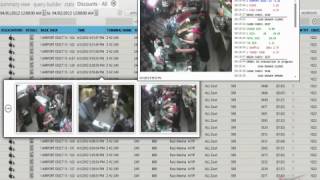
Welcome to the POS Connect demo. Today we're going to show you the POS Connect product that is our loss prevention suite which integrates to most major point of sale systems and surveillance systems. We have the dashboard here to start with that shows you trends that are happening live in your system and or historical with drill down capabilities that take you into the data showing you not only the video that transpired during that particular report, but also the data that came out of the point of sale system during that instance. So you can quickly identify an abnormality in a trend. You can drill into the actual virtual ticket that you see there and rewind video, go back in time, forward video, go back to a specific date. You can scroll down live to see maybe a transaction that looks suspicious that transpired earlier, a line item void or a cash drawer kick, no sale, something like a return item that stands out as a red flag. So you have the ability to review the system live as well as go back in time and view any the place and time that you have archived. More importantly, as we'll see in this video, the Business Intelligence is the tool that is used predominantly to find theft and other abnormal situations which employees get themselves into going to the POS area of the system, the summary view. These reports and queries are all built dynamically and customizable via our query builder. We have the ability to deploy these reports so they can be saved for specific users. So each user in the system may have a different role. One may be a more of an F and B or a bar manager type. Another person could be a surveillance manager or surveillance investigator. So depending on rights you can either have certain reports, just reports, reports and video or just video. Just depends on what your user level is going through this system. You can do quick spot checks when you run an analysis on in this case discounts. I can go and hover over the camera association off to the left and find out if theft had occurred or if it was a legitimate transaction. I have multiple videos I can associate with a single point of sale as you see in here so I can look at the different perspectives to see which might give me the indication if it was legitimate or not or if there was theft involved. Of course all the tickets off to the right side there that are scrolling are all hyperlinkable to the actual larger video and data feed. All these reports can be sorted at will you get access to the check summary information as well so you can see each detail of every keystroke that's coming out of the point of sale source system. So every time the end user touches the screen, we track that. In this case, we're sorting data via terminal ID number. Sometimes that's a great way to look at busy terminals to see what's going on. In the stats view here we're allowed to see a summary view of everything that's going on from menu item detail checks, revenue, etc. Etc. One of our most powerful tools is the aggregate feature seen in this pie chart. We have the ability to match employees against each other to see who may be standing outside of the trend that's going on. In this case, looking at discounts again, we're able to see a number of transactions by an employee who had done way more than their peers had done during the same period of time. This is a definite red flag for any operator.
As you can see. You can look at the multiple videos again that are associated with the particular transaction.
Many times our existing user community is using the aggregate function to find a lot of theft. There have been a lot of arrests, a lot of terminations in and around using the aggregate feature. Because basically employees should generally be similar in their transaction types depending on their work hours. So if they work the same 8 hour shifts, 40 hour work week, theoretically their transactions should be similar not only in dollar amounts, but in transaction types and functions they use in the pos. If not, there's one of two things happening. Either there's theft going on or there's a training issue. In this case on the screen, as you're seeing here, the case manager is a tool that we use in this case. This incident is being recorded and sent over to the case manager for further review. Could be used in court cases. Can be used just for termination, for reprimanding an employee, or just gathering intelligence on a larger case. Once again, all the cases can be imported here. They can also be exported out onto CD thumb drive and they keep their integrity as far as watermarking and whatnot from the surveillance system so that you don't have a problem when it comes to trials and the judge seeing exactly what content is realistic to use. There's an exporting function. We're downloading it now to an external source so they can be used again.
System is built in the fin client. It's powerful. It's basically a customized proprietary browser because we can control more of the logic and make it run more efficiently in our own E Connect browser than we can in say, Explorer or Firefox or some of the others.
Here's a sample of the query builder giving you the ability to quickly run a new report based upon criteria that you set out of the point of sale. So in this case, it's looking for a keyword and it'll search up quickly for soup. You wanted to see what was happening with soup. You can do that the same thing with a check number. Enter the check number and then you have the ability to look up a check quickly and see exactly what happened through the video. Visual verification.
Any of these queries that you run you can save permanently so that they can be stored in the summary view. When you log into the system, you can run your favorite reports daily, the ones that are relevant to your operation.
We have hundreds of customers using this product with a tremendous ROI, usually between 2 and 3 month ROI, never any more than a 6 month ROI. From the sheer fact that we're able to save so many of these dollars that could be going outside of your operation. We call this profit recovery. On average, when a theft occurs, by the time you find out a theft has happened, if you happen to stumble over it. Without a system like this, on average $187,000 has been stolen. Usually a 3 year employee or more.
Is the one that starts the scam. Usually the scam starts via an accident that then turns into a habit that becomes a scam. We appreciate you watching this presentation. If you have any questions, please reach out to SalesConnect TV. Thank you and have a great day.