Final AR Presentation
Hrithik Sanyal presents Wedding Bliss, a voice-controlled AR app that lets couples visualize dresses, rings, cakes, and venue décor in real time before buying. Users say "Hey Bliss," pick a theme, customize items by color and size, see instant pricing, and try things on virtually to cut through wedding planning stress.
Chapters
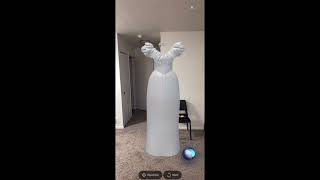
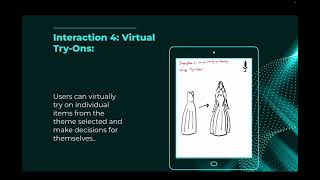
Hello everyone, my name is Hrithik Sanyal and this is my final AR project. The name of the project is Wedding Bliss and this is— I chose this as my ultimate personal assistant and it's basically an assistant that helps you in planning your weddings. Yeah, so this is the index and I'll be speaking quickly on over all of the topics. From problem statement, why I chose AR, the target audience, what's Wedding Bliss, initial sketches, storyboards, physical prototype, digital prototype, and etc. Yeah, so let's get started. Uh, the problem statement, uh, so as we all know, when planning a wedding can be a very difficult task, and since it has lots of timeline details, coordinations, so like what I felt was like families and basically the couples, the bride and bridegroom, they are always overwhelmed because of the decisions. Sometimes they make wrong decisions, sometimes the decisions tend to turn up to be good, but it's an overwhelming process and everyone wants their wedding to be a dream wedding experience, like a dream experience, so dreamy experience. So yeah, to address this challenge, I came up with this innovative solution that, uh, like a personal wedding planner assistant that would like leverage augmented reality and as the ultimate personal assistant for planning wedding. Uh, this would like integrate the wedding planning process. This would be real time. It would be like interactive for the bride or bridegroom or the users, uh, so to say. And it would simplify the entire process, make it like less complicated, and would probably enhance the decision making and make— try to make it a stress-free, um, wedding celebration and choices. So why AR? So like, basically AR blends your 3D models on the real-world environment, making it like a clear winner since it's more intuitive and like has a better immersive experience compared to VR. So since AR has better enhanced interactions compared to VR and makes the experience better, I thought let's go for AR. And choosing AR for wedding planner assistant was not a very difficult thing. And yeah, this would be like very beneficial for the couples or the family members to like have like plans for real-world weddings. The assistant would help in exploring wedding cards, wedding rings, dress, decorations, all in real time. And very quickly. And since this could— like, I came up with the, uh, solution that this could be a headphone AR or a mobile-based AR. I went with the mobile-based. So yeah, so this Wedding Bliss, the wedding planning assistant, would be, uh, like helping in making the decisions for the couples or the— for the families, like Decision making would be like really quick. Target audience, as I said, I'll quickly go over it. The target audience would be families or bride or bridegrooms or both the couples. Yeah, and, uh, but I've kind of mainly focused more on the couples so that the brides are like very much tensed and under pressure while planning their weddings. They have numerous things to do and it's just not the— like, they probably don't get time to give, like, equal time to all of them. So coming up with a planning assistant, that would help in not only help them in having a better decision making, but they could, like, visualize them, have try-ons and do try-ons and interact with them all in real time using the AI technology. So yeah. That was my plan. Wedding Bliss. So I'll quickly go over this. It is an ultimate wedding planning assistant in the augmented and virtual world, and it would be helpful in planning wedding, allowing the couples or the users to visualize and, uh, have, uh, which finally leads on to having a enhance decision-making for their dreamy wedding experience. Coming to quickly the sketches and the storyboards, so I'll quickly go over the initial sketches. As you could see, this was the very first, uh, sketch which I did. So I thought of incorporating the wedding rings, the invitee cards, the cake, the dress, the venue, the food, and the location and everything, but Yeah, that's what your initial sketches are for, which came down to this. I tried, um, like making it compact. I tried to make it more plausible, so I just came up with a couple of interactions and things that would like be, um, like, um, like be easy for me to incorporate. So yeah, these are two different sketches and it basically shows you what are the interactions which I'll go over later on. So yeah, coming to the storyboard, this is the storyboard. So the user like quickly opens the mobile-based AR application, Mobile Wedding Bliss, and land second screen. You could see that they lands onto the home screen, but the good part is that there are a lot many screens in between them. And since this is a voice-based mobile application, application which uses, leverages AR. So the user has to interact with the, um, uh, the user has to interact with the application using voice commands or voice prompts. And then you could see that the user can go through the themes, can change, make changes in the colors, the rings, can even do virtual try-ons and then finalize their wardrobe. Features and interactions. I incorporated just 4 of them, like exploring themes, customizing the theme or an individual item, the cost estimation, and virtual try-ons. So users can give voice commands and explore themes like classic theme, modern themes, and the assistant will provide suggestions. Customizing theme, the user can again give voice commands to customize an entire theme or change the individual color, individual items, maybe the color, the size, the design, and the assistant will provide suggestions and do accordingly. Third is the user can ask for, like, verbally ask for the cost estimation, and the assistant can provide suggestions for that. And finally, the user can go for a virtual try-on, and this would be like very beneficial for the user to have an enhanced and a better decision making. The design rationale: so I leveraged AR technology because they make the entire user experience for wedding list like more envisioning, more accessible. And as you know, I— it could be done through AR headsets or mobile, it could be mobile based. Since I wanted to have it voice command, so I went on with mobile-based AR application so that we could have voice commands and voice prompts. And so it would— in the setup, this would be like very beneficial for the couples to focus on the wedding planning while engaging with these decision makings in the real world or the physical surrounding. And the AR will help in having a seamless, like will basically seamlessly integrate and give them an immersive experience. So yeah, I mean, for instance, the users can virtually place and visualize their wedding cake, what kind of cake they want, what kind of dress they would want, and what kind of rings they want for their wedding. And so yeah, it would be— again, I would repeat myself— it would help in having an enhanced decision-making What did I learn? So like, I definitely learned that brainstorming is a very big part of the— of this. And I also tried to learn how an actual assistant would work in making the task easier. I have been using Bazi since the start of the semester, from the day one, and incorporating Figma in along with Bazi or Bezel. In-depth, and I got to learn so much about the, like, the, uh, working and, uh, working in MBEZY and trying to be better and better. Um, yeah, finally, I would say that brainstorming, storyboarding, making physical prototypes, digital prototypes is very important. I mean, you can just rush on to make a digital prototype, but that would not be as good. I— this is like a personal experience, something I learned, that for that you need to have a physical prototype. For the physical prototype, you need to have a proper storyboard, and for the storyboard, you need to have good number of sketches. And for those sketches, you definitely need to have a brainstorming. Like, you brainstorm, you come up with different ideas, go and get feedback, and then turn it into sketches, which indeed gets in turned into storyboards, then physical prototype, and finally you have your digital prototype. Yeah. The physical prototype. So that's the physical prototype. I'll quickly go over it. That's the icon for voice commands, and that's the home screen. As you could see that the user can go through the ring, the wedding dress, the card, and the cake. And then the user could customize theme. Um, let's say the user does not like the color of the dress, so it could change the color or change the size of the dress. User can have a cost estimation of the entire theme, uh, like in with the individual item costs, and can like virtually try on. So this is a person trying on the dress selected, maybe the pink dress or white dress, and Yeah, so this is the ring. The user can also have a virtual try-on of the ring and like make changes, or if does not want, cannot, can skip that. So yeah, that's a physical prototype. Going forward to the digital prototype, I have it here. So now I'll be a bit more specific. So this is the data privacy page, and if you see the Siri icon down there. That's basically your place where you can like give voice commands to the system, and you just need to toggle it on and you need to say, hey Bliss, and it starts working. So I'll just quickly demo it. So whenever the user says, hey Bliss, so it starts like you see, it starts listening to it. You give the voice commands and it moves to the next screen. Now you could like, without typing, you could give voice commands and fill out the form. Accordingly. And now the profile has been created. The system asks whether you're bride or bridegroom. You just give it verbally that you're a bride. And now you're at the home screen. Now the user says like, let's explore the classic theme. And, um, it's working on the theme. It's trying to come up with some suggestions. Now you have the suggestion here. You have the wedding ring, you have the wedding card, You have the dress, the gown for the bride, and you have the cake. And maybe the user would want to go back and explore some other theme. So that's the different theme. I think that's a modern theme. That's a different wedding card. That's the ring. And that's the gown here. And that's the cake. Now maybe the user wants to go— like here, the user wants to go with the classic theme but want to change the color of the dress from white to some other color. So can customize an individual item from the theme. So maybe change the color of this gown, and it got changed into blue. So maybe the user likes it, and Yeah, and then the user can go for a cost estimation. The, the system will provide a cost estimation of the theme with the individual items cost, and that's the screen for it. The user could like see the cost estimation of the theme he selected along with the changes made to individual items. Now the user can like virtually try on. So maybe the user wants to try on the ring first. And he gives a voice command. And like, he can go through the ring here and which has virtually tried it on. And now the user would want to go through the wedding dress. So as you know that we made some changes through to the wedding dress, made it blue, and the user could like virtually try it on. And like, the entire decision could be made out of this. And now the user would want to finalize the wardrobe and see it. The personal items. So that's the finalized wardrobe. That was the classic theme with the classic wedding card, the classic ring design. But yeah, the dress was white but got the color of it got changed, and the cake. So that's what it is, that's what my project is about. And going to the next slide. Yeah, thank you so much. And, uh, that was the end of the slides. And I would like, definitely want to thank Professor Nebeling and my GSI, uh, Shweta, for helping me out throughout the semester and giving me feedback. And I'll quickly go over through the resources I use. So these are the resources I use to go through all this process. These are like in-depth what resources I used. Yep, thank you.