A walkthrough of a VR car customization app that lets you pick the model, exterior color, engine, transmission, and tires while watching a 3D model update in real time. The demo ends with a full rotating view of your finished vehicle.
Chapters
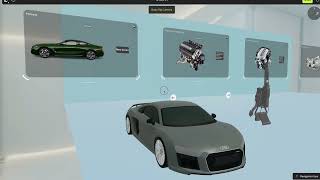
So I'll quickly go over my VR prototype. So this is the welcome page and the next bit says, let's start. The user gets to choose from different models of the car. So this is like option 1, then the second option, third, and fourth. Let's say I want to go with this one. I really like this one. So it takes me directly to the exterior color choices. Let's say I would want to have white color. So you see, we get a 3D model here and it's in white. Let's say I want to like go through other colors. That's the black, blue, red, gray, and we have also— we also have green. But let's say I want to go with the gray one. See, so it gives us the gray option and we could like see the color of the car. Now it takes us to the engine, like what engine do you want to have. So we already have the 3D model of the engine. Um, let's say I want to look at the other engine. I select this, it changes, the 3D model changes as you could see, but I think I'll go with the previous one. Now it takes us to the transmission. So do you want a manual transmission or do you want an automatic one? So if I click on the manual transmission, I get the 3D model of the manual transmission. And I can also go for the automatic one. Now it brings us to the tire selection. So this is the first tire, this is the second tire, and that's the third. So if I click on this one, so I get the option of the tire. Uh, let's check the other one. Oh, it's a smaller one, so I'll probably go with this one. And I'll just scroll ahead. And congratulations, we have finally customized a car. And we can also view our car. So we have the final version of our car that's rotating, and I could do that again for you. So we have the car, that's the car we just customized. And yeah, that's my project. Thank you.