evyAI Black Friday Special - 172 LinkedIn Live - Joe Apfelbaum
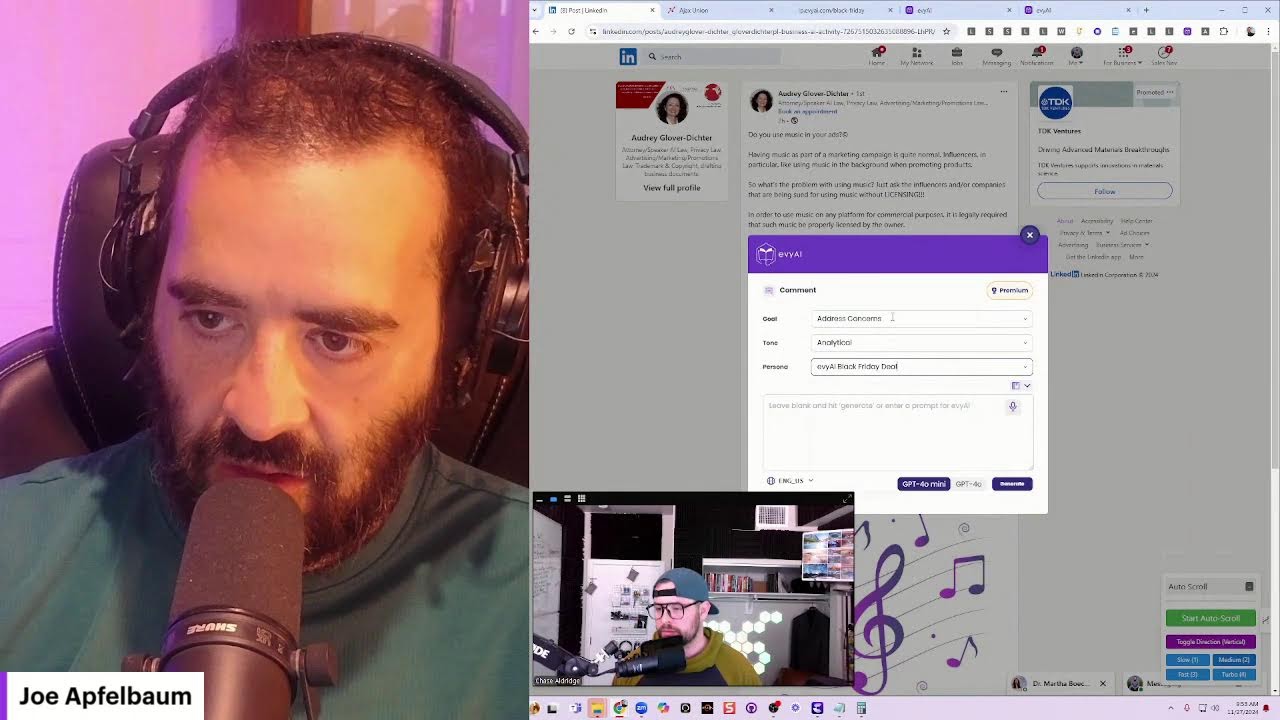
In this LinkedIn Live session, host Joe Apfelbaum showcases Evvy AI’s new Pro offering during a Black Friday promotion, walking client Chase Aldridge through a suite of AI‑powered tools. Joe demonstrates a custom auto‑scroll browser extension (built with Claude) that automatically scrolls LinkedIn feeds, an auto‑liker, and then dives into the Evvy AI CRM, highlighting unlimited contacts, one‑click calling, lead import from LinkedIn, and a full marketing automation platform. He outlines the Black Friday package: $20,000 worth of training, courses, lead generation (1,000 leads), landing‑page software, social‑post scheduling, pipeline management, Make.com integration, phone support, AI‑agent strategy sessions, and a members‑only forum, all for a limited $9/month (or $249/month trial). Joe shows how to create personas, generate AI‑crafted comments and messages, and bulk‑upload social posts via CSV, comparing this to Buffer/Airtable workflows. He answers Chase’s questions about phone‑number formatting, CSV imports, and integration possibilities. The demo also covers keyboard shortcuts (Alt+1‑4, Alt+S) for the auto‑scroll tool and mentions the Harpa capture extension. Throughout, Joe emphasizes the value‑driven goal of helping users generate $100,000 profit within a year, building a community of 1,000 users, and leveraging the extensive feature set to automate LinkedIn outreach and content distribution.
Chapters
Officially live. I'm so excited that we are here today. My name is Joe Apfelbaum and I have the wonderful, incredible Chase, Chase Aldridge. Chase, thank you so much for being with me on LinkedIn Live.
Yeah, thank you, Joe. Pleasure to be here, brother.
So Chase is a client of Evvy AI and he's gonna be upgrading to Pro and he wants to know some of the things that he gets with their Black Friday special. So Chase, first of all, check out this auto scroll thing. I'm gonna, I'm gonna click on medium and start scrolling. Look at the way it's automatically scrolling the feed.
Ooh.
How cool is that? That extension's currently available. I made it with Claude and it just goes and just scrolls the feed for you. And if you wanna stop scrolling, you just click and you can comment. So I just click, I can hit stop auto scroll if I want, or I could just leave a comment with Evie AI just like that. And then I can have it just keep scrolling the feed if I want. Check this out. I'm gonna hit auto scroll and it's gonna keep scrolling the feed. How convenient is that? To keep scrolling the feed. Now I also have an auto liker that will like every single comment on— it's just epic. But nobody ever thought of doing an auto scroll on a feed. And this works also on Facebook. It works everywhere, this auto scroll. So I'm just, I'm so happy that I was able to build this auto scroll in about 10 minutes using artificial intelligence. But let me, let me quickly show you the CRM because that's really what you wanted to see as part of our Black Friday special. If you go to evviai.com/blackfriday, /blackfriday, you'll notice that we have a bunch of things that we're offering. We're offering 6 major specials, which includes a year's worth of training and a bunch of courses valued at $17,000. So imagine learning the step-by-step process to be able to generate $100,000 in new profit in your business. Together with me and just a couple of other pro users. You're going to get advanced LinkedIn strategy. We're going to meet for 2 hours a month. You're going to get our 52 LinkedIn hacks. You're going to get our evergreen networking course, our Sales Navigator bootcamp, 6 hours of advanced Sales Navigator training, our goal setting masterclass. I'm going to build 1,000 leads for you. So I'm going to take 1,000 of your connections or 1,000 people on LinkedIn and get their email addresses and build it for you and put it into your CRM. I'm gonna make you a CRM, which includes landing pages, access to landing page software, social media automation where you can have recurring social posts, pipeline management so you can manage your leads when people call you or speak to you with notes, and integration with Make.com and everything all integrated. That's a $3,000 value. We sell that for $249 a month right now. So you get a year trial of that. And then you get the Inc. 5000 list. You get your connections dashboard where we export all of your connections and put it into the dashboard and then integrate it into the CRM so you can enrich everything. You get phone support if you need phone support on how to use Evvy AI or how to use LinkedIn or anything. You get a monthly strategy session with our AI agent Ava, who will brainstorm ideas with you, and you get access to a special Evvy AI forum. We're going to be putting together groups of 20 Pro members at a time to support each other. So you get training, data support, automation, strategy, and community, and you get all that for one low price of just $9. But that's going away soon. So if you guys want to grab this, now's the time. And if you paid for Evy AI, we actually prorate it for you. So it's actually less than this if you bought Evy AI. So that's that. In terms of the CRM, you know, one of the most magical things about the CRM is that you get unlimited contacts. So for example, I'm going to go on LinkedIn right now. I'm going to find a random person, this guy Brandon. You see Brandon Konami, whatever. I'm going to copy his name. I'm going to put him into the CRM just to kind of see what comes up. I do a search. I see he's right here. You see, with his microphone and everything, because it was imported right from LinkedIn. So when I click on this, I can easily give him a call right from the CRM. So I can grab his phone number from right over here. Um, often people will have their phone number. He doesn't. In this case, I happen to have his phone number in my contacts. I could just add him. But if he had a phone number right here, I could just add it to the CRM and boom, I just give him a call right from the CRM. In this case, he doesn't. What's your area code, Chase?
541.
541. So I'm just going to search 541 right now. I'm going to click on People just to kind of show you how many people have the 541 number on their profile.
Oh, I think we're missing a 1 there.
Oh, there you go. That's why. 541. Let me see if it'll find 541. Um, so often what I'll find is that people put their 541 numbers, um, on— it's not a popular phone. Are you in Dallas, Texas? Like, where are you?
No, that's from, um, Bend, Oregon, but I live in Denver.
So— Oregon. So you click on Oregon. Let me see. Let's see who has a 541 number. Okay. So we have people with their 541 numbers here. So let's say, for example, this person here, director of KY Commercial. So if I wanted to call Melissa Hayes, I would just copy her phone number, go to the CRM, click on the contacts, add a new contact with the plus sign, Melissa Hayes, put her phone number here, hit save. Now what I can do is I can just call her. Now it's just dialing. Just like that. And so, yes, eventually we're going to have a button that just basically allows you to just add her right from here to your CRM. You see I'm in the middle of building that right now. So it'll automatically find all her contact information. Like if I hit Save Profile, it'll go here, it'll pull all her information in here, and then when I hit Send to CRM, it'll send it straight to my CRM. Just like that.
You see?
Because all her contact information is right in here.
Now this may be a silly question, but does the formatting of the number that you put in there, the phone number, need to be the same every time you record it?
No, it doesn't need to be formatted. Um, you can just paste it in and it automatically formats it. So I just put it in and it just automatically formatted it, and I already saved her to the CRM. So I just press Send to CRM and it already saved her and all her contact information. including who our ideal clients are and all that other information, all the jazz, introduction, everything is all saved. So if you guys want to get access to this, this is the current price for the year. The price is definitely going to go up, so if you guys are interested and you're not going to get the $20,000 worth of bonuses, today's the day that you guys need to sign up to this. Really, really powerful. The CRM also has the ability to do marketing automation, so I have recurring posts that go out all the time. And these posts get automatically scheduled and reoccur. So if you want, you can put up 100 posts and then they will automatically be posted on whatever platform you want— TikTok, Facebook, Instagram, YouTube, LinkedIn. You get unlimited amount of posts that you can schedule. We also have an opportunities tab that shows you all the different opportunities. You can move people from stage to stage like Pipedrive. You have a calendar, you have contacts, you have text SMS notifications back and forth. So someone wrote the word demo yesterday. And they got back a response like this, you see, and it will automatically keep following up with them based on the workflows that we set up. We have landing page software. You can add unlimited domains to this. I have all these websites and landing pages and funnels that are set up on here. Memberships, reporting, a mobile app. We have so much going on over here. Um, you can accept payments and invoice people from this. You can have webinars. You could have— there's like an unlimited amount of things that you can do on this. It's really incredible. And so this is one benefit of Evvii AI Pro that you get access to the system for a year as kind of like a trial. And then we'll support you and train you on how to use it as well. So do you have any specific questions about the CRM or did I just explain it all pretty quickly?
Explained it all pretty quickly. So one question is with regards to setting up our social media posts, I have some automations that go through Airtable that I then send directly to Buffer to queue up. Would I be able to replace Buffer with this basically and send those same automations into—
Yeah, the way that you would do it here would be a little bit different. You would export a CSV from Airtable with the exact format that you need, and you would just upload the CSV right here, and then you would be able to just bulk upload all of them. You can't do that with Buffer now. Buffer, you're going to have to send them one at a time. To save operations, you just export, you create as many posts as you want, and then you do upload to CSV, and then you could just upload all of them at one time into here, into this tool. So it goes pretty quickly. It doesn't have, right now it doesn't have Make.com integration for this like Buffer does, but this is actually a much more robust way, and once you set up your posts here and you have them just reoccur, Buffer doesn't have recurring posts. So once you set up all your posts as recurring posts, you never have to worry about social media ever again. You don't need to keep creating new posts over and over and over. You just take your top 100 posts, you add them here for every platform, and then you're done. You can walk away from it. You don't need to automate, you just have it automatically updating all your social media platforms forever. And it'll keep being super diverse because 100 posts is very diverse. So every 90 days you post the same 100 posts. No one's going to know that you posted it 100 days ago. No one's keeping track of like, oh my God, he already posted this 100 days ago. No one knows that.
Yeah. The one thing is I have a bunch of data that is being imported weekly from different news outlets. Being in commercial real estate, I want to keep all my clients up to date with the most recent legislative changes, development changes. I really do like the recurring, definitely. I would also want to have new information coming in too.
Yeah, 100%, 100%. So you could definitely keep it in the mix by adding the CSV file in there and so on. But that's a really powerful way to be able to mass upload. And we do this for all of our clients, like done for you as well. But that's a really powerful way to do things.
Oh, cool.
100%, yeah. You also get, of course, access to unlimited ideas, unlimited PostWriter, unlimited Profile Optimizer, personas, saved profiles. You know, the learning hub, and we're gonna be adding many, many more features to Evie AI Pro that most people don't have access to. Um, like for example, a, a prompt library, an influencer library, access to templates, access to, um, post monitoring. Um, we're in the middle of building that out and, um, a, a dashboard and, you know, tons of other stuff. So, um, really, really powerful. Sweet. Yeah. This guy over here said, good morning, Joe. I see that we're connected in first degree to 290 CEOs and founders of companies that may benefit from services I offer to clients. Would you be open to a referral to any of these? So I'm going to have Evvy AI write me a reply. And I'm going to say, I'm going to tell it to use my Joe Apfelbaum 20-word Persona. I appreciate your proactive approach. Early referrals can be powerful. I'll review the connection to see my benefit at EOS. Let's keep the conversation going. Boom. And then I'm going to say, did you see our Black Friday deal? Please let me know. Now what I'm going to do is I'm going to go ahead and create a persona. So I'm going to go into Evy AI, go to evyai.com. I'm gonna hit Ctrl+0. I'm gonna press login. And over here, I'm gonna do, um, I'm gonna do personas. Then I'm gonna do add a persona. And then over here, I'm gonna say Evvy AI Black Friday deal. I'm gonna go to person and I'm gonna, um, I'm gonna write industry.
LinkedIn.
I'm going to go ahead and do friendly keywords, Black Friday deal. And over here, I'm just going to talk to it. I'm going to say, act as Joe, CEO of Evy AI, and introduce the concept of our Black Friday deal where we throw in $20,000 worth of value, including training, data access, support, lists, and so much more with our new upgraded version of Evie AI Pro. Oh, messed up Evie AI. So I'm going to fix it. And then I'm going to say, make sure to include the link to Evie AI Pro as http://www.evieai.com/black.
Friday.
I'll link the— make sure to include the details for the link to EVI Pro Black Friday deal as Black Friday. Do not include words like you nailed it. Or sound robotic, and do not sound robotic. Make it conversational. Okay, now I'm just going to press save, um, save, uh, thing. I'm going to go in here and grab some more. I'm going to hit cancel. I'm not going to delete this. I'm going to hit edit. I'm going to go in here and I'm just going to take this from here. Use words like boom, you're the best, blah blah blah. I'm going to go back to the personas. I'm going to edit this one over here. Joe Applebaum, CEO of Heavy AI. And I'm just going to add that right from the perspective of professional networker, author, CEO, blah, blah, blah, blah, blah, focus on the target market, blah, blah, blah. Okay. And I'm going to just delete I'm gonna delete this here 'cause I don't need this. I use that instead. So I'm gonna press Update Persona. And now I'm gonna go here and I'm going to leave a comment on Audrey's post. Let's just see what comes up with that new persona that I just created, see if it injects the link in there. Cool. I'm gonna go in here. I'm gonna click on, let's see, I'm gonna click on, Joe Applebaum Black Friday person. Oh, Evie AI. Let's see if it finds a Black Friday deal. Instead of addressing concerns, I'm going to build relationships and I'm going to make a professional comment. So let's see what it does. Great insights, Audrey. The importance of licensing music can't be overstated. Speaking of value, I'm excited about our Black Friday deal for Evie AI. It's $20,000 upgraded to Evie AI Pro. Let's keep the conversation going. Do you see the way I, I added the whole, the whole thing there?
Yeah, that was nice.
Yeah, so this saves a ton of time. Let's see if anybody's actually watching this now. I'm always curious to see who's watching my lives. So in order for me to see who's watching my lives, I just go here and I can see who's watching my lives. And we have a posting party at 12:00 PM today, just FYI. Looks like we have Anita. So let's say I want to send Anita a message now. She's in Greater Cleveland. I'm going to click on message. And now what I'm going to do is, oh, let's see, I sent her the live on October 8th. I'm going to have her say, have you seen our Black Friday special? I hit generate and it's going to write a whole thing. Hey, have you seen our Black Friday special, Anita? We're offering $20,000 worth of value. It's a fantastic opportunity. Boom. Do you see the way it wrote the whole pitch for me?
Mm-hmm.
And she's watching hopefully this live because she liked the video. So chances are she might be watching this live right now. And now I'm having a conversation with her in the chat and I'm giving her the exact, um, the exact link that she needs. And I didn't have to type in the whole entire thing. It kind of ties it in, puts her name, everything's in there. So, um, people that sign up to EvAI Pro get unlimited access to Isn't that fantastic?
That is nice.
And then we're also quick and personal. Yeah. And we're also going to be giving like lots and lots of LinkedIn training as well to help people. You know, my goal is for every person that signs up to EvAI Pro is to give them so much value that, um, they get $100,000 worth of profit in the next year as a result of them being part of EvAI Pro, which includes training and everything that they possibly need. So I really want to support people deeply, and that's why I'm kind of including all these bonuses for people, you know, giving you everything you need. Sometimes people say, okay, sign up to this software, but they don't give you all the support and the resources that you might need, including a CRM and access and everything else. And we're literally giving everything that you possibly might need there, including community support, like the full, the full monty, the full package. So that's really exciting. Yeah, that's my, my goal is really to help 1,000 people. Like I really wanna impact people deeply. I do have 30,000 connections right now. By the way, this, this, I'm obsessed with this auto scroll thing, Chase. If I click on, if I click on connections over here and I wanna auto scroll through my connections, now I just start auto scrolling and I can see all my connections just like that.
Oh, nice. And I see you got 4 different speeds on there too. Yeah, slow, medium, fast, and turbo.
I'm going to click turbo so it just goes down like a mother. You see the way I'm going to click on show results here? I'm going to hit stop scroll, auto scroll turbo, and it's going to keep scrolling and scrolling and scrolling and load all of my connections in one page.
Now the 1, 2, 3, 4, can you just click, uh, the number pad keys and will it change the speed? Is that, uh, what those represent?
Yes, it should be able to do that. That's the That's the idea. So, I'm gonna hit—
Nice.
I think Alt+1. Alt+2. Alt+3. Alt+4. Alt+1. Alt+2. Yeah. It goes slow down.
Nice.
And Alt+S stops it. And Alt+S starts it. Alt+S should start it. I don't know why it's—
Beautiful.
Looks like it crashed my— oh, Harpa said— Requested additional permissions. Allow. Okay. Let's try again. Alt+S.
Yeah, I have a Stream Deck here. So, I'll have a whole page dedicated to Evie AI.
Oh, Alt+S is being taken up by— wow, what is this doing here? Oh, capture view. That's cool. Look what Harpa is doing. Wow. It captures everything that it finds on a page.
Wow.
Alt+S does capture view. I probably have to disable Harpa or change the thing. Or it looks like my team is asking me to join a meeting. So, I appreciate you endlessly. Thank you for being here with me. And for you guys watching this, hit that repost button. I'll see you soon, Chase.
More from Joe




How to Beat the Algorithm: Remove Hidden Watermarks & Scale Content with evyAI






