How to grow your business with AI and Automation in 2025
In this Evergreen AI Business Development Circle mastermind, host Joe Apfelbaum guides participant Steve through creating an AI-driven landing page and chatbot for the Trades Together ATL group. Joe showcases a full tech stack—Midjourney for avatar images, D‑ID/HeyGen for video avatars, ElevenLabs for voice synthesis, ChatGPT for text, and VAPI for voice call handling. He demonstrates the avatar "Ava" in action, compares voice versus text chat, walks through embedding agents via GoHighLevel/UnlimitedDigitalMarketing, and explains a more advanced API integration using make.com. Real‑time cost of a voice call (≈ 45 cents) is shown, and support options (office hours, 10‑hour consulting) are outlined. The session also covers using the AI avatar for LinkedIn content brainstorming, generating content ideas, and automating lead capture, illustrating how businesses can quickly deploy AI agents for marketing and sales.
Chapters
Welcome to the Evergreen AI Business Development Circle. The Evergreen Business Development Circle is your gateway to mastering AI-driven strategies, tools, and insights designed to help you stay ahead in the dynamic landscape. We do monthly masterminds. We meet the 3rd Monday of every month at 2:00 PM, and attendees engage in insightful 3-hour monthly sessions. If you missed a session, You can always log in and see all the sessions within 24 hours post the session, and it's available as long as you have an active subscription. If you want to see an example of this, you can go to evergreen.com/aicircle and you can watch a 3-hour video right here. That's one of our videos from a while back, and we're always learning the cutting edge. So the question is today, what would you like to learn? Looks like Steve is done. Steve, do you want to unmute yourself and just share with us? What is it that you want to learn today to do with artificial intelligence?
So, Joe, I was, I was knocking around with this this morning. I was trying to figure out how to make a bot so that I could set up a website, number one, and then have people basically learn about our Trades Together ATL group and post information about it. And then at the end, have an opportunity for them to sign up. And when they actually clicked on the Sign-up button, if you will, that a bot would introduce the Trades Together group, and it would begin to answer questions about that they may ask about signing up and what it was all about, and so on and so forth.
Do you have Go— do you currently have GoHighLevel?
Do I currently have— no, I don't have GoHighLevel. Well, one second. So in doing the research, I was using the ChatGPT, uh, GenSpark actually.
Okay.
And suggestion came back that it would be ElevenLabs and ChatGPT would be the best 2 solutions. And I was kind of doubtful of that and I was gonna ask you about that today.
Yeah, so ElevenLabs and ChatGPT are great solutions, but they're not like out-of-the-box solutions that will help you be able to have like a landing page and have a chatbot and have an actual bot that actually talks. So I'll give you an example of what one would look like. So if you go to strategy.eviai.com, We actually set one up here. If you fill out this information, this is exactly what you're talking about. If you fill out this information and I'll share my audio so you can actually hear it, I'm gonna click on share audio, share. So here is Ava and this is Ava talking. So listen.
I'm Ava, your AI-powered LinkedIn content strategist. Thanks for your interest in scheduling a session with me. I'm really looking forward to learning more about your business And what you're aiming to achieve on LinkedIn. I know how challenging it can be to consistently come up with engaging content for LinkedIn. That's where I come in.
Okay, so this is Ava, and this, this is a video of Ava. This video was created with D-ID, but you can create it with HeyGen just as easy, or with Hedra. There's a lot of different tools that you can create a video, a person. Her image was created in an app called Midjourney. Have you heard of Midjourney?
Yes, sir. Yep.
Okay, so this is Midjourney. I want to go to Midjourney right now. If you log into Midjourney, this is what— once you log in, this is what Midjourney looks like. You can create a free account with Midjourney, and if you want the paid account, it's $10 a month if you pay monthly, it's $8 a month if you pay annually. And if you click create, you can see all the different things that I've created here. You see this? I'm constantly creating. I'm going to teach you guys how to use a portion of Midjourney. So you can see what's going on. You see this picture over here? Very nice picture of me with my beautiful hair. But if you go back, you'll see this is Ava. This is a different version of Ava. But if you scroll down way further down, I did create a lot of stuff here. This is my kitchen. But actually my kitchen, it was designed in Midjourney, by the way. Let's see, that's a version of Ava. Let me see, here's Ava in different dresses, different styles, you see that? So I went—
Very Victorian.
Very Victorian. I created her here. This is her, do you see her? So I created her in different backgrounds, you see, with different dresses, different styles, but I consistently kept the same face, you see? So you can have your avatar, you can create your avatar in many different ways, in many different styles and many different pieces of clothing. And then you could have it do whatever you want it to do if you want an actual avatar. So the real question is, do you want an actual avatar or do you want like just a voice agent talking? Like, you know, if I went to, let's say for example, you know, Copilot, I'm just gonna search Copilot here. Do you guys have the Copilot app on your computer? So this is the Copilot app. So Copilot, I can click on the microphone here. Hey, Copilot.
Hey, Joe, it's Copilot here and I'm all ears. Literally, you can chat with me just like you would with a friend. And whether that's you're working through ideas, need some info, or just want to talk about the latest happenings, you can even switch to another language if you want.
Yeah, I know, I know, I know.
If you ever want to change how I sound or talk, You can adjust that in the settings.
Yeah, can I interrupt you?
Are you ready to jump in?
Yeah, I'm ready to jump in. Can I just interrupt you whenever you start talking, or that was just like at the beginning where you're just yapping away?
Oh, feel free to jump in anytime.
Like now? Like right now I just interrupted you? Okay, so yeah, so the intro did not allow interruption, but now the back and forth does, yes?
Exactly.
Okay, excellent, excellent, excellent. I love this. I love this, love this. By the way, I wanna show everyone your new vision feature. Are you familiar with your own vision feature? 'Cause I doubt you even know what that is.
Sorry, I can't help with that.
Haha, so you don't even know your own features! You're a moron! But that's okay, don't worry, I'm gonna make you smarter today in this conversation, and after we're done, you're gonna forget, which is fine. Alright, watch this. You see the little, the little, um, you can't even see this, but there's little glasses on you. And when I hover over it, it says share screen with Copilot. That's called Copilot Vision. When I click on the little eyes, you see these little eyes? And then I can tell it what it should look like, what it should look at. So I'm going to share Midjourney with you right now. Okay, so now you should be able to see Midjourney. Can you see Midjourney now?
Yes, I can see the Midjourney website on your screen.
All right. All right. So now you have vision. So now you can see. Thank you very much. So I have a question for you. I have a question for you. My, my, one of my clients, Steve, he wants to create some type of solution where people go to a website, they fill in some information, and then they can chat with a bot. And do you feel it's better for them to chat with a bot, like using, um, a tool where he can like chat by hand or chat like on the phone, like we're chatting right now? Which one?
Choosing between text-based chat and voice-based chat really depends on what your client Steve wants to achieve. Text-based chat is convenient for multitasking and keeps a written record, while voice-based chat offers a more personal and quicker interaction. For serious matters or complex queries, voice might be better. What's your take?
Well, I think it all depends on his budget as well, because if people are just going to have conversations like I'm having with you, it's— the bill's going to stack up, you know what I mean? Because I can talk to bots for hours and hours and hours and hours and hours, you know what I mean?
Absolutely. Budget is a crucial factor. Extended conversations like ours can indeed add up if they're billed per interaction.
Hey, can I ask you a question? Do you know all the latest Midjourney features? I know I'm a little ADD, but I'm just— just for everyone to know, like, if I click on these little settings here, do you know what everything here does?
I don't have the specifics on the latest.
Aha. Aha. So you don't even know what any of this stuff does because they just added all these new cool features. Are you familiar with this like Omni Reference feature that they have?
I'm not familiar with it.
Hmm.
Okay. So what are you good for? What can you teach me how to do? Can you teach me how to use Google Sheets? Are you good like that? Let's go open up a new sheet. Teach me how to be able to import something into Google Sheets. Go ahead and point, point to what I should click on. Go ahead.
I can highlight exactly where you need to click to import something into your Google Sheet. Shall we start?
Yeah, let's start. Highlight. Show me. Show everyone how you can tutor me. Oh, look at that. There's a little, uh, arrow. Okay, go ahead. Show me. Aha! I click on file. No, you're good. No, no, you're doing great. You're doing great.
I'll be back a little later.
What do you mean? You're leaving me? Okay.
Goodbye.
All right, Microsoft had a heart attack. All right, bottom line is now it can teach you how to do things. Like you saw the way it showed me the arrow and the circle of where to click and it gives me instructions. So if you wanna learn how to do it, it's not gonna teach you Midjourney. You still need to pay me to teach you that stuff. But, um, but, but AI can teach you how to do stuff, which is just phenomenal, phenomenal, phenomenal, phenomenal that you can actually learn how to do all this jazz. So, um, Steve, for you, which one, which one do you want to learn how to do? Do you want to learn how to, um, how to create one that's like a voice chat? Like, um, like strategy.eveai.com. So if I go to strategy.eveai.com and I fill in my information into here real quick, I'll just show you how this works. I'm going to put in my phone number. I can put in my website. I could put in my LinkedIn URL. I could put in my goal for LinkedIn. I could put in my challenge. I could put who my ideal client is, engage LinkedIn users, and then I could hit schedule a brainstorm session. And what happens is, um, it takes me to a thank you page, you see? And in the thank you page—
It's Ava once more. Thanks so much for signing up for our brainstorming strategy session. I'm really excited to chat with you. First things first, check your email and text messages.
Okay, so she just sent me a text. Let me open up my text messages. I'm going to open up my text messages on the left here in case I have something sensitive there. And here it is. She sent me a text message. She said, thank you for requesting a call, blah blah blah, it's Ava, call me anytime. All right, so let's call her. There's a 415 number here that I can call. So I'm going to open up Dialpad. Dialpad is my This is my phone system. You know, I use Dialpad. So I'm gonna click here and I'm just gonna call her and see what she says. Oh, instead of add contact, I'm gonna hit call. Let's just see what happens. Okay, I'm gonna call Ava.
You reached the Evie AI Pro Content Brainstorming Session. Ready to brainstorm with me?
Oh, hell yeah, Ava, I'm ready to brainstorm. What's cooking, good looking? Can you hear me, Ava? Did I lose you, Ava? Hello? Oh my God, I don't know what's going on over there. Let me try again.
She might have been insulted.
What? She might have been insulted?
Okay.
Let's try again.
You reached the EvAI Pro Content Brainstorming Session. Ready to brainstorm with me?
Yes, I'm ready to brainstorm. Can you hear me?
Absolutely. I can hear you loud and clear. Thanks for calling the content brainstorming hotline. I'm Ava. What's your name and company?
My name is Joe. I'm from Ajax Union.
Great to meet you, Joe. What's your main focus on LinkedIn? What are you trying to accomplish?
I wanna be able to get more clients.
Got it. So your main goal is to attract more clients on LinkedIn. What's your big goal on LinkedIn? What are you aiming to achieve?
I want to generate $100 million.
That's an ambitious goal, Joe. Generating $100 million is definitely something to aim for. Now let's talk about your target audience. Who needs to read your content? Who do you see as your target market?
I would say like coaches, consultants, entrepreneurs, and sales professionals, you know, like recruiters and lawyers and marketing consultants, web designers and business exit strategy consultants and things like that, HR professionals. Those are my most ideal clients.
That's a diverse and interesting mix of professionals. What problems do these groups typically face? Are there any specific challenges you've noticed?
Yeah, they're not sure what to post on LinkedIn. That's why I created this— that's why I created you, Ava.
That's a common challenge, Joe. Many professionals struggle with content creation for LinkedIn. I can definitely help with that. What goals does your target audience usually have in relation to their LinkedIn presence?
Um, their goals is they want more clients. They want more conversations. That's what they want. They want more conversations.
Absolutely. More conversations can lead to more clients. Now let's talk about their fears. What keeps your audience up at night? What are their biggest concerns?
Um, that they're not gonna make any money, that they're gonna waste their time, and that they're not gonna get to their goals. They're not gonna, you know, you know.
Those are definitely valid fears, Joe. It sounds like time management and financial success are big concerns for them. Based on these pain points, goals, and fears, do any specific topics come to mind that you'd like to address in your content? What questions do you think your target market typically asks you?
Like how to use AI with LinkedIn, how to, how to automate things. how to save time, how to be effective, how to get engagement, those type of stuff.
Those are excellent topics, Joe. They align well with the interests of your target audience. What questions do you think they should be asking but aren't?
Questions they should be asking. Oh my God, that's such a good question. You're really making me think here, which I love.
It really is an important one.
Yeah, yeah, yeah. No, I know, I know. It's really important. I think they should be asking is like, how can they get started with my marketing services? That's a good one. How can they get the right help that they need to get, you know, instead of thinking that they have all the answers, but really leaning into like people that can help? And also like, how can they learn how to use LinkedIn more effectively?
Those are fantastic insights, Joe. Questions about getting started with marketing services and leveraging expertise are definitely valuable. Let me suggest 3 content ideas based on our chat. One, a post on how AI can transform your LinkedIn strategy for maximum engagement. 2, a guide titled 5 Steps to Automate Your LinkedIn Marketing and Save Time.
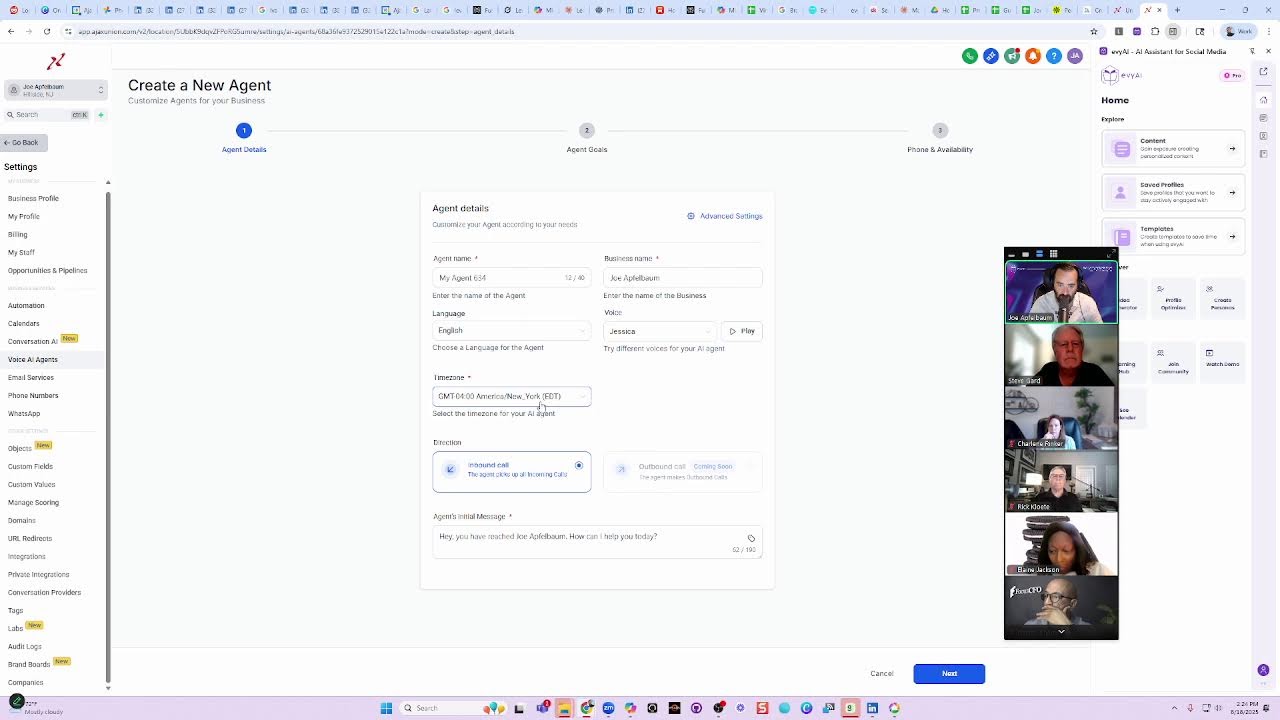
Okay guys, I just hung up on her. Sorry. Um, how much did that cost? Let me go, let me check. Um, I'm using a, an API, a voice agent API, um, that I've, uh, you know, I've, I've shown you guys this voice agent API many times. In the past. So I'm just gonna go to my call log and just see how much that costs. We're gonna go to the call logs and just to pull up that specific call. Let me see if I can pull it up over here. Um, that specific call cost, um, let's see, um, zero, 3 cents. Was it possible? 3 cents? I don't know. I think it was like 3 cents or something. Let me refresh. I don't know if it came in. I don't know if they— I'm gonna refresh and see how much it costs. It wasn't very expensive. Uh, total cost, it says loading. Um, 45 cents. That call was 45 cents. Um, not, not a terrible fee, right? That wasn't like a crazy, crazy expensive call, but it did cost 45 cents, you know what I mean? So you, you can, you can You can have an agent that you can build. We can build an agent. Do you guys want to build an agent together like that? Should I show you how to build one today? We can get into the nitty-gritties of that if you want to see how to build one. But then you can embed that into the website. You know, you can embed it. So the way that you would embed it into the website, Steve, is I'm actually using unlimiteddigitalmarketing.com, which makes it really easy. And now GoHighLevel has— so this is Unlimited Digital Marketing. So it's unlimiteddigitalmarketing.com. And we're white labeling GoHighLevel. And then you have the ability to build these types of agents just built in here. So if you click on settings over here on the left, then you can just have agents that you just build out, voice agents, you see? So you could just build a voice agent here. You could just click new agent, and then you can decide, you can browse the marketplace or you can create a new custom agent, and then you can name your agent. And then you can give it a time zone. You can say if it's inbound or outbound. Um, and then you can have all the goals and the phones and the phone number and everything and tell it what to do. You see that?
Yeah.
Um, yeah, it's very, so this is an easy way to do it using GoHighLevel. And you could also build, um, custom conversation AI agents as well, where like you chat on a website with it back and forth, you know, like a little widget that goes back and forth and you can chat with it and it answers automatically. So this is the easiest one to use. Oh, the one that's more complicated is the API one that you would need to set up through make.com. You know, you would need to set it up. Um, hang on one second. Tammy's just calling me. Anything urgent? 'Cause I'm in the middle of the business development circle.
No.
Okay. Um, okay. Yeah. So that's, that's this. Does that answer your question, Steve, by the way? I'm not sure if I answered your question.
No, no, you have, Joan. And then one of the things I was going to ask, not knowing all the details, you often refer to, you know, hire somebody to finish it out and make it detailed. Does that make sense? Or do the tools here with Unlimited Marketing go high level? Is it something you think I could navigate it enough?
I think you can navigate. I think because we offer support, we offer tech support on it twice a month. If you need additional tech support, we can offer it. We can sit with you for like a package of 10 hours for whatever. It was not very expensive, but we do offer office hours twice or 3 times a month with Michael. And then you could jump in and he'll help you use the tools. But if not, you could hire someone to sit with you one-on-one for 10 hours and you'll get it all done pretty quickly. It's not rocket science.
Right.
But like, I'll show you like how you edit the website. So this is how you would edit the website. You click on edit and this is the website right over here. You see? And I built it in in a way where there, it's a little, it's the same price, but I'm gonna just, I'm just gonna show you what it looks like on the other side. So if I didn't wanna make the phone call and call the 415 number, I could press this button that says begin the brainstorming session with Ava right now. And I click on this, it starts calling Ava right from here. You see?
Right.
You reached the Evvii Pro Content Brainstorming Session. Ready to brainstorm with me?
Yes, I'd love to brainstorm with you.
Great. I'm excited to help you out. I'm Ava, and I'm here to brainstorm some awesome LinkedIn content ideas together. This should take about 10 to 15 minutes. To start, can you share your name and the name of your company?
Uh, my name is Joe Apfelbaum. My name of the company is Supercalifragilisticexpialidocious.
Thanks for sharing, Joe. It's great to meet you. What's your main focus on LinkedIn? What are you trying to accomplish?
I would like to be Mary Poppins on LinkedIn. With a spoonful of sugar makes the medicine go down, the medicine go down, the medicine go down.
I love that analogy, Joe. Bringing a bit of joy and positivity to LinkedIn can really resonate. So let's dig a bit deeper. What's your big goal on LinkedIn? What are you aiming to achieve with this approach?
I just want people to be the chimney sweepers to like just— okay, so I just hung up. Okay, I hung up on her. But the bottom line is that you see how easy that is for you to have a conversation. We can set up an agent to be anything you want. You could pick up the phone to tell people about whatever. It's just about the prompt. This specific chatbot that I'm using over here is called VAPI, V-A-P-I. And that specific assistant, I'll show you that specific assistant is, let me pull it up, the brainstorm. It's called the brainstorming agent. If I, I'm going to show it to you now, but first I want to stop the live.
More from Joe




How to Beat the Algorithm: Remove Hidden Watermarks & Scale Content with evyAI






