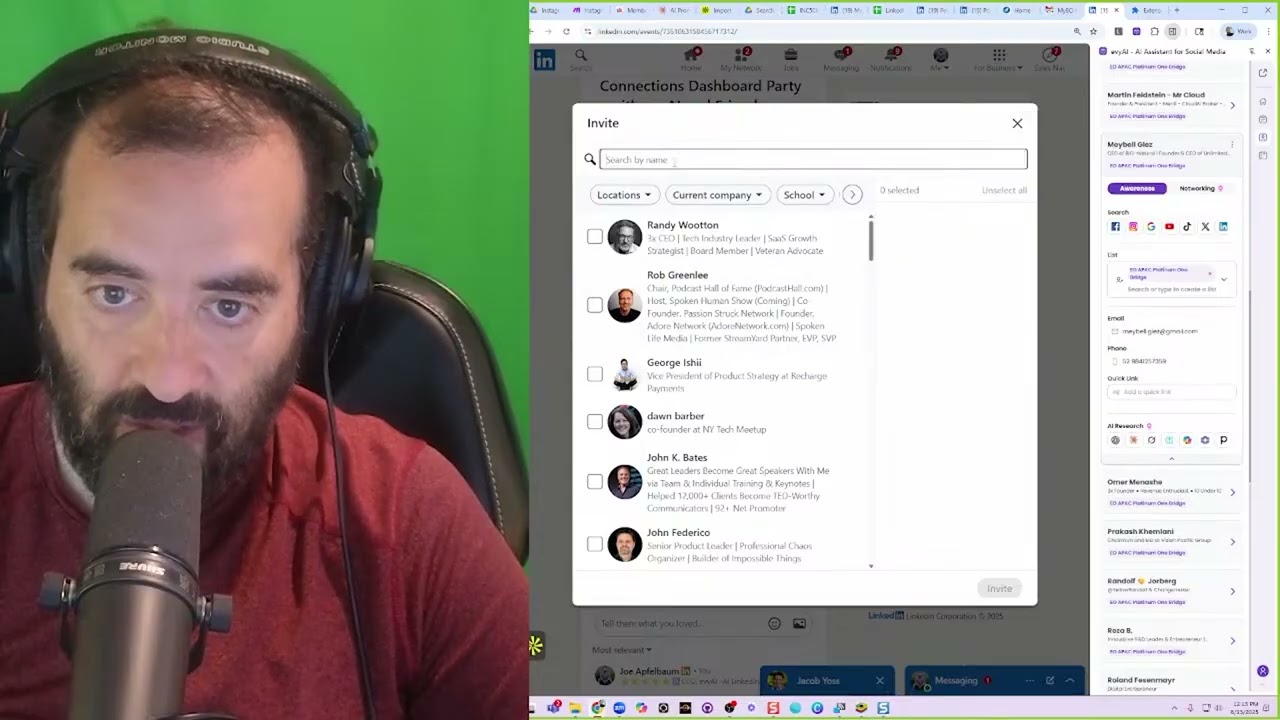
In this instructional video, the presenter walks through a step‑by‑step workflow for rapidly inviting large numbers of LinkedIn connections to a LinkedIn Live event. The method relies on LinkedIn’s built‑in invite interface combined with systematic filtering (by first name, last name, company, location, school, industry) and bulk‑selection tricks (checkbox counting, auto‑scroll extensions). The speaker demonstrates inviting groups of "Evans", "Ricks", "Jessica", company employees (e.g., GoDaddy, Google), geographic clusters (Guyana, San Diego), and surname groups (Cohens, Roberts). He shows the cumulative invite count rising toward 1,000 within minutes. Additional tactics include using a browser extension to auto‑scroll and auto‑check boxes, leveraging AI tools (e.g., Perplexity, Grok) for quick research, and repurposing the live stream into multiple short videos via Opus. The video ends with a promotional plug for Evvy AI, an AI‑powered networking assistant. The overall purpose is to teach LinkedIn power‑users how to scale event invitations efficiently and turn live content into a broader networking engine.
Chapters
Welcome to the 99 LinkedIn Hacks. For the first hack, we want to encourage you to start leveraging LinkedIn Live. Inviting the whole world into your office to join you. The best way to invite people to a LinkedIn event. Let's say for example you wanted to have a LinkedIn event and this is an example of a LinkedIn event. I recently closed a deal from a LinkedIn event, and I realized the importance of LinkedIn events because there are people on LinkedIn looking for events. Now what I'm going to do is I'm going to press share, invite, and I'm going to invite Evan. Now it's going to find all my Evans. So what I want to do is I want to check off all these Evans. I don't want to do it one at a time, so I'm going to use these, uh, 50, and boom, it just sent 50 Evans A checkbox thing. I'm gonna do invite. That's Evans. I'm gonna do Rick. I wanna invite all my Ricks. And I'm gonna go here, scroll down, make sure it loads all the Ricks. Count checkboxes, check all, and then invite. Okay, so I just invited all the Ricks. Now this is how you invite women. You pick a woman's name. For example, I'm gonna invite Jessica. And then I'm gonna go here, count checkboxes, check all, and then invite. And it's gonna send 50 invites. So if you wanna see how many people I invited so far, you just click on Manage, Manage Attendees, and you see invited 173 people. You see that? Now you can also invite people via their company. So you do current company, I'm going to do GoDaddy. Press show results, it'll show all the people that I'm connected to in GoDaddy. I'm going to press go, and I'm going to press invite. So it's going to go ahead and invite all these people from GoDaddy. If I want to invite people from, say, Google, current company, Google, press okay, show results, it'll show all the people I'm connected to that work for Google. Invite 44 people that work at Google. You see? So that helps me be able to do that. The beauty of this is that you can keep inviting people based on company, based on location as well. So let's say I want to invite everyone in Guyana. I'm going to do Guyana. And I press show results. It will show me all the people I'm connected to in Guyana. And I hit invite. I just invited all these people from Guyana. I want to invite people from, say for example, San Diego. I type in San Diego. I press Show Results. I could scroll down, find all the San Diegans. You see? Keep going down. And now that I have all these San Diegans, 117 people, I hit Invite. and 117 San Diegans have been invited. Now the beauty is I can just keep inviting and inviting and inviting and inviting people to this, and within just a few minutes, you saw how many people I invited. If I click on Manage and Manage Attendees, you'll see that I already invited 350 people. So in a couple more minutes, you'll see the way I get to 1,000 people. And this is the path that I take. Now if I wanted to target people based on last name, so for example Cohen, these are all the Cohens that I'm connected to. I'm gonna have to use a special extension that will send a message to all the Cohens. If I wanted to message all the Roberts, I can go to where it says share invite, I'm going to search Robert, and of course, count, check, send. So now we're about 500, we're about halfway done. So what's another strategy to invite people? You can invite people based on a particular school that they're a part of, a particular industry, say professional services, you see? So I can invite 100 people that are in professional services here. And then I could just let it keep scrolling. You see the way it just keeps scrolling and scrolling and scrolling? It'll just keep scrolling. It's called auto-scroll. I also have an app that will automatically auto-scroll. So I'm going to go ahead and click on this, hit send, and 136 people were just invited. Here I'm going to have Perplexity research him. Grok, do research. We got a phone number here. We got a phone number and we got an email address. And I'm gonna also add it as a note for later. I am currently live right here. You see that? And I have 3 comments. So I'm constantly just doing my work while I'm live. So the hack is just go live, like go live on LinkedIn every day. Then you can repurpose that by going to Opus. It'll turn that one video into many, many, many videos. If someone cancels a meeting, I'm live. You can review your website while you're on live, just making phone calls and Working. People want to be in your office. Download your 15,000 people and putting it into a dashboard. Recognize, strategize, and prioritize all of my connections. Who do I know? Who do I not know? Who's a potential client? And all that stuff. Keep it simple to the outcome. Yeah, the outcome and who you're talking— I help advisors, blah, blah, blah. I help, you know, coaches get on the phone with more people. You know, looking for more conversations in seconds? Click. Want to make networking easier and more effective? Try Evvy AI. Your AI-powered sidekick that helps you connect, engage, and grow your network faster than ever. Click the link and start building smarter relationships today.