How to transform LinkedIn profile photos into a photo Library
In this 12,672‑token livestream, host Joe Apfelbaum demonstrates how to harvest LinkedIn profile pictures, feed them into AI image generators (Evie AI’s Nano Banana) with carefully crafted prompts, and produce a variety of stylized outputs—black‑and‑white headshots, duotone corporate images, Hollywood‑glamour portraits, executive power poses, and collages. He curates these results into a personal photo library, publishes selections to his Substack, and shares prompt templates with the live audience. Throughout the session he engages viewers (Danielle, John, Douglas, Kelly, etc.), creates personalized images for them, and encourages interaction. The second half shifts to building a Chrome extension for GoHighLevel: using Gemini to generate code that adds custom buttons to pipeline cards (Google search, call, save to Evie AI). He walks through inspecting HTML, editing the manifest, loading the unpacked extension, debugging, and testing live calls and research workflows. Additional discussions cover bulk‑mention automation (the “mention saver”), planning a mini‑course on onboarding, and real‑time troubleshooting of the extension. The stream blends instructional, enthusiastic, and informal tones, peppered with spontaneous rap verses and audience banter.
Chapters
One of the clever things that I just thought about doing is taking somebody's LinkedIn profile. I'll give you my LinkedIn profile, for example. I'm gonna pull up my LinkedIn profile and grabbing my LinkedIn profile photo. This is it right here, you see? I'm gonna right-click on the profile photo. I'm gonna hit Save Image As. I'm gonna call this one Joe Apfelbaum Profile.
Photo.
Okay, that's my profile photo. Let's see what that looks like. Okay, this is it right over here. Okay, now I have my profile photo. Now what I'm going to do is I'm going to take that profile photo, put it into a piece of technology. Let's see, let's find a piece of technology that we could use, and then let's find a good prompt. Okay, so we're going to use this technology here. We're going to grab this photo, drag it into this technology, and then what we're going to do is we're going to use a specific prompt from our prompt library, and we're going to say the following: take this LinkedIn profile photo and transform it into a timeless black and white headshot. Now we're going to use Evie AI's Nano Banana. So we're integrating Nano Banana and look at how beautiful this photo is. Wow.
Wow.
Oh my gosh, this is so good. So we're going to turn this into, um, my library. So we're going to create a library of photos now and we're going to keep asking it to do things like, for example, keep the person exactly as they appear on the LinkedIn photo. I'm gonna grab, not this one, I'm gonna grab this one here. And I'm gonna say, replace the background with relevant industry scene for business professionals, modern city skyline at dusk with office building lights. Okay, I can do business professional, tech worker, I'm gonna say business professional. Let's see what it does. Let's see what it does. Okay, don't love that one. Um, all right, so we're gonna say transform this LinkedIn photo into a mono A modern duotone image using corporate brand colors. Apply a 2-color gradient overlay. Now what I want to do is I want to give it my brand colors, so I'm going to say use the Evie AI brand colors. Let's just see. I just took a screenshot of my brand colors. Let's see what it does. And then I'm gonna do using the darkest purple and the yellow from your primary. Okay, um, now what I'm gonna do is I'm gonna say use a link to photo-based informational graphic quote. So this time we're gonna use this photo here. And see, position the person slightly to the left and to the right of the space with a semi-transparent typography. Suggest a Montserrat or Helvetica font. So I gave it the specific fonts it should use. Leadership is not about being in charge. Okay, good. Now create a sophisticated collage using a LinkedIn photo as a central element. Let's see what it does. It says something went wrong. Okay, so now it crashed. Let's go ahead and start over. We're going to press create an image. We're going to drag in the profile photo. We're going to go with the first one right here. And we're going to do this again and see how it kind of changes because I really like this one. Uh, I really do like that one. Make me 10 variations of this one. Okay, let's just see. Um, I like that. Let's see, grab that photo. Sometimes you got to kind of start over. Let's see if anybody's messaging me. By the way, if you guys are watching me and enjoying this, say I'm enjoying it in the chat. I'm gonna go ahead and give myself a like. Also give me a like if you can. Okay, okay, very nice. Um, let's see this one here. And we're also going to take these and put them into Substack as an option to kind of show you how that kind of transforms. Transform the link to a striking high fashion with white editorial portrait, black and white editorial portrait. So these are all like black and white high editorial. Apply intense contrast. Oh, look Look at that one. That one's good. We're gonna do a classic Hollywood glamour version. We're gonna do this like that. Classic Hollywood. Convert this photo into a timeless Hollywood glamour black and white corporate. Crop the shoulder face 85— 68% of the frame. Okay, make me 10 options in color. Okay, very nice. Very nice.
Wow.
Let me try it in color. Take my photo. Try it in color. I'm going to say, take this LinkedIn photo and transform it into a prestigious warm-toned executive portrait. Crop slightly from the shoulders up, ensuring the face fills 75% of the frame. Apply a golden hour color tone, color grade with warm amber lights and deep bronze shadows. Wow, this is a good photo. It's a good photo. I like it. I like that photo a lot. Let's try a corporate Power blue portrait. Let's try that one. By the way, if you guys want the prompts, just say I want the prompts and I'll make them available to you. Let's see if anybody's even commenting. All right, you guys like the post so I know that you're here. I'm going to say post an activity. I'm going to like my own post. Oh, looks like we have a couple people here, but I don't know that you guys are here. Oh look, Danielle's here. This is great. She said Let's take Danielle's photo. Here's Danielle's photo. She has 150 followers. I'm gonna copy it. I'm gonna test it out with your photo, Danielle, just for the sake of it. I'm gonna do it in a new chat, create an image, and then I'm gonna do the same thing here. Transform the LinkedIn photo into compelling corporate blue executive headshot. Let's just see what it does. With mid-chest up, 70% of frame. Let's see what it does. Okay, okay, kind of kept the whole thing. Cinematic teal. Let's try cinematic teal. I'm gonna try me again. Oh, we're gonna try me, and I'm gonna say put us both in a selfie. Let's just see what it does. I just said put us both in a selfie. See if it does it. Danielle, let's see if it puts us both in a selfie. Oh, look at that! We're in a selfie. Oh my God, this is so good. This is so good. I'm gonna send you this in a message as my little gift. There you go. Here is our gift, and you can go ahead and post this if you want. Oh my God, so good. So if you ever want to take a selfie with somebody, that's a method. That's a method of taking a selfie.
No?
Do you guys agree? John says, I want the prompts. Okay, John, I'll give you all the prompts. John wants the prompts. All right, let's see. I'm gonna go in here. I'm gonna put this here. I'm gonna do luxury rose premium. All right, let's just see what that looks like. Transform this LinkedIn photo into an opulent rose gold executive portrait cropped elegantly from shoulder line, occupying 71% of the frame. Apply sophisticated rose gold color grade with warm pink highlights and a copper shadow tone. Professional attire should be complementary. Burgundy, navy, and cream tones. Add a subtle metallic. Ooh, look at you. Look at you, my man. You're looking good. Let's see if I do the warm golden hour one, if it improves that. Um, let's see if it improves that. Copy image. Paste it here. Let's see what it does there. John, John, what's going on, John? What's going on, John? John, John, John, what's going on? Um, okay. All right, all right, not bad. You see? Give me— All right, so we're going to try to make you pose. I want you to position a person standing Confident. So let's go ahead and do that. Let's position you— oh shoot. Okay, let's go ahead. New chat. Banana. Let's pull in the banana. Let's go ahead and play with John, and let's just see what it does. Position the person standing feet and shoulder width apart, body angled 15 degrees with Left while face looks directly at the camera. Oh, look at you, look at you, my man. You're looking good, you're looking spliffy, you're looking pretty spliffy today. Let's go ahead, let's go ahead and send you that. That, my man, is a good photo. Oh my God, and it kind of looks like you're wearing the same suit, you know what I mean? Different angles. Let's see if I can have you seated now. Let's sit you down. Yo, I'm gonna sit you down. I'm gonna— yo, sit on that chair. Sit on that chair, Marianne. Sit on that chair. I want you to sit on that chair. Sit on that chair. Sit on that chair. Sit on that. Sit on that. Sit on that chair. I want the prom. See my Made me look better.
Haha.
I think you're looking great anyway. All right, lol. I'm actually gonna put it on my Substack. I'm gonna put it on joeapplebaum.substack.com. I'm gonna pop it on there. But this is— oh wow, look at you. Look at you. Very good. But if you guys are watching this right now, let me know that you're watching this. Say, I'm watching you live, Joe. And let me know if you want me to try one on you, uh, because we are totally crackalackin' right now. We are crackin' the lackin'. If you haven't gotten the hacks yet, just go to 99hacks.club. Check this out. Yo, check my flow here. What? Uh, uh, uh.
Scrolling through the feed, algorithms playing chess. 99 hacks, Joe Apfelbaum blessed. Connections popping, got my DMs on fire. Optimized my profile, now I'm the one they hire. Swipe left, swipe right, endorsements on stack. SE on my headline, keep the clicks coming back. Network like a ninja, stealthy and slick. Turning views into deals with one clever trick.
99 LinkedIn hacks, stacking the stacks. More clients, more shine, cutting time flat. Scrolling through the noise, now I'm running the track.
99 Profile pic crispy, banner looking prime. Call to action sharp, I'm saving that time. Content like a magnet, pulling eyes to my post. Dropping gems in the comments, I'm doing the most. Hashtag science, I'm cracking the code. Analytics my weapon, watch the numbers explode. Joe's blueprint's golden, I'm taking the wheel. From ghost in the feed to closing the deal.
99 LinkedIn hacks, stacking the stacks. More clients, more shine, cutting time flat. Scrolling through the noise, now I'm running the track. 99 LinkedIn hacks, got my game on max. 99 LinkedIn hacks.
Let's make a strategic thinking, a strategic thinking version of that. Let's see what it does. It says generating image. Ooh, I like it. Let's send it to them as a gift. Let's give it to them as a gift. Let's see what it does. Boom. My gift to you today. Oh, that's cool.
Pretty cool.
Okay, this is insane because I just figured out something crazy. Give me 10 more poses. All right, let's see, Team Builder. Let's take a look at a new one here. Um, let's find somebody else. Somebody else that commented on my post. I'm gonna go here, post an activity. Let's find more comments. Who else? Ooh, Kelly, Kelly, Kelly, Kelly. Ooh, Douglas. Should we do Kelly or Douglas? We'll start with Douglas. Douglas, what's up, my man? What's up, my man Douglas? He's watching. He's going to be a team builder right now. We're going to make Douglas into a team builder. Here we go. Here we go. And Kelly just sent me a post to comment on on WhatsApp. If you guys want to join the WhatsApp group, say I want to join the WhatsApp group. Look at Kelly. Look at Kelly. Kelly. Kelly. What a fun way to celebrate a quick. Snack. Okay, we can close that. We already left a comment on that. Oh, look at him! Look at you! Look at you, Douglas! You're looking good, Douglas! Douglas, you're looking good! Here we go, Doug! Yo, Douglas!
Douglas!
Douglas! Douglas!
Scrolling through the feed, algorithms playing chess. 99 hacks, yo, Appleborn blessed. Connections popping, got my DMs on fire. Optimized my profile, now I'm the one they hire. Swipe left, swipe right, endorsements on stack. SEO my headline, keep the clicks coming back. Network like a ninja, stealthy and slick. Turning views into deals with one clever trick.
99 LinkedIn hacks, stacking the stacks. More clients, more shine, cutting time flat. Scrolling through the noise, now I'm running the track. 99 LinkedIn hacks, got my game on max. 99 LinkedIn hacks.
Saving that time, content like a magnet pulling eyes to my post. Dropping gems in the comments, I'm doing the most. Hashtag science, I'm cracking the code. Analytics my weapon, watch the numbers explode. Joe's blueprint's golden, I'm taking the wheel. From ghosting the feed to closing the deal.
99 LinkedIn hacks, stacking the stacks. More clients, more shine, cutting time flat track. Scrolling through the noise, now I'm running the track. 99 LinkedIn hacks, got my game on max. 99 LinkedIn hacks.
Was that a good song? I think this is him. All right, let's look for Steph. Steph H. What is her name? Did we lose her? What is going on? How come she's not showing up? Oh, because it's Stephanie. That's why, because it's Stephanie. There you go, Stephanie. Look how cool this is. So what I'm doing is I am creating the ability for me to comment on each person's post— I mean, tag each person very, very quickly. But then what I'm going to do is I'm going to take all this and then I'm going to Copy all of it and put it into my mention saver. Here's my mention saver. Look at this. I'm gonna go in here, paste it in here. Okay, so I just tagged all these people. So now I'm gonna say copy this, for example, and I'm gonna go to my live and And I'm going to tag all these people inside my live. So watch this. I'm going to go here, click on show all posts. I'm going to go into my live and I'm going to say, I am live now. And all these people are now tagged. Boom. You see the way I tagged all these people right here? Just like that. Oh my God. All right, guys, if you're watching, let me know what city you're dialing in from. What city are you in right now? Tell me what city you're in. Send me the sitting one, please. Of course, John, I'll be happy to send you all of them. Look at Douglas. Look at Douglas. Look at Douglas. This is really good. These are some really good photos. Let me see. Let me do the power stance. See if we can get you a power stance here, Douglas. Douglas, let's see if we get you a power stance going. Ah, this is such a good song. I want to listen to it again. Yo, what's your city?
Scrolling through the feed, algorithms playing chess. 99 hacks. Yo, Appleborn blessed. Connections popping, got my DMs on fire. Optimized my profile, now I'm the one they hire. Swipe left, swipe right, endorsements on stack. SEO my headline, keep the clicks coming back. Network like a ninja, stealthy and slick. Turning views into deals with one clever trick.
99 LinkedIn hacks, stacking the stats. More clients, more shine, cutting time flat. Scrolling through the noise, now I'm running the track. 99 LinkedIn hacks, got my game on max. 99 LinkedIn hacks.
Speed banner looking prime, call to action sharp. I'm saving that time, content like a magnet pulling eyes to my post. Dropping gems in the comments, I'm doing the most. Hashtag science, I'm cracking the code. Analytics my weapon, watch the numbers explode. Joe's blueprint's golden, I'm taking the wheel. From ghosting the feed to closing the deal.
99 LinkedIn hacks, stacking the stacks. More clients, more shine, cutting time flat track. Scrolling through the noise, now I'm running the track. 99 LinkedIn hacks, got my game on max.
I want to see if I can take a photo from a flyer and pull the person out of the flyer. And have them standing 3/4 profile. Wow, it kept the whole thing and it just kind of flipped her in it. That is epic. Pull her out of the flyer. Pull her out of the flyer. In a kitchen. Let's see. I'm gonna say pull her out of the flyer and make her cooking in a kitchen. Let's see what it does, dude. This does not look like her. Does not look like her. I'm gonna say pull her out of the flyer and make her cooking in a kitchen, and I give her the image. Pull her out of the flyer. I'm just gonna pull her out of the flyer, see what it does. Okay, kind of looks like her. Now that I have her, I'm gonna download it. Now I'm gonna say position this person standing behind a large desk. Let's see what it does.
Uh, kind of doesn't look like it. Sorry.
We're gonna try it again. We're gonna do create an image. We're gonna pull the actual generated image in and we're gonna try something else. We're gonna do the mentor wisdom pose. Let's see what it does. See if we can get you a mentor wisdom pose. Let's drop an extra 30 comments, 30 people. Let's see, 1, 2, 30. Let's get 20. Let's do 29 additional people on this post. All right, let's just see. Let's see who these people— let's see what these people are doing. This is really good. Uh, who is this Holland? Let me see who this person is. Okay, she has her hair in a bun. That's her. See, people hide their last name. It gets really annoying because then I don't know who they are. Do you see the way I'm gonna mention all these people? Cassandra. Which Cassandra? So many Cassandras. Let me find the right Cassandra. Cassandra. Oh, it's Sandra. Oh my God, does it come up as Cassandra? Oh, because she has a space in her URL here.
Uh, no.
https://linkedin.com/in/Sandra. What? linkedin.com. Oh, there's a space here too. Son of a gun. Oh my God, people are so annoying the way they make spaces everywhere. Sandra Anderson. Let's copy this and see if we can get the right, the right person tagged. Uh, let's get that face. Where's that face? Uh, where it's not there. So the way— so if you try to mention somebody and the face is not there, you can even use the mention generator Or you can just type in partner manager at whatever and see if it pulls it up. Sometimes if you do that— partner manager— or you'd put in the company name like this. There you go, it found it. Boom. Cool, isn't that awesome? I'm gonna do Janet. We're gonna do Jennifer next. I'm gonna do Muhammad. Okay, this one's hard to— David, Brandy, Danielle, Nathan. We got this guy here. This guy, uh, Alessandro Elp. The hell is that? Why is that one not coming up? Oh my God, this doesn't work anymore. All right, we're gonna have to deal with this. Erica Klein. What cannot be mentioned? Why can Erica be mentioned? Maybe she turned off mentions. Victor Mendoza. Which Victor Mendoza is it? Oh my God, there's so many Victor Mendozas. Let's see which Victor Mendoza it is. Victor Vijay Mendoza. Okay, all right. I got you. Max Myers, Roberta Fernandez. Oh my God, there's so many Roberta Fernandezes. Let's see which one it is. It's a very popular name, Roberta Fernandez. Um, we're gonna do provisor member Roberta Fernandez LLC. Oh, she's a provisor member. Interesting. Oh my God, she's so hard to find. Why are people so hard to find? Oh, this is her. Okay, Blair Gupta. Oh my God, Blair Gupta is also hard to find. Let's see, Blair Gupta with a B, that's why. Blair Gupta, would it just be— I hate when people don't have their photos online. Vincent. All right, here we go. I'm gonna copy all this so that I don't have to go through this ever again. Comment, and then you put it in the mention saver and you save them all for later. So if I wanted to mention 100 people, all I would have to do is hit copy, paste, copy, paste, copy, paste, copy, paste. I have 100 people. Isn't that nuts? I can mention 100 people just like that. Unbelievable. That's the power of Evie AI. Let's see what people are saying here.
Scrolling through the feed, algorithms playing chess. 99 hacks, Joe Appleborn Black. Connections popping, got my DMs on fire. Optimized my profile, now I'm the one they hire. Swipe left, swipe right, endorsements on stack. SEO my headline, keep the clicks coming back. Network like a ninja, stealthy and slick. Turning views into deals with one clever trick.
99 LinkedIn hacks, stacking the stacks. More clients, more shine, cutting time flat. Scrolling through the noise, now I'm running the track. 99 LinkedIn hacks, got my game on max. 99 LinkedIn hacks.
Looking prime, call to action sharp. I'm saving that time, content like a magnet pulling eyes to my post. Dropping gems in the comments, I'm doing the most. Hashtag science, I'm cracking the code. Analytics my weapon, watch the numbers explode. Joe's blueprint's golden, I'm taking the wheel. From ghosting the feed to closing the deal.
99 LinkedIn hacks, stacking the stacks. More clients, more shine, cutting time flat. Scrolling through the noise, now I'm running the track. 99 LinkedIn hacks.
All right, let's make a, a cold call right now. Let's call somebody who raised their hand.
Please state your name after the tone and Google Voice will try to connect you.
Hey, Ray, you mentioned you wanted info on the 99 LinkedIn hacks. This is Joe.
Let's see what's going on with Ray.
There's a way where I can select name, you know what I mean? Let me try something out. Let me build something.
The Google subscriber you have called is not available. Please leave a message after the tone.
Hey, this is Joe Apfelbaum. Please call me at 917-865-7631 when you can. I'd love to chat with you if you have a moment. Would be happy to connect with you and learn more about what you want to do with LinkedIn. Okay. Talk to you soon. Thank you. All right. Let's see if I can add a little button that says, you know, like this button over here, add an appointment. I want to add a little button that says something like, um, you know, like search LinkedIn or something, you know, like let's try to do that.
Okay.
GoHighLevel has tiny little buttons. Ooh, look at that.
Okay.
So we have all these little buttons.
Okay.
I'm gonna do edit as HTML. So I'm gonna grab all these little buttons and I'm gonna go to Gemini and I'm gonna say GoHighLevel has All these buttons on each card in the pipeline. I want to create an extension that allows me to add a button to the card that does a Google search on the person Person's name on the card. Do you see the info from the card name from this code here? Okay. Let's just see if it sees the info from the card name. Okay, right-click on the person's name, inspect, H4 contact name. Okay, let's just see. Let's go here. Oh, here's the whole card. Edit as HTML. Person's name is— this person's name is Ray. How about now? This is a card where the name is Ray. Yes, raising HTML snippet. Good job. You can inside the a tag access it with the extension reliably grab the name of the Google search. Your extension code should look like a— okay, hang on a second. Let me see. Uh, right-click on this, inspect. Here's Nico's Here's a card for Nikos. There's HTML. Here's a card for Nikos. Here is a card for Nikos. Can you— what can you see? Uh, is this—
Before we leave, I just want to check the credit card machine. He hasn't checked in yet today, 7 PM, so that means it ended up after Sunday night, 7 PM. I don't know about— only find out tomorrow, so I'm sorry about that. Plan differently on it and we'll figure it out.
So I'll go ahead Okay, let's see what this says.
Okay.
Hey. Hey, Michael's calling you. Michael's calling you.
Where? Call your cell phone.
Check your cell phone.
I don't have any missed calls. I'm on LinkedIn Live. Let's see. I don't— I see. Keep calling. All right, ladies and gentlemen, are you guys still watching me? Trying to build an extension right now that does something specific. Let's just see if Gemini does it. In the meantime, let's keep calling people. Let's call a few more people. Michael, what's going on? Michael. Hang on, we have a workshop right now? Okay, okay, you're talking about a webinar or something else? Okay.
Hi, this is Nikos Jason Saccharo. I'm not available to take your call. Your call has been forwarded to voicemail. The person you're trying to reach is not available. At the tone, please record your message. When you have finished recording, you may hang up.
Yeah.
And also that show Um, so what was the third thing? And then also show, yeah, just how we can automate like the— so intake with the chatbot and then automating moving people through your like, uh, your sales process, but also your onboarding process using, um, automation and the pipelines. And then also showing how you could make a course for like Onboarding our new clients or educating them. So then like we'll show people the communities feature cuz nobody really has been using that with us and that's pretty cool. Yeah. So do you have, do you have anything set up? Have you used the courses feature? I could bring up—
No, I haven't.
Yeah. Tina said I can use her account.
I wonder, I could also I have not used it at all.
Okay, maybe I'll get something like— maybe I'll just show how easy it is to set something up.
We could even create a mini course today. We can like sit down and make one because I have, I have, uh, stuff that I would love to create a course about. Like, you can show, you can show me like— Do you have some videos? Yeah, I have videos.
What if we set up a mini course on the workshop for like 10 minutes and I'll just, if you can just send me the videos.
They're in my viral, they're in my viral videos thing.
Okay, great. So I'll pull that up as a reference and I'll show how that can be used. Like you can either sell a course or you can make a free product that onboards your clients. And then I'll show the—
I wanna show, I wanna show how I use my pipeline, how I make Uh, cold call calls from an ad that came in. I already have that ready to go.
Okay. So you'll do that. Then I'll show the intake, um, with like custom, like how you create custom fields. And then once that field is filled out, it triggers an email out to ask for the next thing you need or whatever. And then we'll show the communities because we haven't shown those 3 things at all. So that's great.
Okay, great.
I'll make a deck and I'll put like the timelines on the agenda. You can kind of, you can kind of start with going through the— you're more engaging and fun, so we maybe start with the sales piece, but then I'll cut you off so I can get the other things in.
Unless you want to end because you like to be more open-ended.
No, I'm cool.
All right, I'll make an agenda. It'll be simple, just 3 things. On a slide deck, and then I'll have the team ready with some questions.
Okay, great.
All right, thanks, Joe. Talk to you later.
All right, bye.
All right, let's see. I'm going to call this guy here.
Hi, this is Tim Lawrence. Please leave me a message and I will get back to you as soon as possible. Thanks and have a great day.
Hey, this is Joe Apfelbaum. Call me at 917-865-7631 if you have a minute. Um, Tim, I'm calling you about the 99 LinkedIn hacks that you requested information about.
All right, let's see.
Code snippet manifest 3. Let's see what that looks like.
Your call has been forwarded to voicemail. The person you're trying to reach is not available. At the tone, please record your message. When you have finished recording, you may hang up.
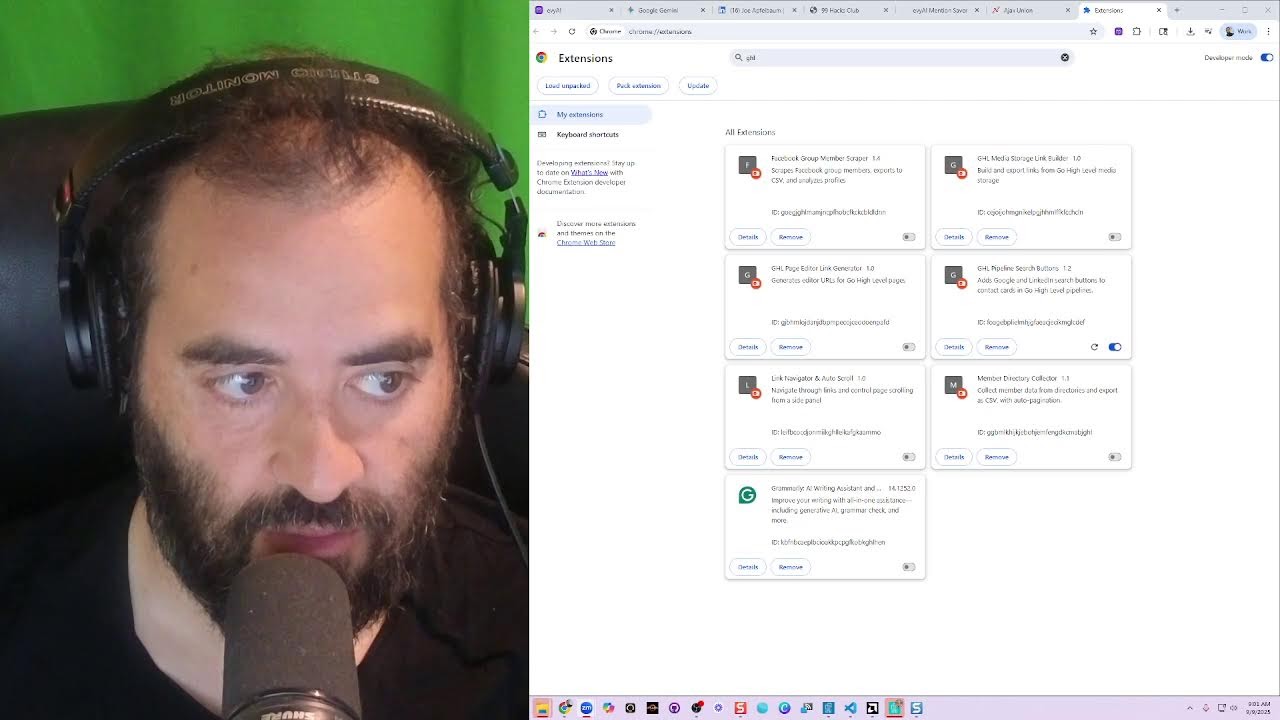
Okay, that didn't work. Let's go back over here and say give me the manifest. Let's see if you can give me the manifest with no icons. There you go, that's what I wanted. All right, now let's install it. We're going to install the extension. So we just built an extension. Now we're going to install it. Manage extensions, load unpacked. I'm going to go to the place where the extensions are. Um, okay, we're going to press add and then we're going to see if it works. We're going to refresh this page. It did not add it. Did it add it maybe here? I don't see it anywhere. Is it even on? How do I know if it works? I don't even see it on.
Okay.
All right, let's look for that.
Refresh.
We're going to close the extension. We're going to click on Inspect Console. Refresh. Looks like my call is starting.
Recording in progress.
All right, let's see if my 9 AM shows up. I'm probably gonna have to end this. If it doesn't show up, we can keep playing. Thank you for writing that code. Very helpful debugging. That's great what's happening. The good news is the message DHL confirms your manifest credit successfully running on the page. The other errors are likely not related to the extension. Most likely the reason aren't appearing. Go high level updated HTML. I've written the JS file. More robust HTML selectors.
Okay.
Replace the content.js. So let's replace it. Copy contents. I'm going to go into here. I actually have to paste it in here under content.js. Ctrl+A, Ctrl+V, Ctrl+S. Let's see, content.js. Then I could Right-click here, do Manage Extensions, uh, JHL Media Store, JHL Page Editor, Link Generator, Pipeline Search Buttons. This is it here. Refresh it, turn it off, turn it on, refresh it. And then I'm going to go here. Looks like there's 2 people in my waiting room. George is in my waiting room. Um, I'm gonna go to the GHL thing here and refresh it.
Hey.
Hey, what's going on? How are you?
I'm good, sir.
What's the word? Uh, I just created an extension. Check this out. I literally just built something crazy. Watch this. And I'm doing this on LinkedIn Live while we speak. Check this out. Watch this, watch this, watch this. If I want, You see all these people that are here? Like this guy, Michael Davis. If I want to Google search him, I can click on this little Google button and it'll Google search him. You see that?
Yeah.
I just added these buttons here using an extension. This is, this is the tool that I built and I used Gemini to build it. So you see the way I just, I just copied and pasted this code here.
Yeah.
And then it, It added this to my pipeline. So if I want to call somebody, let's say for example, I want to call this guy Bob Hope, right? Or this guy Bob Hope. I'm going to press, I'm going to press call. It's literally going to just start ringing. But if I want to research him while I'm, while it, while the phone is going, I can now press—
Hello, we can help you find another business in the area. Since the number you called is not in service. I'll look for you now.
So this guy, this Bob Hope thing is obviously not real Bob Hope. So I have to like let my team know that this is BS, this is not a real opportunity. So then I go into here and I could say this person is, instead of new lead, it's bad contact info. You see that? And I press update. So that kind of moves it across the pipeline. So if you're, if you're like trying to close deals, the most important thing you have to do is have stages in your pipeline, but then also be able to kind of do research on people like this person over here, Monique Chihardy. If I want to call this person, I can press the call button. It'll start calling. But at the same time, I could pop open their LinkedIn. And if I find them on LinkedIn, like this person right here, I found her on LinkedIn and I want to research her. I can now pull up Evvy AI. Save her into Evvy AI like this. Watch, I'm going to save her as a 99 Hacks lead, 99 Hacks prospect. I press save, it saves her into Evvy AI. But now what I can do is I can just click on any of these agents and it'll start researching this person all over the internet. Look at, look at what it's looking for.
Your call has been forwarded to voicemail. The person you're trying to reach is not available. At the tone, It's a real— Please record your message.
Real amazing—
When you have finished recording, you may hang up. That's so neat.
Hey, I just wanted to know what best practices you follow in launching new product lines in international retail markets like Walmart and Costco. Give me a call. My name is Joe Apfelbaum, 917-865-7631. And I wanted to know how you balance ESG commitments with product innovation and all that stuff, if that's what you do. And you want to learn more about our 99 Hacks, I'd love to chat with you. Talk to you soon. But do you see the way I kind of— what's up, Jen? Excuse me, we have someone in the waiting room. Are we expecting someone else? No, we're not. I don't know who Peter Fan is, and that person just keeps— you know, you could just report it because I don't
More from Joe




How to Beat the Algorithm: Remove Hidden Watermarks & Scale Content with evyAI






