How to use a AI Chat AGENT to get clients on Linkedin
In this LinkedIn Live session, Joe Apfelbaum demonstrates the Evvy AI platform, focusing on its AI-powered chatbot. He walks through how users can access the chatbot, train it with personal context, and use it to search a massive 280 million‑record prospect database with filters (e.g., "business coach" with LinkedIn, phone, email). The demo shows the chatbot’s ability to generate advice, create lists of prospects, and retain conversation history. Joe explains the workflow for creating LinkedIn posts, then repurposing them into tweets, video scripts, and hooks via the chatbot. He highlights the integration of external AI research agents (Perplexity, Claude, Gemini, etc.)—the Pro version can scrape hundreds of websites for deep enrichment, showing an example of a CMO profile enriched from 92 sites. Community support features such as office‑hours, webinars, and a demo request line are presented. Additional upcoming capabilities include a local‑business finder that pulls data from Google Maps in real time, and a persona‑building process that combines AI research with the chatbot to generate concise bios. Throughout, Joe emphasizes the need to provide the bot with clear context, the independent nature of each chat session, and the roadmap for future enhancements.
Chapters
And we have a chatbot that I want you guys to know about. So if you log into Evie AI, on the left side you click on AI chatbot, or if you're in the side panel extension, there's a section here called chat. You can click on chat. It's the same chatbot. Um, the one thing I want you to know about the chatbot is the chatbot is a powerful AI agentic chatbot that you can chat with about whatever you want. So for example, you can tell it to give you advice. Please give me some advice as an owner of a SaaS company called Evvii AI about who the best target market is to be able to target. So I just basically do that and it'll gimme some advice as the owner of a SaaS company called Evvii AI about who the best target market is. And you see it gives me advice over here. If I want to be able to turn this advice into something specific, So it tells me over here for a SaaS company like Evvii, the best target market is usually one with a clear painful problem, short sales cycle, and so on. So I want to target coaches. Can you find me a list of people that have the word coach or specifically business coach in their headline that also have a LinkedIn URL, a mobile number, and an email address?
Okay.
Now the agent also has the ability to search through people's headlines. And so it's going to go ahead and reason and create, it's going to create a search. It's going to put in the filters, coach, has LinkedIn, has mobile phone, has an email. And it's going to find me all the people that has the word coach on their profile. We have 280 million records and it found 877,000 people that have the word coach in their profile. Now, any of these companies over here, for example, Chief Talent Officer, Karen PhD, or Rosie, I can also research them using any of these powerful AI agents. The thing is, if you chat with this AI and you don't tell it who you are or what you do or what you want, or you just say, can you find me restaurants that have more than 25 locations? It's not going to be able to do it because what this is actually doing is it's searching through our network. So if you click on network on the left side of Evy AI, and then you click on find prospects, we have a section over here called show filter on the top right corner, where we have a bunch of different filters you can search through. One of the filters is called headline. So if I type in coach over here and I press search, I'm going to specifically type in business coach, business coach, and it could do exact business coach or contains business coach. And I press search. It's going to find me every person that has the word business coach in their headline. I don't want to have to manually go through all these filters. These are 27,000 filters. 27,000 people come up for this. I don't want to have to manually go through these filters so I can go to the chatbot and I can chat with it. Now you might say, Joe, hang on a second. You were just chatting with the chatbot. You went back to it and everything's gone. Everything's gone, but there's a history. So on the left top corner here, there's a little— says to show conversations. And then the history appears on the left side. You guys see that? It says the left side, it appears the history. So that's how you can do history. If you're in the middle of a chat and you want to start a new chat, you could just click on the new chat button on the top right corner. Now anyone can use this chatbot for the summer for free, unlimited. We're going to be adding more tools to this chatbot to do more fancy footwork. But for right now, you need to train the chatbot on who you are, and each conversation is independent. We're going to be adding memories and many other stuff to it. But for now, you got to train it on who you are. Also, we have a community. Inside our community, we have a section in the classroom under the library called the chatbot. And we have different chat flows. So flow 1 is strategy development. So you can say, I am job title who is targeting target audience. And I want to figure out who my best target market is on LinkedIn. Can you help me narrow it down? And then the chatbot might ask you a question and then you can follow up with, my price point is X. I work with B2B or B2C. My main problem I solve is X. Who should I be targeting? And then you can follow up with, I like option 3. Can you tell me more about what this person cares about? And then you finally follow up with, now help me find this target market or find me, turn this target market into a strategy. Can you guys see the way there's like a flow of talking to the chatbot? You're not just telling the chatbot, find me clients and it's going to go find you clients because it's not going to know any of that. You got to have to have a back and forth conversation with the chatbot to help you be able to be more successful with the chatbot. And that's the idea behind the chatbot. So anything you need to do within Evvy AI, for example, you want to create templates, you can have it create templates. You want to create posts or you want to refine posts. So for example, if I want to create a post inside Evvy AI, I click on content. I can click on Post Writer on the top left corner, and then I can say, write me a post about the benefits of business networking on LinkedIn for a SaaS business owner that has over 30,000 followers on LinkedIn. Okay, so I'm going to press generate and it's going to write a post. The post is going to have a hook, main points, call to action, hashtags. If you want to modify this post, you can copy the post. You can open up the chatbot in the side panel here. I'm going to click on the chatbot on the side panel and you can say, you can say, turn this post into a series of 5 tweets. Okay, and then you press send and it's going to turn this post into a series of 5 tweets. You see tweet 1, tweet 2, tweet 3, tweet 4. Turn this post into a 30-second script for a video. And it's going to go read the post from before and turn it into a 30-second script for a video. Now turn the post into 5 different hooks, and it's going to go ahead and turn the post into 5 different hooks. You see that? I am chatting with it. Now I can tell it— so you can keep chatting with it and it will remember what you said before. For example, you can say, tell me all the different things I asked you to do during this chat. And it'll go ahead and tell you all the different things that you asked to do during the chat. You see, one, turn it into a series of tweets, turn it into a 30-second video, turn it into 5 different hooks, summarize all the tasks. Now, sometimes you're gonna ask the AI to do something for you and it's not gonna do exactly what you want it to do. And so don't freak out about it. Instead, come to office hours inside our community. We have something called office hours. So if you go back here and you scroll down to where it says community, join community, and you click on calendar, you're going to notice that we have office hours every single day at 12 at evviai.com/success and every single day at 7 at evviai.com/success. That's 12 Eastern and 7 Eastern. And today we actually have a webinar at 1:00 PM at evviai.com/webinar. We have these webinars 25 times a year. So register for the next webinar at evaai.com/webinar. And if you want a detailed demo of how Evai works, you can send the word demo to 973-841-8868, and we'll go ahead and send you a video demo. That's 973-841-8868. Send the word demo. Any questions that you have, James, about the chatbot?
Uh, but would this actually go through how many websites, how many websites this bot actually goes through if I'm searching for someone or something?
So if you're searching for someone or something, like for example, find me chief marketing officers in Madison, Wisconsin that have a phone number and a LinkedIn URL. Okay, so I say that. What it's going to do is it's actually going to go ahead and find me chief marketing officers in Madison, Wisconsin that have a LinkedIn URL and a phone number. Now over here it says, oops, something went wrong. It couldn't find it. You see that? Yeah. So instead what I'm going to do is I'm going to say, find me CMOs in Los Angeles, California with a LinkedIn URL. Okay. So I'm going to go ahead and say, um, where it's going to do, it's going to go ahead and do that right now. It's having some issues. I don't know why it's not doing what I want it to do, but it still worked over here. Do you see that?
Yeah.
And so it's not gonna search the websites. It's just searching our repository of contacts. We have 280 million people in here. If I wanna search the internet, I can click on any of these AI agents. If you're using Evvy AI Pro, the pro version of Evvy AI, when you click on these agents, they will deploy agents that will search the internet for the person and it'll look at hundreds of websites to tell you everything about the CMO. So as you can see over here, it's finding, um, it's doing research for me and I could press think harder and it'll go ahead and think much, much harder. But right now it just researched for 18, 19 seconds about this person. It gave me their target market, their key services, how they help client. It gave me their address, their phone number, social profiles, 3 conversation starters, potential business opportunities, notable achievements, And it looked at 92 different websites to get me all this information. Do you see phone number, address? Everything is here. If I want additional stuff, I could actually enrich it by clicking on the checkbox here, scrolling to the bottom and clicking on save connection. When I press save connection, if you have Evvy AI Pro, you can also leave notes. You can generate insights and much, much more. There's a lot that you can do here. Does that answer your question, James?
Yes, it did. Thank you.
Amazing. Laurie, do you have any questions about the chatbot?
Uh, with regard to the chatbot, um, let's see, searching for CMOs in Angeles, California. I guess that's it.
Okay, great. Thank you. What about you, Mark? Do you have any questions about the chatbot?
Yeah, I do have actually a question. Will the AI chatbot automatically create different like result tabs like the ChatGPT? They provided different tabs for each search based on—
When you're clicking, yeah, when you're clicking on these links over here, new windows will open up with the results. So for example, for Laura, a new window opened up with the result. So whether I'm searching here inside the web app Or if I'm searching here in the extension, if I say, find me CEOs of marketing agencies in New York City that have a mobile phone number, you see that? And I press search. It's going to come up with the, with the search here on the side. Do you see the way it's coming up inside the extension?
Mm-hmm.
And if I want to research them, say, let's say for example, using Perplexity, I just push this button and it's going to start researching these people using Perplexity. If I want to see who else works at this person's company, I just have to click on their website here and Evvy AI will automatically check who else works at their company. You see that?
Yep.
And it will load it up. But in terms of this is a very powerful tool that opens it up in different websites.
Amazing. Follow up.
Thank you.
Go ahead, James.
Follow up question regarding that, Joe. Would it actually matter how are we looking into the agents that we have, like let's say per practice Perplexity, if we have, um, a subscription on it, or does it change if we're just using it for free?
If you're using it for free, you'll still be able to use it. But if you have a subscription, it'll save everything to the left. Do you see it's saving everything that I did to the left here inside Perplexity?
Yeah.
So, and also I'll have other models that I could use if I'm paying for it. You see, I could use other models to do the research. Um, so I could switch to Kami K 2.6 here and it'll use Kami K 2.6 with thinking and it'll do research using that. You see that? So I can turn on thinking and I could say, do a little bit of a deeper research on this person and get me some more information. You see, I just switched models on the fly and it kept the context of the model and I'm using Kami K 2.6. That's the power of Perplexity.
Yeah.
With Claude, you can't just change models in the middle of conversation. But with Perplexity, I went ahead and—
You have to start over.
You have to completely start over. And it doesn't have the models like Claude and Gemini and ChatGPT and Kimmy K 2.6 or Nemotron Ultra, which is the new NVIDIA, um, um, thing. But do you see the way Kimmy K is doing even more research on this person? Pulling up images, education and training, online background. It's doing deep, deep research on this person here.
So basically it doesn't matter if we're logged in or not, it would still give us what we need, right? Like the conversation stuff.
Right, even if you're not logged in, it'll work. But if you are logged in, you'll be able to have more features.
Oh, okay, got it.
Yeah.
Yeah, thanks, Joe.
And actually I noticed also though with Evie AI, if you're browsing to it and if you, Open it just now or refresh it, it will clear everything without remember any previous conversation and use that context to use that.
If you are in middle of chatting with a chatbot, every conversation has its own URL. So if I refresh this conversation right over here, I'm still on the same URL and it's still go ahead and doing, it remembers everything we spoke about. But if I click new conversation, it'll create a new conversation because the URL changed. If I want to see the previous conversation, I just click on history here and then I could load up that previous conversation.
Oh, there you go.
Yeah.
That's the history here.
Okay. I got it.
All right. Well, thank you. This concludes our training session. Does anybody else have any questions before we move on?
I have not.
Okay, what did you notice, Lorena? What did you notice? Is there anything that you noticed anything? Oh, you're good? Okay, no questions, awesome. So now you understand how the AI chatbot works. We're going to be adding additional tools to the AI chatbot, but even if you wanted to say, for example, using the AI chatbot to create a persona of a person. So let's say for example, you wanted to create a persona. This is specifically for Fernando. Fernando, you're here, right?
Yes, sir.
So from now on, when somebody wants to create a persona for Evvy AI, instead of creating a persona in ChatGPT or Gemini or somewhere else, what you're going to want to do is you're going to want to first do AI research on a person. So for example, if I want to do a persona for myself, I would search Joe Apfelbaum. I would open up my thing and I would do AI research on myself. Okay, so I'm going to click on Grok, I'm going to click on ChatGPT, I'm going to do a little bit of AI research on myself, you see? And when I do AI research on myself, I'll have a bunch of information about myself, right?
Yeah.
Then I'm gonna go into the Evvy AI chatbot, grab that information about myself, either from the AI research that I did or either from the AI research that I did or from the networking system strategy that we have. And then I paste that information over here and I say, I would like to create a short blurb about my background and history that is 300 characters long. I mean, 300 words long based on this information. Okay, so I'm going to paste this in. I'm going to press send and hopefully it'll create a 300-word overview that I could put inside Evvii AI under where it says personas. I can click on new persona. And then do you see the way, absolutely, here's a polished thing about Joe Apfelbaum, and I can add this here. You see that?
Yep.
So I can just say Joe Apfelbaum persona, and I press save. And now I have a persona for Joe Apfelbaum. You see, I can add an image to this persona if I want.
Pictures.
I'm going to add a baby photo of me. You see? Joe Apfelbaum baby photo. And I have my persona over here that explains who I am and what I do. If I want it in bullet points, I can say, give me 10 fun facts about Joe Apfelbaum in bullet points. And it's gonna gimme 10 fun facts about Joe Apfelbaum in bullet points that I could use for the persona. You see?
Mm-hmm.
I can add this to the persona if I wanna add additional things to the persona. I can add these, you see?
Yeah.
Uh, for each bullet point, can you just say it in full? Like, Joe Apfelbaum is the CEO and founder of Evvy AI. Joe Apfelbaum is the CEO and founder of Ajax Union. Joe Apfelbaum is a certified Google trainer. And maybe give me 20 fun facts about him, please. Do you see the way I'm kind of changing this? It's putting it all together. Oh, perfect. You see?
Wow, it's great.
But Fernando, do you see the difference? Do you see the difference?
Yes.
And so now I'm creating per— now you can create personas, templates, styles, everything with the chatbot. Makes life easier, right?
Correct.
Yeah.
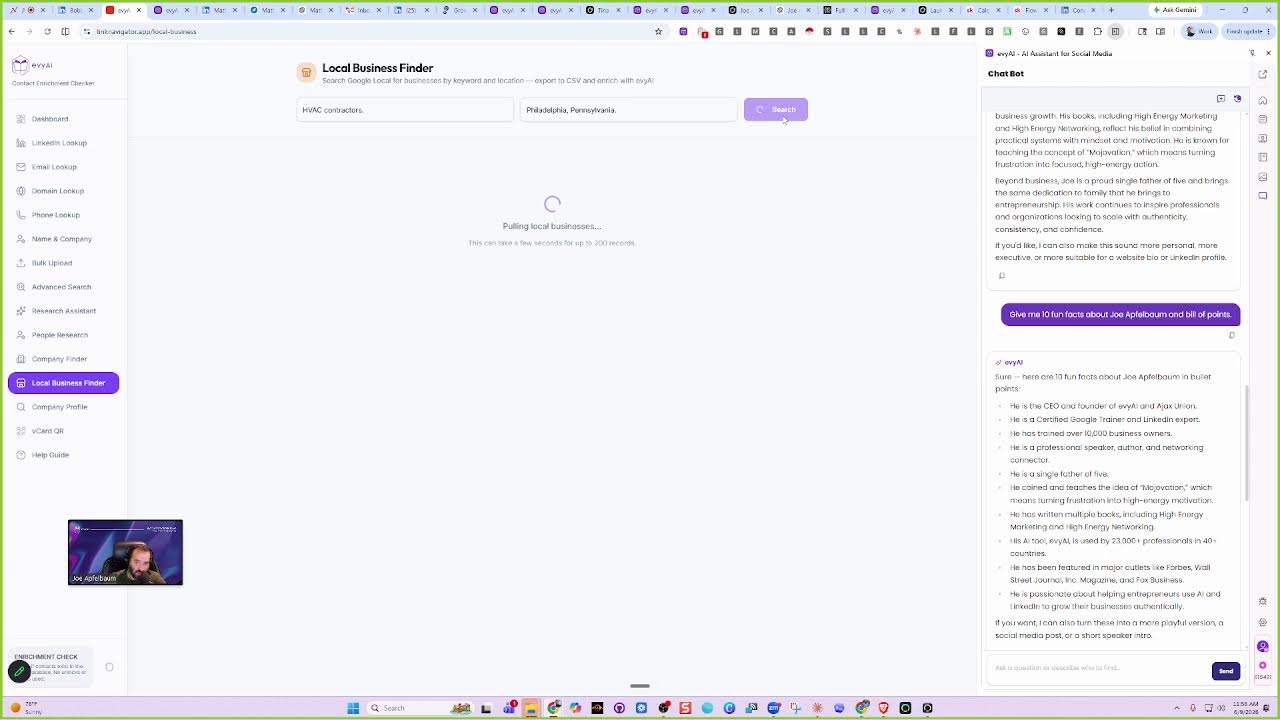
Having to go back and forth. And if you want to find prospects, you can easily find prospects right in here. Now we did create a temporary thing called linknavigator.app, where you can go in here and look for local businesses. So for example, if somebody wants to find, let's say, HVAC contractors, and you want to find HVAC contractors where, in Pennsylvania, Philadelphia, Pennsylvania, and I press search, it's going to find all the HVAC contractors in Philadelphia, Pennsylvania. And it's going to go through Google Maps and find them and make them available. And once it finds them, you're going to be able to enrich them with Evvii AI. We're going to be adding this local business finder into the chatbot. It's not there yet, but we have it available as a test if you want to test it out on this test website that we created. But this is the type of idea, because right now we only have 280 million records inside Evvii AI, but we're going to be adding local businesses as well. All the businesses in Google Maps, which are tens of millions of businesses. that are currently not available in our database. Does that make sense?
Yep. Yep.
And we're going to get it real time from Google Maps. So as people are updating their websites, their phone numbers on Google Maps, we're going to pull that information real time and be able to show it inside Evvy AI with all the contact information about every person. So right now it's doing searches inside Google And then it's going to pull together every single person it was able to find. And that takes about 60 seconds or so to be able to pull the information together. The beauty of this is that you also get phone numbers, you get websites, and you also get to see the reviews as well, to see how many reviews they have. So for example, this company, Gen 3 Electric, they have 5,100 reviews as an HVAC contractor in Philadelphia. You see that? If I click enrich with Evvii AI now, it'll do the search app.evvii.com/app/network/prospects-find/domain, and it'll have the domain there. You see that?
Yeah.
And then it'll tell you everyone that works at the company with everything that you need here. This is extremely powerful. So we're about to add this technology to Evvii AI so that we can find many, many more companies. Because until now, If you just search HVAC contractor in Philadelphia, Pennsylvania, it's not going to find much people inside Evvai because— We are transitioning to office hours soon. Amazing. Amazing. So do you see over here? There's all these, all these things. It doesn't say the ability to search HVAC contractor here. So we're going to kind of have a whole new ability to search for our clients. Anyway, thank you very much for watching. This concludes our LinkedIn Live. If you enjoy this, please Hit the repost button, give me a like, give me a comment.
More from Joe




How to Beat the Algorithm: Remove Hidden Watermarks & Scale Content with evyAI






