How to use LinkedIn Mentions and Tagging
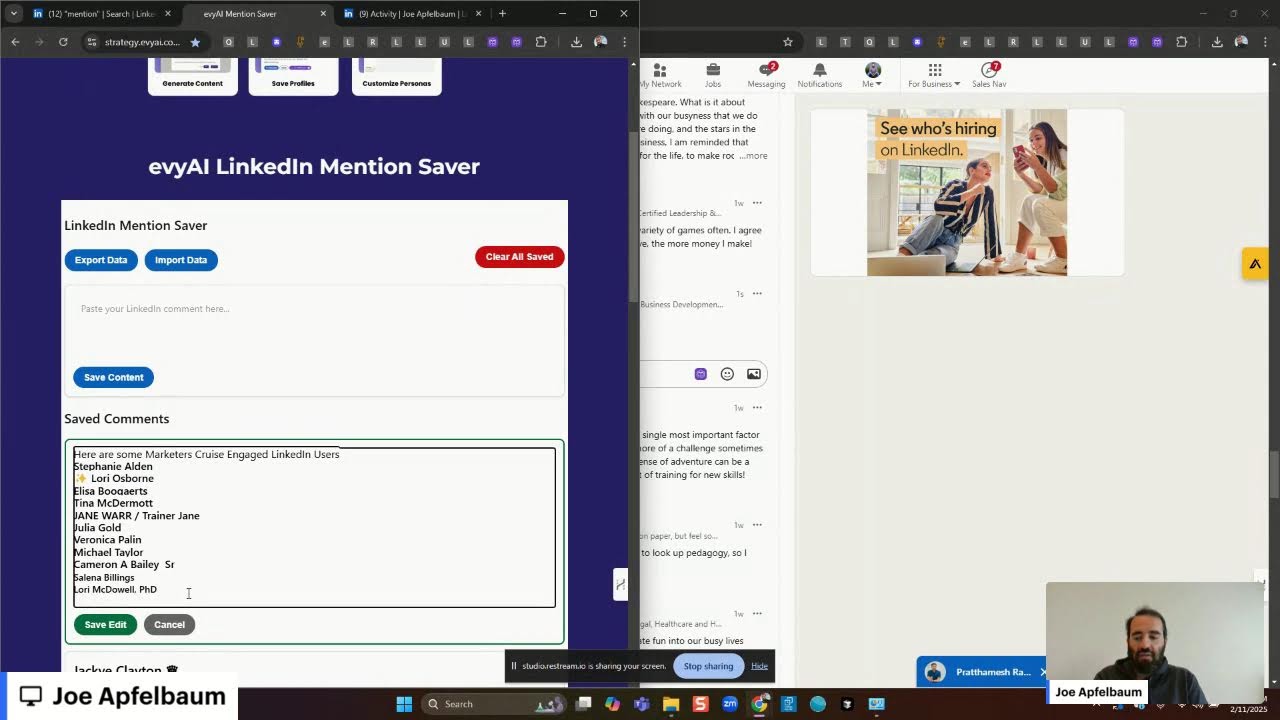
In this live tutorial, Joe Apfelbaum walks viewers through the concept of LinkedIn mentions, demonstrates how to capture and reuse them with a custom "Mention Saver" tool, and shows how to automate comment creation using Evie AI. He explains the mechanics of mentions (pressing @, selecting a profile, automatic insertion on replies), how to copy, store, and batch‑mention up to ~25 people to avoid LinkedIn throttling, and how to organize lists by segment (e.g., marketers, executives). Joe emphasizes permission‑based mentioning, building a community of engaged users, and leveraging mentions to drive post visibility and engagement. He also promotes his Influencer Summit 2025 and other services, while sharing practical tips for finding recent activity, commenting, and maintaining relationships on LinkedIn.
Chapters
Has anybody mentioned you lately? I don't know if anybody's mentioned you, but people are having a hard time with mentions. What's this thing called mentions and how does it work? Hmm. Do you know what a mention is? I'll show you what a mention is. Let me let me pull up LinkedIn real quick and just kind of show you what a LinkedIn mention is because a lot of people have no idea what it is. A mention is simply when you go on LinkedIn and you press the@ sign and then you click on someone's name. I'll share my screen so you can see what I'm talking about here. Click share screen. I'm gonna go to window. I'm just gonna share a window real quick. Actually, you know what? Yeah, let me just share this window and see if you can see my window. Can you guys see my window? Let me just see if we're on LinkedIn right now. I'm gonna go to view profile. And I left my phone on because I have an important call coming in and I got to keep my phone on. So it's gonna be making a lot of noises. I just wanted to check to see if you got her email about YPO leads. Not yet, but I'll check. Okay, let me go here and do this. Okay, let's check this out. All right, so what's a mention? How does it work? All right, so let's go in here to my latest post right over here. Okay, I'm gonna go to the post right over here. And I'm going to go down to the bottom of the post, and you can see he mentioned me here. Do you see that he mentioned me? I usually have a link in my post at Joe Apfelbaum, you see. So this guy was able to mention me. I mentioned him here, you see that. Now whenever you reply to anybody's post, for example Frank, when you press reply, the mention automatically happens. Can you see the way the mention automatically happened here? So when the mention automatically happens, you can take that mention, copy it, Ctrl+C, and you can put it into strategy— let's say strategy.ebai.com/mentionsaver. You see that? And I can go in here and then paste this mention here. Now if I save this mention, then I can later copy any of these mentions By pressing the copy button and automatically paste these mentions in. Now, why do you think that's important? That's important because if you want to use mentions strategically, like for example, let's say I want to use mentions right over here. I'm going to copy these mentions here and mention all these people here. So I want to mention them all. I'm going to say thank you. Now when I press reply, now he will get a notification that I mentioned him. But let's say I wanted to mention all the members of the Executives Association. So I just paste in all the mentions here, and I'm going to say, here are some members, here are some friends and members of EANYC you might find valuable following. Okay, so now I have John Rafferty, Frank Winston, Elise, Matt, all these people over here. You see that? Boris, special shout out to our president who'll be leading us to thrive, who is leading us to thrive, and who will be, who is leading us to thrive in 2020. Um, and I'm gonna put the— I'm actually gonna cut these out from here. Ctrl+X. Paste these into here like that. Okay, so now we have all these people. Now I press comment, all those people get mentioned. You see that? I just mentioned all those people. Now could you imagine if you saved a list of mentions and you can mention people on as many posts as you want, as often as you like, and you just had a list of people that wanted to be mentioned? As a matter of fact, What I can do is I can go back to mention. I'm just going to search the word mention, and then I'm going to click posts to find posts that have the word mention in them. And I'm going to specifically look for all posts by me. So I'm going to go here from me. So I'm searching my own posts and posts that have an image with it. I'm going to press show results, and it's going to show all the posts that have the word mention in it. You see that? So one month ago I posted this post right here. I said, do you mind if I mention you in the posts and comments? So now I'm going to automatically— I'm going to reuse this right here. I'm going to click on this post, I'm going to right-click on this image, I'm going to hit Save Image As, I'm going to call it Mention. And as you can see, I had 70 comments on this and one repost. And I'm going to use this mention strategy right now just to kind of show you how this works. Ctrl+C. I'm going to go here to linkedin.com and I'm going to click on— first of all, I'm going to leave a comment on this post over here by Matt Schnurr— by David Schnurman. Next week I'll be co-leading a 2-day workshop YPO. What an exciting opportunity, David. Sharing your experience on YPO can be truly amazing. I'm going to click on that. Now I'm going to click here and click on Start a New Post, and I'll show you how I repurpose a post. So I'm going to click on Add Media. I'm going to go to my photos. I'm going to go to pictures. I'm going to click M for mention. I'm going to take this one right over here, press next, and now I'm going to grab the content from here. I'm going to copy all this content from right here, Ctrl+C. I don't even have to reinvent the wheel. Evie AI already wrote this one time, so I don't have to rewrite it. And I'm going to say mention Strategy. Okay, so now we have over here, would you, would you be willing to be mentioned on one of my posts? The only request is that you reply, otherwise the powers that be get upset that I mentioned you didn't reply. Today I'm on a mission to empower a million businesses using AI. You know, new test, new technology allows me to engage, mention engaged users on my posts. I call this the Mention Saber. I did a LinkedIn Live about this. I'm doing it right now. Watch it. Okay, this mention— this feature aims to foster community activity without being intrusive. If you're interested in being part of this experiment, simply leave a comment below indicating that you would like to be mentioned in my posts and comments. Your feedback is invaluable. If you found this post insightful, what are your thoughts on AI enhancing engagement? Let's discuss. Now I'm going to write, here are some people who said they wanted to be mentioned the last time I did this post. Tag at least 3 people who like being mentioned on LinkedIn and want more exposure. 1,000 people will see this. Okay, so let's just find those people that wanted to be mentioned last time. So how do we find them? We go to the comments and then we click on— now I have 70 different comments over here, so let's just see. Let me know if you see this: Jacqueline Clayton and Don Davis. Um, and I want to go here, I'm going to copy these right here. I'm gonna go here. Now I'm gonna put this side by side, this and this side by side, just like that. You see that? And I'm gonna paste in the names of the people. Now if I paste in the names of the people just like this, you see Don Davis, Jacqueline Clayton, their names are not automatically mentioned. But if I click on their name, they get mentioned. You see, I click on their name just like that, they get mentioned. So what I'm gonna do is I have to manually go ahead and mention all these people. However, If I edit a comment and I press edit just like that, I can actually edit this. You see this? I'm not going to do Tammy and Esty. I'm going to go here. I'm going to pin— you see the way I pasted? The mention stayed. So I'm going to hit cancel here. And I'm going to go find more people that I mentioned in the past. Now it's a pain in the butt. Look, Carrie said she wants to be mentioned. So you can only mention up to 30 people. After that, LinkedIn gets upset and they start blocking the whole thing and everything goes ape. So what I'm going to do instead is I'm going to mention 25. So, so far I have 6 people. I'm going to go ahead and find a few more. In the meantime, let me know in the comments if you want to be mentioned. And I may mention you. Let's see. I'm always honored to be mentioned by you. I'm gonna say Jeff Goldberg, the sales trainer. Let's see. To those in Nevada, sure, anytime. Brett said Brett Oakley. Okay, now I'm gonna go here. I'm gonna click on I appreciate you leading. What does she say over here? She Terry said, "I appreciate. I appreciate you leading the way to connect. Thank you." I'm in, Terry said. So Terry mentioned Terry Lenowski. Okay, so that's one, two, three, four, five, six, seven, eight, nine. That's nine so far. That would be nice, Judge Rinka. Jadranka. Okay, who else said Steve Gard? Steve Gard. Let's see who else said anything. So Steve. Now the fast way to get the mention done without having to add anything is you go and you hit reply right here. So feel free to mention me. Rick said feel free to mention me. So I hit the reply button. Check this out. Check out what happens. The mention is complete. So sometimes it's hard to find somebody, so you go to any of their comments, you hit reply, and then you copy and paste the actual reply, the actual mention inside the reply. So you see the way that Lisa said, yes, I am? I hit the reply button there, her name got highlighted, and automatically the mention's ready. So now I could use the mention just like that. Do you see the speed at which I'm able to do this compared to like copying their name, pasting it, and having to deal with all that stuff. That's a pain in the butt. Um, so what I do is I just literally just paste in the mention from here. Keisha King said, let's go. I can just reply now. I can reply to all these people as well while I have their comments open over here. I can reply to the people as well. I'm gonna go to Tyler Martin. So I could just press Ctrl+A, Ctrl+C if I don't want to hover over it. I could just go like that. Great idea, mention away, Jay said. CEO of Elephants. Ctrl+A, Ctrl+C, click in here, enter, Ctrl+V, enter. Um, in the words of Rocky Balboa, go for it. I click reply, Ctrl+A, Ctrl+C, click Ctrl+V, Enter, Enter. I'm going to press more comments. Let me just see how many we have. 1, 2, 3, 4, 5, 6, 7, 8, 9, 10, 11, 12, 13, 14, 15, 16, 17, 18. We only got a couple more left, but do you see how quickly I'm able to do this? This is actually a strategy that I teach people. Mark Teller said, I would love to be mentioned. So I said, I will be mentioning you. I'm gonna hit Ctrl+A, Ctrl+C, Ctrl+V. Let's see, Audrey says yes and thank you. I said boom. Ctrl+A, Ctrl+C. Greg said certainly free for both. Ctrl+A, Ctrl+C, Ctrl+V. So we're at 20. We can only do— I'm only gonna do 5 more because I don't wanna go crazy. But I'll do a separate post where I'll do more of them. Ruth said, I'm in, I'm in, and so is my company. Ctrl+A, Ctrl+C, Ctrl+V. Nelson said, AI has a great potential to transform engagement relationships here. Joe, I'd love to be mentioned, Ray said. I'm going to click here. Yeah, I said happy to be mentioned in your post, Howard said. Ctrl+A, Ctrl+C, Ctrl+V. We got 4 more people, so we'll do Howard. Let's see, Howard Glick. Now even though I'm taking this shortcut approach right over here and I'm copying and pasting, it's still taking me considerable amount of time to compile a list of 25 people. But once I have this done, I just put it inside the Mention Saver, and now I have this whole group of 1, 2, 3, 4, 5, 6 7, 8, 9, 10, 11, 12, 13, 14, 15, 16, 17, 18, 19, 20, 21, 22, 23, 24, 25. I have a list of 25 people here. Hannah said she wants to be part of the experiment, so let me just add Hannah here. Why not? We'll do 26. Ctrl+C. And we'll do Mike Woolley, 27. See, Mike Woolley's not even connected to me. He's a second-degree connection. Ctrl+C, Ctrl+V. So it's a good mix of first-degree and second-degree connections. I'm going to take these 27 people here, I'm going to copy all this here, I'm going to copy it just like that. I'm going to go into Mention Saver, I'm going to paste it in here, and I'm going to hit Save Content. Now this saves this content. I can paste these Mentions anywhere I want on the internet. All right, so now I'm going to go here and I'm gonna just post it. Now I can post it right now or I can post it later. So what I'm going to do is I'm going to inspect to see if anybody's actually watching me live right now. If you're watching me live, write, I'm watching you live, in the chat so I could find you. And if you want— if you learned something new today, say, I learned something new, in the chat. I'm curious to know if you guys learned something new, if you guys could even hear me. I don't even know if you could hear me. Oh, it looks like somebody left a comment. I And can hear you. I'm gonna give myself a heart here. And it looks like Steven says, please mention me, Steve Green. All right, so let's, let's mention Steve Green here as well. I'm gonna go here, Steven Green. Let's see, Steven Green, second-degree connection, Empowering Entrepreneurs to Strive Virtually. It looks like his photo, so I'm going to click on it and then I'm going to click on post. Now, when was the last time I posted? I posted 15 minutes ago, so I've been on this live for 15 minutes. Before that, I posted a poll 3 hours ago, so it's safe if you post something 3 hours ago and you want to post again. Totally safe to post every couple of hours, but you don't want to post things that are too close together because otherwise it'll crack the engagement and it won't work. Okay, I'm going to hit post and I'm going to go ahead and wait to see if it posts. So it looks like it posted successfully. You see that it posted successfully. Now I have a brand new post on LinkedIn and it says, would you be willing to be mentioned in one of my posts or comments? The only request that I have is that you reply, otherwise the powers that be get upset that I mentioned you and you did not reply. Today I'm on a mission to empower a million businesses on LinkedIn using AI. I'm looking for a test new functionality for Evvy AI that allows me to mention engaged LinkedIn users in my posts and comments. I call the mention— I call this the mention saver. I did a LinkedIn Live about this, watch it. The feature aims to foster community and recognition without being intrusive. Okay, so that's cool. Now let me— so you guys just saw what I did over here. Now what I'm going to do is I'm going to go back and comment on each of these people. I mentioned you Okay, now I'm going to copy this. I'm going to press reply. Now it's really easy for me to mention these people individually on this post. I'm going to say, I mentioned you, let me know if you got a notification, and feel free to comment on the new post. Okay, so I'm going to go here, copy this, and then I am going to paste it in all 25 comments. I'm going to go ahead and leave an additional 25 comments on this original demo post right over here, and I already have all the comments already open, so I don't have to like reinvent the wheel. If I want to have a unique comment on each post, I can do that by using Evie AI, and Evie AI will be more than happy to read this comment and draft a reply to the previous comment that they had, as you can see. But I already have all the comments open, so I can simply just paste in a response to each person And before I pasted the response, I copied and pasted their mention into the mention saver. So like this person over here, and Nilsson, I can reply to him by pressing the reply button. It's going to open up this with his thing there. Then I click on Evie AI, and Evie AI can simply draft a friendly comment response to him addressing his concerns, having a normal tone. I press next, insert. And boom, I just inserted that. You're right, Nelson, AI can really enhance us. Okay, now the people that said I'm in, I'm simply going to just reply with this template that I created. And the same thing with Greg, he said certainly free for both. I mentioned you in a post, let me know if you got a notification. I'm gonna go in here and paste this just like this. I'm gonna fix the text here and hit reply. And this is, this is called a comment reply. You see, I'm replying to everybody's comments over here. I mentioned you. Let me know if you got a notification. Feel free to comment on the new post. Now I'm going to refresh this new post over here and see if it comes up. Anything comes up? Jim Stevens right over here. Left a— started over here. I'm going to click on this. I'm also going to see if I got a text because I am on call right now. Let's see what Jen said. What did Jen say? What did Jen— Joe, I'm going on break now. You have a call with Paul at 1, Ishana at 2. I'm gonna go on break. Okay. Okay. All right, excellent. Um, you see what I'm doing over here? I'm leaving comments on people's posts. Now you might be wondering, Joe, how do you leave so many comments on people's posts? There's many different strategies to leave comments on posts. But the most important thing to remember is that if you're not regularly commenting on LinkedIn, people are not going to remember that you exist just by you having a profile. Having a profile is important, but it's not enough just to have a profile. People need to see that you exist. People need to see that you're alive. People need to see that you're real and that you have credibility. And if you're not commenting, it's not going to work. So look at this. Absolutely mention me. And I'll reply, of course. Thank you so much for replying. I'm going to press reply. Yeah, mention me, I will reply, of course. Perfect. I will include you on my list of people that I mentioned. So now what I'm going to do is I'm going to copy his name just like that. And I'm going to put him into my mention saver. I'm going to press edit, paste his name, hit save, and now I have him in the mention saver. So if I want to mention these 2 people somewhere, I can then mention them. So she said yes. I'm going to say— I'm going to hit Ctrl+A, Ctrl+C. I'm going to say thank you. I'm going to hit reply, and then I'm going to go to edit this right here. And I'll paste this just like that. Now I'm also going to have different categories of people that I mentioned. So for example, I'm going to say marketers, marketers crews engaged. Here are some marketers crews engaged LinkedIn users, and I'll put her in there. And then what I'll do is I'll go find the marketers crews engaged LinkedIn users. Now the place where I find them is app.eviai.com, and then I click on Saved Profiles, and then I click on Select List, and I say Cruise, and then I click on Marketing Cruise Active, and I press Apply. And that's going to show me the list of all the people that are active on the Marketers Cruise. So let me go here and see if this— oh, This is only showing this. I'm not even showing everything. I'm going to stop sharing. I don't think I was sharing my whole screen, was I? I was not sharing my whole screen, right? Let me share my whole screen real quick because I am sitting here doing stuff and you guys can't even see what I'm doing. Entire screen share. All right, so now you should see my screen, my entire screen right now. All right. Um, so this is the list of the people that are on the Marketers Cruise, that were on the Marketers Cruise. I can go in here and I can say, okay, show me, say, 50 at a time. It's going to show me all the active people from the Marketers Cruise, and I could open each person's recent activity. You see that? These are all the people in the recent activity. So Sherry, for example, she posted 44 minutes ago. I'm going to hit like and I'm going to leave a comment on her post. I'm going to leave a friendly comment. See that? And then Sherry Armstrong, I could easily find a comment where she commented in the past, hit reply, and boom, there we go. I see she's posting a lot over here, but there's something wrong with her profile. Because I can't see her face. So I need to message her and tell her we need to work on her profile together. Sherry Armstrong needs to work on her profile. She received a recommendation back in 2014. She needs new recommendations as well. So we'll work on that together. Let me go here, see who has sent me. See, I have 2 spots left for recommendation for connections. I'm going to try to take one up with, with Sherry. So I'm going to send her a connection request. The way that I send her a connection request is I click on the More button over here. You see, I click the More button over here and then I click on Connect. And now it wants her email address. It's adding mine there, but I'm going to ask her to remove that also because that's a pain in the butt. What's the point of doing that? I'm going to hit more. I'm going to click send a message. Can can you see this? Let me know. If you can see this. This. Okay, I'm gonna hit send. I just sent her a message asking her if she can see this message. Okay, I'm gonna hit close. I'm gonna go back to the mention saver. So do you see? I'm gonna go back to here just to kind of show you a couple things. So this was the mention saver. This was an image of this. So check this out. So I have 4 different screens— I have 3 different screens open. I have my Mention Saver over here where I'm saving people's mentions. I have my Evie AI list of people that I can check out their recent posts. For example, if I want to check out Lori's post, I hit check out recent activity and loads up all of her recent posts. You see that? So she just posted, uh, 4 days ago. I already commented on this. We see there's 28 people that commented. I can take these 28 people and I can reply to each one. So for example, if I click on reply here and I press Ctrl+A, Ctrl+C, I can go here and I can paste. You see Lori Osborne there? I don't have to actually reply to her. I can just click on reply here. Ctrl+A, Ctrl+C, paste. And so I'm building my list of people that are likely to leave comments and that are part of the cruise. Load more comments by just simply clicking reply and it automatically mentions the person. You see that? So I hit reply, Ctrl+A, Ctrl+C, paste. I go to Jane, I hit reply, Ctrl+A, Ctrl+C, paste. Julia, I hit reply, Ctrl+A, Ctrl+C, paste. Veronica. I happen to know all these people because I met all these people. Ctrl+A, Ctrl+C, paste. Keep scrolling down here. Michael Taylor, hit reply. Ctrl+A, Ctrl+C, paste. Cameron Bailey, hit that reply button. So I'm building my list of people. Once I have this list of people, I can easily share this list of people with anybody. Nikki Green is not, Jocelyn is not. I'm gonna hit view more comments, see if I could load more. It doesn't look like there's any more over here. I'm gonna go to Jane's profile real quick just to kind of see what's going on in Jane's profile. Look at Jane's most recent post. Scroll here. That's her featured post. This is her post from 3 days ago. I'm going to click on her post from 3 days ago. I'm going to go to the comments of her post. I see she doesn't have any comments on this post. I'm going to go back and then I'm going to click on this post over here. Oh no, that's not even the post I want. I want this post here. There you go, because this one has all the comments on it. You can see how many comments have are here: Veronica, Tina, Elisa, Michael Gold, Nikki, Cameron. I'm going to click on more. Ricardo, Mimi. So these are the people that actually commented on her post. All right, so now I have my list. I press save content, and now I have a list of marketers cruised engaged. LinkedIn users just like that. And I can keep going through this one after another. So for example, Veronica, I could look at Veronica's latest post, scroll down, see she had 3 comments on this one here. She had 1 comment. Let's see what else she had going on over here. I'm gonna try to find a post that was part of— we do a posting party on Fridays. And you'll be able to see all the people that are part of that. So 19 comments over here, you see that? So these are the people that are part of that posting party. You'll see the same people here, Elisa, Veronica. Let's see who else is there. Julia, we have Selena. So I'm gonna add Selena to the list. Mm-hmm. You see that? Control A, Control C. Edit this, Ctrl+V. So I just added Selena. Let's see who else we had. Tina, Laurie, Cameron, Deepak, Michael Taylor, and that's it. Those are all the people that were part of that posting party. Um, yeah, so I can, I can just close this out. I don't need to keep that open. I can leave. I don't need to comment on all those people. Um, I can look up Tammy. Tammy was also there. I could look at Megan, Megan Betzer. I could look at Stephanie Alden, Carol Register, Paul Brown, Ann Landstrom, Marsour, Lori McDowell. Let's say I wanted to pull up more Lori McDowell's posts to stay top of mind with her. And let me go here in the meantime and load my recent activity so I could see if anybody's commenting on anything here. Lori says, my new book will be released called blah blah blah. So I'm going to click on like. I'm going to click on comment. I'm going to hit on generate. I'm going to generate a comment. And look at this, we already got 73 impressions on this and 12 comments and 12 likes. Life for the people, life of people, or list. Happy to be in the life of the people as well. I'm gonna write LOL. Life and list. And I'm going to press reply. And let's just see what else is going on over here. Yes, Howard said happy to see how AI is utilized for business applications. Stephen Green says, is this a native feature of LinkedIn or is it part of Evie AI software? Both. I'm gonna hit both. I'm gonna say both. I'm excited to be a part of this and appreciate the opportunity to connect with more professionals. Thank you so much. I am live now, by the way. You want to hit search, reply. Never an issue. Happy to be mentioned. I'm a huge fan of your strategies and teaching of your software. Keep the strategies coming. I'm going to say thank you. Okay, and Muhammad said, I agree. I'm gonna give it a like. All right, moving on. Let's see what else we got over here. Um, just got on, Greta said. I'm gonna say most recent. Okay, by the way guys, let me know if you're watching this live or if you're watching the replay. I can only be here for about 8 more minutes or so because I have a call coming up. How can I view this later? I have no idea what you're doing. I am teaching how mentions work. I am teaching how mentions work on LinkedIn. You can watch this later on YouTube at youtube.com/@JoeApfelbaum/live. Okay, I want to press go. Okay, uh, Greg says if you click on the 3 dots, there's an option to save the post. Yes, there's an option to save the post, but how do you save the mentions on the post so you can reuse them? Okay, I just replied to that. I'm gonna close this out. I'm gonna hit view more comments. Curtis, I just got on, hello. Steve says please mention Stephen Green. Okay, I mentioned you. We can hear you. All right, thank you for telling me that you can hear me. Thank you for telling me that you're on right now. I'm gonna close out of this and I'm gonna go here and comment on Lori's post. So now I'm gonna @Lori here, you see @LoriMcDowell. And then I'm going to copy that mention that I just did so that I have that juicy mention for later. And I'll paste the juicy mention in here. You see that? Save. So I just saved this, this juicy mention into here. Um, let me go see if she has any other posts that had a lot of comments on it. Let's see, 9 comments, 7 comments, 3 comments, 4 comments, 35 comments on this one. Okay, so let's go check out if there's any other people here. That need to be saved. All right, so Tammy needs to be saved. Who else? Let's see. Elisa, Lori, Nancy, Tina, Jane, Selena, Nathan, Nathan Johnson, Michael Bishop, Jenny Bellinger. Jenny Bellinger for sure. I love to play. I'm gonna hit reply, Ctrl+A, Ctrl+C. I'm gonna say boom. Then I'm going to go back to the mention saver right here, press edit, and add Jenny Bellinger here. You see? Save. Now let's see who else we have here. Um, Bruce Barnes, don't know him. I don't know Sarah. Sarah Fuentes, I think, is part of Yeah, she was part of it as well. So I'm going to click here. Love, love, love. Ctrl+A, Ctrl+C. Edit this and then paste it here and hit save. Okay, excellent. All right, let's see who else we have here. We don't really have anybody else that we didn't got. We said Tammy. I'm gonna hit reply and I'm gonna press Ctrl+A, Ctrl+C. And then edit, and then paste, and hit save. Okay, so now I have a list of 1, 2, 3, 4, 5, 6, 7, 8, 9, 10, 11, 12, 13, 14— 14 people. So if I want to copy this list of 14 people, I can copy the list. I can go into any of my posts, any of my posts, and for example, um, Say this one over here, when it comes to being successful and engaging. Let's see what this is. This is— oh, this is my poll, so I'm not gonna do the poll. What I'll do is I'll do the mention post. Uh, let's see, do you want to get mentioned? Let's see if we have it over here. 19 votes on that. Tell me what industry you're in. Let's see, I'm going to refresh this page over here. I'm going to hit reload. Let's see what happens when I hit reload. Yay, I hit reload! Now I'm going to click on mentions. There's a special mention tab over here that you guys may have not noticed, and you can see anytime ever anyone ever mentions you inside this mentions notification. So it's a mention notification filter. I'm going to close Sherry's profile here. So it says notifications/question mark equals mentions underscore all. So can we take a moment and celebrate when it comes to digital, when it comes to successful? Let's see. Strengthening our team. Diane said thanks so much for your feedback here. Let's see what Michael Dupont wants. Michael sent me his phone number. Good day, I'm ready to attend your virtual weekly event. I sold my parents' residence. Oh yeah, let me give him a call now. All right guys, this is constant. I am constantly getting people that want to have conversations with me, so I'm going to stop sharing my screen right now and I want to tell you something. There's a couple things you should know. Number one is if you use the right strategy with LinkedIn, you're much more likely to be successful on the platform. If you use the wrong strategy, you're less likely to be successful. As simple as that. Taking a mention approach, which means mentioning specific people on specific posts or inside specific comments, will notify those people that you mention them. And when they get notified they are much more likely to go to that post, engage with it, interact with it, and even see it. Because most of the stuff never make it to the feed, especially if you're doing it the wrong way. So I would highly recommend you take the time to mention all the right people, but mention with permission. Like, for example, you saw the way that I posted just now, and I asked people, would you like me to mention you? And you saw I had 70 comments on that post. So I have 70 people essentially that have given me permission to mention them in the future, either on posts or comments or both. So I want you to consider to build your network of, say, 5 or 10 people that don't mind being mentioned by you, and then have a real relationship with them. Maybe get on the phone, have a conversation with them. And if you do that, you're going to be much more likely to be able to have engagement on your post. Now, if you want more engagement You want to be more successful? Come to our Influencer Summit, influencersummit2025.com. I'd love to have you there. Now I have a series of calls that I'm going to hop on. I'm busy. As they say, you got to get on 5 calls every single day because a call a day will keep the debt away. Something like that. I don't even know what the saying is, but you got to get on more phone calls. So let me know if this was valuable. Write valuable in the chat. Greta, if you click on the 3 dots, there's an option to save the post. Thank you. And let me know if you want to get mentioned. Say Joe mentioned me.
More from Joe




How to Beat the Algorithm: Remove Hidden Watermarks & Scale Content with evyAI






