Joe Apfelbaum & Philip Lanos Do the Internet - Skool Community Growth Hacks
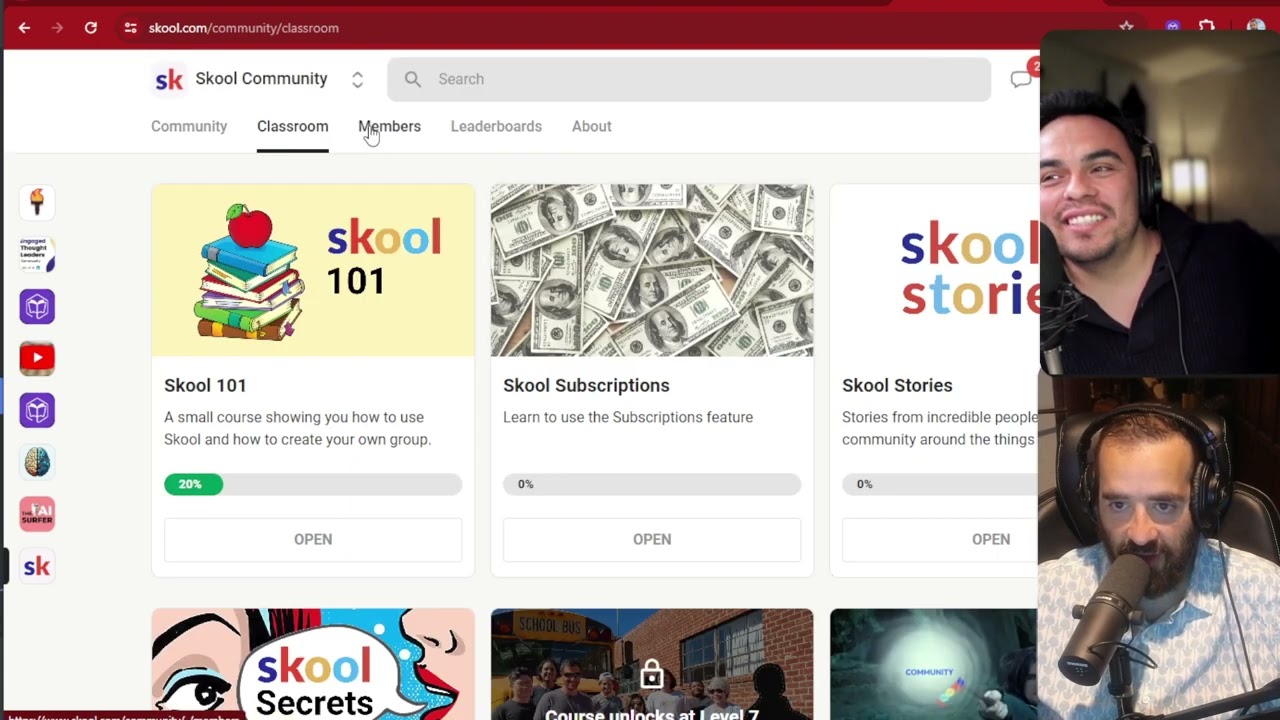
In this 2024 YouTube episode of "Joe and Philip Do the Internet," host Joe Apfelbaum walks guest Philip Llanos through the Skool platform, demonstrating how to build, price, and grow online communities. They explore the backend interface, the three core components (Community, Classroom, Calendar), and how to use public vs. private groups for SEO. Joe shows how to set up affiliate links, create and price paid tiers ($97, $997, etc.), manage members, track churn, and leverage leaderboards and gamified rewards to boost engagement. They discuss discovery tactics, using the Skool "School Games" competition, and analyzing top earners’ revenue data. The duo also uses ChatGPT to brainstorm community names, and showcases the Evyai LinkedIn AI assistant for automated commenting. Throughout, they share practical hacks for outreach (DM limits, finding members via shared groups), leveling up on leaderboards, and monetization strategies, while reflecting on their own content creation history and growth lessons.
Chapters
Welcome to another edition of Joe and Philip Do the Internet. Today, I'm gonna show Philip how to use Skool. And if you're listening to this and you're watching this right now, you wanna pay attention because Philip already got a person to commit to $97 a month to join his new community. And how much revenue are you going for?
I'm gonna go for $10,000 to start.
$10,000 a month in recurring revenue. So let's show him how this freaking works. So I have a free Skool community. And then I have 2 paid communities. So let me show you the backend over here. So the about section, that's how you see all the school communities. You click on the about section, and then on the right side, you see how many people are online, how many admins there are, and how many members they have. And over here, it shows you whether it's a public group or a private group. It's a public group. You can actually browse through the entire group without even joining it. If it's a private group, you have to join it in order to see it. There's 271 members in this community over here. And as you can see, um, in this community, it's skool.com/evai. And the reason I have this community as a free community and an open public community so that it ranks on Google for SEO. So Philip, if you Google, like for example, the ultimate LinkedIn task list, this community's gonna be on the first page of Google or any other posts that we have within it. So it ranks really high for SEO. You know what I mean?
Okay.
And then I have all the links over here. And if somebody wants to sign up to my Skool community and become my affiliate, I put my affiliate link right over here. You see that? If you wanna join up, school, use my affiliate link right here. And I had quite a few people join with my affiliate group already. Okay. So if I click on leaderboards, you can actually see all the people that are the leaderboards, the people that are the leaders inside the community. And there's the 7-day board, the 30-day board, and the all-time board. And I can create rewards for people. I can unlock certain courses depending on who is in which community, who's in what part of the community. If I click on members, I actually see all the members that are part of it. I can see the people that have left, the people that churned, the people that canceled. I can filter by admins, online, free, and people that are— have particular courses. And then I can do last active and people that have the most points. I could also check out my calendar. I have a whole calendar of events and the things that we're doing. So for example, tomorrow at 12 o'clock, we're doing a LinkedIn webinar. So we're promoting this webinar inside our community here. You see that? Yeah. And so you have the main 3 parts of a community is the community where everybody's chatting. There's the classroom where you have all your different courses. You see that? And all the things that we're promoting over here. So if you want to promote your one-on-one time, you could promote it here. And then you have your calendar. So the 3 C's are community, classroom, and calendar. And then of course, if you want to check out other communities on the top, you can click this dropdown and then click on discover communities. So we have another community called the Engaged Thought Leaders Community. If you click on this community over here, we're having a meetup in 36 hours. This community is currently $997 a month. I have 26 members that are part of this community. And if somebody wants to join this community, they need to fill out this form over here. And every once in a while, we let people in at a lower price just to get them in the door. But then I hire the price because I don't really want random people just joining for no reason. If I want, if they're going to join it, they have to be really committed. I had to have a conversation with them. So no one's randomly paying $997 a month, but if they fill out this form, I can qualify them and see if they're really qualified to be part of this. And then I can give them a really, really good deal on joining. If you click on the leaderboard, you can actually see the human beings that are part of this.
You see this?
Some of the human beings that are on this board are also on the free community board. So they're on both communities, which is really cool. So the free community is where they join and then they upgrade to this community or they upgrade to my other community, which is my LinkedIn automation community. So over here, of course I have members. You see these people are paying $97 a month, $1,000 a month each. I have calendar. I have one event per month. That is what the, that's what this community is about. I have one event per month and that event is one hour long. But we have other things that we do, like we support each other every single day. Everybody comments and likes on each other's content. You can see who the people are that are part of the community. You see there's 129 comments here. It's very active. It's a very, very active community. As a matter of fact, this community ranks high on Skool in the discovery because of the activity that's on it. It may not have a lot of members, but we're highly, highly active. You see that?
Yeah.
There's a lot of stuff. So we have CEOs, we have doctors, we have business consultants, business advisors. We have professional speakers, we have media trainers, you know, we have all types of very interesting people that are here, everything from accountants to lawyers to doctors and so on, you know, professionals. So that's this community here. And then the other community is $97 a month. This community here teaches you LinkedIn automation. So I have 15 members in this community. Let me see who the latest member is. It looks like, oh, we just got a new member, Jason Crawford. Jason is our latest member. And we have a small leaderboard, not a lot of activity 'cause it's a pretty new community. And if you click on classroom, we have lots of courses and classes. So I actually have this, my avatar teaching a whole course on how to optimize your profile on LinkedIn. It's a 12-module course here. And then of course we have AI automations, workflows, we have, We have other things like the replays of all of our training sessions. So we do training sessions every 2 weeks here and people can kind of join here. If you click on calendar, you can see when our next training session is and our office hours and so on. So we do weekly office hours on Mondays and then we have additional office hours on Tuesdays and then we have 1 hour every 2 weeks where we teach AI and LinkedIn automation. So that's this community right here. This one's $97 a month. So we have 3 communities. We have the free one, the $97 a month community, and then the $997 $7 a month community. Now I'm part of many other communities. So if I click on this little dropdown, you can see all the communities that I'm part of. If I click on see all, you could see how many communities. So one of them that I'm part of is called the Skool community. The Skool community is the community about school. It's skool.com/community. If you are a community owner, I recommend getting on there. You see there's 96,000 members. All these people either have a trial or they're paying for Skool. Which, if you ask me, I think is pretty crazy to—
Yeah, that's already insane revenue.
Yeah, so they're doing really well financially, but also like, who are these people? These people are people that join and they don't even know how to use technology, a lot of them, and they need your school because they need that support. So you can go DMing people. Now keep in mind, you could only DM 10 people a week. Okay, but 10 people a week is a lot. That's, you know, If you factor that it's 50 weeks, that's 500 people. Just be intentional. Just be intentional when you're DMing, 'cause they'll block you after 10, but it's okay. I get blocked every single week 'cause I'm always DMing new people. It's okay. If you go to the classroom, they teach you how to use Skool. I recommend going through this. It's not bad. They have pretty good stuff. And then they have a community and then they have leaderboards as well. You could see I'm nowhere near on the leaderboard. I was ranking at some point and I was really high on the leaderboard and then I kind of just fell off and stopped doing stuff here. 47 for the all-time leaderboard. But if I really work hard, I can get all the way up. I'm a level 6 Grandmaster. If I want to get to 7, I can get to 7. I would just need to get an additional 1,200 points.
Level 8 Wizard.
But I can teach you how to hack so that me and you can get really, really high really quickly. So if you want to hack with me, we'll work it out. We'll do another video on how to hack school to be able to get to level 8 Wizard pretty quickly. I'll teach you what to do in order to get there.
Okay.
Okay.
If you go to the about section, I just explained this is a paid community, blah, blah, blah, for people that are paying for school. If you go over here, there's another community. Check this out. This is crazy. You wanna see this crazy thing? This is called the School Games. Now the School Games is, they have 14,000 people that are in the School Games and the School Games is trying to win the prize, which means going to see Alex Hormozi in Las Vegas with 10 other people that make the most revenue. So where are the revenues? That's in the leaderboard. So if you go to the leaderboard, you can see each person and where they're holding revenue-wise. So these— once you win one time, you cannot win again. So last month, who won? These are the people that won $115,000 a month in recurring revenue, $67,000 a month in recurring revenue, $64,000 a month, $57,000 a month, $50,000, $48,000. You see, these are all the people that are generating significant amount of recurring revenue. So Jamie got up to $40K.
Wow.
in new MRR, and in the last 24 hours she made $6,000, and then it stopped. And now if you go to June, Jamie's number 1. She's at $29,000 new MRR. You see that? And she's at $700 in the past 24 hours. So people are watching this like hawks and trying to see who is going to win the school games. You see that? Yeah. And people are trying to fight to win because when they win, Then they're able to have the Hormozi 1-day training, and you'll be able to see everything that they did in the 1-day training. You see, so they just published April one, the March one, the February one, and you can watch the trainings and how he trained all these people on how to be able to take their school to $1 million. That's the idea.
Wow.
And then they have Hormozi Q&As, Hormozi Q&As. I never attended any of these, but supposedly they're good. And he basically teaches you A to Z how to win the school game. It gives you all the steps and processes in order to do that. You have a question? Did you raise your hand?
No, I did not actually.
Okay. Somebody raised their hand. Oh, look, I don't know why. Anyway, bottom line is you're not even showing up anymore. It just switched. There you go.
Now you're showing up.
Okay. Um, all right. So, but do you get the point?
I do.
Okay. Any questions so far?
Nope. Makes perfect sense.
Okay. So if I wanna look for you in a community, so I just go back, let's say for example, to the AI for LinkedIn community and I just search Philip. Philip. Filippo. Filippi. Filippo. One L. Philip. I just search Philip. Shows up member. Oh, Philip Griffith. You're not—
Uh, 2 L's. I should be in there.
Uh, you are. Philip Llanos and Philip Llanos. You're there twice.
Yeah, this is the one that's online now.
So I'm going to hit chat and I'll be like, yo, see that? I just sent you a chat. You just switched back.
Let me— yeah, I see it. I didn't realize I was still logged into the community support for someone else.
So now I'm going to click on this one here. And now this is your community. Look at that. That's your community. So if I click on it, you have no image or anything here because obviously you just did it. If I want to join, I'm going to press join group and it says membership pending because you haven't set up the ability to make it a paid community. It's a free community now.
Oh man. I actually have to fix that because I accidentally made that community with the—
no, you could just create a price. Do you want me to teach you how to create a price?
Oh, it's not that. I made that with the wrong email. That, that one, I didn't realize I was logged in for a client of mine, uh, as, as his marketing person. I underwent a course on school.
Okay, so you could always cancel, you could always cancel that and set up another one, but use the affiliate, use my affiliate link so that I get a percentage.
Of course, of course.
But where do you get my affiliate link? You go over here. And then you click on About and you grab it right here. Here's the affiliate link. If you wanna sign up to school, use this affiliate link. So I'll go ahead and send this to you in the chat here. Oh no, wrong thing. Oh, first of all, yes, I wanna see— I wanna show you that. But let me go over here and grab this. I'm gonna right-click, hit copy, and I'm gonna click on your name and paste it. Okay, so I just sent you that.
Yeah, that's, that's, that's the wrong one. I gotta cancel that one. I actually have to delete that one.
Okay, I'll send it to you. Let's see. I'll send it to you. What, to the other one?
Yeah, the one where I'm wearing a beanie.
Let's see. This one here?
Yeah.
Excuse me. I can't even send you a message on this one.
Really? How do I enable that?
No, I just sent it to you.
Okay.
Okay, I sent it.
There it is.
Okay. Whoop. Also, now you're online on this one. Oh my God. Are you going to be able to call? Are you going to be able to build that community even though you built it here? By the way, I wouldn't call it tech support help desk. I would call it help desk test support. We think it should be help desk test support or tech support help desk.
I mean, I'm impartial. I mean, either way is fine with me. If you think that sounds better, that's fine.
We could ask ChatGPT. Should we ask ChatGPT?
Yeah. Now I have to wonder. I wonder if I can transfer ownership or—
I don't know. I don't think so. So let me— whatever. I don't know. Let me ask ChatGPT what sounds better for a community.
Now I also have to delete the post that I made with the link to the community because—
Let's see. Tech support help desk. It says sounds better. It flows more naturally. Give me 10 names for a tech support community for people who need internet tech support. Philip Llanos is hosting a new community for people who have trouble with tech. Let's see what happens. Here are 10 names. Oh, look at that. Webwise Support Hub. Oh, Support Hub. Online Oasis. Surf Support Forum. Digital Drift Help Desk. InnoTech Support Community. What would people call themselves? Let's see. Tech Navigators. Oh my God, Tech Pioneers or Connection Guides. I like Tech Navigators. Are you— hey everyone! Hey Tech Navigators! Because they're like tech navigators, they're navigating tech. Um, can you include the word navigator in the name so people can be Tech Navigators. Oh, I like that.
Kind of like Disneyland and the Imagineers instead of engineers.
Yeah. The Navigator Tech Community, the Navigator Hub, the Tech Navigator Circle. The Tech Navigator Circle sounds very catchy. The Tech Navigator Network, the Cyber Navigator Q, the Connect Navigators. What about the Tech Navigators Support Desk or Help Desk. Let's see, both options sound really good. Tech Navigators Support Desk or Tech Navigators Help Desk. Which one do you like better?
Uh, I mean, I think the term Help Desk makes more sense. Just in general, but I can't— I'm impartial.
This one, should it be with an S or without? I recommend Tech Navigator's Help Desk. Okay, that's what it recommends. So now we have a name. We just used ChatGPT, ladies and gentlemen, to come up with a name. So create a new community, forget about the old one. You can leave the old one as is, that could be your free community. And then the new one, just create a new one called TechNavigator's Help Desk, and you can cancel the old one later.
Okay.
Just go ahead and create a new one now, and then I can teach you how to create a product within the new one.
Uh, right.
When you're ready, let me know, and then I'll just show you how to create a product in the new one, okay?
All right.
Just create a free one initially and then I'll, I'll, I'll show you how to make it paid. All right, so now that we're chatting over here, let me, let me quickly navigate to— navigate. Ooh, I like that word. Let me navigate to another community that I'm part of called AI Mastery. So I'm part of this community over here. If I click on about, it shows this community's $8 a month. You see this community has 2,500 members, but all 2,500 members had gotten in for free.
Mm-hmm.
And the stuff, and it says over here, next price, $16 a month, next price, $32 a month. This guy wanted to sell me his community for a couple thousand dollars, and I wasn't interested in buying it because the people that are in there are just not very active. But if you click on members and you take a look at where I am in the leaderboard, you'll notice that I am on the all-time, I'm number 2 on the all-time of the leaderboard over here. And I'm number, number 20 here on the 7-day because I have just haven't been active. But how did I get on the all-time? I'll just quickly show you. Do you want me to show you?
Sure.
So if you go in here and you type in Joe Apfelbaum, I'll teach you the hack right now. Um, and I say, need, need a hand leveling up? Let me give you a hand. How many comments are here? Can you see this?
Yeah, 496.
So this is what I did. I went here and I said, where do you live? And then people responded where they live. You see that? And then each person that responded, I gave them a like. And every time you get a like, you get a point. So you see, I'm going to give like, like, like, like. I'm giving you all these evil points. So that helps them level up. You see that? And every time I get a comment and a like, I level up. You see that?
Mm-hmm.
So I gave all these people likes here. I don't know if all these comments count as points for me, but I'm certainly giving a lot of likes. Now what I can do is I can ask each, each one of these people a question, and then they respond to that question, and all of a sudden I get 1,000 points because there's 500 comments. You see, if I asked each person a question and they liked my question and then they responded, and you get what I'm saying? So me and you could have a fierce conversation where we give each other— we just go to ChatGPT and I say, give me 100 different quotes, and then we just reply to each quote, and then we just have a whole conversation in the chat, and then we like each other's replies. Then do you get what I'm saying or not really?
Yeah.
If you reply to me and I reply to you and you reply to me and I reply to you and we like each other's replies each time, we're going to go up in points.
It's early enough in the space for a strategy like this to really be effective, for sure.
Yeah. And this way you could just get to the top and also just know how it works. And if you're on the top in a community, you end up ranking really high. Okay, so let's, so let's, so let's look in the classroom of this community just to give you an idea. If I go to the classroom, there's nothing in here. Oh, there's no Joe Apfelbaum in the classroom. Of course not. Um, let me go in here. Let me just delete this. I'm just gonna delete the search from the top.
Yeah.
I'm gonna click on classroom just to show you. He has all these classrooms, the AI Vault. The weekly live call, GPT Mastery Level 3, Level 4, Level 5, Level 6. So I'm gonna click on, let's say for example, Level 4, Notion AI Mastery. What's here? Nothing. Nothing. Just a link to a Notion. So I click on this link to a Notion. What's here? Literally nothing. Just a few videos that are unrelated. Yeah, but it's videos that are unrelated. to this guy. He just randomly took a bunch of YouTube videos and copied and pasted them here. So people are fighting to win levels to get to this. And meanwhile, he just put a bunch of YouTube videos inside a Notion thing. He just copied and—
I can help people with Notion.
What?
I can help people with Notion. That's sad that he didn't take the time to just make a video.
My point is, it's not that it's sad, is that he just basically just made a bunch of things he copied and pasted. All this stuff, everything that's here is all copied and pasted.
Wow.
It looks like it's a bunch of different courses, but really it's a bunch of copied and pasted stuff. So people go in, they're like, oh wow, look at this. Look how amazing this is. There's so much content.
If it makes any money at all, that's a huge hustle.
Yeah, but there's no, there's no money. There's no money. Nobody's buying any of this stuff. All these people are free. Maybe some people that just joined, who knows? I can, I can, I can, I can't really filter and sort unless it's my community. But I can see who's online and I can see when they joined. You see April 4th, April 2nd, April 5th. You see that?
Right.
But if you want to see who's— who the communities that have the most online people are, like the school community, you see the school community, look, it has 569 people that are online right now. You see?
Yeah.
So these are people that are live right now. So I can send these people messages. I could say, Harvey, how is school? Going for you. I sent him a message. I broke the ice. So if I click on his profile, you'll see he has a free community with 53 members, AGM Action Club. Most people are just not doing anything. They're not making any money. They're not on the, you know, there's 100,000 people. There's only 10, you know, there's only, let's see, let's go to the discovery. There's 10,000 communities that are actually on here. You see, If you go to 34, you go to the end, 34 times 1, 2, 3, 4, 5, 6, 7, 8, 9, 10. So 34 times 10, that's how many communities there are in the discovery. So if you type in LinkedIn, check this out, LinkedIn, look at this. We're ranked, we rank number 354, the Engaged Thought Leaders community. And then this one ranks 726, the AI for LinkedIn. You see that?
Yeah, that's crazy.
We're in the top communities. We're in the top, you know, we're in the top most popular communities in the top 500 communities out of 100,000 communities. You see, I have 2. I probably have 3. If I get this one rolling, I'll have 3. There's not enough people in there making noise, but you get what I'm saying? And you can go through this and kind of like learn. I have the list of all the communities. I had someone download the list of all the communities from here with all the community organizers and I have all their LinkedIns and their Instagrams and their Twitters and everything.
There's no security.
If we want to hack, let's go. Let's go. Do you get what I'm saying?
I do. It's early and there's plenty of opportunity.
Look at this guy, the Elite Sales Alliance. This guy here has 11,000 members. It's a free community. So he's using this as kind of like a lead-in. So you can join some of these communities and find people. Interesting. So what you wanna do is you wanna find communities that are like tech communities and join them and find other people in those communities. But I would just go on LinkedIn and just find people. But if you want tech, you search tech. And this guy's the AI Guy Academy. You see he's $50 a month. He has 354 people. You see this guy Jack? He's charging $50 a month. He has 1,004. He won the school games last month. He made $50,000 a month in recurring revenue last month. He just opened up his community. I joined when it was half the price. I'm in his community. I'm paying for certain communities. I'm loving it. And I present in his communities. I'm in his classroom. Wow. You see that? I'm a level 6 in several communities. I'm a level 6 in AI Mastery. I'm a level 6 in, in Jax. I'm a level 6 in several communities. I have this new one that I joined called AI Surfer. Go to the leaderboard. I'm already on the leaderboard, number 7. You see?
Yeah, I see that.
And how did I do that? I'm a level 2 over here, but I need 4 points to level up. So if I go to the classroom, if I go to the community, you'll see what these people are talking about. I said email pitch from a prospect. I'm going to give myself a like, of course, but here, LinkedIn Guru. This guy just mentioned me, but this community is not very active. There's not a lot of people that are super active here. I wrote, "How optimized is your profile?" And look at all the people that responded to me. Look what people responded. They said, "Wow, blah blah blah blah." And by the way, she she wants to chat with me. She's a potential client already. You see that?
Yeah.
Anyway, so I'm not going to get into all that, but the bottom line is if you go in here and you just search Joe Apfelbaum in the Skool community, you can see all the things that I've done. 186 mentions of my name. You see that?
Yeah, I see that.
So over here I wrote, join my first thing, blah, blah, blah. You see, you can see all the things that I've done. And so I recommend joining this community. And kind of checking out. Now there's a notifications thing over here on the right. You see that? I could see every time somebody likes and comments, and you can change your notifications. If you click on your own name and then you click on settings of your own name, you see it says settings. That takes you to your own settings. If you click on account, it shows you your account, your password, your notifications. You can change your notifications for each community that you're part of. You see that? Look how many communities I'm part of. I'm part of this company called— this community called the Weekly Digital Offers Bundle. You see?
Yeah.
So if I go to that community and then I go to about, you see it's $39 a month, but then I go to settings and you see I'm paying $8 a month.
You got in early.
Because when I got in early, yeah. If I click on notifications, I can change my notifications. I can turn chat on and off. I could also invite people to join. So if I click on classroom, you can see all the different things she has here. Foundations course, live Q&A, tools and templates, learn 5 minutes per day, bonus. She's amazing. She won the community the first, the first, the first month she won. She was one of the first people to win. That's why I kind of joined her community to kind of learn what she's doing. Amazing. She has an amazing community. So in the community, she doesn't really have as much activity. She has 26 online members out of 2,800, which is not such a big group of online members, not so engaged. But look at the people that are writing over here, you see? And I'm not even on the— I don't think I'm even on the leaderboard. I wrote how to get clients with zero audience: create a LinkedIn account, add connections, create a poll Promote the poll, send a Google Form to qualify, and then close deals. Total cost, $0. And people wrote, thank you. She wrote, thank you for sharing. Nobody else engaged with this, you see? So not, not very engaged community. I wrote the same thing in a different community and I got like 20 comments.
You get it?
This community is not very engaged. I'm going to click on leaderboards. You see, I'm not even on the leaderboard. I'm number 101 on the 7-day leaderboard. I'm not doing very well in this community. I'm also never in here and doing anything. I need 44 more points to get to level 4 and become a Pradatarian or whatever. But if you go to classroom, she locks certain community— well, she doesn't lock anything, but, um, you can—
What are the benefits of leveling up?
Oh, you get access to certain courses. So for example, in Jack's community, if you go to the courses You'll notice that all these are locked. This is a level 7 course, level 8, and level 9. You see that?
Yeah.
So people lock courses to encourage people to go. And there's other stuff. There's, you know, you get on the leaderboard, you get exposure. It's gamification. It's cool. Any other questions, comments, or concerns?
No, no, this was helpful. Thank you.
Yeah. I'm happy to help. If anybody else is watching this and you wanna learn how to be able to grow your school community, just hit me up, put your questions in the chat, or go to skool.com/eviai. And if you're wondering what Eviai is, Eviai allows you to be able to leave comments on LinkedIn. So for example, you see Gary Vaynerchuk's post right over here. I'm gonna click on comment. I'm gonna open up Eviai right here. I'm gonna click on generate, and it's gonna generate a comment in 2 seconds, and then I'm gonna post the comment on Gary's post. How cool was that? That's what Evvy AI is all about. And so if you wanna check it out, you just go to evyai.com. It's your LinkedIn AI assistant. We do lots of stuff like create content for LinkedIn, help you save profiles into lists, help you engage with your voice. We have so many different things, reply to direct messages. We have templates, personas, a connection customizer, a profile optimizer, and we have 10,000 users currently using Evvy AI. to be able to take their LinkedIn experience to a whole new level. So if you want to grow on LinkedIn, definitely check out evviai.com and join our Skool community at skool.com/EVVAI. Click on the about section. And if you want to create your own Skool community, make sure to use my affiliate link right here. If you want to join my Engaged Thought Leaders community and you don't want to pay $997, then fill out the form inside the about section of the Engaged Thought Leaders community. And if you want to enjoy the— you want to join our AI automation community, which is a LinkedIn automation community, then just join this one. It's skool.com/AIautomation. And I actually am going to go ahead and put in the link here to this one. Want to learn LinkedIn automation? Join this community. Save.
You see that?
I just added the link here. Now what I'm gonna also show you how to do is I'm gonna copy this link to this referral thing here. You're referred by Joe Apfelbaum. I'm gonna copy this. I'm gonna go to the AI Automation Community. I'm gonna click on About, you see? And I'm gonna put it in here. Want— oh, it's not allowing me because I put too much content here already. I already put too much content. I'm going to click on settings. I'm going to click on links and I'm going to add the link. Oh, I can only add 3 links. Son of a gun.
It's not ready for your level of competence yet, of your ability to maximize, optimize.
That's okay. It's not the end of the world. I'm going to go in here. I'm going to delete this 5th one. And I'll just paste, get your own school community. Okay. Save. Now you can go here and get your own school community as well. Screw that. Why am I going to give a 5th thing there? I could just add this instead. Make some money. Money, money, money, money, money. You see that? All these people commenting. What do you want to learn next? How to download your LinkedIn connections. What does your next client look like? What idea automation ideas do you have? Profile picture tips. Lots of stuff going on over here. And then if you go to this one over here, um, I just posted this. I wanted to see what the best photo was. You see?
Yeah.
I want to create a commercial real estate agent and look at all these people commenting here. Steve Duke, Rhonda, Steve Gard, Jenny, Rick, David, Ivan. Cool, right? They're telling me which—
I definitely learned a lot today about how Skool is working, what's important.
Dude, I spent so much time, but that's why I'm generating recurring revenue from it on many different schools, on many different levels. Like, most people have no idea how it works, and this is kind of like a shortcut to be able to leverage Skool properly. Oh, by the way, if you go to my community, if you go to your own community and you click on edit profile here, you see you go to skool.com/@JoeApfelbaum, whatever. and then you click on Edit Profile, you can change your URL after a certain period of time. So I'm gonna press Change URL. I'm gonna make it slash just Joe Apfelbaum. I'm gonna press Change URL. Are you sure? You can only change it once. Yes. You see, now it's skl.com/@JoeApfelbaum.
But you can only do it—
Congratulations.
Yeah, I just did that 'cause I have to have it for 90 days in order to do that. Now if you click on Membership Visibility, You can turn on and off certain visibility for certain groups on your profile. So when you join someone else's group, like I joined Python for AI Agents, I didn't want anyone to see, so I turned it off. As soon as you join a group, you gotta come here to your school.com/settings, scroll down and turn that off, membership visibility. If you wanna see your social links, you see over here it says social links. Make sure to add your website, your Instagram, your Twitter, your YouTube, your LinkedIn, and your Facebook. Most people have this empty. So if you want someone to reach out to you by going to your profile, then you got to go to your profile settings. How do you get there? You click on the profile here and you click on settings. And then once you click on settings, you scroll down to social links and then you can fill in your social links right here. You also have your account, your password, notifications, chat, the communities that you're part of, the referrals that you've gotten. The payment methods that you have, your payment history, and then your theme. And you can go through all that and just kind of check it out and see what it's all about. It's really cool. I love going through the discovery and just checking out all the different things that exist. You can click on filter, you could see all the private ones, and then you can see all the paid ones. But if you want to see all the public ones, you just do public and you do free. And then you can see all the public free ones. So for example, Agency World, this is a public group. Click on classroom. You can see all the different things in the classroom. You can see everything that's going on here. You see who the members are. See that I can message members. I'm not even connected to any of these people, but if I want to message, for example, Corey Williams, I would click on his profile. You see, he's not even, he doesn't even have his thing here. But what I would do is I would join another group that he's part of. A free group that he's part of. He's like, steal my agency, $297 a month. He's part of all these groups. You see that?
Yeah.
I'm gonna go here. Peter Gade. You see Peter Gade is part of all these groups here. He joined December 2023. You could also see how active somebody is by their contributions. And you see, here's his website. He has a GoHighLevel referral link. You see on the bottom it says GoHighLevel FP question mark whatever right here?
Yeah.
That's his GoHighLevel referral mark. Um, but yeah, I— you can go through these members if you want to message somebody and it doesn't allow you to message them. You just find a group that they're a part of. So for example, David Navanas, I can't message him here. There's no message box. So this is how I would do this. The hack, you copy his name, you go into school community You search for him in here. And as soon as he comes up over here, you see, then you can click chat within this community. That's the hack of how you chat somebody in a community. You have to find the group that you're with them and then find them in that group. And then you can chat with them. I'm going to say, how is school going for you? You see that? I just DM'd him.
All right.
Pretty cool, right? So these are all people asking all types of stuff, and most people are just not gonna go respond to any of this stuff. But if you get— if you respond, then you're active here. I just sold my first paid membership today. You see that? It's encouraging to kind of be part of this. I'm gonna say congrats.
Congrats.
And then I tag the person. You see, press@ and tag the person. And I'm going to add a GIF and I press comment. So I tagged this person. I'm also going to message him. I'm going to say, congrats on closing a deal.
You see?
Now you can find lots of people in this community, in this school community, because there's almost 100,000 people here. You can find a lot of people that need tech help. Tech help. You just search tech help. Look at this. You see, I got a ConvertKit. Now what? You see, love, love, love. You could just search the word help. There's 1,000 posts with the word help. Help! Any advice would be helpful. Help, help, help, help. Da da da da da da da da da da da da. Help, help, help, help. You see?
Right.
Beginner help. This guy Peter. I need basic instructions on how to blah blah blah. So I'm going to upload this video and then I'm going to put this video in here with all the beginner help. You see? Twelve days ago. I'm actually gonna post this video inside school. I don't know that I should because I talked about all these hacks and stuff, but whatever. How many people are actually gonna see it? You get it?
I do.
Okay, let's see. There's 8,000 members. Let's see how many people have the word Joe in their name. There's 400 people with the word Joe in their name. Oh, Joe Filippino, DeFilippo. Who's this guy, Joe DeFilippo? Let's see if I'm connected. I think I'm connected to him on LinkedIn. Now I'm second-degree connection. You see, he has the STFTU Testing University. Oh, look at this, he has a little thing. He has 890. Get the free STU access for life as a premium member. Oh, he teaches you how to get a QA job search toolkit. That's cool. He charges $100 a month to do a QA job toolkit.
You see this?
And he has 100 members. He's already almost at 10 grand a month. Now the truth is, it could be that some of his members are free and some of his members are $8 a month, you know, like I showed you with the other one. So just because you see somebody that's $89 a month and has 100 members doesn't mean that they're automatically making $10K a month, you know. It could be some are, some people really legitimately are. And you can see the MRRs if you go into the school, the school games. and then you click on leaderboards, you can see all the people where they are. You see this guy Ryan Duncan from retention? He's doing $5K in MRR for just this month alone. And you can click on his group and then you can see it's a $9.99 group. So he got 5 members to join. You see?
Yeah. The numbers don't lie.
Numbers don't lie. Well, these, these numbers are real. These are real numbers. So I like going through these people and just kind of see, okay, what are they doing? What are they selling? So some people are selling trading. Some people are teaching AI. Some people are just, they're doing random things. Like this guy's popular on YouTube. So you go in here, No Code Architects. You check out his profile, you pull him up on YouTube, you see right here is his YouTube on the bottom right. Can't really see it, hang on. You see right here, it's YouTube. Mm-hmm. I click on YouTube, it opens up his YouTube right there. And you can see he has 14,000 subscribers. So the guy has hundreds of people that are paying him $50 a month or whatever it is And he has 14,000 subscribers. That's how he got it. So if you go to his videos, you take a look at his videos, 11,000 views, 1,000 views, 15,000 views, 2,000 views, 1,000, 2,000. But he's been doing this for many years. His videos from a month ago, but I've been— I researched him a little bit. If I go to oldest, you see he's been doing this 3 years ago. You see?
Yeah.
He hasn't lost any additional hair though. But you see, how many videos does he have total? If you click on About— where's the About section of YouTube?
I think they changed it to something else now. Or you go to More About This Channel, or right up above his name.
Oh, right here. You could see he has 1,494 videos. Damn, son. Damn, that's a lot of videos.
Wouldn't it work?
But almost a million views, and he joined in 2006. So he's been around for a while.
So don't be discouraged.
Don't be discouraged.
You like—
people like, oh, how do I make $20K, $10K a month? I'm like, dude, he's making $6K a month just this month alone from the leaderboard right here. You see, $16,000 a month, but he's been working on it since 2006 trying to figure it out. So, and he has 1,400 videos. How many videos did you put up?
Wow.
Right? Think about it. Oh, I put up 100 videos. Screw you, man. 100 videos? That's nothing. Let's see how many videos I have. I don't even know how many videos I have. I'm gonna view my channel. Now that I know how to do this, I just learned from the tech master. I have 383 videos, 50,000 views. I joined in 2005.
Add those numbers up.
Probably half of these videos I did this year.
Wow. Congratulations. And you know what? You've made more than that. Oh, for sure.
I have other channels.
You just haven't published them.
Yeah.
Yeah. I have the Joe Apfelbaum channel. I don't even know how to combine these. Let me just search Joe Applebaum. So I have user Joe Apfelbaum. Look, I have, I have @JoeApfelbaum and I have user Joe Apfelbaum. That's a different channel. Let me click on more about this. There's 123 subscribers, 121 videos, 5,000 views from 2009. And then I have the Evie AI.
Exactly.
@EvieAI.
So your efforts have just been distributed.
Yeah, I have 269 subscribers, 42 videos, and 11,000 views. And then I have Evergreen.
So you've almost made 1,000 videos in total too.
I have 62,240 videos. And then I have Ajax Union, this one here. Let's see.
Says right there, actually.
82,000 videos since 2008. 191 videos, 82,000 views. And then I have Grow Time.
Grow Time.
I remember that. Grow Time TV, my friend.
Wow.
Is it Grow Time TV? It's user. From Average Joe to see, I only did 93 videos and I got 39,000 views. I was onto something. Dude, I was onto something here.
So altogether you've made roughly about the same amount of videos as that other guy.
Yeah, but I, I, I'm not, I wasn't focused on AI for a sec. Well, for God knows how long. Let's go to the most popular video. Let's see what this video looks like. Oh my God. Oh my God. This video is a fat version of me. Just FYI. Fat version of me. Let's hear it.
Oh, do not get that complicated one. Get the iPhone.
All right, all right, back soon. Not sure what type of phone to get for your business?
Today we're going to discuss mobile phones.
Okay, keep in mind this is 11 years ago. I'm super self-conscious about this video, but 11 years ago. Check, 11,000 views on this video. Dude, it's crazy.
You've come such a long way.
Hello, I'm actually driving right now and filming a Grow Time episode. I can't talk. Hello, welcome to Grow Time where we talk—
I'm like, hello, is that a BlackBerry in your phone? That was a BlackBerry.
And technology so you can grow from average Joe to CEO. Today we're going to talk about—
we used to call it a CrackBerry, by the way.
About the best cell phone for your business. People always ask me, what type of mobile phone should I get for my business? Should I get an iPhone? Should I get an Android? Should I stick with BlackBerry? Or should I get one of those old flip phones? What is that thing there? That ancient thing that takes quarters? Is it some type of a ride? Smartphones are so popular now.
Oh my God, I can't!
I'm so cheesy!
You know what though?
You were legitimately onto something though, because it is kind of like TV.
Yeah. That Apple stock actually went down because it only sold 5 million iPhones in the first weekend. Here are 3 tips to pick the perfect cell phone for your business. Number 1, decide what you need your cell phone the most for. Do you need it for talking, for texting, for emailing, or for photo and video? Number 2, identify the best provider for your cell phone. Is it Sprint? Is it Verizon? Is it AT&T? Is it T-Mobile? Then you can pick the phone that they offer because not all providers have all phones. I can't hear you, I have bad reception. Let me change to the other provider. Number 3, think about—
Isn't that cute?
What a way to do this before ChatGPT, so you had to script it out.
Manual, manual, dude. This was hectic. This is me in my car driving with a whole video team.
What type of apps do you use on your phone? What type of email do you use? And what type of other resources does your phone need to be compatible with for you to be successful? What type of cell phone do you use?
Cell phone?
You using iPhones? What do you like about the iPhone?
It's easy.
Before the iPhone came out, what did you use?
I had the Android.
The Android. Okay.
Before that, I had the old-fashioned flip.
The flip phone. No internet, no technology. Do you feel like you're busier with the iPhone now?
Yeah, definitely.
Even when you have nothing to do, you flip through it. That's great.
Dude, this is 20— this is 11 years ago.
That's the coolest New York guy ever. Yeah, he's got an iPhone.
I randomly pulled up to a guy in Manhattan.
The iPhone is a fashion statement. It's a beautiful piece of technology. It really It really looks nice, it works really well, it's smooth, you know that it's always gonna respond to you, and the camera is actually really good on it. For me, the cons of the iPhone is number one, it doesn't have a back button. That's like my biggest pet peeve.
I hate it. I hate that it doesn't have a back button. I'm telling you, I hate it! I hate it! I just can't take it!
You can just swipe like that and it goes back, right?
I don't know. I don't know. I don't have one. Okay, let's hear it about the iPhone.
Yeah, the iPhone.
I mean, I actually have one. I shouldn't say I don't have one. I have an iPhone, but I, I use my Android. I don't use my iPhone.
It's dead.
The iPhone that I have is dead.
Number 2 is you can't swap out the battery. And number 3 is—
Okay, okay, I was obsessed with swapping out batteries back then. I would swap out batteries all the time.
You only have one way to do everything. You just have to do it the Apple way or the highway. What I really, really like about BlackBerry is that the emails are so easy to use. You can just quickly get an email, respond, get an email, respond. The reason the BlackBerry died is because of how slow it was, how it didn't really work with apps the way it was supposed to work, and it's just like outdated technology, you know? What I really like about the Android phone is that it's really quick. It allows you to do things in many different ways. It allows you to swap out the battery. It allows you to install apps There are many apps that don't need to be approved by Apple that you can use on your Android. I like the ability to be able to sync with Google really, really quickly. What I don't like about the Android so much is that it's kind of a cheapish phone. I wish they had a higher quality—
What, like the Galaxy S24? Like the— like the AI phone that I have now? Like a $2,000 phone with a gigabyte of memory in it? Why not? I'm never gonna run out of memory. I have a gigabyte of memory in my phone right now. It's crazy.
Like metal phone that you can use. So I feel like the quality is not as great, but the technology is awesome. I can't wait till the Galaxy S4.
The Galaxy S4! I'm at the S24 now.
What? Wow.
Now you have the information that you need to get the perfect cell phone for your business. We'll see you next week, same time, same place, Thursday at noon on GrowTime.tv, where we help grow your business one entrepreneur at a time. Why don't you take a moment to comment in the box below Do you guys want shawarma? Sorry I'm not looking at you, but I gotta keep my eyes on the road. Despite what it looks like, Grow Time does not condone using your cell phone while driving. We seriously want you to pull over like I just pulled over right here and say, thank you very much for watching this video. What I want you to do is I want you to comment in the box below. I want you to like this video. I want to hear I want you to—
dude, the way when I said I want you to like this video, did you see the way the like lit up? That is fucking amazing. That's incredible. Think about that for a second. It lit up. Did you see that?
Yeah, yeah, that's new. That's AI-based.
Dude, I'm gonna like it.
To tell me what you think about this video so that I can continue making these awesome videos to help you grow your business. In the box below, tell me what cell phone you use, And you could win the book of the month. That's right. Every month we give away a free book.
Oh my gosh! We give away a free book since when?
This month we're giving away a book called Endless Referrals by Bob Berg.
Berg.
If you enjoyed this video, I would welcome you to comment in the box below. While I'm driving in my car, I want you to enjoy learning grow time. So you can grow your business. Here are—
Okay, let's go down and see the last comment that we had 11 years ago. Oh my God, 8 years ago. Let's see most recent, sort by newest comment. 5 years ago. I'm subscribing because I think you're informative. Aw, that's so sweet. Thank you for the information. You really know how to use an iPhone. The iPhone 6 Plus is the best phone on the planet. From 7 years ago. I 100% agree with the iPhone. It's a deal breaker. Look at these people. I ignored them all. I never replied to any of the comments or liked any of the comments or anything. I totally ignored them.
Crazy.
I could have built a community if I would have just built a community, you know? Imagine if I did this for 11 years, I'd have millions of followers.
But I didn't.
I think I met you right at the end of Growth Time.
Yeah, you met me when I was making this video about procrastination.
Yep. Welcome to Grow Time, where we talk about business, marketing, and technology. This is the final episode of 2016.
Oh my gosh.
I am so excited right now.
Oh my gosh, look at me, terrible audio.
Because it's all about procrastination.
I literally wrote down 52 episodes and I just filmed them all at once. I sat down for several hours and I filmed them all at once, and then I had someone edit it and make it and just publish it for me. I didn't even look at it. I just— you're amazing, keep it up. Look at that, from 6 years ago. Wow, crazy, right?
You've come a long way, Joe. So for anybody who's sitting there complaining that they made 30 videos and have seen no growth Yeah. Take a better look.
And you'll take your life and your business to a whole new level. We'll see you next year with some new amazing episodes. Thank you very much. Feel free to like. Feel free to subscribe. Feel free to email me your goals for next year. The goals that you're gonna stop procrastinating. See you soon.
You didn't even do the tagline.
I know I was done with taglines. I was like, I'm done with it. Now what I'm going to do is I'm going to grab this and I'm going to, and I'm just going to repurpose. I like the intro and the outro. I think I'm going to repurpose that. I'm going to use it. Do you ever use Clip Grab?
Clip Grab? No.
This right here, Clip Grab. So you go into Clip Grab, you just paste this here. Um, and then you can select if you want the MP3 or the original. I'm going to do original. And then I'm gonna do grab this clip. It's gonna ask me where you wanna save it. I'm just gonna save it to my downloads. And boom, it's starting to download. You see it says starting here? Yeah, pretty cool. Downloading. Yeah, so once it finishes downloading, I'm just gonna edit it. I'll grab the front of it and maybe I'll make a Grow Time video if I could find the login. I'll make a Grow Time video for old time's sake, you know?
All right.
Welcome to Grow Time. Are we taking—
I actually have to take this, but—
All right, go. All right, go. Great talking to you. Thank you very much.
Yeah, no, I love you, Joe.
Oh guys, don't forget, Don't forget, in the comments below, give it— let me know what you guys thought of this video. And also give this a like. And shout out to Philip. Philip, put your, uh, put your community in the comments.
Time to start the journey.
Good luck. We'll check in again soon. Boom.
Yeah. Bye.
More from Joe




How to Beat the Algorithm: Remove Hidden Watermarks & Scale Content with evyAI






