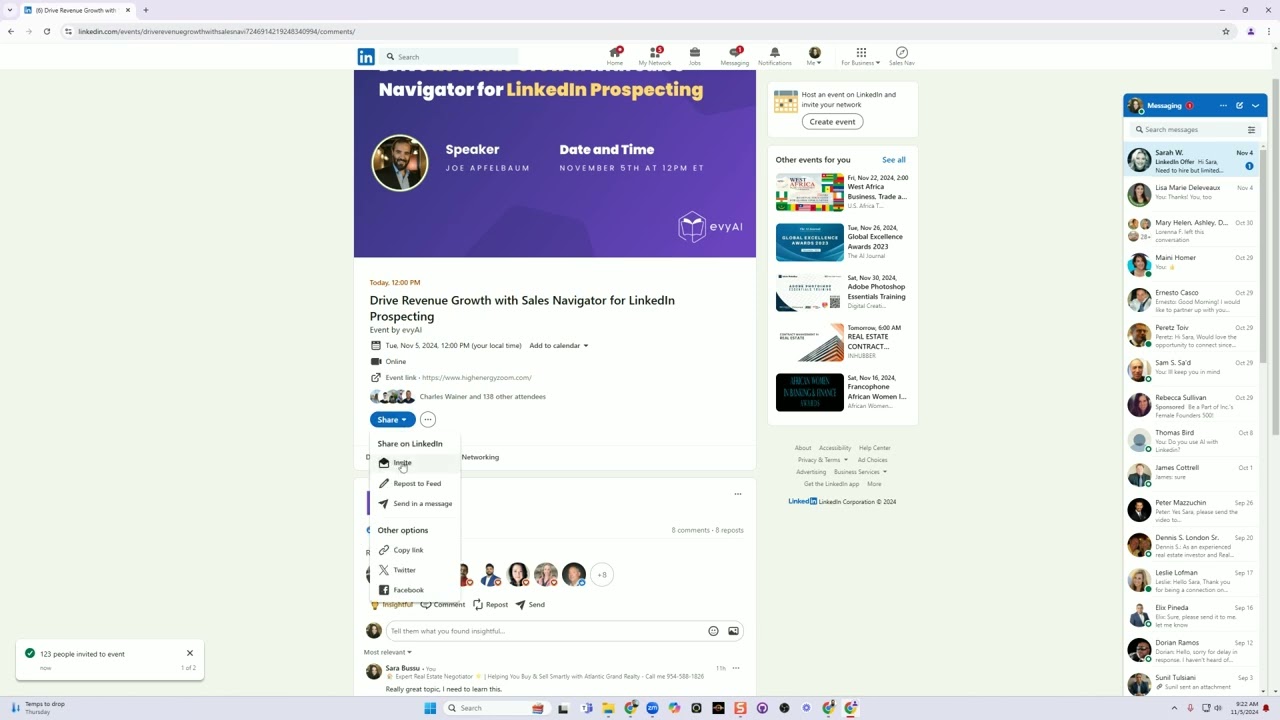
Joe Apfelbaum shows how to invite up to 1,000 LinkedIn connections to an event in one click using filters like location, company, and industry. You can send around 380 invites per batch, hit a weekly cap of 1,000, and collect attendee emails for your list.
Chapters
In this video, I'm going to show you how to invite 1,000 connections to your LinkedIn events with just a click of a button. Let's dig in. First, find the event that you want to invite people to. So for example, this is an Evvy AI event. Joe Apfelbaum is a speaker. Here's the day and time. You have to press attend event. Once you press attend event, you'll see a share box. The little share button opens up a box and you have invite, repost to feed, send in a message. If you want to send it in a message, you can send it in a message. You could also copy the link, post it on Twitter or Facebook. In this case, in order to send it to 1,000 people, all you got to do is click on Invite. When you click on Invite, it's going to load all your connections. Now you have filters here. You can select location, for example, United States. Press Show Results. It's going to show all the people in the United States. Now look at the way it added this checkbox over here. So if I want to find all the people in the United States, I just keep scrolling down. Let's say you have 1,000 connections. You can scroll all the way down. And if I hold my mouse like that and I pull down, it's going to start loading more and more and more people. You see that the way it's loading all this? Now, if you wait— now you don't want to invite too many people at once, otherwise it's going to error out. So I like the max I've ever invited at one time was several hundred people. I think it was like 380, but if I tried to do more than that, I would get an error. So I would kind of like maybe load 10 pages or so, and I would press check. There's 249. I press invite, and then if it worked, it'll say 249 people were invited to the event. See that? Now there are many other ways that you can invite people to the event. You can select by a specific company. So for example, eXp. So if I want to invite all the eXp realtors that I'm connected to, I would click the little button like that. It would load all of the eXp realtors. You see See, it's loading them all. Anyone that has the word eXp on their profile that work for that company or worked for that company, I press select. It's going to select 123. Now on the bottom left, it'll tell you if it worked or not. You see 123 people invited to this event. So now it invited all the 123 realtors. Now I press invite. I can also select by school. So for example, everybody that went to University of Miami, I press show results. I can go ahead and invite all the people that went to University of Miami. It's going to load all these people, and once it finishes loading, I just click on this little checkbox here and I hit invite. Now you could also search for specific people or names. Like for example, if I press share, invite, I can search for, let's say, Julia, and it'll find all the Julias that I'm connected to. Now you can invite people that you're not connected to, and the downside of searching for Julia is that you actually have to check it off all manually, which is not so terrible. I'm not connected to that many Julias. But the point is, if you wanted to click on the checkbox that automatically selects everybody, you have to use one of those filters. And the available filters that exist is location, current company, school, or industry. So for example, if I want someone in professional services, I can show all my connections and professional services. I could scroll down like this, hold down the mouse, not hold down anything, I don't have to hold anything down, it just keeps going, going, going, and once it's done, I select the checkbox over here, I select invite, and when you get to 1,000, it'll start erroring out and it'll say you can't invite any more people this week, but you can invite 1,000 per week per account, so say you have 20 people that you get to do this for you, you're going to have many, many people that were invited to this event. And where does the invitation go? It goes into where it says My Network, and then under Invitations, it's going to say Events. And so this guy invited me to this event over here. I'm going to press Ignore, or I can hit Accept and it goes to the event. If you want to find additional events that you can invite people to, you could just search something like, for example, ChatGPT. You press search, and then there's a thing called events. You press events, and you can see all the 4,500 events related to ChatGPT. And you could see the ones that have a lot of attendees. It's because they use this strategy to invite people to those attend— to invite people to those events. So I press ChatGPT, I press register. You see that? And it says, okay, do you want to put your information here? I say yes, put my information in there. And you just collected the person's email address. So this is a great way to collect email addresses and build your list fairly quickly by using one of these amazing strategies. Now there are many other ways to share events. You can repost on the feed, you can send a message, but this is a key way to be able to do this. So let me know if you have an event that you want to share, put it in the comments of this, and hope that you got value from this. Now remember, You can use Evvy AI to write your posts, comments, messages, and so much more. So check out evviai.com today and learn how to leverage AI with LinkedIn. Boom.