CMA
Joe Homs shows H&M agents how to run comparative market analyses on bank-owned properties using Realist and Matrix. He walks through filtering comps by neighborhood and square footage, adjusting prices for upgrades like kitchens and parking, and generating reports with Cloud CMA for a polished final product.
Chapters
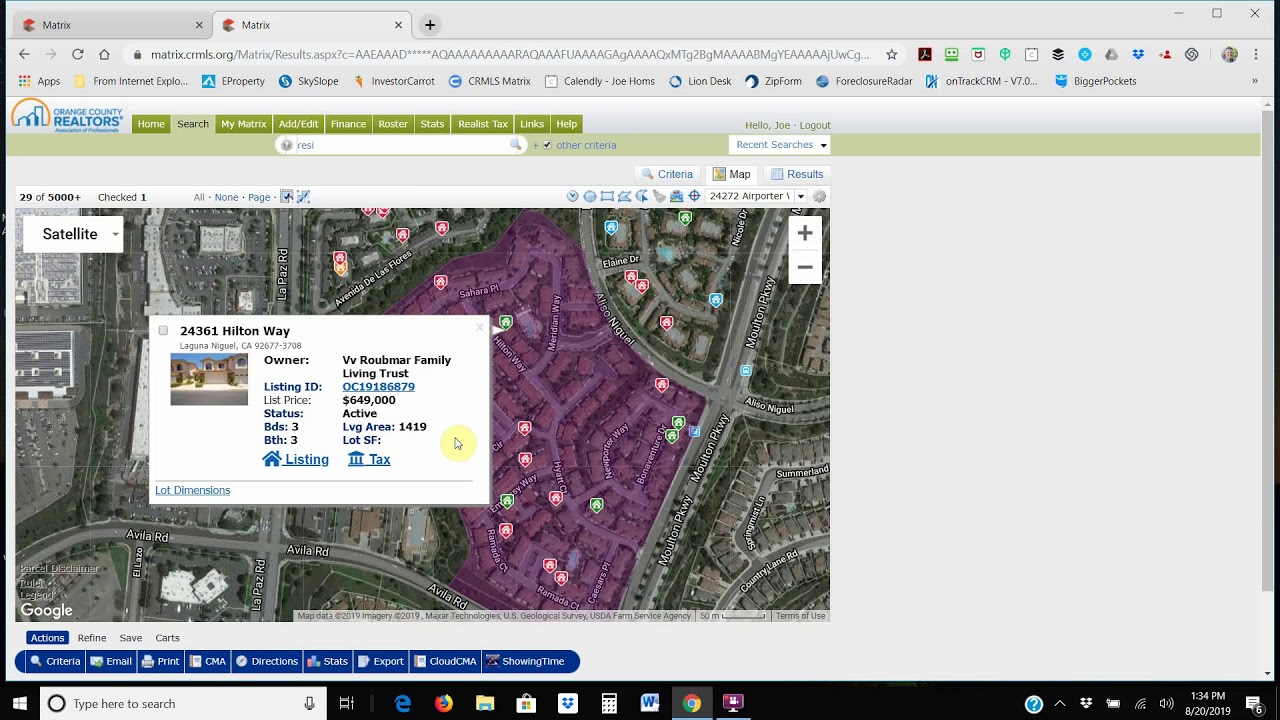
Okay, welcome H&M agents. We're going to talk about doing some CMAs and some quick comps. And let me open up one of these bank-owned properties here. Let's see here, let's pick on this one on AirPorter. So there's a few ways to do comps. The first way that I like to look at properties and kind of do what I call a A dirty, down-and-dirty quick comp is to right here click on the parcel number. That'll bring you to Realist, and the first thing that I like to look at is the value range. So $485,000 to $642,000, and you go back and see that they want $503,000 for this property. So that's getting down to the lower price of the range. That's good. If you want to get more into detail, you click on comparables up there, and my computer wants it always to say yes to JavaScript, so I already did that. Hopefully I did that. And so now we're opening up comparables in the area. This is what I would call more of a Zillow-type comparable search. As you can see, number 10 up here, that's kind of out of the range where we want to be, different neighborhoods. So we're going to unclick that one. Number 9, same thing. So now we're into the area that this property is located in. And let me go down a little here. So you can see that there's comps and they range high of $660,000, low of $280,000. Let's go look at that $280,000 one that I don't know why it's even in there. So that's, that's going to definitely go out of there. Here's one for $400,000 and we're going to take that one out of there. So these are more in line with what the comps are in that area. So you have to look at the building square footage and make sure we're at the right square footage. The $1,600 square foot, that's probably a little bit too high. So we're going to get rid of that one. And 1419, here's one 1494 for $615,000. Here's one 1500, it says 1419 on it, $620,000. So those are pretty good comps. So as you can see that the high comp on this is $620,000. We can actually look at that $620,000 one, just click on the pictures. It'll open up the pictures for you and you can see whether that's a normal standard property, was it rehabbed. I like to look through the pictures here real quick to see what's going on. The kitchen is what I focus on. So it looks like, you know, they upgrade, maybe upgraded this kitchen a little bit. They've got some flooring. Now this is all standard stuff in the bathrooms there. So that's nothing that's been upgraded. Again, all standard. This is what I call the banjo here, the vanity on top of here. That's what I call the banjo. Gold frame, that's old. So, you know, what you're looking at here— go back to this picture— what you're looking at here is just, you know, looks like they put some painting, probably put some new carpeting, didn't do much of anything else. But they did get $620,000 for it, so that's probably your best comp in this range. And remember again, $503,000 was the asking price for this house. So between $503,000 and $620,000 is a pretty good range, something that you can actually buy to flip. So the next thing we need to do, to do like a CMA, which is probably the way you should do it, is I like to highlight the ad We'll open up another window here on Matrix. So I want to go to search, I want to go to detail, active, under contract, pending close. Do map search. Type in the address you just copied and it'll bring you to the neighborhood. And then from here we're looking for again 3-bedroom, 1,400 square feet. So you just kind of look on here and see that this is a 3-bedroom, 1,600 square feet, a little bit bigger. Here's one exactly model match. Oh, that is, that is the property that we were talking about. So okay, we'll just click on it. And this one For some reason I can't click it, but anyway, here's another one, 649. That's exactly a model match, so we'll click on that. Come over here. That's close enough. That's $1,419 to $1,500. If it's within $100, I'm good with it. Look at this one. So that's bigger. That's 4 bedrooms. So that's 4 bedrooms, that's 2 bedrooms, that's— here's 3 bedrooms, a little bit bigger. And this one, again, a little bit bigger. This one, this one's about right, $634,000. So you've got some good comps there. Go back to— Your criteria and click on results. And then what I would do here is click on CMA here, or you can click on Cloud CMA, whichever. We'll just— we'll do CMA real quick here. So this is actually building a CMA. So let me just put one of my clients in there. Pages, you can add your pages in here. Subject property, I put the whole thing in there. Comparables, I like to put a full report, static, and then the map down at the bottom so it gives you a complete picture of what's going on. So then the next thing is the subject, and so you can autofill by copying The listing ID, you come back over here and you fill that in. And so now it brings over all the information for the property and then the COVID and then here we go with comparables. So these are the comparables that we had picked out. Now you can go in here and do adjustments later. Here's the map for where they're at and then you can do adjustments here. So For example, the first one is 503 because that's the one we're kind of copying. The others are 634, 637, 649. So, you know, you could say that the 649 one, you know, maybe it has a better view or something like that, so you can reduce the price of that. So here, that's— building square footage is a good way to do it as well. Parking, interior appliances, fireplace, style. We're just going to put style here so you can subtract $10,000. Let's say comparing to everything else, this one has a better view, so we're going to reduce it. You can see it's now adjusted down to $639,000, which puts everything kind of in line. Then you press Finish, and then you can view your CMA. Okay, so this CMA that you can print out and take with you on a listing appointment, it gives you all the details of the properties that you used in your CMA, your market analysis. Then it obviously goes into what is a CMA, timing, value of the property, things like that. That's a quick CMA report there. We're going to go back here and I'm going to lose my connection there. We're going to go back and And we're going to click on the same property again. And we're going to go do a different thing, Cloud CMA. So you could go back and you can actually click on those properties that I picked, and then you can come over here to Cloud CMA. Now Cloud CMA also searches properties in a different way. So again, copy the address, enter your address here, and it'll find it for you. It'll populate everything for you, and then you can click here, automatically find listings near the subject property. You go fetch listings, and this is basically going to do the same thing. It's going to bring you to that area in specific, and it's going to say, okay, well, these, these are the ones that kind of match what you're looking for. And then really it's kind of up to you to determine, you know, whether the values that you see on here are any good. You can see that— well, I can tell you that all these up here are not even close. So what you need to do is uncheck these so it doesn't use them. There's one right behind there too. Uncheck those. This one here. And that way it's not being used. This one's in the same complex, we'll leave that there. So you can see you got the median price $572,000, high $679,000. So if we, if we go down to the $679,000 one, let's find that one. So that's 3-bedroom, that's a big one, so we're gonna uncheck that one. Not letting me uncheck it, I don't know why, but the rest of these you can look to see that— here's one that's closed, but it's way bigger. So I don't know why it's not letting me uncheck these. There we go. Update. Back up. Yeah, that's set up. Okay, so here I would just do this. There we go, this way. And this one is too big. This one's not even close. This one's close. This one's there. This one's too big. This is one we're comping anyways. This one's too small. So look like I have one active and one sold on this one. And then you customize the report and you can create this— what this does is create a better, I guess, a better-looking CMA. It's really up to you. Whether you think it is or not. And you can add all these things. You got some Tom Ferry pages in here that will cost you more if you add those on there. But pretty much what they give you with the MLS that you have— let me just publish here so you can look at it— what they give you with the MLS is sufficient enough. I added some stuff down here Kind of six reasons. Not now. Don't want a cash offer on this. So that you can see is is getting ready. It's publishing the report. So we'll pick on another one of my listings here. So this is a CMA that I did for a client, and this is basically what that looks like. It's just, again, it's the same thing, but it's just a little bit better looking, if you want to say, better details on this type of page. So that's up to you. They also have it where you can put play a slideshow as well. You can email this stuff to your client and you can see here's a slideshow where the properties are at, sold listings. Okay, it goes into details, the active listings goes into detail on those and it gives you the comparables and the price range and the suggested list price and the commissions and who gets paid what, the timing, and that was it. That's it. So that's pretty much the 2 ways that you can do CMAs on properties. Again, the first way I like to use that kind of a down and dirty. If I'm looking at this property and it's at the lower end of the CMA, that tells me that it's priced really well. So then I'll move forward and start doing my homework on whether it's going to be a good buy for a flip or not, and then that'll get me my butt off the chair and driving out there to take a look at it. So as I look at all these, you know, there may be 20, 30 properties that I look at a day. This is what I do. This is my routine, and I go from there. If you're doing more formal type of CMA, you're going to concentrate down here where it says CMA or use the cloud CMA. Whichever. Cloud CMA, I would, you know, prefer that you guys use because it is, it is a lot better looking. But the way that you do the CMA is the same. Okay, okay, thank you.
More from Joe

Practical Tax Planning Strategies For Real Estate Investors with Jason Malabute, CPA


Did you know you can buy a home in Orange County with a 2-3% mortgage rate right now? Here's how — A