Writing an offer
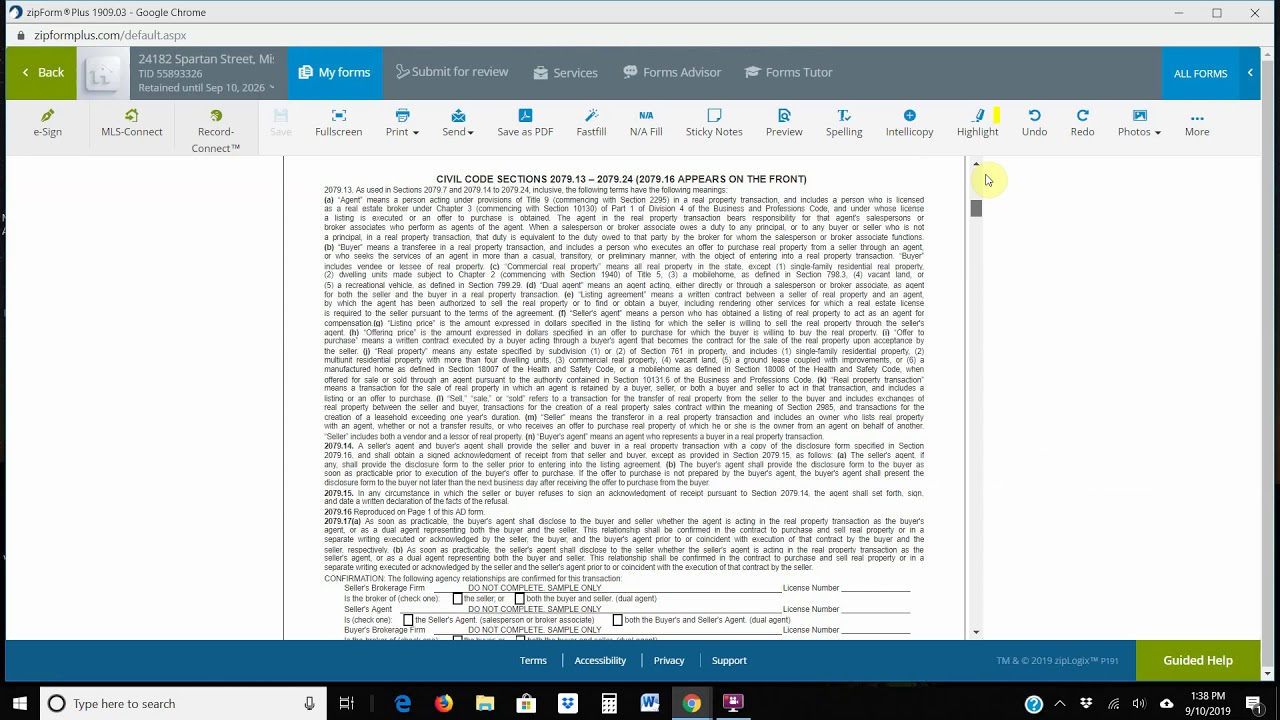
Joe Homs walks through drafting a real estate offer on a bank-owned property using MLS data and ZipForms. He shows how to import listings, set deposit amounts based on price, adjust contingencies to make offers more competitive, and use e-signatures. Pre-filled templates can cut offer-writing time to under five minutes.
Chapters
Hey agents, H&M agents, welcome back. What we're going to do today is we're actually going to write an offer, and so hopefully you've got all your templates in place. The first thing we're going to do is let's go back to the MLS and find a property. Let's pick on this bank-owned property that I have a link to right there, 695 Spartan Just real briefly, you know, since we're here, we're just going to go through some of these pictures and stuff, look at it. They obviously loved wood. If you're evaluating this property, whether it's good enough for a flip, click on the parcel number. Owned by HUD. You go down here real briefly, 627 to 752. $695,000, not really a lot of room there. That's the value range. You want to get a little bit more close to comparables, and we click on that. And then there's always the actual way to do it on the MLS and do a map search and actually go into that area. So these 2 ways that I'm showing you are just kind of quick and easy. If something comes up, then, you know, I'll go a little bit further. So you can see 4 and 6 are on the other side of Alicia there. It's a big freeway— I mean, a big roadway. So I don't want anything to do with 4 and 6. Now it turns into 5, so I'm going to unclick. This is more in a neighborhood. Number 5 is out of the neighborhood off of Geronimo. Number Yeah, that's close enough. So these are pretty much the comps that you have. You can see there's one that's $799. It's a little bit— well, it's pretty big. It's bigger than that. Here's a model match for $770. That would probably be the one that I would use for this one, for this evaluation. And you can see the pictures. Looks like somebody actually did Probably flip it. Hold on a second, let me pause this. Okay, back again. Anyways, so you can see this property looks like it was probably a flip property because it's so well done. Looks like it was staged. So this is a model match, 770. I know I'm digressing here, but Even even at 770, there's really not enough room to do this property. So we're not gonna worry about that. So the next thing we do is we're gonna write an offer for this property. Okay, I highlighted the street information, and then we're gonna go back into zip forms. We're gonna go into new new purchase. I just cut and paste that in there. Then we come back to the actual listing itself. We're going to highlight the listing ID right here on the right there. We're going to go back into writing an offer. You see right over here on the right-hand side where it says MLS Connect, MLS name is CRMLS1. Okay, so you change that. I know some of you don't have both of these. One's CCRMLS, the other one's CRMLS One, which is one you need to use. Then you put the listing information in there, you include the property photos, you press find, and voilà, hopefully it'll find that listing. And once it finds that listing, it'll fill in all the information. So use that listing, click on Residential, go down here to My Templates. Remember, this is a purchase, okay? So you click on the purchase template and then you press Save. Okay, that's going to save the transaction for you, and the first thing we need to do is come to the documents themselves. Open up the COVID sheet and we got buyer number 1, Mr. Smith. And then let's say buyer number 2, Mrs. Smith, and they have email addresses. We're just gonna pick something here at random that I already have in. The seller, in this case it's bank owned so I just put Mr. Seller. If you keep going down here, it puts in the MLS number, the address, the price it's listed for, the date of the listing and we obviously want to go down here for purchase price. We want a purchase price of $595,000. Agreement date, you can double-click and it'll put the the date for you. Deposit amount, you can put whatever you want there. The higher the price is, the more I put. If it's down less than $400,000, I'll put $5,000 deposit. If it's over $500,000, then I put $10,000 deposit. This should all be prefilled in, escrow company, your information, and voilà, look, the seller's information is in there. Isn't that neat? So all that's done, ready to go. You can press save if you like, but if you press back, it's going to save it for you anyways. See how it says saved up there? So we're going to come into the purchase agreement itself. We're going to open that up and start out at the top of the page, the disclosure. You can see there's 2 buyers here, so click on that, and it's got all your information filled in. It's got theirs information in there as well. Mr. and Mrs. Smith, agent information. All the dates are going to be filled out when they sign it. Now we get into the actual contract and then closing. You can click on here, 30 days, 60 days. The shorter the period, the better. 30 days and for this case, we are going to do An all-cash offer, so we can actually click this and it'll show that we have $585,000 left to put at close of escrow. Now that's an all-cash offer, so let's uncheck that because that's too easy. If you want to put an offer in and it has a loan, so you're going to put the loan amount in here. So let's say it's a $400,000 loan. And then it'll calculate how much of an additional down payment is necessary at close of escrow. So we keep going. The date's already been put in there. If you do not want to change appraisal contingencies or removal periods and just leave everything alone, it goes from 17 days. If you want to shorten it, then you would shorten it right here. You would make it, let's say, you know, to make your offer more attractive. Let's say we'll remove everything in 10 days. Okay, same thing with loan contingency, 10 days. So this is just making your offer a little bit more attractive. Nothing needed down here. All this information was already inputted from your offer, your template, so all that's all ready to go. Same thing with everything here. Usually on an REO property, they're not going to pay for much of anything. So they're not going to pay for the extended warranty, the home warranty, so you can just click here and that kind of erases all that that you've already put in. Washer, dryer, refrigerator, if they're in there, I mean, leave it, no big deal. I'm going to replace them anyways. In this case, buyer does not intend to reside on the property, so I'll click on that, number 9. And I know we're going fast, you can slow down the video if you need to. Again, pretty much all this is pretty much filled in. The rest of it is all legal language. As we go down the next few pages, 6 and 7 and 8, okay, 9, 10. Again, this is where I have my information down. Now if I want to like tell them, you know, they've got a day or two to do this, this is the 10th. Let's say we want them to respond by the 11th. Not that they're going to, but we can ask by 11th and let's say that we've given them till 5:00 PM to do that. This is basically an expiration of offer. All offers expire in 3 days unless you want to make it sooner. The example for this is like let's say it's Thursday or Friday this week and they just listed it. you're hoping to get back a response before they do the open houses on the weekend, then I would suggest you do this. Whether you get the response back or not, that's really up to the other agent. All the information here is pre-written from the template. Anyways, you're basically done with this offer. I mean, when you start working with offers like this, It shouldn't take you more than, geez, 5 minutes at the most, especially if you have a template to do all this stuff. You can press save and then you press e-sign here and it's going to give me some errors because I'll show you next. Anyways, this is going to go to DocuSign. You can use ZipLogic digital signature which is the same But it's not as robust as DocuSign or quick or easy to use, but it's free. So if you want to use a free one, fine. If not, then you have to upgrade to DocuSign. That's up to you. Press next. It's going to tell me that— okay, well, I'm sorry, these do have some emails there. So first one goes to Mr. Smith, next one goes to Mrs. Smith, and the last one goes to me. Now again, you have to know your client because I actually sent a listing agreement once to the mister first because being American, that's what we traditionally do. She got upset that I sent it to him and decided not to list with me for that reason. Anyways, you close this and then this is where these emails are going to end up going to and then you press next. Okay. Next is going to take you to the actual document itself. And then everything's pretty much prefilled, but I always like to go through it to make sure that everybody that needs to sign is signing. Remember, you're representing the buyer, so just the buyers are signing and you are signing, not the other agent. That's going to be— all that stuff's going to be left blank. Okay, and as you go through this, everything's there ready to go. If you have additional financing terms, you would put that over there, like if you're using a hard money loan or something like that, just kind of let everybody know. Any other terms in here? Great other terms are, I'm an active real estate agent buying this property as a principal, things like that. Okay. So that's pretty much writing an offer in a nutshell. So hopefully if you have questions, just give me a call. If not, then I'm going to end this and send it to you guys here shortly. Thank you. Thank you.
More from Joe

Practical Tax Planning Strategies For Real Estate Investors with Jason Malabute, CPA


Did you know you can buy a home in Orange County with a 2-3% mortgage rate right now? Here's how — A