This transcript is a short walkthrough of the Anvil platform using the Wealth Advisors Pack. It demonstrates the advisor dashboard, the Clients tab for grouping shared flows, creating leads and converting them to clients, CRM integrations (Redtail and Salesforce), generating personalized web forms, automatic DocuSign signature requests, and tracking completed workflows from the dashboard.
Chapters
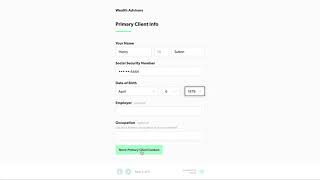
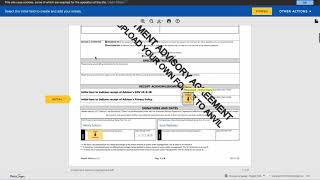
Welcome to a quick walkthrough of Anvil with the Wealth Advisors Pack. When you log in to Anvil, you are presented with a dashboard. This is your command center for managing client data. The Advisor pack includes 3 pre made anvil flows to help you get started. At the top there is a tab titled Clients. Clients is a way to group Anvil flows so that data between each flow is shared. Let's start a new client as a lead. Simply enter the client's information or copy the link at the top of the web browser and share with the potential client for them to complete. You will notice some fields are optional, but the more information you enter, the less work you will have. When a lead converts into a client, our CRM integration will automatically create a new lead in your CRM. Clicking into Henry, you can see that all his information has been entered and he is properly connected with his spouse Sarah in the Redtail CRM system. Currently we support Redtail and Salesforce. Henry has decided to become a client. So let's set up the new client Anvil flow for Henry. Henry's name and email is pre filled in the flow. We then allow you to adjust your fee schedule for Henry. If your fees are generally the same, Anvil can also set default values so you don't have to type it in every time. Lastly, add the advisor information and the setup is complete. Anvil will generate a personalized web form for this client. Simply copy the link and share with your client or if you prefer, you can complete it on behalf of your client during a call or meeting. Let's do that. Here comes the magical part. Anvil only asks for the missing pieces of information, reducing the friction of onboarding clients, increasing client close rates, and ultimately giving you more time to focus on your client's financial goals. After answering a few simple questions to help you build out an accurate client profile, Anvil generates a complete PDF and requests signatures from all parties via your existing DocuSign account. Back in your Anvil dashboard, you can track progress on completed workflows, download executed documents, and know that everything you need from a client is secure and accessible at all times. That's it for our walkthrough. Make sure to link all your CRM and DocuSign accounts to get the most out of Anvil. Use the link on the left to upload your own advisory forms and an Anvil agent will process them for you. If you have any other questions, please reach out@hellosanvil.com.