This is a short demo (YouTube) showing how to use Anvil to convert a standardized PDF (example: a W4 form) into an online, mobile-friendly web form. The walkthrough covers uploading a PDF, automatic detection of input fields, renaming/grouping fields, drawing missing fields, saving, generating a web form (giving it a name and unique URL), removing unwanted fields, customizing labels/helper text/placeholders/optional flags and numeric limits, and field-specific options (e.g., auto-populating ZIP+4). It also shows testing the live form (including Google API address autocompletion), fixing mapping/format errors, reloading to view changes, and downloading a completed PDF. The presenter notes the full conversion took about seven minutes and directs viewers to useanvil.com for more examples.
Questions this video answers
W4 (U.S. tax form)
About seven minutes.
useanvil.com
February 22, 2019
tolerant-aria
Chapters
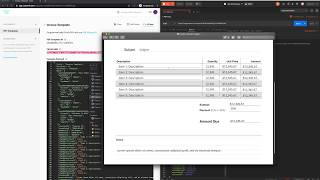
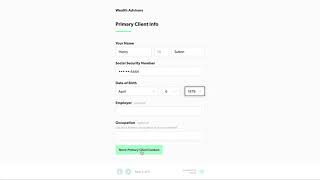
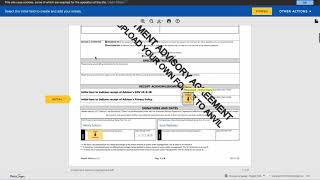
Hi everyone. This is a sneak peek on how we use Anvil to convert any standardized PDF form into an online web form. First, you simply upload the PDF that you would like to convert into an online web form. Once the form is uploaded, you'll notice that Anvil automatically finds all the fields where data must be entered. Next, you work through the document to assign each field a type and group together related fields, such as the first, middle and last name fields, the address fields, and the related checkboxes. If a field is missing a name, or if the name is not descriptive of the field, you can update the name by simply typing in a new name, as is the case with a checkbox on line four. Fortunately, Anvil found all of the boxes on this W4 PDF, but if a box is missing, all you need to do is drag the cursor to draw a new box anywhere on the PDF and then give it a descriptive name and a type. Lastly, let's make sure we save our work and we can move on to automatically generating a web form from this PDF. To start, we need to give the web form a name, a unique identifying URL, and then we select the PDF file we would like to use when generating the webform. Let's use the W4 that we just uploaded and remove some of the fields that we don't want as part of the webform. And there it is. At this point you can share the web form for anyone to complete. But before we do that, let's customize the form a little bit. As you can see, when you hover over each field, you are given the option to drag and move the fields around into the order that you prefer. When generating each field on the web form, we just use the names you provided on the PDF, but here you can modify the labels to be more descriptive, as well as add helper text below each label so that there is no confusion as to what information needs to go into the field. Other modifications you can make include marking certain fields as optional, adding placeholder text, as well as adding minimum and maximum limits to fields that only accept numbers. There are also field specific options you can select, such as automatically populating the zip four on the address field. Now the only thing left for us to do is to test out our online Anvil powered web form. As you can see, we have built in some nice features for each component, such as automatically grabbing nearby addresses using the Google API. By testing out the form, I can already spot some errors, such as the field labeled Last name differs on SSN card should be an optional field. Also, the employer EIN is in the Social Security number format. Let's go back and fix these errors. Switching back to the tab where we are testing the web form, all we have to do is reload the page and the changes will be displayed. Also note that all of the data is saved so you never have to worry about losing your progress in an Anvil webform. Lets Download the completed PDF version of the W4 form and take a look. There it is. A properly completed W4 using the modern and mobile friendly Anvil web form. I hope you enjoyed watching our sneak preview. The entire conversion process took about seven minutes in real time. To learn more, visit useanvil.com and check out some of our free Anvil powered web forms.