3 MidJourney-Like Tools That You Can Use For Free
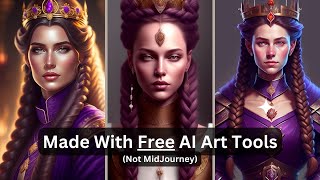
Matt Wolfe demos three free AI image generators that rival MidJourney: Lexica (100 free generations monthly), Dreamlike Art (credit-based, regenerates over time), and Instant Art (fully free, many model options). He compares outputs side-by-side and finds Instant Art's MidJourney-v4-style and Protogen models produce near-MidJourney quality without paying.
Questions this video answers
January 25, 2023
100 generations per month (free tier)
About 25 images (one-time free credits when signing up)
Aperture (built on Stable Diffusion)
Dreamlike Diffusion (a stylistic model trained on specific images)
Chapters
In this video, I'm going to show you three different tools that you can use to generate AI images for free, and they're all pretty dang good. Now, I'm not going to try to claim that any of these tools are going to generate images better than Midjourney. In my opinion, Midjourney is still the best AI image generator there is. However, in order to really get the most out of Mid Journey, you have to pay for the upgrade. Otherwise you can only generate about 25 images. These tools you're not going to have to pay for, and you're going to get pretty dang close to that quality. Let's dive into my three favorite AI art tools that aren't called Midjourney. Now, you may already be familiar with Lexica Art. It's a great site for getting inspiration for prompts for images. You can see all sorts of images that have been generated here. You click on the image, it'll tell you what the prompt was, and then you can use elements of that prompt for your own images to get a similar style. However, Lexica actually has its own prompt generator up here, where you can click generate and make prompts of your own. Lexica isn't actually totally free, however, they do let you have a hundred generations per per month for free. With Mid journey, you get 25 images and then that's it. You don't get a new 25 images every month. So if you're planning on doing less than 100 image generations a month, Lexica might be a good option for you. Now, to really compare these tools, I want to use similar prompts across all of these different tools that I'm going to talk about. So what I want to do is I want to find an image here that I really like and just borrow the prompt and then we'll test that prompt across multiple tools. So I came across this bird image here that looks really cool. I like this image a lot. So I want to borrow this prompt and I want to plug it into these various tools. So I'm going to go ahead and copy and paste it over into a document here, over on my other monitor and see how this one looks across multiple tools. I also want to find another one, preferably with a person in it so we can see how it generates people. Okay, so I really like this one here. Portrait of a young queen with long wine color braided hair. This is just a really cool image. You know, if I click through, other people have used this same prompt and gotten really, really cool image. So I. I'm Going to go ahead and copy this prompt as well and we'll use these as our example images. So first let's start by generating some images here in Lexica. So let's see what we've got under Advanced settings can mess with the guidance scale, which in this case gives it less contrast or more contrast. We'll just keep everything at the default and see how it comes out. So let's go ahead and test our first prompt here. Symmetry Product Render poster. Vivid colors. Vine proportion. Eagle, ice and snow. Glowing fog. Intricate, elegant, highly detailed digital painting art station concept art. Smooth, sharp focus illustration. So let's go ahead and see what this prompt generates. It should look similar to the example image we saw earlier because that one was also generated in Lexica. Let's see what this does. So check out this artwork. It came out just awesome. Now this is using Lexica's own trained model. So Lexica does use stable diffusion behind the scenes. Lexica has trained its own unique model, similar to the way Midjourney uses stable diffusion. And Midjourney kind of has its own trained model behind the scenes as well. So this is Lexica's proprietary model that theoretically you shouldn't find anywhere else other than on the Lexica site. But these images are pretty damn near mid journey quality art. Now let's test our second prompt. Portrait of a young queen with long wine colored braided hair. Royal guard purple outfit. Elegant, highly detailed digital painting art station concept art. Smooth illustration. Oval face art by Helena Nicolina. And so let's go ahead and generate this and see what this generates for us. And once again, very similar to that original prompt that we were looking at. All right, so that was Lexica art. And their model is called Aperture. And once again, that's built on stable diffusion. Check that out. If you're not generating more than 100 images a month, you can use this. Or if you want to pay to upgrade and get a lot more images, you can. It's actually less expensive than Midjourney. Now the next one I want to talk about is Dreamlike Art. Now Dreamlike Art is another one that they've trained their own model based on stable diffusion. And I believe they actually have some different models that you can play with as well. It does say free forever. And so let's go ahead and click get started. Now this one, you can see it has a credit system up at the top and I have 37 credits. Now the way the credits work is you can generate some images and it'll use your credits when you step away from this app for a while, your credits regenerate. So you can't actually go in and just generate tons and tons and tons of images all at once without paying. You know, you'd have to buy additional credits. But if you're just generating a handful of images at a time, you can jump in here, generate a few images, get what you need and get out. And then the next time you jump back into this tool, your credits should be refreshed, you're good to go again. Theoretically, you generate tons of images every single month. You just can't do them in rapid succession. Now, they do have a couple models to choose from here. You can choose Dreamlike Diffusion, Dreamlike Photo Real and regular stable diffusion 1.5. But the real magic is in their Dreamlike Diffusion. This is like a special model that's been trained on a specific set of images to give this very stylistic look. Now, if we click on settings here, there's this guidance scale here where you can prioritize the creativity or prioritize the prompt. You can choose how many images you want to generate, you can choose how many steps it takes. So the less steps, the faster it is. The more steps, the better quality. You have the sampler here, most likely you're just going to leave it on the default. If you want, you can get in here, change the sampler, see how that changes the outcome. You can actually upload an image here and do an image to image inside of Dreamlike Diffusion. You've got your various aspect ratios. If you know what seed you want to use, you can pick a specific seed here. So let's go ahead and run our exact same prompt in this and see how this style differs. So let's run that same bird prompt here. The symmetry with the eagle and the ice, et cetera, et cetera. It says it's going to use 6.2 credits. If you up the number of images, it uses more credits. So I'm just going to leave it at four images on this one, just so it's kind of comparable to the last one that we did and see how it comes with everything kind of set to the default settings here. So let's go ahead and click Dream and see what comes out of it. So check these out. These are completely different style than what we got out of Lexica, but they're all still really, really cool art. They all came out really awesome. Now let's go ahead and test our other prompt. Portrait of a young queen with long wine colored braided hair. Let's dream 6.2 credits again, look at those. Still really, really cool, really good, high quality images, but a totally different style. They don't look like the same image because it's using a different model. The other one was using the Lexica Aperture 2 model still on Stable Diffusion. This one is using Dreamlike Diffusion based on stable Diffusion. Same underlying technology, but trained on different images underneath. So you get a completely different style out of it. You can this one at Dreamlike Art. Again, not free if you want to generate tons and tons of images, but you can definitely generate a handful of images and then step away and then let your credits refresh and then come back and generate more images. So another way to create free images without having to pay any sort of monthly fee to be able to generate them. Now, finally, I want to show you the one that I think is actually the coolest and most valuable, but also super under the radar. I haven't seen anybody else talk about this tool yet and I don't know why, because it's so good. Now, on the surface, this looks a lot like Lexica, but these images don't look very good. I'm not very impressed with what I'm seeing here. A lot of this is just kind of meh. But this tool is super powerful and as far as I can tell, there's absolutely no charge at all. I've clicked around through all of these pages and can't find anywhere where there's any sort of charge. But what I really, really like about Instant Art is if I come over here to generate get all of these models that they have built into it, it claims to be able to generate mid journey version 4 style art. Waifu Diffusion. That's like anime style art, Wavy fusion. I don't know what that is, but we'll test it in a minute here. F222. So many different models that are trained on stable diffusion that you can choose from. Disco Diffusion, Open Journey, Low Poly World, LinkedIn photo shoot. That's a bunch of options for dimensions. And you have stock which uses analog diffusion, which I don't know what that does either, but we'll test it in a minute here. But how cool is this to have a completely free stable diffusion art generator with all of these models built into it. So let's go ahead and start by testing the Mid Journey v4. Let's see how close it actually gets to what Midjourney would generate. Let's go ahead and paste in our initial prompt here to try to get our bird image and click Generate. And here's what it came up with. I actually had the image count set to two. So I ran it twice here to get four images. And you could see, once again, a completely different style from what we got before. Now, just for fun, why don't we pull this into Mid Journey and see what this prompt generates in Mid Journey. See how close this is to what Mid Journey would do. And so this is what Mid Journey generated when I tossed it into there. Let's try this wavy diffusion. See what this generates. I'm just going to leave the image count on two this time, and we'll just generate two at a time with some of these other models just to kind of get an idea of the variation that you can generate. Very interesting. This is a completely different look now. Not even close to the images we were generating before. Let's try a different model here. Let's try. Let's try Robo Diffusion and see what that does. Couldn't be more different. Look at that. It generated basically like a robot eagle thing. I want to try. Let's see what Disco Diffusion does. Here's what Disco Diffusion gave us. Very interesting. Very different image. All right, let's try our other prompt in here now. And let's switch it now to Portrait. And let's go back to the Mid Journey, because that seemed to generate some pretty good results. Here's what we got with the Mid Journey V4 model that we plugged in. Pretty dang cool. And just for reference, here's what Mid Journey actually generated. So not exactly what you would get out of Mid Journey, but pretty dang close to the style, honestly. Let's test a couple different models that we haven't tested yet. Let's try this Waifu Diffusion, which is kind of like an anime style, and see what that brings up. Once again, a completely different style. Let's try a couple more. Let's go over to Stock and let's go to Portrait. See what this analog diffusion model gives us. That's an interesting result. This one's actually not too bad. I kind of like this style. This one a little bit funky. I want to try one more here. Let's go back to art, and let's try Protogen x 3.4 and see how that comes out. And check these out. This is what the Protogen model generated. These are really good. These look really, really good. I'm very impressed with these. So, so cool. Again, this one's called Instant Art, and it's totally free, and you can generate as many images as you want. And there's all of These different models in here don't let the homepage distract you. Some of these images on the homepage are not that impressive. But when you start generating with this thing and you see what it's capable of, it makes some really, really cool images. So once again, you can find this at instantart IO now, just to recap on these, this prompt was Symmetry Product render poster. Vivid colors. Divine proportion. Eagle, ice and snow. Glowing fog. Intricate, elegant, highly detailed digital painting Art station concept art Smooth sharp focus illustration. And these are the images that we got out of it. The one on the very left over here, this was created with Lexica. In my opinion, this is the best of the four. This one here we did with Dreamlike Diffusion. This one here we did with Instant Arts version of midjourney version 4. And this over here was the actual midjourney version 4. All three of these could have been done completely for free. Lexica if you do it within the 100 free credits a month. Dreamlike Diffusion, as long as you have enough credits that have regenerated to make it Instant art. Midjourney version 4, completely free as far as I can tell. And then the actual Mid Journey 4, this is the only one that you would have had to pay for unless you're on your 25 free credits when you first sign up for Mid Journey prompt for this one. Portrait of a young queen with long wine colored braided hair. Royal guard purple outfit. Elegant, highly detailed digital painting Art station concept art Smooth illustration. Oval faced art by Helena Nicolina. This one on the left here, this was Lexica's version. This one right here was the Dreamlike Diffusion version. This one here was the Instant art completely free midjourney version 4. And then this one here is actual midjourney version 4. All of these are really, really good. And these three over here could have all been done for free without needing Mid Journey. All of these would have been perfectly acceptable and really, really good images. And you know, I would argue that the Lexica model is just as good as the Mid Journey model over here. So pretty cool. ST that gives you some more tools, more stuff to play around with. If you like tools like this, you want to find more cool free tools that you can play around with, check out FutureTools IE. This is where I curate and aggregate all sorts of cool tools that I come across. And I've just recently added the Mat's picks here. So if you need to narrow it down from 522 tools to just the exact tools that I would have picked, you can click on Mat's picks. It'll narrow it down to 103 tools and then let's say you need a copywriting tool. Click on Copywriting. It'll narrow it down to the 14 copywriting tools that are also my picks. Need a free copywriting tool? Check free freemium GitHub, Google Collab open source. It'll narrow it down to 11 copywriting tools that you can use for free. So if you haven't already, make sure you sign up for the free newsletter every Friday. I send you the five coolest tools that I come across each week, three interesting articles in the AI space, three great YouTube videos, and one cool way to make money with AI. It goes out every Friday like clockwork. And if you jump on the mailing list for free right now, I'll send you this Fridays. Thanks so much for nerding out with me. Again. If you like this kind of video you want to nerd out some more, make sure you like it so that you see more of these videos in your feed and subscribe if you haven't already. Really appreciate it. See you guys in the next video. Bye bye.
More from Matt




AI News: Dots, GPT-6.1 Sol, Sonnet 5.5, Gemini 4, and everything you need to know




