Make A Royalty-Free Copy of ANY Image You Find Online
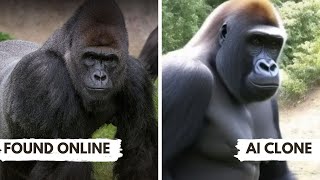
Matt Wolfe shows how Synthesis X, a Chrome extension, regenerates any image you find online into a new royalty-free version. It works well on landscapes and objects but struggles with people and complex scenes. The tool raises questions about using AI to recreate copyrighted images.
Chapters
Hey, what's up, Matt Wolf here. I recently came across a tool that claims that you can pretty much take any image online and use AI to remake that image so that you can use it. And the new version of the image will be royalty free and you can use it however you want without having to worry about getting sued or anything like that. Let's go ahead and take a look at it. So the best way to find it is if you come over here to FutureTools IO. First of all, you'll notice that I have retooled it so that it is now sorted by the newest tool. So it's any tools that I just added. All of the latest, greatest, newest, coolest stuff is popping up towards the top of the feed. So that's something really cool to notice. But to find this synthesis tool, come on over here and click on Generative Art up in the top. And you should find it under the Generative Art section. It's called Synthesis X. So let's take a peek at this. Synthesis X claims that you can start turning your online inspiration into your own unique creations. Create your own versions of any image you find online. And it's a Chrome extension. Come down here. It says easily generate images without the need for prompts or special inputs. It says you'll own all copyrights to your finished creation. Use it online with confidence. So we don't have to worry about that email from Associated Press saying you owe us $800 for using our image. Yes, I've gotten that email before. To set up synthesis, come up here, click on Add Synthesis X to Chrome. And right here it will say install in Chrome. I've already got it installed. You can see it up in my top corner here. And once it's installed, it'll add an extra cool feature to your Chrome browser. Let's test this out by coming over here to Google Images and let's test it out on some images of a wolf. Let's type a wolf in the snow and see what we get. All right, so let's take a peek at this image here that has a wolf in the snow. And if I right click on this image here, you'll see in Chrome it added a new menu item that says right here, revisualize this image. If I click Revisualize this image, you'll see the synthesis tool pop up over here on the right and try to generate an image of a wolf in the snow. And you can see it generated some. Got some extra legs or something going on. As with all AI images, It's not always perfect and these are some kind of funky images. Let's go ahead and see what we do with another one. Let's go ahead and try this wolf in the snow here. Right click. Revisualize the image. And we've got a wolf in the snow. And we've got something that looks like it didn't fully process. Yes. Let's go ahead and try again. And we've got a wolf in the snow. A wolf howling. That's kind of cropped here. Let's try this one here. That's got kind of like a family of wolves. So let's. Right click. Revisualize this image. Generated a whole pack of wolves here. Let's try a wolf in the forest. Here's a cool picture of a wolf with a forest behind it kind of looking at the camera. Let's go ahead and revisualize this and see what it comes up with. So you got a couple pictures of wolves with a force behind them. Not too bad. If you look here, you could tell they're AI generated. There's some funkiness going on. But let's go ahead and try again and see what else it gives us. This one looks like weird two headed wolf up here, but this one down here doesn't look too bad. Let's pick another one. Here's another one with a wolf staring at the camera with another force behind it. Let's revisualize this image, see what it comes up with. Not too bad, not too bad. I don't know what's going on with this one. Maybe there's another wolf standing next to it. I don't know. Let's try another animal here. Let's try a gorilla at the zoo. All right, so here's a picture of a gorilla walking. Let's go ahead and revisualize this image. Not too bad. Didn't finish processing this top one. Let's try again. And so far synthesis seems to be free. I haven't seen anything about paying for it. Maybe it's going to be paid in the future, but right now it's a free tool. So you could pretty much click here and try again as many times as you want from what I can tell. Until you get an image you like. This one's not too bad. I can see this one being used for a YouTube thumbnail or something like that. Let's give it another shot. Since it doesn't seem to be fully processing both images. These really aren't too bad, honestly. Need a picture of a gorilla that's license free that you can use. These would probably do the trick. Works okay for wolves and gorillas. Let's try some landscape photos. Let's do a snow covered mountain with a lake. All right, so we've got some really, really cool pictures here of a lake with snow covered mountains all around it. And. And let's go ahead and revisualize this. Not too bad. It really, really does seem to do landscape pictures. Well, you've got some snow, you've got some trees, you've got a lake. It's definitely got the vibe. Let's try it again. Yeah, these are really, really great landscape photos. I can see using these. If you need this sort of background for let's say a slide deck or a YouTube thumbnail or put on some sort of sales page or something like that. Let's try another landscape. Let's do a sunset at the beach. So we've got some really cool beach photos here with a sunset. Let's try this one and let's revisualize this I.M. there you go. You've got definitely a sunset on the beach. And both of these it looks exactly like you'd want it to. And these are totally royalty free images that you can use. Let's see what happens when we add a little bit more stuff going on here. This image has got the Ferris wheel and the pier going on here. Let's go ahead and revisualize this and see what it gives us a little bit funkier. You can tell you can get the idea. It's got the essence of the original image. Let's do it one more time, see what it comes up with. Not too bad. These are some Ferris wheels on the beach. Once you start getting more things in the picture, you can tell it has a little bit harder of a time processing it. And one thing I noticed when I was experimenting with it earlier is that it really, really has a hard time with people. A guy working out at the gym. All right, so we got this muscle dude working out here. Let's go ahead and revisualize and see how it does. Not too bad, but a little funky stuff going on in both of these images. This guy's arm is bigger than the rest of his body there. Let's go ahead and grab this dude here who's doing his battle ropes and revis, visualize this image. This guy, his arms turned into ropes and this person.
Let'S say a lady going for a jog. All right, so here's one of a woman jogging kind of at Sunset. Let's see how it revisualizes this. Not horrible. This person's got funky face going on and both of them are kind of funky. You can tell it's trying. There's an attempt. Let's, let's try this side angle one here and revisualize this person. Yeah, I don't know what's going on here, but you can tell when people start getting into the picture, getting into the mix. It doesn't really do a great job. Let's try something that might do well on like a stock photo site. A bowl of fruit. How it generates with something like this. So we've got this fruit bowl here. Let's go ahead and revisualize this image and see if we can come up with something pretty damn good. I mean, this bottom one, I'm not, I'm not quite sure what this fruit is here, but other than that it looks pretty dang decent. This one is solid. This, this top image is really, really good. I'm, I'm impressed with that one. Let's try another fruit bowl here. So we've got this one with some bananas, some apples, some grapes. Let's revisualize this one. Not too bad. Some funky colors going on with some of these fruits, but it looks pretty good. I mean, you can definitely use these if you need a stock photo of a fruit bowl. These are pretty good. So far, what we know is that animals. Okay. Landscape, pretty damn good people. Scary bowls of fruit. Mwah. Now let's try some like, fictional characters. This is one last, last little experiment. Second to last little experiment I'll do here. So let's do the Joker. Very recognizable character. Obviously you don't want to use other people's IP in your work because that could get you in trouble too. I'm just kind of curious to see how this is going to come out. So let's take a picture of Heath Ledger's Joker here and revisualize this image. Not too bad, actually better than I was anticipating. They're both very creepy and very surrealist, but kind of cool. I mean, definitely something you could use in a YouTube thumbnail if it, you know, wasn't somebody else's IP. Obviously. I want to try the Joker cartoon and actually start with a cartoon image. See how that does. And try this one where he's got a vat of acid or whatever it is behind him. He's already starting with a cut off arm, so that's not a great start. But let's see how this does. That's creepy. Really, really creepy. Yep, that one's going to haunt your nightmares up there. So have fun with that. We've got some clown people monsters going on here. So, yeah, last little experiment that I want to do here. I want to actually jump over to Adobe stock and click on Insights and see what some of the popular images here say. I wanted a stock photo style image and I want to use it for my YouTube thumbnail or for my featured image on my blog post. Can I recreate popular images for myself over here? So we've got some of these digital images here that represent data visualization or whatever you would call it. Let's go ahead and click on one here. We've got this one. Internet network technology, digital software, blah, blah, blah. Let's revisualize this and see what it comes up with. All right, so that's not even close. We've got a girl with hands that are merged together. Maybe some extra fingers on one hand and not enough fingers. A little nub going on right here. This looks like maybe a hand above an iPhone or something. I don't know what's going on. Not even close on this one. Let's go ahead and close this out here. Let's try something else. So this is an image I was playing around with on one of my past videos. Let's go ahead and revisualize this one and see what happens. Okay. Not too bad, right? It's got a hand with a brain in it. This one's kind of like a head brain hybrid. Let's try this one again, see what else it gives us. Okay, so it's kind of got the essence of it. It's got the essence. It's just not quite there. Right. You can tell there's a brain and it's on a chalkboard and there's some fingers ish going on this one. I don't know what's going on. I think that might be a book that's bent backwards or something and somebody's thumbs are merged together. So not totally there yet. You know, the technology is really cool. I like what they're trying to accomplish with this. I like the idea of, oh, I came across this image on the Internet and I really like it. I wish I had something like that for featured image of my blog post. Or I really wish I had something like that for my YouTube thumbnail. But I don't want to just like rip it off from this site. Let's revisualize it and see if it gives me something better. I really, really like that concept. But this technology's obviously still not there yet. Unless you're making bowls of fruit or landscape photography. Really cool stuff. I'm excited. Now, there are obviously some ethical questions that pop up with here. I'm not making this YouTube channel to really go over the ethics. Maybe I'll do that in a future video. Some guests. I am no expert on the ethical side of this stuff. Who owns these images? According to synthesis, you own them, but you're also pulling them off of other people's images. So I, you know, I don't know how to feel about that, quite honestly. But I like the concept. I like the technology. The genie's out of the bottle with this. It exists. So I'm gonna kind of embrace it and play around with it and keep making videos to show off cool tools like this. That's what I do. I nerd out about cool tools. I'll leave it up to you to decide the ethics of them and how you want to use them within your business. But if you're looking for a lot more cool tools, what you should do is head over to FutureTools IO. FutureTools IO is a website where I curate all of the cool tools that I come across every single day. I'm adding tons of new tools. I think I'm averaging something like 15 to 20 new tools added to the site every day by default. Now, it sorts by the newest tools. So all of the coolest ones that I'm coming across here, they'll always be towards the top. You're getting the latest, greatest, newest technology just by popping onto the site. But you can also sort it by the most upvoted tools. See which ones people that visit the site seem to like the most. Or you can sort it alphabetically or oldest to newest, newest to oldest, all sorts of sorts. The way I highly recommend using the site is to leverage this search bar. I've really, really tried to dial this search bar in, and I'm trying to improve it all the time so the search gets better and better. Here's how I would use it if I was you. Come up here, let's say you're a YouTuber. Come type YouTube. It will automatically filter it down to 25 tools that are going to help you with your YouTube channel. From video editing to getting growth on your YouTube channel, to transcribing to all of that kind of stuff. Stuff that helps you with YouTube. Let's say maybe you're a podcaster. Come up here, type podcast. It'll narrow it down to 15 tools that's going to help you with your podcast. Let's say you run an E commerce brand. Come up here, type E Commerce. It's going to show you the tools that I've created that help you with E commerce. Maybe you only want to see free tools for E commerce. Well, I searched out E Commerce. Now I can check the box that says free Freemium, GitHub, Google, Collab and Open source. Those are all free tools. It narrowed it down to four free tools that you can use for E commerce. Now I've also added some filters here that you can automatically use. Let's say you don't know what you want to search for, but you know you want to mess around with some video stuff. You can come up here and select Generative Video. Let's say you want to add text to video and you want to add video editing. Well, here you go. Here's 25 tools all related to doing cool stuff with video and AI. Really cool site, trying to make it as useful as possible to people, trying to improve it every single day. Add new tools. I really think you're going to love it. Available at FutureTools IO. And as another cool thing that I'm doing, if you really want to stay in the loop with all of the cool AI tech that's coming out, click into any tool. Scroll down to the bottom here and you'll see this box that says Grab free to the AI Income database. If you put your email in here, you'll be added to our weekly newsletter. It goes out every single Friday. And in that newsletter I give you the five coolest tools that I came across this week. So every week I'm looking at 15 to 20 tools every single day, seven days a week. I narrow it down to the five coolest tools that I came across and I email you about it. I also share three really fascinating news articles from the week, three really cool YouTube videos that I think you should watch, and one new way to make money with an AI tool, one cool tactic that you can try. And I send that email every single Friday. And as a thank you for signing up to it, I'm also going to give you access to the AI Income database, which is an ongoing list of all the different ways that you can experiment with AI to make money as a side hustle. So check that out. It's all available at FutureTools IO. I really think you're going to enjoy it. I think this site is super beneficial, super helpful. I find myself personally using it every single day to find tools for things that I need to do. So I think you're going to love it too. Future Tools IO if you like cool AI tools, consider subscribing to this YouTube channel. Because I'm making new videos all the time about all of these AI tools that I'm coming across, and I'm going to keep on making more cool videos about AI stuff. So hang out with me. Click, subscribe, click. Like, do all the things that other YouTubers tell you to do. Really appreciate it. Thanks so much for hanging out. Have fun out there.
Sam.
More from Matt




AI News: Dots, GPT-6.1 Sol, Sonnet 5.5, Gemini 4, and everything you need to know




