MidJourney V5 Is Live! Here's EVERYTHING You Need To Know
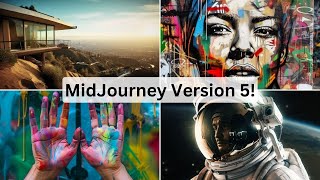
YouTube video (Matt Wolfe) summarizing MidJourney’s v5 launch (live Discord office hours). Covers new features (improved photo realism, skin/teeth/hands, upscaling, broader aspect ratios, tiling, image weights), changes to prompting style (natural-language sentences), access limitations (v5 for paying subscribers only), and roadmap hints (magazine, API possibility, v6 expected soon). Provides demonstrations and comparisons vs v4.
Questions this video answers
Matt Wolfe
March 16, 2023
Three and a half hours
About 2,000 people live
mag.midjourney.com; promo code: subscriber
Chapters
If this week didn't start off crazy enough with GPT4 launching and Microsoft deciding they're going to basically put AI in everything, well, today we got Midjourney version 5. They held a live office hours inside of their discord that went for three and a half hours. And in that office hours they made two big announcements. And I hung out for the entire three and a half hour live stream because I didn't want to miss a single detail about what they're doing with mid journey version 5 so that you don't have to. So let's go ahead and break it all down. So on the call they made two announcements, the first one being the launch of Mid Journey magazine. Midjourney magazine is going to be a magazine that showcases the diverse creativity of the Mid Journey community. If you go to mag.midjourney.com you can actually sign up and they'll send you the first issue for free. You just have to use the coupon code subscriber. It says here that each magazine features a selection of artwork curated from the 10,000 most highly rated images, as well as interviews with Mid Journey community members. And then as we scroll down the page, we can kind of get a glimpse of what we can expect this magazine to look like. And you could click on get the magazine. It shows it's $4, but if you add promotion code subscriber and click Apply, it'll discount it down to free for your first issue. So that's pretty cool. But the real reason this Discord Open Office hours had almost 2,000 people attend live was because today they announced the release of Midjourney 5. Now, it doesn't explicitly say this inside of their announcement here, but they did say it on the live call. They that Midjourney version 5 is currently only available for the paying subscriber members of Midjourney. So if you're still using a free trial of Midjourney, you're not going to be able to use version 5. They did say they just did not have the computational power to let everybody use it for free. So it does require that you're at least on one of their premium plans. So now that I've got that out of the way, let's dig into how you can go and access Midjourney version 5 right now. So assuming that you're a paying member of Midjourney, you can get access to version 5 in two ways. You can add dash dash V space 5 to the end of any prompt and it will prompt that image with version 5. Or you can set it to your default by typing slash settings and selecting Midjourney version 5 as your default version. Either one of those will get you midjourney version 5 images. Now, I've created my own test server over here to do various testing inside of Mid Journey. You can invite the Mid Journey bot to your own server if you're on one of the paid plans. And then you could create different rooms just to keep your own Mid Journey generations organized. That's what I do. Now, if you go into the Mid Journey discord and on the left sidebar here, you scroll down to prompt FAQs. Up at the top there is what is V5? How do I use V5? If you click in here, you'll see pretty much all of the most common questions people will have about version 5. And this covers a lot of what they covered on today's live office hours, but they also gave a lot more details live that isn't in here. So I'm going to make sure I break it all down and cover all of the interesting things that came out on this live office hour. Now, to start Midjourney version 5 does have improved resolution. When you prompt an image, all four of the images in the grid are actually already upscaled by default. So if I look at these four images and I decide I want to upscale this one on the top left and I click upscale one, it will upscale it nearly instantaneously because it's already upscaled. It's just grabbing that image that's already been upscaled. So watch this. I will click it and I will not speed up this video.
Boom. There's our upscaled version. Just like that. I can go and I can view it in a browser and see the full resolution image of this image we just created. Now, the most obvious difference that you're gonna notice is that in version 5, the prompts designed to look like photographs will look more like photographs. They really improved the photo quality. You'll also notice that they really, really improved the generation of hands. This was one of the questions that when I made my last Midjourney 5 video, everybody was asking, are the hands better now? Yes, the hands are much better most of the time. Every once in a while, you'll get something that looks a little bit funky and a little bit off, but most of the time, the hands are pretty spot on. Now, another noticeable improvement was that they really put a lot more focus into improving the skin texture. So you will notice if you look closely on some of the images that there are some blemishes in the Skin, you will notice more freckles. Sometimes characters that you generate will have moles on them. They wanted to add more realistic skin, skin texture, imperfections and blemishes and things like that. You'll also notice that the teeth are greatly improved. One of the funny things about Mid Journey version four was that if you made a picture of somebody smiling, a lot of times they would have more teeth than it looked like a mouth should have. They seem to have really, really improved that inside of mid journey version 5. Now, another thing that they stressed a lot on this live stream was that prompting is going to be different now. It's much more powerful. You need to actually add a lot more detail with your prompts. You can no longer longer just put a whole bunch of random words separated by commas and expect to get a really highly detailed, perfect image. It doesn't seem to work like that anymore. In fact, now it's got improved natural language processing, meaning that they want you to write your prompts like you would write a sentence in school. So think of how you would write out a sentence and prompt that way instead of just breaking up a whole bunch of keywords. This also means that single word prompts aren't going to be as effective as they once were. So in past videos I talked about how in Mid Journey four, I like to put just a one word prompt prompt of chaos or beauty or insanity or something like that. Those aren't quite as effective anymore. You're going to want to structure it much more like a sentence in how you might talk or how you might actually write a sentence in school. Now keep in mind that Midjourney version 4 isn't going anywhere. So if you really like the look and the ability to just use one word prompts or just to throw random words together with colons between it, you could still do that with Mid Journey version four. And it's just not going to be as effective in Mid Journey version five. So if that's the look you want, it's still there for you. Now, they also stress that using words like unreal engine or 8K or octane render, they're not going to get you super realistic results anymore. They're actually going to get you less realistic results. If you type in Unreal Engine as part of your prompt, you're going to get images that look like they came out of a video game and not images that look like they're realistic. They suggested using words like cinematic lighting and adding more detail. And notice how I structured this in the form of a sentence A highly detailed photograph of a person standing on a mountain with cinematic lighting during sunset. I didn't just break up a bunch of words with commas. And this is the result we get out of that. We get so much more detailed and realistic looking images that don't look like a video game like they do if we use a keyword like unreal engine. Here's another example that I did earlier. An editorial photo from Dwell of a mid century modern house on a cliff that overlooks Los Angeles. The morning sun shines over the brilliant architecture of the beautiful, exclusive and expensive house. And this was the image that I got. Just look at that detail. This could be a real photograph. And this comes from using more of that sentence structure as opposed to breaking up the words like you might be used to in Mid Journey version four. And earlier. Here's another one where the prompt was a highly detailed samurai warrior on the battlefield holding a sword in a ready to attack pose with cinematic lighting and detailed facial features. Now, it kind of hid the detailed facial features, but we've got a pretty cool, realistic cinematic image here. The example that they give in their FAQ here is your prompts will benefit even more from being written in the form of sentences rather than lists. Try writing like you learned in school. For example, an astronaut floating in outer space may produce more predictable results than astronaut comma, floating comma, outer space. All right, so I think I've hammered that in enough. The next thing was they improved the remix feature. So this feature where you can blend two images together and get some sort of composite image, it works much better than it used to. For example, I took this image of a woman that I found on the Internet and this image of a brick wall that I found on the Internet. And here was the image it generated with version four. It kind of merged the woman into the brick wall where she's kind of peeking out a little bit. And here's what it made when I did it with version 5, it made the woman standing in front of the brick wall, which makes a lot more sense. I also tested blending this photo of an elephant with this photo of a cat and got this cataphant here where you can see it took the body of the elephant, but the face and the fur of the cat. And it also took the background, the desert sort of savannah background of the elephant and used that for the photo as well. So really, really cool blending features. They've also added image weights back into Mid Journey five. And what that is is when you blend an image with a text prompt. You can tell the prompt how much you want it to weight that image into the final result. I took this same picture of an elephant here, and I pasted the URL in and an elephant standing on the beach, image weight 2. Image weights can be 0 through 2 right now. So I wanted it to weight the image highly in this over the text prompt. And if you look at this, there's really no beach in sight. It's just kind of an elephant standing there. So it put most of the weight on the elephant image. Now, in this second prompt here, I did an elephant standing on the beach, image weight zero. And this time I told it, essentially I wanted to put a little more focus on the text and less on the image. We still got our image of an elephant, but you can see now we've got the elephant standing on a beach. You can see a beach in the background, a beach on the side, and all of these images. This probably isn't the best example, but you can see that it actually put focus on the beach in this image when it didn't in the first image. That's what image weights do. Now, another thing that they added in is that it's got broader aspect ratio options. You could pretty much create any aspect ratio you want. In fact, on the live stream, they mentioned that some people were generating images that just look like a thin line with the aspect ratio. In fact, if we look at some of the other images that other people have created, you can see here's an example of somebody that did an aspect ratio of 110 and got this giant, long, tall image that looks kind of like an infographic here. Here's a grid of four more images that were all generated at that 1:10 aspect ratio. So really, there isn't much of a limit right now of what sort of aspect ratio you can generate. This may change in the future, but right now you can literally generate pretty much any aspect ratio you can think of. Something else that they've recently added in that I find really cool is they added the functionality to add tile to your prompt and it will actually make your image tileable. So they will all line up side by side. So, for example, let's do imagine a pixel art garden with green grass and red flowers. And then if I add tile to the end of it, it will actually make it tileable. So you can see it created these pixel art images for me. And theoretically these are tileable now, where they should all line up with each other. So let's go ahead and take. Let's take this Bottom left here. Let's upscale it. I'm going to save it to my desktop real quick. And let's see what happens if I set this as my desktop background, if it tiles properly. So if I save that and I set it to tile, you can actually see that it tiles. I can't really find the seams in it. Let's go ahead and do one that's not so pixel arty, so maybe it's a little bit better of a representation. Let's do imagine a colorful galaxy filled with stars, planets and spaceships. And then I'll put dash, dash, tile. I'm actually going to add the word detailed here at the front. And let's just see what we get out of this. All right, so here's what we got this time. They all look pretty similar. I feel like this bottom left one's got some decent contrast. So let's go ahead and upscale this bottom left one here. It tiles perfectly. Once again, I can't even really find the seams in it. So that's another cool thing that you could do with Mid Journey is you can make these tiling images, which, if you're a game designer, there's a lot of use cases for that. And maybe if you just want to make cool backgrounds, obviously some use cases for that as well. Now, one thing on this live stream that they explicitly said it is still not going to be good at is generating text. You're still going to have to probably pull them into Photoshop or Canva or something like that to add the text to it because they said it's still crap at text. And from my testing, I can 100% confirm that unless you want street signs that say Hari Toot, Riddap or Hadio, it's not very good at doing text. All right, now, I want to jump in and do some more exact example images here in a second. But before I do, I want to briefly mention a few interesting little tidbits that they did say on the stream that you're not going to find in their announcements, you're not going to find in their faq. But they're things that, as I was sitting there taking notes earlier, I took some notes that these are things that are in the works for mid journey version 5. So a little peek behind the curtain here. This is my notes and script for this video that I'm doing. Here's a few interesting notes that they said. One of the things is that they hinted that they are open to releasing an API for midjourney. They actually, on the call said, if you're interested in the API to DM them, API might be coming soon for this. They also clarified on the call that Midjourney is not using stable diffusion. They are using their own proprietary model. So it is not stable diffusion under the hood. And the other thing they said was that they expect that Midjourney version 6 will be out within the next two months. Somebody jumped on the call and said, do you think Midjourney V6 is going to be out before August? Jack over at Midjourney said, I expect Midjourney version 6 to be out within the next two months. So the pace at where we're going to see additional versions of Midjourney probably going to be pretty dang quick and it's going to accelerate here. All right, now that I covered pretty much all of the juicy details that were on the live stream. I literally kind of covered everything they talked about. Let's play with it. One of the things that they suggested was going to your Mid Journey gallery. So if you're a premium member, you get your own gallery of images that you can sift through and clicking on top and sorting it by your most popular images. These are images, images that people have voted up in the past. So these are some of my most popular images. They said take some of those and copy the exact same prompt into Midjourney version 5 and then compare the difference. So this is clearly my most popular. It's kind of unfortunate because I'm pretty sure I borrowed this prompt from somebody else and it's not my own original prompt. But let's go ahead and copy it anyway, see what it does in Mid Journey version five. And I'm just gonna paste in that same exact prompt. Okay, so these look absolutely amazing. Look at the mid journey version 5 images that it created. I'd say this, bottom right probably has the most details. Let's go ahead and upscale that one real quick. And so this was Mid Journey version 5. This is Mid Journey version 4 of the same exact prompt by 4. Pretty, pretty cool. Here's another one that I did. I just used a two word prompt here. Carnival glass paper. I also used aspect ratio 2, 3. So let's go ahead and add that aspect ratio. But let's just try this two word prompt and see how it comes out. Carnival glass paper. This is a prompt that was inspired by my friend Heather Cooper as well. She does awesome Twitter spaces every Friday about AI. So come join us on one. Okay. So it definitely interpreted the prompt wildly different. Still pretty cool images. But I would Say, I actually like the mid journey version 4 images better. So this one down in the bottom right, probably the closest to the other one. So let's go ahead and upscale that and compare it side by side. So here's the Mid Journey version five. Here's the Mid Journey version four. I think in this scenario because we use less prompts, Remember they want you to use more detailed prompts in version 5. Midjourney 4 did it better this time. This is version 5. This is version 4. Totally different interpretation of this prompt here. Let's do this one with my simulated kind Joe Rogan ish. And let's see how it does. Trying to create like a celebrity. I wonder if it's actually better at doing a celebrity now. So let's do realistic portrait of young Joe Rogan looking into the camera and let's see if this works. Okay. Well, it clearly still sucks at trying to figure out what Joe Rogan looks like because those don't look anything like Joe Rogan. I have seen some other images inside of the Mid Journey discord that did get celebrities, but maybe Joe Rogan's just one that it's not very good at. For example, I just had it generate a portrait of Larry David from Curb youb Enthusiasm and it did pretty, pretty, pretty good. All right, that's the second time I've made that joke in a video, so I won't do that again. Let's try like a landscape photo. So I've got this image here which I think is a pretty dang impressive landscape photo. But it does kind of look like a painting or something. So let's try a beautiful green forest with a lake and snow capped mountain in the background. It's already formed kind of in the form of a sentence, so that should do pretty decent. Let's see how it does here. And here's what we got. These look like happy little trees, like a Bob Ross painting or something. This one on the top right. This one looks like a photo to me. One looks really photorealistic. Let me upscale this top right one here. So that would be number two. And let's compare it with the one that I have before. So this is the one with mid journey version 5. Damn, that looks good. Like that looks really realistic to me. And here's mid journey version 4. Mid journey version 4. Mid journey version 5. Oh yeah. Mid journey version 5. Definitely takes this one. I think that's Mid Journey version five. That's Mid Journey version four. Both awesome, awesome images. I'm not complaining about either of them. But that mid journey version 5 is just the realism just so much better. This one. Right, Two last things I want to try and then we'll wrap this baby up. So one thing that worked really well in Mid Journey version four was just tossing in emojis and letting it generate something interesting based on the emojis. I don't know what mid journey version 5 is going to do if I try that. So let's just test it. Let's go imagine and let's do. I always like to throw in the rainbow emoji and let's throw in a rocket ship and let's just see if it works with some emojis. All right. So it actually still makes pretty dang cool looking images with emojis. I mean it's totally like a roll of the dice, a complete gamble of what you're going to get. This top left one makes a lot of sense to me. It's astronaut with a rainbow behind them. Rocket ship plus astronaut makes a lot of sense. How we got a girl with she's got metal coming out of her nose and cheek and stuff. I don't totally know what's going on with these bottom two. Definitely think the emoji tactic works better on Midjourney version 4 though. Now the last thing I want to test is on the live stream. One of the developers jumped in towards the end of the stream and said there is a one word prompt that still is actually working pretty well and that he's been loving the result of. And that's simply the word imagination. Imagine imagination. And he was saying that he was getting some amazing results with this one word prompt on version 5. And since he said it on the live stream, let's see what it does. And here's what the prompt imagination got us. Pretty cool stuff. I really like them. I can't really tell what's going on in this one and this one's a little bit creeping me out, but that is my overview of everything about today's open office hours for Mid Journey version five. Again, it was a three and a half hour live stream. I know this video is probably a little bit longer than some of my past videos, but again, I'm trying to distill three and a half hours of an open office hours from Mid Journey down into however long this video came out. So hopefully you'll forgive me for the length of this video. I wanted to cram a lot in here. I took tons and tons of notes and I feel like I gave you everything that you need to know on Midjourney version 5 and all of the cool stuff that they talked about, including the fact that there's probably an API coming out for Mid Journey MidJourney version 6 is probably only two months away and that I could once and for all confirm that Mid Journey at the moment is not built on top of stable diffusion. Hopefully you enjoyed this video. If you enjoyed this video and you like stuff about mid journey and AI and GPT4 and Microsoft, all of the cool stuff that's in AI, give this video a like and you'll see more of it. Subscribe to the channel. It'll make sure you see more from me. And before I let you go, head on over to FutureTools IE. Click this button here to join the free newsletter and every Friday I'll send you the TLDR of everything that happened in AI for this week, including the five coolest tools that I came across for the week. We're almost up to 40 subscribers on the newsletter, including people from Microsoft and Apple and Hugging Face and Nvidia. And just go to futuretools IO. Click on the Join the Free Newsletter button. Thanks again for tuning in. I really, really appreciate you watching my videos and spending the time with me. Go have some fun with mid Journey version 5. It's available right now. All right, see you guys later. By.
Sam.
More from Matt




AI News: Dots, GPT-6.1 Sol, Sonnet 5.5, Gemini 4, and everything you need to know




