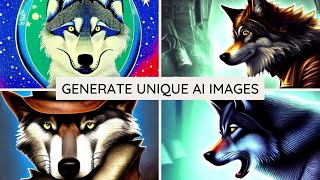
Matt Wolfe shows how to generate AI images for free using Craiyon and Hot Pot AI Art Maker. He creates wolves, a cat eating tacos in the desert, a monkey in sunglasses, and a samurai bowling, then experiments with styles like photorealistic and steampunk. The tools work well but often struggle with hands.
Chapters
Do you want to learn how to make AI generated art? Like this wolf on a computer, or these samurais bowling, or this cat eating tacos, or this monkey on the beach wearing sunglasses, or this unicorn in front of a castle? All of these were generated with AI art. And I'm going to show you how you can do it yourself for free. Let's get into it. So I recently changed up my Twitter profile pic and the pic that I used was actually generated by artificial intelligence. And I really, really like the way that some of these images came out. So here's a few that I'm kind of decid on to use as my main profile pick. So I've got this kind of wolf here, I got this wolf here, you got this wolf here, and you got this wolf here. And if you're wondering why I'm looking at wolves, my last name is Wolf E. Flo is actually wolf backwards. So that's kind of why I've settled on using a wolf. Some of the prompts I gave it were a wolf typing on a computer. This one was a wolf in space. This was. I actually think I put a wolf wearing a baseball hat and this is what it gave me. So, you know, not always perfect. It's kind of an interesting picture where you can't tell where the ears start or end and where the hat starts or end. It's kind of like the ears and the hat all sort of became one thing. But that's what I got when I typed a wolf wearing a baseball hat. So obviously AI is not always perfect. And this was another one where I think it was a steampunk wolf in space. Right. So really, really cool images. I love the colors on these. I want to show you in this video how you can make artificially, intelligently artificial, intelligently generated images. I think that's the way you would say it. So let's go ahead and do it. Now, you've probably heard of Dall? E2. A lot of other YouTubers have created videos on it. And one way to generate artificial intelligence images is through a website called Crayon with an AI in the middle. So C R A I Y O N. This site will use Dall essentially to generate artificially intelligent images. And it works. Okay, it's not my favorite site. I'll show you in a minute what site I actually use to generate most of my images. But this is one that uses the more popular, more well known Dall E. So let's go ahead and make up some prompts here and see what it spits out at us. So let's do a photo realistic cat eating tacos in the desert. Let's see what it gives us for this. It will take up to two minutes to generate. So I might speed this up a little bit. So here's what it generated for a photorealistic cat eating tacos in the desert. You can see not always perfect. I'm not quite sure what's going on with this image here. I guess maybe that's a cat. You could tell it doesn't always know how to process what you're giving it. It understood desert. It understood cat. It understood tacos. Bringing them all together seems to be a challeng. This one looks okay here. Now there's another tool that I like using that I've actually used more than this one and it's actually on this site called Hot Pot AI Art Maker. You can see I recently generated a picture of a wolf. I told it to do a wolf with silly teeth. It ignored the silly teeth part. I'm going to go ahead and grab this exact same prompt. A photorealistic cat eating tacos in the desert. Let's go ahead and copy that. Paste it in this area here. This one actually gives you a few more options. You could pay and actually get higher resolutions. I'm going to go ahead and leave it at 256 by 256 for now. Under style. There's all sorts of options here. The ones I've really liked are the steampunk. The they usually generate some really cool images. The Japanese art has come up with some cool images. You've got portrait Photorealistic. I did select Photorealistic up here. So let's go ahead and test Photorealistic and let's go ahead and let this generate a photorealistic cat eating tacos in the desert and see what this one does. Now this one isn't any more accurate than the other one, the Dall e. They are just cooler images. They are more colorful. They just pop out better. They're better used for things like profile pics which you'll see as soon as this one's done processing here. So this one did a photorealistic cat eating tacos but kind of ignored the desert portion which you're going to get some of that. And if I go and change up the style here, let's go ahead and throw it as steampunk. This usually generates some really cool images. I'm going to get rid of the photorealistic portion. Just do a cat eating tacos in the desert. See what this brings up. Now we're talking. Look at this. That to me, looks like a cat eating tacos in the desert with a human hand. One thing you will notice about almost every image you generate with any of these AI generators is, is they're really, really bad at hands. They're not going to put like a cat paw in there. It's almost always going to be like a human ish looking hand. But I think that's actually a pretty funny looking image. I love the colors. This one really tends to give you, like really cool color palettes when you generate images here. So let's go ahead and change the style from steampunk to Japanese art. I've gotten some really cool images with the Japanese art here. So let's go ahead and try this one once again. We've got a, you know, a Japanese style image of a cat eating tacos. No real desert behind it. Let's go ahead and change the back. Let's try some other stuff here. Let's go. A monkey on the beach with sunglasses.
And then I'm going to change the style to just the Hot Pot Art 6. Just kind of the default one. That'll be what it's set on typically when you come to the site. Let's create. See what that comes up with. You've got a monkey on the beach with sunglasses. You actually get a bonus monkey. It looks like. Let's try a flying unicorn in front of a castle. And then let's see, is there like a fantasy art style? Let's put it in this fantasy art style. See what it comes up with. So this is a flying unicorn in front of a castle with sort of a weird swirling thing. Maybe I'll get rid of the flying part. Let's. Let's go. A rainbow unicorn in front of a castle with a moat. That's what it came up with. A rainbow unicorn in front of a castle with a moat. That's actually a pretty good one. Let's try a samurai bowling a strike.
Then let's try this style as.
Haven'T had. Good luck with comic book. Those always looked a little funky to me. Foreign.
Let's try this graffiti style, see what happens. There you go. That's a samurai apparently bowling a strike. I see no reference to bowling in there, but what are you gonna do? AI isn't perfect, but you'll get some fun images nonetheless. Let's see what this other one generates when I try bringing it over into crayon.
There we go. This one looks a little bit more like what I was thinking would come up. They look like really, really sort of ancient images or something, but you can tell this is supposed to be a bowling ball in some lanes, these are supposed to be bowling balls. With some samurais, they don't. There's not a lot of definition in the samurais themselves generated some interesting looking images. So that's how you use AI to generate potential profile pictures or pictures for whatever you need to use them for.