This AI-Video Tool Will Change Video Production Forever
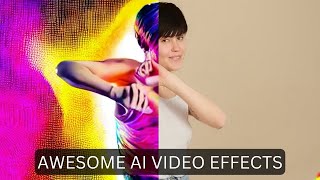
Matt Wolfe demos Runway ML's Gen1, a Discord bot that transforms video clips by blending them with AI-generated images or text prompts. It currently makes 3-second clips in 4 to 11 minutes and is available to a few hundred users. Wolfe shows the process using stock footage and Midjourney-created styles.
Questions this video answers
Inside Discord (Gen1 bot).
About 200–230 people (mentions ~200 initially, later ~230).
About three seconds per generation (≈3s).
--subsampling, --depth_blur_level, --cfg_scale, --compare (true).
Roughly 4–11 minutes per generation (varies with load).
Chapters
Today I'm looking at Runway ML's new Gen1 platform. This is a platform that lets you take a video file and an image file and sort of mash them together to get like a cool effect like you're seeing on the screen right now. Now, this is the demo reel that they put out, but in this video I'm going to play with it myself and see what I can make out of it. So let's get into it. So as of right now, Gen1 is only available inside of Discord. And if we look over here, there's only a little over 200 people that have access to it right now. And I l luckily was able to get early access. But if you're interested in getting to experiment with Gen1, there's two things you've got to do. Number one, you got to head over to runwayml.com come up here and click Request Access. Click on this Request Access button and get on the waiting list. And the second thing you've got to do is join their Discord. And the reason you've got to join the Discord is similar to Mid Journey, this whole thing runs inside of Discord. So all of the generations that you create, you do it inside of Discord. And also similar to Midjourney, you can look back and see some of the other generations that people have made and get ideas of what they're doing. So this one right here, for example, you can see they have this image of a car that looks like it's out of Grand Theft Auto or something. And they've got this video here.
And if we look over here on the right, you can see in this thread here, this is the video that it generated.
So pretty cool stuff. Now, one thing to keep in mind with Gen1, and I didn't really realize this until I actually got into the platform, is right now it really only creates about three second videos. And if you watch a lot of their teaser reels and all the videos that have been circulating so far, all of the videos are real short in length. They've just strung a lot of them together. So you'll see these videos, which looks like these really cool long animations, but if you notice, they're all just sort of three second clips strung together. So all of the videos you'll see as you're scrolling through here are all three second generations. Now, I've downloaded a few videos here from a stock video site, and these are some of the videos I'm gonna play around with. So we've got this video of a Woman dancing. I've got this video of a man canoeing down a river. This one of a woman running through a tulip field, and this one of somebody snowboarding through the mountains. I want to use these for quick videos and see what kind of generations I can get. Now, in order to get some real stylistic stuff, I want to blend it with Mid Journey because I just love the way that Mid Journey images come out. So as you can see in a lot of these, you take an image and you take a video and you mash them together. So let's go create an image in Mid Journey real quick. So first, I'm going to create an image a man made out of volcanic lava. Let's just see what that gives us. All right, so we have some pretty cool generations here. I wonder what would happen if I blended one of these with, like, my snowboarder. And let's see what happens. So let's go ahead and upscale. I think this number four looks pretty cool. So let's upscale number four here. All right, so here's our upscaled version. I'm going to go ahead and open it in the browser. I'll download this real quick. And now let me jump back into discord here. And let's do our first generation here in Runway. In order to do this, we type at Gen1, and then we attach our video and our image. So let me pull open my folder here. Let's bring in our snowboarding man, and let's bring in our volcano man here and submit it. Let's see what happens. It's going to take a second to upload the video file. And you can see it created this little thread over here with details about what's going on. And there's a little timer here to show that it's working. It looks like when I look at some of these past videos up here, it takes roughly four or five minutes to finish the generation. So we'll go ahead and wait and see what happens. All right, and it looks like our video is ready. So let's go ahead and take a peek. Here's what we got with our snowboarding man on fire.
Look at that. And again, they're only about three seconds long. Let's go ahead and take another quick look at that. It's so cool. It's like a dude made out of lava and his snowboards on fire. All right, so let's go generate another image in Mid Journey real quick for the girl dancing. Let's do. Let's make it like a real colorful sort of like Rave environment. Let's go imagine a colorful neon rave party. And let's go ahead and add neon core. And let's go ahead and make it an aspect ratio of 16:9, just because the video itself is also 16:9. So let's just see if that has any effect on things. Okay. So these are some awesome colors. I'm really, really digging this a lot. This one down here is just creepy. I'm not sure how that's a neon rave party. Let's go ahead and grab this top right one. This one will probably blend really well with the girl Danc. Let's go ahead and upscale number two here, and we'll play with that one. And while we're waiting for this, might as well make a few more images. So for the one with the girl running through the flowers, I was thinking about blending it with some sort of like, rainbow candy land kind of thing. So let's just go imagine a rainbow candy land filled with unicorns and glitter. Yeah, that. And then I'm going to go ahead and add RGB because I want to be real colorful. And I'm going to add the rainbow emoji to it. And then I'm going to add the aspect. Aspect ratio 16:9 on this one as well. And then for the guy that's canoeing down the river, I wanted something a little bit darker. So let's do imagine an ancient Aztec rainforest. And then let's just do aspect ratio 16:9 and let's go ahead and see what that generates. And that way I'll have all of my images ready so we can have kind of all of our generations going at the same time. All right, so I got my neon core image here. Let's go ahead and open this in the browser. I'll go ahead and download this one. We got some images for our Raym rainbow unicorn Candyland here. So let's go ahead and take this one in the bottom right here. I'm going to upscale number four. And now we've got some options for our Aztec rainforest. These all look really, really cool. Let's go ahead and upscale number three here. All right, so we got our rainbow Candyland image here. Save it. And we got our ancient Aztec village here. So I'll go ahead and open this in the browser and save that. I'm going to jump back over here to Runway. So the next video I want to play around with is this one of the woman dancing in a studio here. So I'm going and pull this one in over here. And then I want to Combine it with this neon rave party image that I generated. So let's pull this one in here as well, and then we'll just Tag at Gen1 and let that one run. All right, so this one is now ready. This one took quite a bit longer. I think the amount of time it takes for it to generate might be based on how many people are also generating at the same time. You can see I started this generation here at 507 and it completed at 5:18. So it took about 11 minutes to generate this one. But so let's go ahead and check it out here. All right, so that's pretty cool looking. All right, so I'm just going to go ahead and get the next two going. So they're both kind of going at the same time. And then after that, we're going to mess with some of the settings and see what some of the settings do, because you can see that there's all sorts of things down here that we can play with. So for my next one, I'm going to use this clip of this woman running through the tulips here, and I'm going to combine it with that Candyland image and see what it comes up with. So I'll go ahead and pull this one in down here. Pull in this rainbow Candy Land image here, and let's go ahead and tag EN1. And this time I'm going to also add a text prompt to it because you can also give it a little bit extra of what you're looking for using text prompts. So I'm going to say woman running through colorful Candy land. And we'll go ahead and let it generate that. So now you can see that it's got a text prompt and this video and this colorful image, and we'll see what the text prompt actually contributes to it. While we're waiting for that, I'm going to go ahead and upload my final one here, which is going to be this man canoeing right here, combined with this ancient Aztec village here. All right, so I've pulled both those in. And this one, I'm also going to do a text prompt again with it. A man canoeing through an ancient Aztec river. Let's go ahead and let that generate. And it actually looks like our Candyland one is ready here. So let's go ahead and take a peek at this one and see what we get. And this is what this one generated.
Pretty cool colors. They're just so short. All right, so now let me go ahead and close out of that one. We've got our Aztec one running here. All right, and our canoe video is ready. So let's take a peek at this one, and here's what we get. Okay, so this one is really cool. It's interesting because it kind of made it look like his face is sort of made out of the same stuff the statue is made out of, but it still came out pretty dang cool. Like, I just love the color palette of it. Now what I want to do here is I've got these four threads. You can see, I've got my thread here with our snowboarder that we created. I've got my thread with our dancer here. We've got our thread with the girl running through a colorful candy land, and then our thread with our Aztec canoe. Now, when you first log into Gen1, they do have a little welcome area here. And this video From Ian from OneRay here explains what all of the various things do. So the first time you get into Gen1, you're going to want to watch that video and learn about what they all do. But one piece of advice he gives right here is if your generation is ending too soon, try increasing the sub sampling value to 3 or 4 to get more dramatic results. Try increasing the depth blur level value and the CFG scale value while generating. So I want to try to get more dramatic results, and I also want to try to get longer results. So let's play around with some of those numbers. So in order to do that, we're going to come into this thread. So I'll start with this one with the girl dancing here. And we're going to go, go at Gen1, put a space, and then we're going to go dash, dash. We're going to grab this subsampling word here and we'll paste it in. There's not supposed to be any spaces after the dashes, so just dash, dash, subsampling and then no colon here. And then let's go ahead and turn this to a four. Now let's go ahead and mess with the depth blur level here. So I'll copy this depth blur level. We'll put a dash dash, add the depth blur level, put a space. It's currently set at 2, so let's go ahead and put it at a 1 and see what happens. And then let's mess with our CFG scale a little bit. Let's go ahead and copy this. Put our dash, dash, paste that in here. It's at 8.5. Now let's go ahead and set it at 10. So the subsampling I'm hoping it'll make it a little bit longer. And then it said for more dramatic results, mess with the depth blur level and the CFG scale. So let's just change those and see what the results are. All right, so it looks like we do need to upload the video and image again. So we'll go ahead and put our at Gen1, and I'm going to paste this same thing back in here. And then I need to pull in our woman dancing into the same thread here, along with our colorful neon rave party image. I'll go ahead and add a text prompt this time. Colorful neon rave party. All right, so I'm using the same video, the same original image, but I'm adding a text prompt this time. Colorful neon rave party. Changing the subsampling to 4, the depth blur to 1, and the CFG scale to 10, and let's go ahead and let it regenerate. All right, so let's take a peek at what these changes did. So here's our woman dancing with our rave colors. It looks like it got a little bit longer. Not a whole lot longer. Still.
Still about 3 seconds. Ish. But it changed the color completely because I believe it used a different seed. And then we also used a different CFG scale and a different depth blur level, so all of those had a big impact on it. Now, I also tweaked some things on our guy canoeing here. This time I set the depth of blur level to 3 and the temporal scale to 10 because I wanted to see how that would change things. And you can also see that it automatically changed the seed as well. I could have had it use the same seed, but I went ahead and let it make a new seed. So let's go ahead and take a peek at this one.
This just looks so cool to me. I just love the color scheme of it. Still doesn't seem like it got a whole heck of a lot longer, but it looks pretty dang cool. Now another thing that we can try is you can upload a video without an image and then give it a text prompt for what you want it to change that image to. So let's go ahead and upload our woman dancing again here, and let's Tag at Gen1, but this time I'm not even going to upload an image. Let's just go ahead and say an anime girl dancing, and let's just leave it at that. And let's see if it can figure out how to turn this video into an anime girl dancing. All Right. So here's what it generated with that. Let's take a peek. I mean, the face is a little bit creepy, but it's pretty cool that it generated an anime girl dancing from what I. Now, one last thing that's really cool that you can do is I also set this compare to true. I did this on my snowboarder video. And check out what this does when you turn on the compare. It gives it this little animation where it switches between it. And that to me looks really cool. I just love that effect of here's the original, here's the new one. That swipe effect is really, really cool. So you can do that with any video that you make. You just do it in the same way where you tag at Gen1 and then you would just set the compare to true. So I would do it like this. I would go at gen 1, dash, dash, compare, space, true. And then obviously I would upload my original video and prompts and whatever else I was doing. I absolutely love playing with stuff like this. Like, I'm probably not going to sleep tonight. I'm probably just going to keep on generating more videos inside of Gen 1. Now again, it is closed off. They've let roughly 230ish people into this already, but they are opening up spots. When I was in here yesterday, there was only 200 people in here. Today there's 230. So they are rolling it out to people on the waitlist. I am seeing more and more people join this. If you want to get in on this. The direct link here is Research Runway ML Gen 1. And then you can click on Request Access and fill out the waitlist form. And then again, because it is in discord, you're going to want to join their discord. And again, stuff like this is just going to keep on improving and improving. It's only a matter of time before we can generate longer videos. I can't wait till I can upload like a minute long video and have it generate just this awesome animation. And as computational power gets cheaper and cheaper and cheaper, we're going to be able to do stuff like that. As GPUs get better and better, we're going to have the ability to just generate amazing animations and videos. Today it's three seconds, but give it a couple of months and our minds are going to be blown by the type of stuff we're going to be able to generate with tools like Gen1 and what companies like Runway are coming out with right now. So I just can't get Enough of this stuff. I love nerding out about it. I think I say the words nerding out a little too much, but it's true. I'm just a huge nerd. I love shiny objects. I love all these digital toys that are coming out nowadays, and I love showing them off to you. So get on the wait list. Go play with Gen1. Runway is an awesome company. In fact, one of the creators behind this was one of the creators behind Stable Diffusion. So these are OGs in the space that have been developing this kind of stuff for a while now, and I'm excited to see where this goes. And if you like nerding out about this stuff with me, head ON over to FutureTools IE. This is where I share all of the coolest tools that I'm coming across. I add a ton every single day. As of right now, there's over a thousand of them. And if a thousand is a little too overwhelming for you, well, the search functionality and the little toggles up here make it really easy to find exactly what you're looking for. But still, if you're too lazy for that, click on Join the Newsletter Every Friday I send you just the five coolest tools that I came across over the week from probably 100 that I looked at. I also send you a handful of cool news articles, a handful of cool YouTube videos, and one cool way to make money with AI. And I said it every Friday. It's basically the TLDR of the Week in AI and I really think you're going to dig it. It's all available over at FutureTools. I oh. So head on over there. And thank you so much for tuning in to this channel and this video. I really, really appreciate you. This channel has grown faster than I ever imagined and it's because people like you keep watching my videos. So thank you so much. I really, really do appreciate you. I appreciate all the comments, I appreciate all the likes, I appreciate all the subscribes. You guys are amazing and I love that there's people out there that are enjoying this cool, nerdy AI tech as much as I am. So love you guys. Thanks so much. See you guys in the next one. Bye.
More from Matt




AI News: Dots, GPT-6.1 Sol, Sonnet 5.5, Gemini 4, and everything you need to know




