Try This Simple Trick Next Time You're In MidJourney
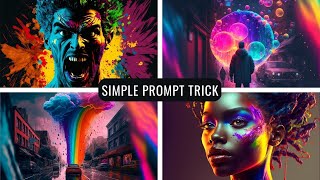
Matt Wolfe shows how to generate colorful desktop backgrounds in MidJourney with simple prompts. Use single words like "fantasy" or "dream", set the aspect ratio to 3:2, add "RGB" for vivid color, and try emojis as prompts.
Questions this video answers
Matt Wolfe
January 21, 2023
3:2 (use --ar 3:2)
RGB
FutureTools IO (Prompt Prompt Guide; weekly newsletter sent every Friday)
Chapters
I'm constantly being asked in the comments how to get cool backgrounds like the backgrounds that I have in this video. I'm going to show you how to make really, really creative and colorful art like this and like these and like these ones. Like this and like these ones. This video is going to be super quick and super to the point. By the end of this video you'll know how to make amazing, beautiful, colorful desktop backgrounds for yourself. And it's really simple and I really think you're going to enjoy it. Let's digging. I wanted to show you some really, really cool tricks with Mid Journey. I've made quite a few videos about Mid Journey. So if you don't know how to use Mid Journey or how to set it up yet, refer back to one of my previous videos about Mid Journey. It'll walk you through how to set this up. Now one of the most common questions that I get asked when I make these videos is where am I getting my desktop background? You can see I've got this colorful background here and pretty much every time I make a video I try to swap out my background with something new. And I like to have them really colorful, really attention grabbing. I like to have them pop. And there is a trick to getting really, really cool desktop back. This is probably my most popular one here. Now the trick to getting desktop backgrounds that look this cool is when it comes to prompting, go for less and not more. So what do I mean by that? I'm going to open up Mid Journey here and I will show you. I want to remind you that this Midjourney bot here, you do need to be on one of the premium versions to be able to have your own private bot. But everything I'm going to show you you still can do if you are still within your free range of what you can use on midjourney. Just come into the Mid Journey discord here and you can do it in any one of the newb rooms with no problem. The way I get really cool backgrounds like this is I like to try one word prompts. You'll find you get some really, really amazing stuff. I like to do, for example imagine fantasy. And then I want to make it an aspect ratio of 3,2 to make it wider for being a good desktop background. So I'll go dash dash ar three colon two to get that three, two aspect ratio and that's it. Just one word. And I like to see what happens with it. And this is what it generated. Look at this. Like a dragon head made out of a tree with A house built into the side of it. It's cool arch thing with a castle and like a lady warrior looking at the castle. A dragon kind of wrapping itself around a castle. This sort of under ocean with sea creatures and a face coming out of it and a castle on top. All of this is what the AI generated from just the word fantasy. If you really want to get some colorfulness to it, I like to add RGB to it. So I'll go imagine and then let's do fantasy again. And then I like to go RGB and then add My aspect ratio 3, 2. And the RGB just means red, green, blue, make it color colorful, essentially. Okay, so check these out. You got this little, like colorful mushroom house and this house in the woods. You've got a tree that looks like a hillside and, you know, some colorful waterfall going down it. A dragon, unicorn, horse thing. And I mean, some of these are just amazing. There's another one that I like to try. Imagine insanity and then add my RGB and then My aspect ratio 3, 2. And check these out. I'm not sure what's going on with the extra letters in the background, but I mean, look at this. This is amazing art off of just one word, plus a little extra criteria of telling it to make it colorful, essentially. Another one that I really like is Imagine beauty, then put RGB aspect ratio 3, colon 2. And I believe this one that I showed you a minute ago was just simply that prompt. And here's what it came up with for beauty. I mean, look at these. They're colorful. They're amazing. All right, this is the last one I'll do here. And then I will have one other really cool trick that I want to show you. So let's do imagine a dream, and I'm going to do RGB aspect ratio 3, colon 2. So I actually ran that one twice. This was the first one it gave me where it has this kind of cool, colorful cloud coming out of the bed. This one was another kind of cloud or somebody staring at it with, like an open door over here. This one looks like maybe somebody struck a match or something like that with colors of paint coming out of it. And this had actually tried to draw the word dream, which surprisingly, for mid journey, did really, really well. If this first letter didn't look more like an R than a D, that's, you know, damn close to spelling the word dream in mid journey, which is just kind of unheard of for AI Art. This was the second round that I did. And look at this. This person outside of a sliding glass door or something with colorful clouds. And you've got this almost like a snow globe habitat thing with colors coming off of it. And over here you have clouds and then this cool tree thing. And it actually managed to properly spell the word dream in this one. I don't know what RMO is, but it actually got the word dream into this one. Now this other really quick trick that I want to show you was inspired by a Twitter friend of mine, Heather Cooper, over at HBCoop. Check her out. She shares some really, really cool AI art stuff on Twitter. Stuff like this origami pastel fashion image and this cool AI waterfall generation. So the trick that she showed me that really kind of blew my mind is that you can use emo emojis as your prompts. So check this out. Let's open up discord again and let's go imagine. And then let's grab a couple emojis and see what happens. Let's go fireworks and then let's add. Let's add the rainbow emoji. Let's combine fireworks and rainbow and see what comes out. And then we'll go aspect ratio 3, 2. Check these out. We got this like rainbow explosion in the clouds here. Some firework cloud rainbow stuff. We got a rainbow parrot for some reason. Some bubbly rainbow stuff going on here. Really, really cool. Let's try some other emojis. Let's go imagine clown face and let's do the wolf emoji. Why not? Let's see what we get with a clown face and a wolf. And then I'll go. Aspect ratio 3, 2. All right, so check those out. This one on the bottom right and top left especially. You've got a clown wolf face that'll haunt your nightmares. All right, last one I want to try. Let's throw three of these in here. I got cheeseburger, American flag, eagle. Aspect ratio 3, 2. And there you go. We got an America burger with a beagle flying over it. And this one kind of looks like a half seagull inside of a burger or something. And then this looks like a burger that wants to eat me. You get some really interesting results. So a couple more fun things to play with in mid journey. Some stuff to experiment with. Try the one word prompts. Try throwing some emojis in there and see what it comes out with. It's some really, really fun stuff sometimes. If you want more ideas for some prompts, head on over to Future Tools IO and click on the Prompt Prompt Guide section. There's 14 different resources in there with all sorts of prompt guides for chat, GPT for GPT3 playground for journey for Stable diffusion and this is where I add all of the cool tools that I come across in the AI space. It's getting updated every single day with new tools. You can filter them, find exactly what you're looking for, and there's a lot of really cool stuff on the site. I think you're going to dig it. And if you're not already, make sure you subscribe to the weekly newsletter. Come over to FutureTools IE, click on the Join the free Newsletter button and every single Friday I'll send you the five coolest tools that I found from the week, three interesting news articles in the AI space, three really cool YouTube videos that I think you're going to dig, and one cool way to make money using AI. I'll send that to you every single Friday. And if you jump over there and get on the newsletter, I'll send you the next Friday's one to your inbox and I'll even let you see the old ones too. So check it out. FutureTools IO, thanks so much for hanging out. I hope you enjoyed this video. Let me know if you like shorter videos like this where I just give a couple quick tips and I'm curious what you think about them, so let me know in the comments below. If you like this, give that thumbs up button a like and subscribe to this channel if you haven't already. Really appreciate it. Hope you like nerding out with me and I'll see you in the next video where we'll nerd out some more in the next one. Bye.
More from Matt




AI News: Dots, GPT-6.1 Sol, Sonnet 5.5, Gemini 4, and everything you need to know




