InVision Studio – BRAND NEW DESIGN TOOL!?
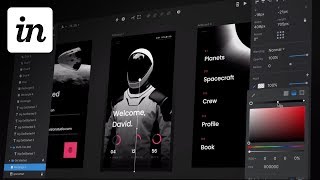
A designer walks through InVision Studio, the new design tool announced in October 2017. The video covers its interface, prototyping and animation features, and how it stacks up against Sketch, Adobe XD, and Figma.
Well, well, well, well, well, well, well. I don't want to be the one to say I told you so, but on November 18, 2016 I wrote this prediction. InVision turns craft into a full blown UI design tool to compete with Sketch, XD, etc. I'm thinking more when I had the the details wrong. It's not Craft expanding into a UI design tool, but rather Envision Studio is now announced as a new design tool. A way to design the future and it looks freaking awesome. Anyway, Envision Studio. It looks amazing. I was kind of thinking that they would call it Craft just because they have, you know, Envision freehand, Envision Craft Envision, you know, whatever. El sure, there's some other things Envision Inspect, but they've called it Envision Studio. And at first I was thinking I don't really love the name just Envision Studio, but I suspect since they've been working on this for the last two years, they probably want to just. This is probably what Envision itself is going to turn into. I want to watch this video with you and point out some very interesting things that I see that have me very, very excited. First of all, you gotta love that guitar intro. Mad props for using elon Musk's new SpaceX spacesuit. That is amazing. The spacesuit is amazing. Perfect choice. Designing the future, the future of exploration. I don't think anything represents the future more than an astronaut. I am just freaking. I really like astronauts and that whole theme. So this whole starting this video, this design, the dark interface, oh it's touching all of my feels and this is getting off to a really good start. But before I go any further, I want to take a look back at some of this stuff here. Alright, so if we just take a look at this screenshot right here, you can see we've got all of our layers here like you would normally expect. And it looks like instead of like with Sketch it has like your pages above and your layers below that. The pages are probably off in a, in a parent section maybe some more similar to xd. And you can also see that you have a layers icon up here and something else perhaps that is like the design system toggle where you can have you know, your main library of assets and building out of that system. You've also got your selector percent zoom prototype kind of style thing where that's actually the interactions linked some other common looking tools here and there. Share all that good stuff. Very like, you know, Sketch inspired with the export panel down here. Loving the big type on all of These properties and man, the dark interface, I really, really like it. All of my Adobe products are set to dark interfaces and I really wish Sketch would allow you to do that. So I'm excited to see a dark interface coming out of the gate. And I love the fact that they're hiding all of the actual tools. You know, there's not a big tool panel for selection rectangle type, all that like it. It's just so intuitive to hit the quick keys for rectangle and oval and text. Like you don't need that. And I'm really excited to see that is not in the picture here. It looks like all of the, all of the things that you would expect are there like the font size, the line spacing, love the number treatment here. The way that they've handled the text align, auto fixed. And I like the way that they've surfaced some of those text properties. Underline, strikethrough. And this looks like title, case, lowercase, uppercase, where you can constrain that character style that's always been kind of tucked into like a settings cog on Sketch and in Illustrator it's kind of like buried way deep and those are frequently used. So I'm glad to see are getting surfaced here. And it looks like you can change the registration point on some of the layers. You may or may not know this, but InVision several years ago bought a software company called Macaw and who created a desktop app called Macaw for you know, it was kind of like a Dreamweaver hybrid. It was outputting like web code and it was a really slick program. I played around with it a little bit, but it just for whatever reason didn't quite fit into my workflow. But it was legit and the team that they bought is top notch. So I'm sure that the majority of the McCall team is working on this. And it definitely has like some, some remnants of the older macaw software. That looks really sweet the way that you can scale down and the rest of the UI is like reacting to the rest to that one component. Not just the artboard change, but you're making that one UI piece. So it looks like they're probably gonna have some kind of pinning mechanism. You can see this other icon is highlighted up here in the top right of this layers panel. Looks like we have colors, layer styles, textiles, icons. So this has got to be the shared library of the design system. I'm guessing that's what this little like bolt icon is. These are probably instances of those library items that we're dragging out from the library into the ui. So this is really interesting. This is where everything's going with a big system. And this looks pretty crazy. So you've got pull changes right here. I can pull changes down from a shared library and it looks like you can select the ones you want to pull and the ones that you don't. This exists in the document. This one's the new one from the library. So you're going to hit pull changes shows you that, hey, we increased the icon size, thinned out the stroke, and it updates very similar to sketch libraries. What Adobe's doing with their libraries, everything being centralized is kind of where things are heading, you know, making things as easy as possible to update, avoiding duplication, duplicate work and just making it more efficient overall. That's kind of what it's all about. And it looks like, you know, that's what they're, that's, that's what they're all about. With this. I absolutely love being able to create quick clickable prototypes. Craft was okay. It always felt kind of like a bolt on into Sketch and it was like, I'll use this, it's okay. Xd, like prototyping in XD is like so buttery smooth. And so I really hope that invision has successfully merged the way XD is so lightning fast with all of the shortcuts and the things that I love about Sketch that aren't in XD yet. I'm really hoping that Envision Studio, like lands right on that line. I'm sure it's not going to be perfect right out of the gate, but that's kind of what I've got my fingers crossed for. And I know a lot of people that are using Figma might say, oh, you should have been using Figma. And I will say Figma looks awesome. I haven't designed a full project with Figma yet, but I also just don't love the idea. I also just don't love the idea of designing only with web, only in the browser. Even if it's with their desktop app, you know, it is still web technologies. I just really like having a local file, a local copy. Anyway, I'm going to keep going. Preview, as you would expect. Advanced animation. Now this looks pretty sweet. It's tricky to do advanced animation. You know, it's like you have to export all of your assets, pull them into another, another tool for animating. And unless you know what you're doing, even when you know what you're doing when you want to make advanced animation, it's like a Whole new project, you know, it's not just like, oh, let me do that real quick. So it looks like they're trying to do with what. What they had. They had a tool called Envision Animate or something like that. I can't remember. It was web based. I was a part of their, like, advisory board. But it just never, like, I never quite wanted to use it because it felt like I had. It was just too much of a. Too much of a burden. So having the ability to animate things right in your design tool, if it's done elegantly and it's not in your way, then it could be amazing. We will see. It looks awesome. The demo looks awesome. We'll have to try it out to see how it is. Ultimately, just having the ability to show the timing of the elements coming in from the bottom, the image scaling and fading in that stuff is huge to show to hand off to a developer. If you're able to do that as quickly as they make it seem, that is going to be huge. Not having to export assets to do it, not having to create a whole new project, a whole new sprint to actually animate this stuff and then hand it off. And then if you have a design change, you have to update your animation and then you have to update. You know, it just. It'll be great if this is all in one. So it looks like it is. I'm excited for it. If you can't tell. Even if it's not properly functioning right out of the gate, it has the appearance of everything that I would want in a tool to make it as easy as possible to go from design to prototyping to development, handing it off to developers. Looks amazing. I'm pumped. I'm pumped up. This looks awesome. I'm going to do my best to get my hands on an early copy of this with my Envision connections. And as I can, as I'm able, I'm going to dig deep into this thing and share as much as I can about this. So if you want to see more about Envision Studio, make sure to hit the subscribe button so you don't miss any of that and I will see you in the next video. If you're new to this channel, you may want to check out some of these other videos along here. There's probably going to be one here and there's probably going to be one right here. And if you click my head right here in the middle, you can subscribe. Make sure you don't miss any videos.










