Bitcoin Tutorial - How To Prove You Own Your Wallet
Learn to prove you own a Bitcoin wallet using Coinomi's sign/verify message feature. You'll generate a signature from your address and a custom message, then share all three pieces with someone to verify ownership. This works for airdrops, forks, and partnerships without exposing your private key.
Chapters
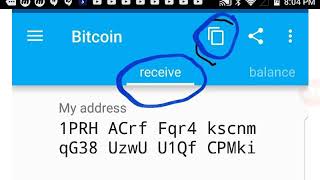
Hey you, welcome back to the channel. Guys, today a very important video. We're going to show you how to prove you own your Bitcoin wallet. Now, some of the reasons you might want to prove you're the owner of your Bitcoin wallet, it could be maybe you're in a business partnership where it's required by your partner. It could be something like an airdrop or a Bitcoin fork where you need to prove that you hold the private keys and you own the wallet. So there could be several reasons why you would want to prove to someone else you actually own your wallet, but today we're going to show you how to do that. Now what I found is that some wallets to do this with is easier than others. It can be a little bit technical. Uh, my recommendation for the easiest wallet is Coinomi. Uh, there are— these steps will work pretty much with most wallets. but there are some, they're a little bit more difficult steps to do and it can get technical. So I would definitely recommend this wallet as well. In the description, we'll try to leave some easy wallets to do this with. Um, and so what happens is when you first set up your wallet, which would be simply like setting up many other wallets, you're going to log in and come to your Bitcoin screen, right? So you're gonna select Bitcoin as— because it's going to have several other— it's going to basically have several other coins you can do this with. You can do it from anything, like you can do it with Ethereum, you could do it with Dash, you do it with Bitcoin Cash, you can do it with hundreds of major cryptocurrencies. But when you come into the wallet, the first thing you want to do is hit receive, right? That's gonna give you what you see here, your Bitcoin address, right? You need to copy that because that's going to be the address you're going to use to prove you own that particular wallet. So after you come down here, after you've done that, next you wanna click on balance. You're gonna go to the top right-hand corner, hit those three dots and click on balance. When you click on your balance, it's basically going to, uh, where you're not going to have anything in there, obviously, but it's going to pull up these, uh, this dropdown that says sign verify message. That easy. When you click that, the sign verify message, then it's going to take you in here to what you have to do to sign and verify your message. Now in this example, the writer of this article by Tether, um, he's put his name as the message, but let me explain what's happening here. In the, uh, signing address here, what you need to do is put in, um, the, the wallet of the address you wish to verify. Now that could be either your wallet or it could be someone else's. The next thing you want to put in is the message. That can be the account holder, uh, it could be a PIN number, it could be anything specifically that communicates whatever information you want to communicate to the person you're trying to verify ownership of the wallet to. And the last part is signature. You don't fill anything in there because what you're going to have here when you drop down is you're going to have a button where you hit the sign. Once you hit the sign button on that, it's going to give you your signature key. Now here's what's very important to note and what you need to understand about this. All 3 of these fields, the signing address, the message, and the signature, you have to have all that information in order to verify you're the owner of the account. When you have all that information, you give these 3 fields, these 3 details to the person you want to verify you're the owner of the account with. Okay. Now this signature key is not your private keys. It's not anything that can hurt you. It's just a way for the system to verify that you own that wallet, right? So it's okay to give this information out. Now, if you wanted to verify that somebody else was the owner, you will put their Bitcoin wallet address in. You would have to have whatever message they put into the system, and you'd have to have their signature key. So again, they will have to give you that information, and once they give you that information, you click the verify sign, okay? And when you hit verify it's gonna kick back. If you see that message, message signed, that means that person owns the account. If you see a red message that says, uh, wrong, um, signature, then you know that person does not own the account. So it's really easy, guys. You might need to roll back the video a little bit to get the understanding of it, but you would have to send that information off. You can do this with any coin if you use Coinomi. right? Now, some wallets, you know, that are Bitcoin wallets that may not have that feature, and you might be able to do this with just Bitcoin, but you won't be able to do it with the other tokens. So now that you understand that, guys, let's test it out and, uh, have you verify it. So how, how we're going to go about doing that, how we're going to go about testing it out, let me take us out of this screen, and I'm actually going to go Let's see here. I'm gonna go to our website and our project, which is, which is a Bitcoin fork. And in this Bitcoin fork, you can claim our BitcoinMYK tokens, okay, by using this same information. You put in your Bitcoin wallet ID. You make up a 4-letter PIN of your choice, your Bitcoin signature key, and then our Waves wallet. And when you put that information in there, it verifies you own that Bitcoin wallet. Now let me tell you why you want to do that and use our token that's trading right now and is of value. The reason you want to do that is because we use something called the Bitcoin Wave Network. And that allows you to send Bitcoin at high, very high speeds without touching your Bitcoin. So it works like money. How do we do that? We verify you're the owner of this wallet through your signature and through your PIN key. You get a social media verifier. So we know you're the owner of the account that gives you all these Bitcoin or the Bitcoins that in your wallet, you get that through our fork. And you're able to send Bitcoin at high speeds all across the network without touching your Bitcoin. So your Bitcoin sits there like gold, and you have the money that's backed by the gold sitting in your wallet safely in your vault. So very interesting, guys. Be sure to try out, to test this out with our Bitcoin fork so you can make some money and get some tokens whilst in the process of doing that. If you have any questions about how to prove ownership of your Bitcoin wallet. If the video was a little bit too technical for you, feel free to ask questions in the comments section or go to our website where you can claim your free Bitcoin fork tokens and leave comments there. Go over to our website live support. We will assist you to get these coins free as part of our fork. Guys, if you like content like this, don't forget to like, subscribe, and until next time, take care.
More from Michael





UBI - CIA Agent Explains Why Americans Will Never Get Universal Basic Income?