Walk through deploying JBoss SOA Platform quickstart examples. Configure build.properties to point to your JBoss home, use Ant to explode the Booking and DVD Store demos, then access them in your browser at localhost:8080.
Chapters
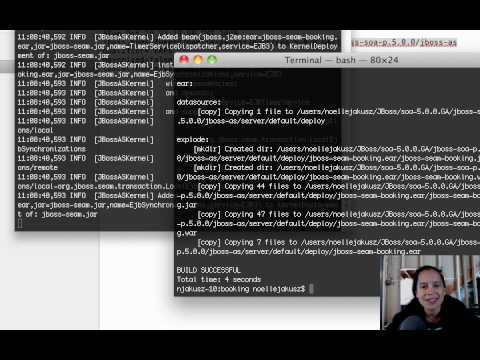
Hi and welcome to another video demonstration. In this video demonstration, we're going to go through the SOA Platform examples. So very quickly, I'm just going to show you how to start up the SOA Platform, which is very easy to do. Then I'm going to show you how to configure the Quick Start examples. Again, another pretty easy to do task. And then execute a couple examples and see them deployed, and then we'll, we'll just see how that goes. So it shouldn't take too long, but for those of you who are just getting started with JBoss, hopefully it'll give you kind of a visual of what you need to do and make it even easier for you to do it. So hopefully you'll enjoy it. So we're gonna start off first, of course, by starting off the SOA Platform. In order for you to do that, you're first going to need to install it. I've installed all of my software to a JBoss directory, so you'll see here there is a directory called SOA And inside of that service-oriented architecture platform that we provide at JBoss, inside of that is the application server installation directory. And then inside of there we'll see the JBoss SOA. And what I wanna do is just kinda show you the, these directory structures. So there's the application server, there's JBPM, REST Easy, and SIEM, depending on the types of applications and resources you wanna deploy to your soa-platform. So we're gonna take a look at, of course, the application server first, um, because that is where the bin directory is and where our run script is to start up the server. So I'm gonna go ahead and do that right now. While that's starting up, usually I like to keep an eye on the terminal in case anything interesting happens in the form of stack traces. Um, this should start up just fine. While that's happening, I wanna go ahead and configure the, uh, examples. So I'm gonna cd over to the SOA platform, and then with that SOA platform, I'm going to then cd into the JBoss component, and then take a look at, in this case, rather than starting up my server, I'm gonna go into the SIEM examples. And take a look at that. Now inside of here you'll notice there is a build.properties file, so we're gonna wanna open that up. Now for ease of use, I'm gonna use a tool to do that, um, but you'll notice here we have a build.properties file in this directory, in the seam directory, inside the directory structure that I had mentioned to you. And now what we're gonna do is go in and change the JBoss home to actually point to our home. Now be really careful with this, 'cause if you don't get this directory structure correct, it will actually create this directory structure for you. So if you accidentally misspell something, or for example, when I first did this, I think I, um, I didn't fully qualify it, so put the directory structure right at the root of my hard drive. So anyway, keep that in mind. You want to be pretty careful with where you put this, but you want it to point directly to your application server. Once that's done, you can save it, and then we can go in and take a look at the examples. So I'm going to cd over to the examples directory and and look in there, and we're gonna go ahead and launch the booking example. So I'm gonna cd into booking, and you'll see here there actually is an Ant script here. So what I'm gonna do is ant explode. Now if you want these instructions written down so you can print them off and follow them, they're found in that README.txt file, so you could do that. So it's gonna use the build.xml One of the things that this does not do is it doesn't really give you kind of a handholding through some of these demonstrations. So what it does instead is just give you the ability to run a script, see it deployed. As you see, it's deploying those resources to the SOA Platform right now. We can see the server reacting. And then we can go into a console and kind of see an application that utilizes certain technologies, in this case a SIEM. Application. So let's go ahead and do that now. You'll notice the build was successful, the deployment was successful, um, and now we're going to, uh, launch Firefox and take a look at localhost:8080. And then we're going to use seam- so whatever, uh, quickstart you use, you'll use the word SIEM dash whatever the name of the quickstart was. So in this case, the quickstart name was booking. So it'll take a minute. Again, we can keep an eye on this in the terminal screen just so we can make sure that everything is working successfully. It'll let us know, right, in the form of messages in the console if that is not the case. Everything seemed to go well, and you see now we are in the booking example. This is a hotel application for the SIEM framework. So now that you've seen the hotels booking demo, I would recommend, you know, going through a couple use cases, booking a couple hotels, taking a look at a couple different components. Usually, you know, it's a matter of just kind of walking through the different things you can do in the application and seeing how SIEM reacts to it. In a later video, we'll probably come back and take a deep dive into what this example is trying to demonstrate, but for right now, I just want you to get the demos going. So let's go ahead and maybe try another one. These are all the QuickStarts that you can use. So what we're going to do is, again, why don't we take a look at another one like the DVD Store. So what I could do is cd into the DVD Store, oops, and then again launch AntXplode. And the goal of this, or the, the important part of this is that as soon as I do this, what's gonna happen is it's going to build that demo and then deploy it to the directory I gave it. So you'll see it'll go through compiling the resources, creating the directory structure for it to store these resources upon deployment, and then once that's done, it'll tell me the build was successful, and you'll see that deployment occur here. Right, so you'll see all those deployment resources happening, the context being built for that application. So I'm gonna go ahead and open up a new browser. Oops. And, uh, 8080 is our port that we are deployed on. It says everything has been deployed, so now I can type in SIEM dash DVD store. And now I have the ability to test this out. Now, one thing that we are going to work on, um, potentially is maybe creating, uh, a JBDS project, pulling in the example, maybe making some customizations to it, and deploying those changes. In this video, I just wanted to get you started. So hopefully you found it useful. Um, play around with the samples, get them going. And then we can move into pulling them into the Dev Studio and creating maybe a reference architecture specific to some of your use cases. So anyway, hope you liked it. Email me with any questions, comments, recommendations for other demos. They're gonna get a little bit more complicated moving forward, but I wanted to get a few of them up that were pretty simple. So hope you liked it. Bye.