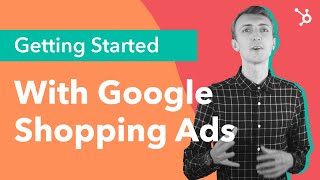
Kirk Williams explains Google Shopping ads: product listings with prices and ratings that appear on search results and YouTube. You need a product feed in Google Merchant Center, a connected Google Ads account, and four required fields: title, price, link, and image. Smart Shopping campaigns use automation and optional target ROAS to maximize conversions across Google channels.
Chapters
Hi there. I'm Corey with HubSpot Academy. Are you interested in getting started with Google Shopping Ads? Well, you've come to the right spot in this video. I sat down with Kirk Williams, a Google Shopping expert and the founder of a micro agency called Zato, to learn what it takes to run Google Shopping Ads. But before we get started, be sure to give this video a like below and subscribe to our channel for more educational content from HubSpot Academy. Ready to jump in? Well, sit back and relax as we hear from Kirk on how to get started with Google Shopping Ads.
Okay. Google Shopping ads are those little images that you'll see at the top of search results that have a little price, maybe a rating. Those are called Google Shopping ads and they are part of Google Ads, but they're run a little bit differently. And so one of the things that I love about Google Shopping Ads is that they do give you that information that you most want to see. Shopping ads are just for E commerce. So shopping ads are for. If you are selling a specific product and on your landing page, you're going to need a cart and someone's going to be able to need to click on that. They're going to have to see a price on that product page. They're going to have to click on that cart, be able to actually check out on your website. You can use a payment gateway like PayPal or something like that. But there does need to be that product, that purchase, purchasable, shippable product that they can click on, purchase and check out through your website with as an illustration. I'm a big, I'm a big Star wars guy. I really like Star wars and I love Lego Star Wars. My office has tons and tons of Lego Star wars sets. And if you were searching for the newest Lego Star Destroyer set that just came out, it's coming out, then you would probably see at the top those little images. And the thing that I like about that is immediately it gives you a visual of, oh, this is the set that I'm looking for. It gives you a price. So you can see maybe immediately compare and click on different options of, hey, this is a lower price. Is there a reason you can click on it? You can see ratings and reviews right there of things that Google has compiled. So you really see all of the things that you're most interested in seeing as a consumer. And then if you're interested, you can click on it and go right to that product landing page. Okay, so when you think about shopping ads, there's kind of four aspects to them. The first being placements. So where do shopping ads appear? This is something that Google has really been expanding in the last few years. Shopping ads are more and more for e commerce company, kind of a focus of spend. So if you are an e commerce company and you're not spending on shopping ads at all, or if you're not spending as much on shopping ads as you are on search right now, that's probably something you want to investigate because really spend spending trends with the vast majority of people out there is that they are pushing more towards shopping. That's because primarily because Google is pushing more and more of these shopping ads like far and wide. So you'll of course see the shopping ad placements appear on in your normal like Google SERPs, your search engine result pages on desktop and mobile. But now they can appear in the image tab. So the feed in Google Merchant center is really kind of the crucial thing to understand. But it's really a simple concept because all it is is a spreadsheet. It's just basically is you submitting here's the product data that Google wants to see and they, they tell all of that because they want to make sure you get it right. And you can, you can Google it. It's all in the policy docs online and you make sure that you get the right product data in there. There are certain required fields that you have to have. Things like your title, your price, your link, your image. And then there are other recommended fields that aren't required. But the thing with the feed is, and this is really important to know about shopping is the feed is how Google is matching your product up to the right user search terms, the search queries. So when a user searches for Lego Star Destroyer, your feed data is a big, big part of what Google is looking at. And then saying, oh hey, this product is actually what would match with that search term. And so making sure that you submit as much as you can in the feed. And then there are even some things that you can do to optimize your feed to try to get better things into the title, better keywords, things like that. The more that you can do with your feed, the better you're setting yourself up then to be able to actually advertise that. All right, we talked about feeds and the next step then would be taking Google Merchant center and your feed and it processed and they'll disapprove some products and you'll have to deal with that, but eventually it'll come through. On the other side, you'll get all that set up and then you need to connect that with Google Ads. And then what you need to do is you need to actually create Google shopping campaigns within Google Ads. There are lots of different ways to do that, but it's basically just a shopping campaign type within Google Ads that you can create. A really, really crucial thing to understand understand about shopping ads is setting up the account is essential. So Google, the way that they advertise your products, the way that they select a search term is through your feed data. That's why you have to submit all that stuff. You submitting product data feed stuff isn't just, you know, because you're bored or Google is. It actually is used by Google to match up your products to search terms in your Google Ads accounts. Then what that means is you want to fill figure out how you're going to set up your campaigns in a way that's going to kind of assist the Google machine. You're trying to assist Google in finding what products you think are the best. And then it's up to you to kind of get creative with with the type of campaign that you run, which is going to kind of determine where your products show as well as what search terms they show on which products you want to show. You can have different products show and different campaigns set to different bids. That's where kind of the more of really trying to identify the shopping strategy that you want for this account and then to create it kind of comes into play. But then once you've created that shopping campaign, your feed's in there, you've set some bids, you're eligible to appear on results for shopping ads. Smart Shopping itself is a new campaign type by Google and what it does is it allows you to give them a budget and if you want, you can give them a target roas goal, although that's not required. You can just tell them, maximize our profit or I'm sorry, maximize our conversion value, maximize our revenue. And you give them those two signals and then you build the feed and send that feed in. And then Google takes all of the channels that they appear on, YouTube, display, search, even email, and they will based upon all of the signals that they receive, audiences, devices, all of that other stuff, they will identify the best people at the best times as they're trying to and they will advertise your shopping ads to them.
There you have it. Kirk just covered the four elements of Google shopping ads, including placements, feeds, setup and optimization. Do you want to learn how to use Google shopping ads as part of your greater paid media strategy. Be sure to check out our new paid media course from HubSpot Academy that covers how to plan, buy and optimize your campaigns to bring return on your investment. Just click the link in the description. Thanks for watching and I'll see you there.