How Lead Generation Works In 2024
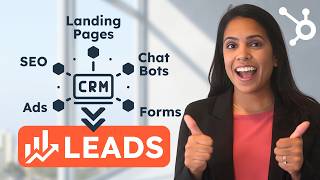
Adrithi walks through lead generation tactics for 2024: building landing pages and forms, using blogs and AI content, deploying chatbots, running email campaigns, and tracking results in HubSpot. The video covers where to store leads, how to segment them, and how to automate follow-ups.
Chapters
Hi there, it's Adrithi from HubSpot. Lead generation is the process of attracting prospects to your business, increasing their interest with the end goal of converting them into customers. When someone shows organic interest in your business, the transition from stranger to customer becomes really natural. And with HubSpot you have a ton of options to do lead generation really well. We'll equip you with ways to automate your processes, manage your data and send personalized messages at scale. So what are you waiting for? Sign up for a free CRM. You'll get all of our free lead generation tools included and I'm going to show you how you can can make a really great lead generation strategy. Come on. Now before we talk about lead generation strategy, I first want to talk about where your leads live. Now they might be living in spreadsheets, but I would really encourage you to use our Smart CRM to house your leads. Now our Smart CRM is a way that you can unify customer profiles, unify teams and unify your tech stack. Here's what it looks like. Here's a contact record in HubSpot Smart CRM. So on the left hand side you'll see all the information about this contact. This is especially helpful for sales reps because you can see their lifecycle stage, their lead status and you'll know where in the sales cycle they are. In the middle you'll also be able to see notes about this person, any past emails that some of your colleagues have sent them, and you can also even create tasks for yourself linked to this person. Now, my favorite part of the CRM is how aligned you can be with your other teams. So all of your customer facing teams can work out of HubSpot if they'd like. That means your sales reps can can talk to your marketing reps who can talk to your service reps as well. You're getting a 360 degree view of your contacts and you're also aligning with your other customer facing teams. Win. Win. The contact record is a great place for sales reps to look to see if a lead has opted in who's communicated with them in the past and more information about if they're ready to purchase or not. Now that that's out of the way, let's create a place where our unknown users can actually interact with us and our content. And you know what that means. Landing pages. So let's say I am a B2B company and I want to create an ebook to share with my visitors and help them convert and get them Talking to me my B2B company is a corporate event planner and I want to create a landing page that houses my ebook that I can send out to people who are interested. Now I want to choose a template and even though there are a couple things that I want to change in this template, I'm not worried because this is a drag and drop editor. As you see, if I don't like the way something looks, I can drag it over or I can even delete it. There is no custom code required for me to create this landing page. Now every good landing page has a form, so let's get to creating ours. I'm just going to click into here and on the left hand side I'm taken to my form editor. I can change the form title and here I'll be able to choose a form I've already created or I can create a new form. Luckily I have one created for this ebook and I can edit it as I see fit. Pro tip here. Make sure the value of your offer matches the length of your form. So because my ebook is actually pretty valuable, I'm going to add another form field for phone number. Now this form is of course embedded on my landing page, but but with HubSpot you can create other types of forms as well like pop up forms. As an example, if I'm just using a form to have someone subscribe to my blog, maybe I only do one or two form fields. For this ebook I'm going to ask a couple more form fields because I think it's pretty valuable. Now if I'm giving them something like a report or something that's super, super intensive, I'm going to be comfortable asking them a couple more questions. Maybe I'll ask for their job title, their company size and a bit more information so I can assess if this is someone who I need to reach out to. Once the form is the way I wanted, I can actually come over here and click into form automation. Here I can automatically follow up with anyone who has completed this form with an email. I can select an email I've already created or I can create a new email. What I want to make sure I'm doing is in this follow up email I need to ensure that I'm sending them the ebook. Otherwise what's the point of sending them that email? In addition to the ebook I can also send them related information, maybe another article. But I want to just make sure that this email is as helpful as possible to the person who filled out this form. So even though this is a mass email. I can actually make it really personal because I know what they're interested in so I can actually send them related information like articles or blog posts. So I'm really providing value after they fill out this form. Another way to generate leads is through a blog. Blogs are a great way to attract new audience and also generate subscribers. With HubSpot you can create your own blog. You can even enlist the help of AI to help you write your article. And if you want to learn more about blog creation, we have a great YouTube video that's linked in the description below. Conversation bots is a great way to automate your lead generation efforts. It's also a great way to have one on one conversations at some point scale. So with HubSpot you are able to create a chat bot. We have a ton of templates to choose from and I do just want to emphasize that bots can be really helpful, especially if you equip them with the right information. For instance, a bot can surface blog post articles or ebooks in exchange for personal information. So think of it as a type of form almost bots can scale one on one conversations and really drive opt inside One of my favorite use cases for bots is the ability for a bot to book a meeting for your visitor with a sales rep. So here's the flow of our bot. At first it'll say, hey, need to talk to someone? Book a meeting. It'll ask your visitor a couple of questions and once it gets that information, it'll be able to send a link so that your visitor will be able to book a meeting with a sales rep. So this is a really, really great way to kind of automate some of these efforts and let a bot take care of some of the communication that you don't need to. If you want to learn more about creating a chat bot, watch the video in our description below. Now you might be wondering that Meeting Scheduler is really cool. How do I build on myself? And you can actually do so inside of HubSpot. If you click Create Scheduling page, you'll be able to create a one on one group or round robin meeting link. Our meeting scheduler will be connected to your Google or Outlook calendar and and it's only going to surface times that works for you. So that way when you send this link to a visitor, they'll be able to book a time with you and that time is not going to overlap with anything else on your calendar. If you want to learn more about the Meeting Scheduler tool, make sure you watch the video linked below now you might be thinking, okay, all this is great, but how do I even get traffic to my landing pages or my blog? With your HubSpot account, you're able to connect your accounts from supported ad Networks to HubSpot. This way you'll be able to see reports on how your ads are performing and also be able to make informed decisions based on these reports. Here you'll be able to create specific audiences from your HubSpot contact database and see which ads are generating the most customers. You can also connect your LinkedIn ads account to HubSpot and track that success in HubSpot as well. HubSpot will help you understand if the traffic from LinkedIn is is actually yielding valuable leads or even valuable customers. In addition to ads, I also want you folks to rely on social media to help build your audience. We have a YouTube channel called Marketing against the Grain that just talks about really great marketing strategies. Our CMO is on it, a couple of other marketing folks are on it, and it's a really great way to generate leads. As you can see within the descriptions of these videos, we also have ways for visitors to to download relevant information. And of course, I'd be remiss if I didn't mention email marketing. Email marketing is one of the best ways to reach out to your prospects and turn them into customers. Now, email marketing won't actually get a new audience to your business, but it can nurture the folks that have already raised their hand in some capacity and turn them into customers. When you use HubSpot to send your marketing emails, you'll also have a ton of reporting so you can understand what emails are performing well and why. Now, in your emails you can also send content offers that might require your audience to submit more information in order to get that valuable offer. Okay, so now that we have created our content, we're generating traffic. The next step is to make informed decisions based on our reporting and and understand how we can optimize our lead generation efforts even more. Now, once you have generated leads, you're able to segment them based on characteristics so that you can send even more personalized messages to them. In order to do so, you can create either active or static lists. Active lists automatically update over time, so records will join or leave the list as properties change. Static lists, on the other hand, do not automatically update as your records change. So, so a static list really represents just a single moment in time. So for instance, I can create a list of folks who have downloaded a certain ebook and maybe send them part two of that ebook Or I can create a list based on if I know a contact's phone number and maybe I can send those people over to our sales reps so that they can nurture through the phone. But really the power of list segmentation is so that you can send more perfect personalized information to specific people. So here I am, I'm going to create a list of people who have clicked a link in this email. Now this to me signifies that they are really interested in my content and I should send them more relevant content. Just FYI, it might take a second for your list to actually appear, but don't worry, it will. Okay, so you folks did all of this hard work and now you need to make sure it's painted paying off. And that's where our reports and dashboards come in handy. So as you'll see here, I have a lead generation dashboard where I can see how many contacts have been created today. I can see marketing qualified leads, how many sales demos I've made through those marketing qualified leads. I really have a ton of options here. So I would encourage you folks to go through all of the reports that we have at HubSpot and, and make sure you're adding the ones that you want to see on a regular basis to your dashboard. This data is really valuable in telling you how you're doing and how you can improve. Now if this is a little intimidating for you, don't worry. We have actually quite a few templated dashboards. If you click Create Dashboard, you'll see a ton of ready made dashboards. So something that I would really recommend is coming down here and clicking lead generation. And if you don't want any of these reports, simply unclick them and save your report. And that's a perfect place to start. Now after you have generated your leads, the next step is to qualify those leads. You want to make sure that the people you're reaching out to are really people who are worth investing your time in. Once you build out your customer journey and you map your lead automation processes to the customer journey, you have a really good chance of creating well qualified leads. And trust me, your sales team is going to love you. Based on G2 ratings, HubSpot has been ranked as leaders in the small business, mid market and enterprise spaces. So what are you waiting for? Sign up for our free CRM today. Start small with HubSpot's free tools and as your business grows, HubSpot can grow with you.
More from Patrick



A NEW BREED OF PARTNER: The Partnership Ecosystem Model Journey of Patrick Biddiscombe, Part 1








Customer Success Workspace: Never Lose Sight Of What Matters Most | HubSpot Spotlight