How To Write a Blog Post with AI in 10 Minutes or LESS (FREE Template)
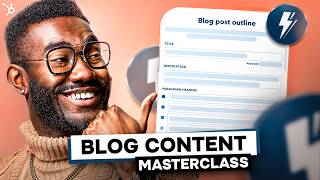
Patrick Biddiscombe shows how to write six types of blog posts in 10 minutes using HubSpot's AI Assistant. He targets keywords with 10-150 monthly searches, edits AI drafts with your own expertise, and provides free templates for how-to, listicle, pillar page, and other formats.
Chapters
I need to write an optimized blog post, but I've only got 10 minutes, so I'm going to see if using HubSpot's AI assistant can help me out. I'm going to experiment with four different styles of blog posts and I'm going to see which one is the best in these 10 minutes. 10 minutes on the clock. Let's go. To get started, I'm going to log into my HubSpot account and then click on Marketing Website Blog and then generate blog post using our friendly neighborhood AI Assistant tool. Hey there buddy. All right, so let's do this in real time. Let's say I'm a coffee aficionado and my business sells ethical organic coffee beans, grounds and other caffeine related merchant accessories. What kind of how to might my customers search Google for? The first step is asking us for prompts to generate ideas for our blog. So let's focus on some keywords that are relevant to our audience. You can be as specific or as general as you like, but since we know we want a how to blog, I'm going to go with how to Brew Coffee at Home. I'm going to select the country of our target audience and then click Next. Our AI Assistant has come up with a bunch of different blog subjects and titles to choose from. I'm going to pick my favorite from this list, but if I didn't like it then I could generate more along a similar line. P.S. you can always edit the title later so it doesn't have to be perfect just yet. I'm going to go with expert tips for brewing Coffee at home like a pro and I'm going to edit that title so that it says how to so we have a fully editable blog outline including title description and paragraph headers to organize the body of your blog, adjust or amend any of these to customize your outline until you're happy. Then click Generate Blog Post to make the magic happen and voila. A draft of your blog has miraculously appeared in your editor. From here you can edit and tailor your content to suit your company's voice, products and services. You can also add images and links, change the formatting and add your own creativity into the mix. A sweet spot for length is between 80 to 1,000 words. Remember, a great how to blog should clearly define the problem you're solving, explain why it's important, and provide a clear step by step solution. Finish up with a final takeaway and that all important call to action and we are done. A few Extra Blogging tips Find your niche and make sure your keywords are specific to your topic to help them rank better. If you choose too broad a topic or keywords that are too competitive, your blog might get lost in the ether. And an ethereal blog isn't a good blog unfortunately. Find your niche and start with a low volume keyword that has between 10 to 150 monthly searches on Google. This will help your new blog post to rank easier. Alright, now we know how to use the AI assistant. Let's move on to blog template number two, the Infographic. This is personally one of my favorite types of content and infographic is a great way to grab your audience's attention with highly visual content, compelling copy and useful data. And while you'll typically use less copy than a traditional blog post, your content must still be engaging and full of valuable information to keep them reading. So how can we make the process quicker using the AI assistant? Just like before, let's input some ideas and see what it comes up with. For my coffee bean business example, how about an infographic about all the different types of coffee from around the world? Okay, a blog outline full of fascinating facts on coffee from different cultures and countries. Now all I need to do is spend a few minutes pulling out some useful tidbits of data and stats to include in an infographic from the origins of coffee to brewing traditions and recipes from around the world. Then all I need to do is to add this content into a bold visual design to create a great looking infographic. And since my coffee company sells beans from each of these locations, I can include some product links and calls to action as well a few infographic tips. This one's all about design, so use imagery, flow and color to highlight your data and make sure your copy is efficient and engaging. You stats, lists, graphs, flowcharts, timelines and comparisons to spark interest and geek out on your specialist subject to show your expertise. Finally, always double check your facts, cite your sources, and above all make sure your info is useful and visually striking to create something that can be shared across multiple platforms. Okay, the next one I'm going to experiment with is the List Blog. I think we all love a good listicle. BuzzFeed has been going strong since 2006. After all. Whether it's a list of interesting facts, a ranking from best to worst, a collection of handy tips, or X ways to do something you A list is a quick and effective way to deliver information to your audience. To come up with list ideas, think about your keywords, what your audience is interested in, what they might be searching Google for and how your information will benefit them. For example, let's get our AI assistant to generate a list blog for coffee loving customers. We want to be showcasing products in this one, so let's try a list of the best coffee recipes. Okay, Nice. All these look absolutely fantastic. And now I have to know what an affogato coffee is. It's already working. So click generate blog and let's see what we've got. We're going to reorganize, edit and expand the list and embellish with images and video to make it even more enticing. And since we're selling the vital ingredients for all of these recipes, coffee beans, we can add a call to action that links back to our shop. And finally, blog template number four. Newsjacking. Posting up a topical blog is a really clever way to up your search ranking and stay relevant. So why not harness the popularity of a relevant breaking news story with some newsjacking content? Obviously, this one needs to be carefully tailored to your subject and audience. There's no point in newsjacking a story about something totally unrelated just because it's newsworthy. So browse the headlines and find a suitable topic that might share your target audience or keywords. Let's try it with our coffee bean company. What is in the ethical coffee news? Hmm, Some drama about Starbucks perhaps? Or how about the viral TikTok Stanley Cup? Might be a little left field, but bear with me. Let's generate a post and see how we can repurpose this content to suit our needs. Lots of topical info here and a great opportunity to talk about making coffee in our insulated Stanley Cup. As always, we can tailor the outline to our needs and jazz it up with images, videos and a call to action at the end. A few newsjacking tips when dealing with breaking news or sensitive subjects, make sure you have the most up to date and accurate information for your blog. Check your sources and keep it relevant. All right, so those are the four different things that I decided to experiment with. But there's a fifth one that I think is really important on top of that, and that's the pillar page, possibly one of the most important aspects of your blog. Remember the how to blog that we did at the start? Well, a pillar page is basically an expanded version, a comprehensive guide to a specific subject that can link to a bunch of different relevant individual blog posts. A pillar post is an in depth blog compiling all the info you have on a particular subject. This is a chance to show search engines you are the ultimate authority on this information, so be sure to use your keywords effectively and include backlinks. This is a big boy. This is going to be a little bit longer than your average blog, usually between 2,000 to 5,000 words. But you can break it up with images, videos, infographics and social media posts. Let's use the AI Assistant to get started with a comprehensive guide to espresso. We're going to select a suitable title to create a range of subjects to start with, then add in headers to expand our outline into a longer pillar post. Remember, you can always edit your title reorder and add sections in the blog itself. Think about all the different questions your audience might ask and make sure you answer each one in your ultimate guide. For example, a definition of the term, the history of the subject, pros and cons, examples, how tos, tips, tricks and common pitfalls, a list of resources, and of course, a call to action. All right, so there's actually a sixth template that I want to experiment with, and that is the what is style of blog. Similar to a how to blog, a what is post simply explains a concept or idea to the reader. It's a quick answer to a question via the magic of the Internet, and your blog is going to be the one with the solution. What is Blogs are often chosen for Google's snippet feature, which shows a summary of your posts right there in the scp. You can also easily adapt a what is post into another kind of question, such as why is, where is, who is? Or when is? Let's use the AI Assistant to quickly generate an outlook. When is the best time to drink coffee? I know, I know. The answer is always. But that could be a pretty short blog post. A great comprehensive rundown of all the times you might need a coffee shop. Of course you know the drill. By now. You can adapt and edit to suit your needs. Include eye catching imagery, links and a call to action. And we're done. Okay dude, six blog types in about 10 minutes. That's. That's not bad at all, honestly. And this is just the starting point. If you created other kinds of blogs using the assistant, we'd love to hear about it. So share your ideas and tips in the comments below. Blogging is still the reigning champ in the most effective methods of adding value and trust to your business online. Not only will great blog content drive traffic to your site, it will improve your search ranking and can be repurposed for a range of other content across different media. You can make the whole process a lot easier using the templates and tools like AI to spark ideas, generate outlines and optimize your blog posts, creating attention grabbing, engaging content effortlessly. Some final blog writing tips for you the AI Assistant is a fantastically useful tool, but don't forget you are the expert on your business. Make sure to fact check, proofread and customize each draft to suit your unique voice and goals. AI can be a great way to break through writer's block, find inspiration, generate outlines and drafts, and streamline the process to increase your output exponentially. But only you can enhance the quality of your posts with your insight and knowledge. So if you want to get started with any of these six blog styles, check out our blog post templates completely free that you can download in the description or below. Generally one of the easiest ways to kickstart your blog writing. Super fantastic. I'm so glad we're giving this away to you guys. And as always, be sure to subscribe to the HubSpot marketing channel so you never miss any marketing insights or tips. Now if you'll excuse me, I'm gonna go have a little coffee. Not because I need it, but because I want it. Until then, I'll see you next time I can find this client info have.
You heard of HubSpot? HubSpot is a CRM platform so it shares its data across every application. Every team can stay aligned. No out of sync spreadsheets or dueling databases.
HubSpot grow better.
More from Patrick



A NEW BREED OF PARTNER: The Partnership Ecosystem Model Journey of Patrick Biddiscombe, Part 1








Customer Success Workspace: Never Lose Sight Of What Matters Most | HubSpot Spotlight