INBOUND 2016: Official HubSpot Product Recap
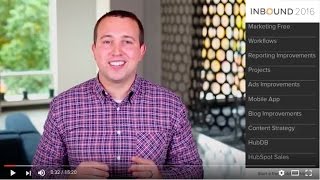
Video recap of HubSpot product announcements at INBOUND 2016 presenting new and updated tools across marketing, sales, content and mobile. Key launches described include HubSpot Marketing Free (a free tier integrated with HubSpot CRM), Visual Workflows (new workflow editor), Web Analytics Dashboard (site analytics beta), Projects (in-app productivity with >50 templates), Ads integrations (Facebook joining LinkedIn and AdWords; Deals ROI feature), a consolidated iOS HubSpot Mobile app, content tools (HubSpot Collect Chrome extension, HubSpot Composer, Content Strategy tool based on topic clusters, HubDB relational tables, multi-language page support), Meetings widget enhancements, and Messages (site chat). Several features are in beta or scheduled for early/Q1 2017 release.
Questions this video answers
Q1 of 2017.
Facebook Ads: live in early 2017; Messages: available in early 2017 (beta rolling out later in 2016).
iOS App Store.
Over 50 pre-built templates.
Chapters
Hello everyone, I'm Kip Bodnar, the CMO here at HubSpot. Each year at Inbound we introduce a number of new products and improvements to HubSpot. This year was no exception. We announced exciting additions to our growth stack, including a new free version of HubSpot's marketing tools, a new mobile app, and massive improvements across our sales and marketing platforms. To help you digest all the news, or in case you didn't get to make it to Inbound, we've created this video. Feel free to jump around by clicking any of the chapters that are most relevant to you. If you'd like more information, or to join any of the betas mentioned in this video, go to HubSpot.com new if you're a HubSpot customer, you can reach out to your sales or service representative for more information. To tell us more about HubSpot marketing free, here's Ari hi, my name is.
Ari and I work on HubSpot's automation and reporting tools. To get us started, we are so excited to introduce a brand new free tier of HubSpot. HubSpot marketing free represents a key building block of your company's growth stack. It's a perfect jumping off point for businesses just getting started with Inbound. Take a look at this quick video we put together on The Basics of.
HubSpot Marketing Free HubSpot Marketing Free turns your website visitors into customers by helping you generate more leads and by giving you detailed context on who they are. It works together with the free HubSpot CRM so you can easily organize and manage every interaction with your leads and customers all in one place. The moment a lead shares them email, you'll know who they are, where they work and what pages they visited, all in real time. HubSpot Marketing Free helps you turn every visitor into a lead through its contact forms and pop ups. Lead Flows are pop up widgets that can be customized to suit any conversion. The Form Collector tool finds all of the forms on your website and captures any submissions that a visitor leaves so you can start generating leads without creating any additional content and without knowing any code. Once you turn those visitors into leads, HubSpot Marketing Free automatically provides you with context on who they are, like what their job role is, their location and their social profiles. You'll also see how they arrived on your site and what they viewed even before they filled out your form and when they come back. Tracking picks up where it left off. Every detail is then organized into the timeline so you have the context you need to market and sell in a relevant, personal way. Now that you have all the information you need on your visitors and leads, you can analyze and improve your conversions with built in analytics, making it easy to learn which traffic sources are driving the most conversions. Then you can spot trends in how visitors are arriving to your site and use those insights to drive more conversions. HubSpot Marketing Free Start turning visitors into Leads today. Get started for free.
If you're a current HubSpot customer, the features of HubSpot Marketing Free have been folded into your HubSpot portal alongside all the tools you're used to. For anyone else, HubSpot Marketing Free is available using the link below. Workflows is HubSpot's automation engine. You can use Workflows to nurture your leads, alert your reps of key website activities, update your data in bulk, create deals, and a whole lot more. As your team scales, automation can get complicated. A single flow turns into three or four. One branch might become several. More people are involved in the process and need a quick way to understand your campaigns. Your processes might get more complex, but your tools don't have to. With that in mind, in the coming months, your workflows tool in HubSpot is getting a fresh new editing interface that's lighter to learn, easier to use and simpler to share. The new editor lays out your workflows in an elegant visual canvas. Add and remove steps with ease and visualize your branches as you go. Zoom in to optimize a specific component or step back to get a holistic view of your flow. If you've made a mistake along the way, we'll even give you a quick tip to get you back on the right track. After you've published your workflow, check back in for powerful, precise and quite simply pretty analytics. Visual Workflows is finishing up beta testing and will be coming to a portal near you in the next few months. Your website is the gateway to your marketing funnel and a key to your inbound success. With that in mind, we're excited to introduce a new set of reports to measure your website's effectiveness. HubSpot's brand new web Analytics Dashboard brings the most pivotal top of funnel metrics into a fresh and easy to use interface, giving you actionable insights into the health of your website. Things like bounce rate, new versus returning visitors, device and location based metrics and more will make their way into the friendly confines of your HubSpot portal for the very first time. Stay tuned for updates. The web Analytics Dashboard is in a small beta as we speak, but in the coming months all HubSpot customers will have access to it.
Hello, my name is Marcus Andrews and I'm excited to tell you about a new product we launched last month called Projects. Projects is our new in app productivity tool and it's changed the way that teams work, collaborate and learn inside of HubSpot. A project is a set of tasks that you and your team can rally around to get more work done faster inside of HubSpot. Each task inside of a project can be assigned an owner, a due date, relevant links and attachments. When built out, this creates a blueprint for you and your team as you work inside of HubSpot. It also allows you to manage your work right where you build all of your assets so you always know where things are without needing to search through other systems. To help you learn and Master Inbound faster, Hubs Projects also features pre built templates created by our HubSpot Academy team. With projects, you'll have access to over 50 of these templates to guide you through almost any inbound marketing tactic. Most marketers we talk to communicate in email, manage their projects with a different app, calendar their time in separate spreadsheets, and on top of that do the bulk of their marketing work inside of HubSpot. Projects solves for the scattered and confusing approach and just helps you get more done. It's a simple way to manage tasks, keep things on time and collaborate better with your team. Projects is live now and it's free. Right now it's only available in our marketing tools and you can find it in the productivity drop down of the navigation. Give it a try. Another product I'm excited to share an Update on is HubSpot Ads. HubSpot Ads integrates top ad networks into HubSpot. This combines your paid media data with your marketing data to show you a closed loop view of what happens from the first time someone clicks on your ad to when they become a paying customer. All inside of HubSpot many of you have been waiting for the ads announcement we shared at Inbound. This year we're integrating Facebook ads into HubSpot. Once live, you'll have the ability to measure and optimize your Facebook ads inside of HubSpot. This means we'll automatically tell you which Facebook ad clicks have turned into leads in HubSpot and add that activity to the contact timeline. Show you the ROI of individual ads and campaigns, which is really the key information you need to optimize your ads. This rounds out our integrations with the top ad networks Facebook will join LinkedIn and AdWords inside of HubSpot. Having all three gives you the power to quickly test and assess different options so you can decide which ads work the best for your business and for your inbound campaigns. You can request access to the limited facebook beta@HubSpot.com New the product will be live in early 2017. We're also introducing a new connection between ads and the CRM that we're calling deals ROI. Full stack HubSpot customers and customers with Salesforce Deal Sync turned on can use their deals data with HubSpot ads. This brings deal data information to the Ads ROI calculation, giving you a precise number for the ROI of your paid investment. Look for it in the setting of the Ads tool.
Hi, my name is Nithya Bhaskar and I've got some really exciting news from the world of Mobile at HubSpot. We've taken the best parts of our existing CRM sales and marketing apps and combined them into a single HubSpot mobile experience for iOS. The new app gives you a view into the full lifecycle of your contacts, from top funnel marketing efforts to in progress deals and sales tasks. When you enter the app, you can customize your mobile digest to display your most important marketing metrics at a glance, as well as flip through your sales leaderboard, activity stream and recent deals. Your entire contact database is available, which allows you to pull up contact records and get more context when you're on the move. There's also a detailed email analytics view which graphs out your email engagement and deliverability metrics so you can check out the impact of your nurturing campaigns. There's lots in store for HubSpot Mobile and we're just getting started, so we'd love to hear your feedback as you try out the app. It's currently available in the iOS App Store, so check it out and let us know what you think.
Hi, my name is Jeffrey Vosal and I'm the product marketer here at HubSpot for our content tools. There are a number of new exciting announcements that we've made at Inbound this year for content that Start by talking about your blog, specifically how you come up with content ideas. All content starts with an idea. HubSpot Collect, a brand new Chrome extension coming to beta soon, helps you clip and store content, whether it's an image, quote or something else. Your entire team can utilize HubSpot collect to gather ideas and research so you'll never run out of content. Next, you want to turn that idea into a blog post. Within the new HubSpot Composer, you can begin writing your post without any distractions. When you're ready to insert a quote or a piece of research that you saved using Collect, you can add it in just one click. It's automatically formatted and attributed for you. After you're done writing, collaborate with colleagues to review your post or provide feedback right within HubSpot. When you're ready to publish, enable support for accelerated mobile pages, otherwise known as amp, and speed up the load time for mobile pages and improve their discoverability in search. Next, let's talk about SEO. Search has changed significantly over the last few years. Buyers are increasingly searching for longer tail terms and as marketers, that means adjusting beyond a keyword based approach. HubSpot's new content strategy tool introduces the concept of topics over keywords. The central component of these topic clusters is a piece of 10x content. Your 10x content should be topic based and a thorough resource. But surrounding that core topic are subtopics, which can be made up of individual blog posts. Each of these supporting pieces of content then link back to your core topic, helping give it more authority in search engines. Within the Content Strategy tool, you can explore and validate your content topics. Before you start writing, simply enter a core topic and then ideas for supporting topics and we'll help you decide if it's relevant, if there's significant competition for that term, and if it's a popular topic. Based on this, you can easily decide what to write about and other ideas to discard. As marketers, we all want to write content that is not only helpful for our prospective customers, but content that achieves our marketing goals. Content strategy helps you discover and validate the ideas that you should pursue so you can spend less time on content that won't work and more time creating content that generates results. Once you create that content, you can measure how individual topic clusters are performing over time and how many visitors, contacts and customers you're generating from your content. Content strategy will be coming soon in Q1 of 2017. Finally, let's talk about your website. With all the content you create, your website should help turn those visitors into customers. But for any of you that have complex team resources, pages, product catalogs, event listings, or other functionality that's driven by a database, you know how difficult it can be to update. I'm Happy to introduce HubDB, a relational database built into the website add on that allows you to create database driven content. With a little help from a developer or anyone familiar with Hubbell, you can create a table, add in all your relevant information, and then add it into pages. Updating content in HubDB means you don't have to go into multiple pages and edit content. You now have one central location where you can edit any database driven content and publish it with one click. While we're on the topic of your website, if you sell and market to a global audience, you know the challenge of adding, managing and then optimizing multi language content within HubSpot. We made this easy and in one click you can create a new page in any language and then utilize any of our translation integration partners to translate your content. When you create the translation of a page, let's say in German, we'll automatically include the de naming and include hreflang tags within the source code of the page. No more spending time on tediously managing and optimizing optimizing your multi language pages. We've got it covered for you.
Hi, my name is Elise Beck and I'm the Product marketing manager for HubSpot Sales. HubSpot Sales is our suite of sales acceleration and productivity tools and it's really built to help you grow revenue by making warmer, more human connections during your sales process. I'm excited to share two separate updates that we've made to these tools. First, Meetings Meetings is a feature that's been around for a little while. It integrates with your Google or Office 365 calendar to make scheduling meetings and appointments really simple. And the latest update makes it easy to customize and embed the meetings widget right on your website. You can think of this as a new type of form, but instead of just capturing a lead, you're actually getting the commitment of a meeting on the books. The next thing I want to tell you about is a brand new feature. Messages is the latest addition to HubSpot sales and it lets you chat with site visitors in real time. You can customize the look of your chat window, target specific visitors on specific pages, and so much more. The part we're most excited about is that Messages actually integrates seamlessly with HubSpot CRM so you can easily view a contact's information right as you're chatting. Once you've wrapped up that conversation, it gets automatically saved to the contact's timeline in the CRM, so it's really easy to take care of. Follow up Messages will be available in early 2017, but we'll be rolling out a beta program later this year.
As you can see, our teams have been hard at work building a set of tools for you to run your business on. And now with Marketing free, we've got the tools for every business to start achieving their goals in 2017. To really drive growth, you need to evolve from point solutions towards a more connected software stack. We're focused on making HubSpot that unifying growth stack. Your growth is our mission in 2017 and beyond. To start using these tools today or to learn more about HubSpot, go to HubSpot.com new to get started.
More from Patrick



A NEW BREED OF PARTNER: The Partnership Ecosystem Model Journey of Patrick Biddiscombe, Part 1








Customer Success Workspace: Never Lose Sight Of What Matters Most | HubSpot Spotlight