Paid Social Ads Made Easy - Budget Tips & Tricks (Free Template)
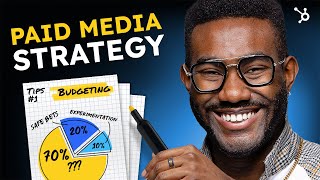
YouTube video by Patrick Biddiscombe (uploaded Sep 11, 2023) explaining how to apply inbound marketing principles to paid advertising. Presents a three-step framework—media planning, media buying, media optimization—plus a free paid media template walkthrough, budget heuristics (revenue-based and goal-driven), a 70/20/10 funnel allocation rule, guidance on manual vs automated bidding, and a HubSpot-enabled case study showing measurable impact.
Questions this video answers
Around 7–8% of gross revenue.
$500.
$350 to social (Pinterest) and $150 to search (Google).
Google: 175 clicks; Pinterest: 225 clicks.
Search CPC: $0.86; Social CPC: $1.56.
Chapters
Have you put time, research and effort into high quality content. But no matter which algorithm, hack or SEO strategy you follow, you can't gain traction. In this video, I'll break down exactly how to apply inbound principles to outbound paid advertising along with actionable tips and templates to create an effective paid media plan to get the most out of your budget and bidding strategy. Let's get to it. Paid advertising has long been a popular customer outreach method. You pay a publisher to display your content to a targeted demographic. In return, you raise awareness of your brand and target quality leads that convert into paying customers. Nice, accessible metrics give fast results. Costs are easy to measure, ROI is easy to track, and campaigns are adjustable and optimizable. With advanced targeting like this, paid ads are one of the best ways to increase revenue because it's easier to reach your ideal customers and hit your business goals faster. But buyers want solutions and value, so how can you seamlessly mix this into your paid media strategy? There are three essential steps. Number 1 Media planning Number 2 Media buying Number 3 Media optimization Media Planning before you launch a paid media campaign, you need to define your goals and key performance indicators, research your audience and choose the right platforms. Everything starts with the people that buy from you. This has a direct impact on where and when you show ads and your bid strategy. Each platform has its own benefits and drawbacks, so do your buyer Persona research first. Media buying is the next critical step in connecting the right ads to the right audiences in the right place and at the right times. Right? Right. Here's where you'll execute strategies for maximizing your budget and purchasing paid media placements. This includes setting bids and automating purchases, which I'll dive deeper into in just a bit. Your main goal is to align advertising content with customer intent at each funnel stage. Let's say you want to convert website visitors into leads, engaging with those who opt in to your email newsletter. You could show your ads to people who've already visited your website by mixing Facebook and Instagram ad with display ads on third party websites. Or maybe your goal is to reach bottom of funnel customers that haven't completed a purchase addressing buyer doubts. You could retarget Instagram followers with a promotion, discount, bonus or gift as a friendly reminder of your offering. When your media buying is aligned to your buyer's journey, you'll be able to understand customer behavior, segment campaigns by user intent, evaluate ad performance, adjust messaging, identify risks and gaps in your marketing funnel and predict costs of attracting new buyers. All important metric to track, test, measure and adjust in your ongoing optimization process. There's a lot you can learn from that dollar and how it performed, which will determine what you can afford to spend now. When it comes to your paid media budget, choosing the right method will depend on several things such as your business goals, total revenue and industry. Businesses using a revenue based approach typically budget around 7 to 8% of gross revenue for paid media. This percentage will vary depending on your business size and industry. A goal driven approach, however, means choosing a budget best suited to achieve business objectives and assigning a dollar amount to each and calculating that ROI will help you understand how your campaign goals impact your overall budget. Let's take a look at how to do this using our free paid media template. Open the template, click the January tab to set your goals and budget. We'll choose Increase sales to existing customers from the dropdown menu, but you can customize based on your needs. If you're working with a small budget or are new to paid media, start then scale based on what works and what doesn't. For budget, let's use $500. Next, let's pick the ad types and platforms that'll help achieve your business goal. In the Type column here you'll find a list of paid media to choose from. Let's say you've got a new product and want to launch two campaigns this month for the same offering, a Google search ad and a Pinterest ad. You've previously seen great performance on Pinterest and want to allocate $350 to Social. You're also interested in how search ads perform and put $150 towards that channel. Go to Type and select Search or for the date, let's enter January 1st to January 1st for platform, enter Google in the Description field. Here we'll type Search ad for new product, then type 150 in the spend field. Now let's do the same for the Pinterest ad. The next step is to launch, then analyze campaign performance. Okay, your Google Ad got 175 clicks and the Pinterest ad 225. Not bad. The cost per click or CPC will auto populate here with 86 cents for the search ad and $1.56 for social. Now at first glance it looks like the Google Ad performed better with a lower cp. But not so fast my friend. Since your goal is to increase sales to existing customers, you want to check how your ads impacted revenue. The search ad generated $400 while the social ad made 1,200. Let's add this to the template in the revenue column. Now let's look at the return on ad spend or roas. This is the golden metric of performance marketing, so you know you're maximizing every dollar spent with real deal returns. You'll see here that ROAS is $2.67 for the search ad, while the social ad has a return of $3.43. This means the Pinterest ad was more efficient even though the CPC is higher. As you monitor performance and optimize campaigns, you can use this data to make a case to increase your paid media budget to bring a higher return over time. Now that you've established your budget and most profitable areas of opportunity, what's the best way to divide that spend? Your marketing funnel will help here. One rule of thumb is the 702010 split. This simplifies budget allocation across the funnel and can be APPL in a variety of ways. If you're just starting out, you could allocate 70% of your budget to the awareness stage, 20% to consideration, and the remaining 10% to decision. This prioritizes channels that generate leads needed to populate your other audiences. Think social ads like Facebook, Instagram and Pinterest. The next 20% brings search ads and remarketing into your mix, with 10% for testing ad formants that push price points and promotions like Google shopping and display ads for established businesses. Implement a 702010 split with 70% on proven channels, 20% on safe bets, and 10% on experimentation. In this split, your 70% bucket is all about refining your success record of tried and tested media. The next 20% is media, which may be more costly or risky, but has a bigger potential new audience. And the 10% is for testing new channels, ensuring campaigns don't get stale. Just remember, the 702010 approach isn't just a one and done success story. It's a framework for testing and adjusting which efforts drive the most engagement and roi. And we dive deeper into the strategic allocation of those dollars in our free paid media course. Now, another important decision that'll impact your bottom line is your bidding strategy. For this, let's take a road trip. There are two ways you can bid on your ad placements, manually or automated. Manual bidding lets you set your own maximum CPC for your ads, and automated or smart bidding on some platforms uses machine learning algorithms to optimize your conversion. So manual bidding is your road atlas while automated bidding is your navigation app. If you want deeper insight into the experience, manual bidding lets you choose your preferred route. Plus the slower pace gives you time to react and course correct. The key benefits being managing how aggressively to bid on keywords, bid revisions to underperforming keywords to correct performance drops, and controlling exactly when these changes are applied. If efficiency is what you want, then the pros of automated are leveraging real time data so ads remain competitive and relevant, maximizing clicks and conversions based on objectives, optimizing targeting performance on audiences, driving the best CPA cost per acquisition and roas return on ad spend and reducing ad costs by finding optimal bid amounts for campaign goals. Automated bid strategies, while powerful, aren't perfect navigational tools. You'll still need to make informed choices for a smooth ride. Use this when you have high volume accounts or large advertising budget. You have enough historical data to optimize your set goal and predict future bids. You want to manage efficiencies and don't have time to monitor a manual campaign for new campaigns. Start with a manual bidding strategy to keep tight control of your keywords and cpc. This gives the algorithm the time and data it needs to understand target audiences. Use this for small campaigns with small budgets. If you have less than 30 days of audience data and time to monitor campaign results after you get enough conversions using a manual strategy, then switch over to automated to drive that traffic. Both will require that you monitor your campaigns to evaluate if the bid strategy will get you to your destination. For those of you who've stuck around with me and thank you by the way, here's an inspiring success story to show what an optimized paid ad campaign can do for your dollar wheel. The World is a unique travel company that provides accessible travel for people with disabilities. To identify high intent leads, they needed to understand how to connect and earn the trust of their customers during the lead to sale journey. With HubSpot's help, a Google Ads campaign allowed them to leverage buyer Persona data and identify the most effective marketing channels for their business. This strategic campaign led to a 65% increase in bookings, 23% growth in leads, 64% decrease in cost per lead and change people's lives by expanding access to travel experiences and that didn't previously exist. Very impressive. In all the buyer's journey is a critical part of your paid advertising strategy. When you harness the targeting capabilities of paid ads with the nurturing power of inbound marketing, my friend, you create a customer centric approach that drives meaningful connections and supercharges growth and profitability. If this video got you inspired to build a successful media strategy, take our free certification course. You'll learn how to plan, buy and optimize ad campaigns across various channels while gaining valuable insights from industry experts and to maximize roi. And as always, make sure to like, comment and subscribe to stay up to date on the latest tips and strategies all across marketing. Now, if you'll excuse me, I'm gonna go put in a bid for a little bit of nap time. Feeling a little a little tired these days, you know. Until then, I'll see you next time I can find this client info have.
You heard of HubSpot? HubSpot is a CRM platform so it shares its data across every application. Every team can can stay aligned. No out of sync spreadsheets or dueling databases.
HubSpot grow better.
More from Patrick



A NEW BREED OF PARTNER: The Partnership Ecosystem Model Journey of Patrick Biddiscombe, Part 1








Customer Success Workspace: Never Lose Sight Of What Matters Most | HubSpot Spotlight