This AI Workflow Made Me 10X More Productive | Project Assistant
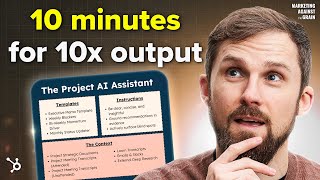
A how-to monologue (YouTube) showing how to build a "Project AI Assistant"—a dedicated ChatGPT/Claude/Gemini project per business outcome that ingests all project-related context (docs, meeting transcripts, Loom videos, research, optionally Slack/email), plus templates and instructions, to produce templatized deliverables (weekly blockers, biweekly momentum updates, monthly status) and proactive recommendations. The speaker emphasizes uploading broad unstructured/internal and external data, giving clear templates, and writing explicit instructions (cite sources, surface blind spots, prioritize actionability).
Chapters
In less than 10 minutes, I'm going to give you a Project AI assistant that is going to change the way that you work and make you way more productive than anyone else in your company. We're going to build it really quickly. It's going to take you a short amount of time, and it's really easy to do. Let's get into today's episode of Marketing against the Grain. One of my favorite use cases for AI is also one of the easiest, easiest to set up. And this is the thing about AI is it's easy to get distracted by all of the flashy demos that are happening across social media. But the fact of the matter is most people still are not using AI in the most simplistic way that could be very, very impactful for the way they work. And this is just one of those ways. And so what I'm going to introduce you to is one of my favorite use cases for AI. It's the Project AI Assistant. And so I've done a really simplistic graphic to talk about how this works. And the Project AI assistant is basically just how you use ChatGPT or Claude or Google for work. And you can use any of those. And I'll take you through how to do it. So what is it? It's basically creating in ChatGPT a specific project for a outcome you're trying to achieve within a business or a cloud project, or a Gemini gem. Let me explain what I mean. So let's say that you are. One of your core goals is I have to grow demand for my business for 50% by 50% year on year. Or I have to increase the weekly active users from my Freemium app by 30% or I have to increase the close one deals my sales team closed by 30% year on year. Whatever the outcome is. Like there's a. I call those projects, but each project should have a core outcome and that outcome is comprised of, you know, usually lots of people. Doesn't have to be lots. In my case, it's lots and lots of people, but comprised of people comprised of lots of comms, comprised of lots of docs, comprised of all of this kind of structured and unstructured data. And so for me, I have like three large projects, three large outcomes within HubSpot. It's basically how we overhaul the way we create demand. It's basically how we drive internal transformation via AI and it's basically how we kind of augment the go to market for the lower end of our business. Right. I have three clear missions and those Missions have many, many people involved, lots of comms, lots of docs, lots of things happening. In a world gone by, it is really hard to manage that amount of things, right? Hundreds and hundreds and hundreds and hundreds of people across these three projects. Now, it doesn't have to be that amount of people. Even if you've got one, two people, even if it's just you, this is going to be pretty useful. And so what I do is for each of those outcomes, for each of those projects, I create a ChatGPT project. Now, you can create Claude project, you can create a Gemini Gem. I just happen to use OpenAI and the reason I do that is I'll explain as I go along. What are some of the benefits of using OpenAI for this ChatGPT for this? Thing I've learned about AI is that.
It works best when you treat it like a collaborator, not just a tool. It's there to help you get moving. It sparks ideas and it makes starting just about anything 100 times easier. Now, to help you tap into the potential of AI, we've worked with our friends at Mindstream, an amazing AI newsletter. We've teamed up with them to release 1000 expert level AI prompts for everything marketing you might ever imagine. When you need some fresh ideas, when you need to adjust your strategies, content creation, inspiration. These prompts are designed to make starting and staying creative a whole lot easier. Get it right now at the link in the description below.
Now back to today's show. What do I do? So I'll explain this and then I'll show you. So what is a project AI assistant and why do we use ChatGPT projects or cloud projects or Gemini Gems to do this? So there's like three core parts of your project AI assistant. There is the context. And this is why we use a project or a Gemini gem, whatever your flavor is, because you want to give it all of the context. And so the context is basically all of the unstructured, unstructured data you have for each project. And this is coming back to one of the fundamental values of AI that people forget. It's all of this information that we have, have had forever becomes way more valuable and usable because of AI. And actually one of the ways you should think about your use of AI is like, am I really getting the maximum amount out of the structure, unstructured data I have before you move on to other use cases? And so the things you put in there are, and I'm going to show you an example really quickly, is you put in all the Project Strategic Docs, right? So any document someone sends or these Google Slides or Google Docs or updates or everything, I put everything in there. I don't even think about it. I'm just like, oh, document related to this, upload it into my project AI assistant. I put all of the meeting transcripts. So all of the meetings that happen that I'm involved in with this project, I capture the meeting notes. I just upload them. Upload more context, more context, more context. Here's a really cool one. If you are busy, there's going to be lots of meetings that happen around your project that sometimes you cannot attend. Now, in the old way, the way we got information is we would just like ask someone what happened in that meeting or these kind of ways that we would have to try to figure out what actually happened in that meeting. So now you can actually send some of these meeting assistants, if you're using them to the meetings on your behalf, and they can capture the notes, or you can have someone on your team who has captured the notes just send you the notes. Maybe they've got the transcript or whatever it may be, they can just send you the notes. Point being, in a world prior to AI, all of this context would be lost to us, right? We wouldn't be able to attend every singular meeting. And so we sometimes would only have half the picture of what's happening within our project. Now you can have the full picture because even if you cannot attend the meetings, you can get the context, get the meeting transcript and upload it into your project assistant. The other one is Loom transcripts. So Loom transcripts. I love video interaction, especially if you're working mostly remote. It's much better than text. And so Loom has double benefits where I think you get better context. You can read tone a lot better from Loom, but you also get the transcript, right? So you can actually just copy the transcript, upload it. More context for your Project AI assistant, the email and Slack. So this is a one that's a bonus, right? I would say this is a bonus because it's hard to get today. Now, there may be another episode I'll do around mcps, because MCPS are a way that we can extend AI applications like a Claude, maybe in the future like a chatgpt that have that give them access to these tools we use. So for example, I can extend Claude to give it access to my Slack and then it can just ingest Slack into its context window if I'm using the cloud projects. This is a bonus I Don't expect most people to be able to do this. It's a bonus. I think if we're thinking about long term project assistance, this will be huge, you know, to capture all of the emails and slacks related to our project. The other one I would just advocate for is like deep research to capture external information that you can give to your project AI assistant to pair with your internal information. So if you have an example that we used it for recently is one of the projects I really wanted to dive into like discounting within SaaS. And it was able to do this incredibly detailed research piece or someone on the team actually did this for me, I thought was really clever use of AI where they captured really how discount is being used across the industry within SaaS. And had this really detailed deep research project and I was like, cool, upload into my project AI assistant so it has all that context. So parent external research with your internal is really powerful and can be done really easy through the project AI assistant. And so basically that will look like something like this, right? So you basically have all of your docs, right? You continue to upload and upload docs and you put them into these project files. So every time you have a doc, boom and you go upload and you go upload and you go upload. And so that's what, that's your context window. It's these project files. And now whenever you talk to the chat, the chat has full context about those project files. Again, this is OpenAI. You can use Claude projects, you can use Gemini Gems. So that's your context window. The context window is a huge, huge unlock when you can give your AI assistant all of that incredible context. The next thing I want to talk a little bit about is the templates. So templates are things that I can give it to use. So when I ask it for a task, it can give it to me in the format I want. So I basically upload a template of how I want this thing to look and anytime I say, hey, I need to do an executive memo to describe the progress on this project, to describe the progress, the opportunities, key milestones. Like there's a certain templatized way that I want to create that I give it a template, right? I upload that into the context window as well. And so I put these things up here because they're not building context about the project AI system, but you upload them in the same place. In that place I showed you with the project files. If you upload templates and it's got that Template I can just say, hey, create a memo for this using the template I give you. Weekly blockers. This is somewhat how I run all projects. Weekly blockers are when you are running these large projects, every single thing that slows down that project should be solved within that week. I try to make sure that there is nothing blocking our success that does not get solved within week. And so what I ask it to do is at the start of every week, show me the blockers across my projects. What are the things I need to solve for this week to make sure we continue to build momentum. The biweekly momentum driver is basically a way that we show what we shipped every two weeks. What did we ship the this two weeks? Was there anything we said we were going to do that we didn't do? And what are we going to ship the next two weeks? And that is again templatized. So whenever I ask for that update, it knows exactly how to give it to me. Monthly status updater so I want to drive accountability. We basically have a templatized way to show what are the things we said we would do in terms of deliverables, in terms of hidden metrics, and where did we fall short and what are the reasons we fell short? Because again, it has all that a context. So we can tell me like, hey, you missed this by 10%. The reason you missed this is because in these updates I found these are the reasons. And it can give you the full thing. And then I can actually part of the template, I have a format that it can, that it can use to create the update that I can send to all the different parties who want to update that. So you can, you can basically use any templates for the way that you want to work. And as long as you upload the templates and documents, when you ask for that task, it will give you back that task in the format that you want. So that's the context window, all of the context about the project, the template. The templates are templatized ways that you want it to return that work, whatever your frequent asks are. And then the instructions. And so I'll show you what my instructions are because I couldn't fit them all into the graphic. But, but the instructions are how you want that AI system to work with you. So the instructions are basically how can this pro. How can the ChatGPT best help you with this project? So I give it some pretty clear instructions. We'll do some live format in here, be clear, concise and insightful. And then I'd Say hey, like keep to the point, right? Like keep the point. Come on. Prioritize clarity. Don't sacrifice debt when nuance matters. Right. Grand recommendations and evidence. This is so important. Okay. This is like one of the core instructions you should take away. When you give it all of that context, it has access to like maybe years worth of docs, right? Like tons and tons of docs. And so what you want to always say is like when you're making recommendations, make sure you cite the information because you want to avoid the fact that it could hallucinate and tell you things that are not true. And so if relevant includes specific extras and page numbers. I can't tell you how game changing this is. And so when it actually recommends things it will tell you exactly why it's recommended that and pull data from these documents. It has actively surface blind spots. Right. I wanted to under. I want, I want it to help me resurface blind spots. So don't just respond to the prompt. Proactively identify risks, missed opportunities or potential second order effects. I may not be considering challenge my thinking respectfully. Right. So if my assumptions are or logic appear flawed, offer a better alternative. Explain why you're reasoning Diversion. So again I wanted to actually like challenge me. Be a real strategic project assistant. Bring external perspective where valuable. So this is the ability to pair external information with internal information. Think long term, right. I again this is how I want it to work with me because it has all of the context. I want it to be able to connect all of the work happening across these disparate teams and basically make sure that it pattern matches to the outcome that we want. One of the things is incredible for is showing you things like overlap across team. Things where teams are disconnected but maybe working on the same thing. All of these things that are really hard for you to spot. It's incredible at spotting that stuff. Prioritize actionable ability. So you basically want it to end with clear steps and give you the exact options to consider. Again, very clear ways that I wanted to work with me. And so the instructions are really important to make sure that it works with you in the way that you want. And so let's go back to the graphic when I save that because I just want a bit of a crazy person around format in here. We're going to run this out here. And so then I have this project assistant that basically now has all of the context. Again, I don't think about this stuff. I just like EW document. You sent it to me. Upload, upload, upload Templates. These are the frequent tasks I'm going to ask it for. Here's the templates. You can actually replicate them the way I want and then have clear instructions in the way you want it to work with you. Very easy. Anyone can set this up. I don't think many people have still figured out that all of this rich comms and data is just incredible now, right? So valuable now. And this is why I can do my job so much, much better. Some quick end points on limitations here. So context window Claude projects. The context window is small and it doesn't have access to. You're not able to upload Google Slides as of recording. So I find Claude very limited in terms of how I can build that context window. That's why I use ChatGPT, Gemini and ChatGPT similar context windows. You can use Gemini Gems as well. The data, it would be much better if the data was dynamically ingested. Right? Like, so I didn't have to continue to remember to upload all this stuff. And I think that at some point will get solved. At some point the templates really matter. And so you do have a little bit of work to do where you want to create these templates. So it knows how to respond. Respond for in the format that you want for any task you ask it. And the instructions are really important as well. So you want to make sure that you are clear on how you want to work with it. But if you set this up for your core outcomes, your core projects, you will be way more productive, I can tell you, definitively more productive than most other people who are not doing this. That's your episode for today. I hope this was useful. Go create your project assistance. Tell us in the comments if you find this valuable and I'll see you next time on Marketing against the Grain. This data is wrong every freaking time. Have you heard of HubSpot? HubSpot is a CRM platform where everything is fully integrated. Whoa. I can see the client's whole history. Calls, support, tickets, emails. And here's a task from three days ago. I totally missed HubSpot grow better.
More from Patrick



A NEW BREED OF PARTNER: The Partnership Ecosystem Model Journey of Patrick Biddiscombe, Part 1








Customer Success Workspace: Never Lose Sight Of What Matters Most | HubSpot Spotlight