1:04
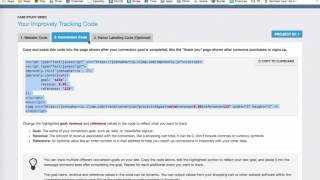
Short spoken tutorial (YouTube) demonstrating how to place and customize Improvely tracking pixels. The speaker instructs placing a main-site pixel, then customizing a second pixel for webinar registration/thank-you pages by setting sale to 'lead', revenue to 0, and keeping reference. A separate pixel (app reference) is modified and placed on the page shown after an application is completed (application thank-you page).
Questions this video answers
Between the <head> tags on the post-registration (thank-you) page.
lead
0
On the page after the application is completed (application thank-you page).
Chapters
More from Peter

youtube.com
278 Profitable Campaigns Documented Over A Year – Peter Szabo's Aicommerce Results
1mo ago




youtube.com
"I Felt Torn In The Beginning" | Wife & Husband Review of Aicommerce by Peter Szabo
10mo ago

See all content