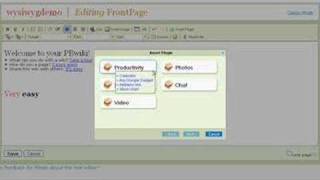
Ramit Sethi demos PBwiki's new point-and-click editor, which works like a word processor with formatting tools, image uploads, and plugins for embedding YouTube videos, photo shows, calendars, and chat rooms.
Chapters
Welcome to the new PBWiki point and click Editor.
My name is Ramit Sethi and I'm one of the co founders of PBWiki. I'm going to spend about 90 seconds with you, taking you through what's new.
With our Point and Click editor. So we heard a lot of you.
Asking for an easier way to use pbwiki than typing in the old classic wiki style. So we spent a lot of time and we developed a new editor that lets you use your wiki just like.
Your favorite word processor.
So here you see a normal wiki. It appears to be normal, but when you click edit, it's all new. Here you can see a familiar word processor type interface. You can also see that you can.
Type things just like regular, but better.
Than that, you can actually change the color of things very, very easily. You can do bold, you can do italics. You can even change the font size so easily.
We've also improved file attachment and importing images. But the coolest part is something we call PBWiki plugins. I want to show you that for just a minute. Plugins let you insert widgets into your.
Wiki with just a few clicks.
For example, if you want a YouTube.
Video, you can insert that. Again, takes you about 10 seconds. If you want to insert a shared calendar for everybody on your wiki, go ahead and put that in a stock chart. An address link, anything you like. If you want a chat room, no problem.
I'm going to show you an example.
Of inserting a photo show.
So here we go through the steps. Here's a little preview of what it will look like.
And here's what it looks like in your editor once you click save.
There you go. You've got a photo show. And here's an example of what it.
Will look like if you insert a bunch of different plugins. Here's a shared calendar where you can add something to your wiki. You can add an event to it, no problem. Here's a chat room that people on your wiki can use. And here's a stock chart.
Now, as always, we'd love to hear.
Your feedback, and we're always making improvements based on what you tell us.
But this pbwiki Point and Click editor.
Is ready to use right now and it's free to you.
Just click the yes button in the.
Top right corner of your screen and we'll turn on Point and Click Editing for your wiki.
Don't worry, you can always switch back.
To the old one.
So give it a shot and let us know what you think. Thanks. From all of us here at Pbwiki, we really do love you.