Ryan Shank demonstrates PhoneWagon, a platform for tracking inbound calls across marketing channels. You create campaigns tied to billboards, mailers, or radio, assign local phone numbers by area code, and see call logs with recordings, caller location, and duration. Mark calls as leads, download recordings, set up automated texts after missed calls, and pull analytics by campaign.
Chapters
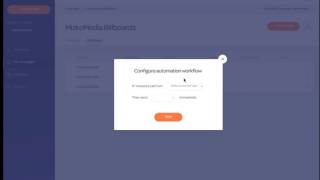
Hey guys, this is Ryan Shank and just wanna give you a teaser right now of the interface that's coming out in just a little bit. So what we're doing right here, we're just creating our account, we're setting it up so we can search by area code and then choose a local phone number or however many you need. Then what we can do is we can sign in or create the account, choose the plan, and then we're gonna dive into the actual dashboard right here. So this is where we're going to configure everything. Once we have data in here, we can sort by date range and everything. And this is what an account looks like once it actually has the data in it, so you'll see a quick summary of the number of calls from the number of active numbers and most recent calls right there. What we can do is we'll have notifications so that we can mark our recent calls as good or bad calls right there. So next thing I'm doing down here is I'm going to my campaigns, and this is gonna be each of your different campaigns. So if you have a billboard, if you are doing a mailer like a Valpak, if you have a radio, whatever you're doing, this is where you're gonna view your campaigns here. And what we can do is we can click into one, say billboards, and then we can view the different numbers that we have set up for our billboard. So let's say, you know, these are the 3 numbers. Looks like this is the only one that's generating phone calls. We can click into that right there. This is just configuring automation. We can talk about that a little bit later. But now I'm into this phone number and here are all the actual phone calls that have been generated by this billboard for this particular tracked number. So you can see location, start time, the duration of the call. Usually duration is a good indication of whether it was a good call or bad call. If it's 30 seconds, probably not a good call, but if it's 8 minutes, probably a good call and you discussed some buying questions from a prospect right there. If you have call recording turned on, you can view the calls right there. I'm gonna give you an example. So let's say we click into one of these calls, okay? This is gonna be the call profile. So you can see all the information about this caller, location, map, duration. You can have the call recording, you can obviously download it. And then you can mark it as if it's a successful lead or not. So this is the call profile page, beautiful, simple, and easy to view. If you wanna add a name up here, again, you can start to add a name, and then that'll go into our contacts list, okay? And then what we're gonna do is we're gonna be able to configure. So now we're in configure, and if this is our phone number, we can, you know, create the campaign right there. So you can start to put in billboard, or you can, you know, put in where you're gonna forward the call to, play the call recording, and everything right there. Super easy configuration of the actual phone numbers, okay? And then finally, obviously, we're gonna have reports. You're gonna be able to say, "Here's all of our reports." We're gonna have a top view, an overview of all the reports, or you can dive down into specific campaign-level reporting right there. But it's beautiful, it's easy to use, and you can get set up really, really quickly. Last thing, I'm not gonna go too in-depth in this, but we have beautiful messaging. So you can message with your clients, send text message, set up automated messages, and respond to clients quickly. So for instance, you can set up rules. Like if you miss a phone call, then send a text message to the customer so that they don't just call the next business on the list. There's a lot of cool things like that inside of PhoneWagon. I'm super excited to get this to you guys.