Ryan Shank walks through PhoneWagon's dashboard for managing tracked phone numbers and routing calls to marketing campaigns. You can add local or toll-free numbers, set up recordings and greetings, and pull call reports with completed, abandoned, and no-answer stats in under 30 seconds.
Chapters
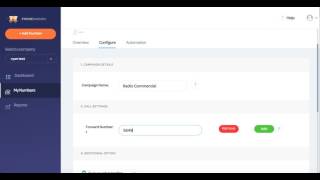
All right, so this is inside of PhoneWagon account. So one of the things that you can do is you can go to my numbers right here. So let's just say this is all of your numbers right here. This is the actual number, and then this is the number that it's forwarded to. So you'll notice that most of these are forwarded to one number. You can also forward it to multiple numbers. And then over here, you can put the campaign that these numbers are associated with. So I can go into this number, and to your point, you know, you wanted to see, hey, how many Or how easy is it to actually just change the backend? Let's say you want this number that's already out there in the wild. It's already in campaigns. Let's say it's on my Twitter ads right now. It's forwarding to this number. Literally, to change it, you just type in a new number and then you click Save. So that same number, it's out there in the wild. Oh, you don't click Add, you just, you just do it right there, and then you can click Save. And now this number is gonna just be forwarded to a different number. So the same tracked number is gonna be out there. To this Twitter ad right here. This is the one we just changed. It was forwarding to a 410 number, now it's forwarding to a 443. Super, super easy to change the configuration of the numbers. Also to add a number, incredibly, incredibly easy, okay? So let's just say I want a 415 number, I can search by area code. If you want a toll-free number, boom, we display toll-free numbers right there. So I can just take a local number, I can add the local number right there, I can click yes, and then very next page, what we're gonna do is we're just gonna, change the campaign details. So let's just say this campaign right here is gonna be for a radio commercial. Boom, you just add the forwarding number, and then you can choose to record the calls, play a greeting, or play a whisper message, and then click Save. I mean, it is literally that easy. And then now this number is configured and ready to go. It takes less than 30 seconds to configure a number. The one at the bottom, this is the one we just did right here. And then from there, again, you can change the backend, but it is super, super easy. It doesn't take, you know, rocket science. And then obviously you can go to reports and then you can see, hey, how many calls did I get for each of my different campaigns, right? Super, super easy. It's lightweight, it's easy to digest. If you want to take this report, you want to print it, what it does is it formats beautifully onto a nice PDF. I'm showing you this right here, so it'll load the preview of the actual PDF and then you'll be able to see that right there. Is if you want to download it as a PDF, you can obviously like change the date range if you want to see the status of the calls, you can do that. We have beautiful graphs right there, but you can basically just see, you know, how many calls were completed, how many were abandoned, how many no answers. So a really easy way to just be able to track calls. I think that's exactly what you're looking for. You want to just have the numbers forwarded to a campaign. You don't need sophisticated call routing. You don't need a lot of the other stuff. It's really cool. And the other thing that we have also is you can add different companies. So let's say you're managing different campaigns for different companies. You can change the companies over here, dental surgery, if you just have different locations. And then you can have users with different permissions. Okay, so it's really cool because you can have different roles. So let's say you want to give one of your clients their own login, right? You can do that as well. They'll have different permissions, they can do different things. So sorry to ramble a little bit, but I definitely just wanted to give you a quick overview so that when you're talking to your, your peeps, you can just tell them how easy it is. And then again, HighLevel, I didn't go over this, but just recent calls down here, boom, see the campaign, you can listen to to the call recording. Uh, you can download the call recording and you can see everything at a glance, but just super easy to use. The interface, beautiful. Uh, a lot of our customers are loving it.