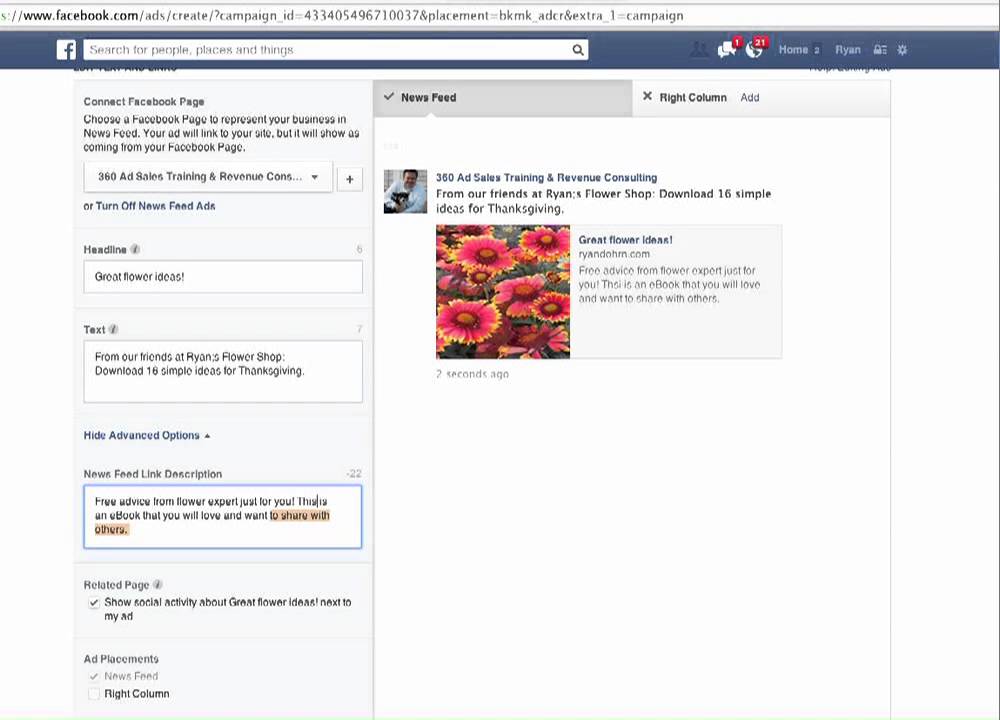
Ryan Dohrn walks through creating a Facebook sponsored post in Ads Manager, using a flower shop example. He covers selecting campaign objectives, uploading images, targeting by age and interests, setting budget and schedule, and optimizing for impressions. He recommends Power Editor for more control and emphasizes strong visuals and copy compliance.
Chapters
Hey everybody, Ryan Dohrn here from 360 Ad Sales and Brain Swell Media. Another tutorial video here involving Facebook and Google AdWords and sponsored posts. Alright, now first of all, I want everybody to understand that I'm not an attorney, and so I really want you to read carefully Facebook's terms of service. Make sure that everything you do on Facebook is in clear, clear agreement with their terms of service. Next, I'm not paid by Facebook or endorsed by Facebook. I'm just trying to give you some help. I prepared this video specifically for my customers. Now there's 2 ways to create sponsored posts or suggested posts just like you see right here. Okay, now the first way is using the Power Editor. Okay, use the Chrome browser, up here in the top window go to facebook.com/powereditor, and there's another video right below this one using the Power Editor. Now this video we're actually going to use the standard Ads Manager that's right here where it says Create Ad here in the left-hand column. So let's do that. Now what we're trying to do— let me give you a common scenario. You've been approached by an advertiser or a partner or sponsor or whatever, and they've said, hey, we would like to promote our product or service on your Facebook page and to your Facebook fans. Okay, and you're saying to yourself, okay, how do I do that without just directly posting it? With status update, you do it through a sponsored post or sponsored story. Now in this case, what I'm gonna do is I'm gonna choose clicks to website. Okay, there's multiple ways to do it. I'm gonna give you the most common scenario. Alright, let's create an ad for a flower shop. We'll call it ryandohrnflowers.com. Alright, and but let's, let's just use ryandohrn.com to make sure that we have a functioning ad. Alright, so we're gonna choose the ad. The address there. Okay, now you notice it's pulled in an ad— I'm sorry, an image from ryandohrn.com. Let's get rid of that and let's upload the image that we want to use. Now remember, a powerful image is very, very important to the success of a sponsored story or sponsored post. Okay, alright, next what I want you to see and understand here is that we want it to be in the newsfeed. It's right there, so let's remove it from the right column. We want it to be in the news feed. Okay, alright, next what we're looking for is we're looking to choose which Facebook page, okay, which Facebook page do we want it to be a part of. So we want it to be coming from the Facebook page, and let's just say that in this case maybe your magazine is called 360 Ad Sales, okay, and that's just one of my sites that I administer. So your magazine name would be here. Now you'll notice as you make changes, okay, what's gonna happen is that the ad is going to work. It's gonna load over here. Okay, so what do we want the headline to be? The headline, we probably want to say something like, from our friends at Ryan's Flower Shop. Okay, we probably want it to, to say that. Alright, okay, oops, sorry, I guess that was just too— it was too long. So let's do Great Flower Ideas from Ryan. Too long. Great Flower Ideas! How about that? Exclamation point. Okay, so there you go. Great Flower Ideas. You can see it right here. Alright, the text. It says right here, Ryan Dohrn. This is going to be this text right here. Alright, so this is where we're going to put from our friends at Ryan's Flower Shop. Okay. And let's go ahead and make this apostrophe correct. Now why do I do that? I mean, you could do a lot of things. You could put sponsored or, you know, whatever it is that you want to put there. But I like to identify this is coming from our friends at Ryan's Flower Shop. Now what we want to also do then is we want to make sure we make the offer. All right, so down— let's say download 16 great and simple ideas for Thanksgiving centerpieces as an example. Simple ideas. Okay, oh, looks like it's gonna be a little too long. Maybe for Thanksgiving, let's do 16 simple ideas. Gonna keep you within its confines here. 16 simple ideas for Thanksgiving. Okay, everybody see that? Now if you wanted to, you could also make this a link to their website, or I'm sorry, to their Facebook page. So you could put from our friends at You know, and if it looks as an example, I can use, you know, I can just go in here and do@ and I could do 360 Ad Sales. It's gonna help me find their, their name there as well. Okay, so from our friends at Ryan's Flower Shop. Okay, got that there. Alright, now we've got the newsfeed link description. So I'm gonna put why do, why do we want people to download this? This is Free advice from flower expert just for you. It's an example. Okay, you'll notice it's adding this right here on the link. Okay, this is an ebook that you will love and want to share with others. Okay, whatever it is. Alright, now We need to make sure our spelling is correct, obviously. Okay, all right, now what we want to do is we're going to— now our ad is basically done, and so what we want to do is we're going to want to make sure that we define our audience. So we don't want people that are 13 years old, do we? So let's maybe choose people that are 25 years or older, maybe are women. Now you can, if you want, choose interests here. Okay, just an example. Now you'll notice right over here we're dealing with a bid situation. We're going to talk about that in a second because I prefer a fixed price. So this is where we're going to define our audience. Okay, now remember something that's really important as we scroll down here. What I want is I want to, I want to make sure that I'm doing something that is based and I want to set a start and an end date. Okay, that's here. And this is where you're going to go and you're going to set your budget here. What I want to do is I want to optimize for impressions, not optimize for clicks. Okay, optimize for impressions, not optimize for clicks. Okay, now the next is we want to make sure we target people. So if you're a magazine, want to make sure we target people that are fans of your page. So one of the pages I have in here is 360 Ad Sales. So I'm going to choose that. It's going to show me the potential audience. Alright. Now obviously when we're talking about the pricing of this, as you change your budget per day, okay, what's gonna happen is gonna change the number of people that it's going to reach. Now I would say this to you, I think that it's important for all of you to understand that I like the Power Editor because it's gonna give me, it's just gonna give me a lot better dashboard of what I'm looking here. That's how we're gonna create that post and how we're gonna schedule it. Now just, just, just for sake of example, Let me just go here real quickly up in my URL and let me type in Power Editor so you can really see what the Power Editor looks like. Now the Power Editor for me, I like it a lot better, okay, because it gives me a really nice snapshot of everything that I'm doing. So I like to choose the Power Editor to create these sponsored posts and sponsored stories for my customers. So you may want to consider that as well. And there's a whole separate video on that for you as well. Now, each little bitty piece here, whether it's the audience, whether it's the budget, each one of those pieces we could talk about for 15, 20 minutes, or 2 hours. You're gonna need to play with it a little bit to really get a really good understanding of each of those things. Just remember, you don't ever want to violate Facebook's terms of service, so make sure you read it, make sure you get some good advice on that. Hopefully this has been helpful to you. Using Facebook as a part of your revenue strategy is really mission-critical to your growth long-term. Just make sure everything you do is in direct accord, is no violations of Facebook's terms of service. And again, please don't take this video as legal advice from me. I'm not a lawyer. Maybe I, maybe I should have been. I think my mother would have probably enjoyed that, but I'm not, so there you go. All right, I'm Ryan Dohrn from 360 Ad Sales. If you need some help from me, reach out. Of course, my first 30 minutes with you is absolutely free, and I work with about 70 publishing companies a month. So hope that's helpful to you as you roll down the road towards having some excellent revenue success.